
PDF

Desalination in an Electrodialysis Cell
Introduction
Electrodialysis is a separation process for electrolytes based on the use of electric fields and ion-selective membranes. Some common applications of the electrodialysis process are:
This tutorial demonstrates the basics of electrodialysis in a desalination cell.
Model Definition
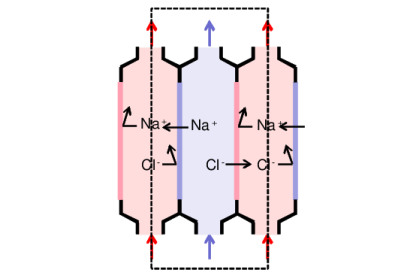
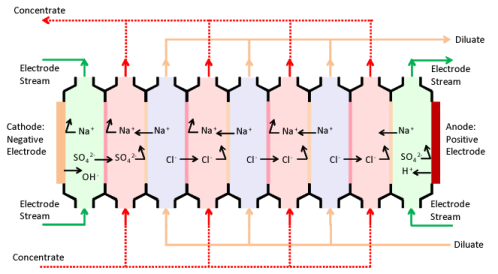
Figure 1 shows the basic principle of the desalination stack. The stack has one repetitive cell unit, shown in Figure 2.
Figure 1: Schematic picture of a desalination stack with 3 desalination units (in reality 10 - 20 unit cells are used)
Figure 2: The repetitive unit cell with one desalination unit.
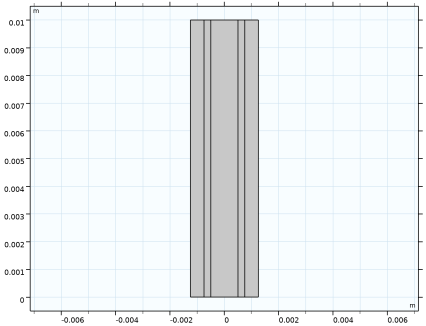
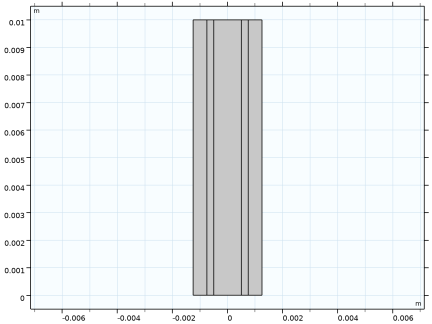
The model geometry for this example is based on the repetitive unit, excluding the inlet and outlet flow regions. The model geometry is shown in Figure 3.
Figure 3: Model geometry.
The cell contains two ion selective membrane domains: the left is mainly permeable to cations, and the right to anions. The middle domain is a free flowing electrolyte domain, where salt is to be removed. This domain is named the diluate domain. The rightmost and leftmost domains are free flowing electrolyte domains, where the ion concentration increases during cell operation. These domains are called the concentrate domains. In the free electrolyte domains, the flow enters at the bottom inlets and exits at the top outlets at an average flow rate is mm·s1. An analytical expression (Poiseuille flow) for the fluid velocity is used in this model.
The cell is fed with a seawater electrolyte consisting of 0.5 M NaCl and operated at a unit cell voltage of 1.5 V.
Choice of current distribution interface
In this model we make use of the Nernst–Planck equations for ion flux and charge transport by which the following equation describes the molar flux of species i (which is either Cl or Na in this model), Ni, due to diffusion, migration and convection:
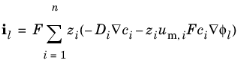
The first term is the diffusion flux, Di is the diffusion coefficient (SI unit: m2/s), and ci the species concentration. The migration term consists of the species charge number zi, the species mobility um,i (SI unit: s·mol/kg) and the electrolyte potential (ϕl). In the convection term, u denotes the fluid velocity vector (SI unit: m/s).
The electrolyte current density is calculated using Faraday’s law by summing up the contributions from the molar fluxes, multiplied by the species charges, with the observation that the convective term vanishes due to the electroneutrality condition (see the theory for the Tertiary Current Distribution, Nernst–Planck interface):
(1)
The conservation of current is then used to calculate the electrolyte potential.
This model uses Tertiary Current Distribution, Nernst–Planck interface when solving for the electrolyte potential in the free electrolyte and ion-selective membrane domains.
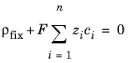
In the free electrolyte domains, the only ions present are assumed to be Na+ and Cl-. The ion selective membranes also contain additional ions fixed in a matrix. Therefore, the fixed space charge, ρfix, is added while calculating the sum of charges in the electroneutrality condition:
(2)
The fixed space charge is prescribed in terms of the membrane charge concentration.
The checkbox Add Donnan shift to initial values, when enabled, shifts the initial values on the selection of the Ion-Exchange Membrane node in order to fulfill electroneutrality and compliance with the Donnan equilibria.
Note that the ion-selective membrane domains do allow for transport of both Na+ and Cl but that the sign and magnitude of the fixed charge, in combination with the Donnan boundary conditions (described in the next section) will favor transport of either anions or cations. The sign of the fixed membrane charge is positive in the anion, and negative in the cation-exchange membrane domains, respectively.
Membrane — free Electrolyte Boundary Conditions
The boundary conditions at the boundaries between the membrane and free electrolyte domains are set up in the following way:
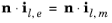
The normal electrolyte current density is equal to the current density in the membrane:
(3)
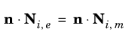
The ion flux for each species is continuous over the membrane-free electrolyte interface:
(4)
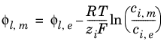
Furthermore, we have the following relation between the potentials, ϕl, and the concentrations:
(5)
where ci,m is the species concentration in the membrane, and ci,e the species concentration in the free electrolyte and zi the corresponding charge. The potential shift caused by Equation 5 is called Donnan potential, or dialysis potential.
Equation 3, Equation 4, and Equation 5 above represent a mix of Dirichlet and Neumann conditions for the electrolyte potential and species concentrations. The Ion-Exchange Membrane domain feature in the Tertiary Current Distribution, Nernst–Planck interface is used to define these conditions.
Periodic condition
Use the Periodic Condition feature to set the concentration on the rightmost boundary to equal that of the leftmost boundary and to set the electrolyte potential offset between the rightmost and leftmost boundaries.
Results and Discussion
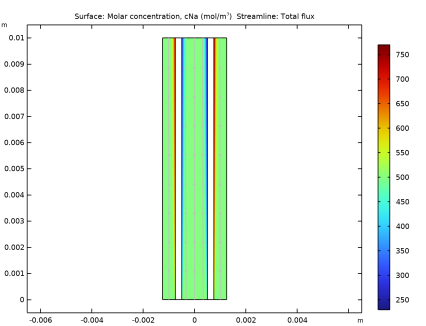
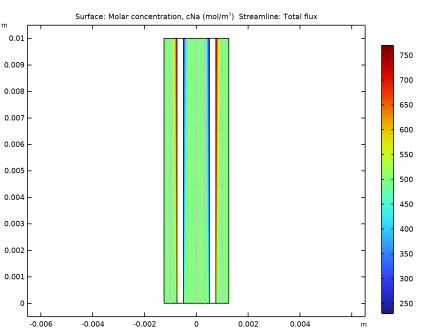
Figure 4 shows the Na+ ion concentration in the cell for the membrane charge concentration of 1000 mol/m3. The concentration increases in the concentrate domains, and decreases in the diluate domain. A boundary layer with high concentration gradients forms close to the membrane surfaces. In a real desalination cell it is common to add spacers that, apart from adding mechanical stability to the cell, also induce convective mass transport in the direction perpendicular to the main flow, and hence may reduce the thickness of the boundary layer.
Figure 4: Ion concentration.
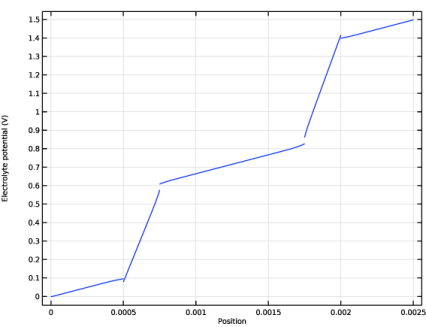
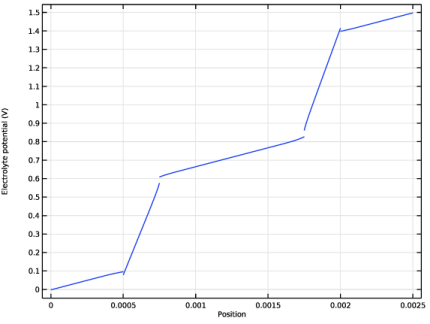
Figure 5 shows the electrolyte potential along a horizontal line placed at half the cell height. The main part of the potential losses occurs in the membranes. The Donnan potential discontinuity can be seen at the boundaries between the free electrolyte and membrane domains.
Figure 5: Electrolyte potential at half the cell height.
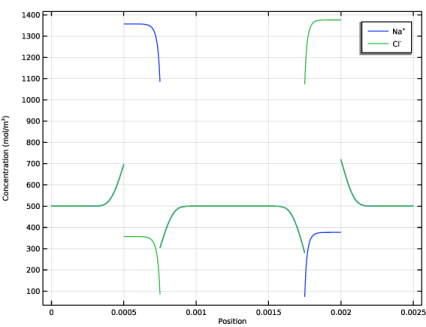
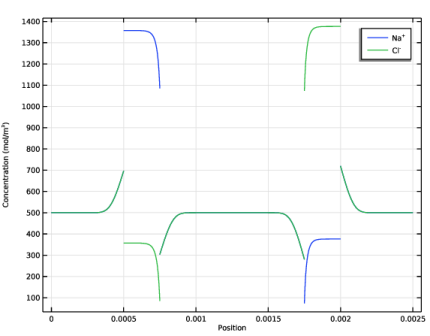
Figure 6 shows the concentration of Na+ and Cl- ions at half the cell height for the membrane charge concentration, 1000 mol/m3. The concentration of both Na+ and Cl-ions is higher in the concentrate domains and lower in the diluate domain, as also shown in Figure 4. The concentration of Na+ is significantly lower than for Cl- in the anion-selective domain (and vice versa), but it is not zero.
Figure 6: Ion concentrations at half the cell height for a membrane charge concentration of 1000 mol/m3.
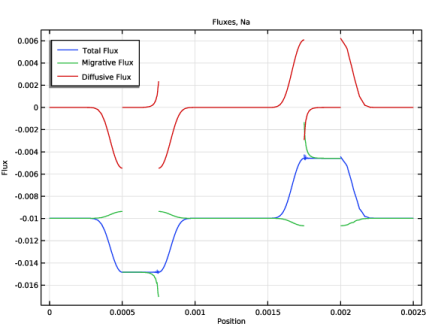
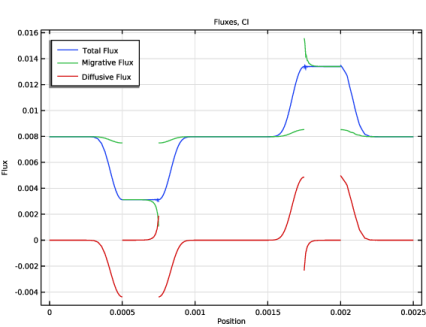
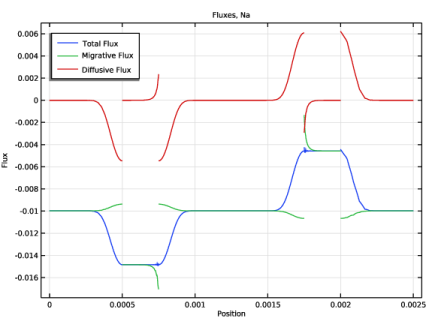
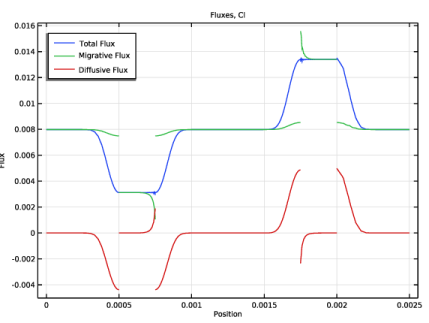
Figure 7 and Figure 8 show a comparison between the migrative and diffusive fluxes in the free electrolyte for Na+ and Cl-, respectively. The diffusive fluxes get prominent close to the membrane boundaries due to the high concentration gradients. The migrative fluxes govern in the middle of the channels and have different signs for Na+ and Cl- due to the different signs of the ion charges.
Figure 7: Comparison of fluxes, species Na+.
Figure 8: Comparison of fluxes, species Cl-.
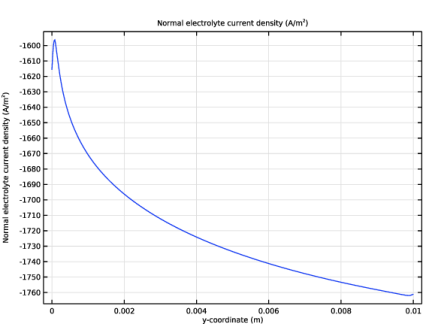
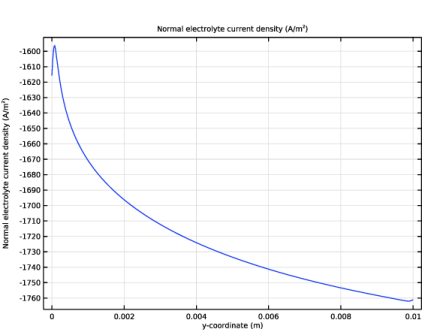
Finally, Figure 9 shows the current density along the left free electrolyte–membrane boundary of the anion selective membrane for membrane charge concentration of 1000 mol/m3. Depletion of chloride gets more prominent toward the top of the cell, resulting in a higher Donnan potential shift and a higher negative current density.
Figure 9: Normal current density along the membrane – free electrolyte boundary for the anion selective membrane for membrane charge concentration of 1000 mol/m3.
Application Library path: Electrochemistry_Module/Electrochemical_Engineering/electrodialysis
Modeling Instructions
From the File menu, choose New.
New
In the New window, click  Model Wizard.
Model Wizard
1
In the Model Wizard window, click  2D.
2
In the Select Physics tree, select Electrochemistry > Tertiary Current Distribution, Nernst–Planck > Tertiary, Electroneutrality (tcd).
3
Click Add.
4
In the Concentrations (mol/m³) table, enter the following settings:
5
Click  Study.
6
In the Select Study tree, select General Studies > Stationary.
7
Global Definitions
Parameters 1
Load the model parameters from a text file.
1
In the Model Builder window, under Global Definitions click Parameters 1.
2
In the Settings window for Parameters, locate the Parameters section.
3
Click  Load from File.
4
Geometry 1
Draw the geometry as a set of rectangles.
Rectangle 1 (r1)
1
In the Geometry toolbar, click  Rectangle.
2
In the Settings window for Rectangle, locate the Size and Shape section.
3
In the Width text field, type 2*(W_ch+W_m).
4
In the Height text field, type L.
5
Locate the Position section. In the x text field, type -(W_ch+W_m).
6
Click  Build Selected.
Rectangle 2 (r2)
1
In the Geometry toolbar, click  Rectangle.
2
In the Settings window for Rectangle, locate the Size and Shape section.
3
In the Width text field, type (W_ch+2*W_m).
4
In the Height text field, type L.
5
Locate the Position section. In the x text field, type -(W_ch+2*W_m)/2.
6
Click  Build Selected.
Rectangle 3 (r3)
1
In the Geometry toolbar, click  Rectangle.
2
In the Settings window for Rectangle, locate the Size and Shape section.
3
In the Width text field, type W_ch.
4
In the Height text field, type L.
5
Locate the Position section. In the x text field, type -W_ch/2.
6
Click  Build Selected.
7
Click the  Zoom Extents button in the Graphics toolbar.
The finished geometry should look like the figure below.
Definitions
Make some selections on the geometry to use later when you set up the physics.
Membrane (Cation Selective)
1
In the Definitions toolbar, click  Explicit.
2
In the Settings window for Explicit, type Membrane (Cation Selective) in the Label text field.
3
Membrane (Anion Selective)
1
In the Definitions toolbar, click  Explicit.
2
In the Settings window for Explicit, type Membrane (Anion Selective) in the Label text field.
3
Channels
1
In the Definitions toolbar, click  Explicit.
2
In the Settings window for Explicit, type Channels in the Label text field.
3
Inlets
1
In the Definitions toolbar, click  Explicit.
2
In the Settings window for Explicit, type Inlets in the Label text field.
3
Locate the Input Entities section. From the Geometric entity level list, choose Boundary.
4
Outlets
1
In the Definitions toolbar, click  Explicit.
2
In the Settings window for Explicit, type Outlets in the Label text field.
3
Locate the Input Entities section. From the Geometric entity level list, choose Boundary.
4
Analytic 1 (an1)
Define an analytical function to account for the convectional velocity for the different domains.
1
In the Definitions toolbar, click  Analytic.
2
In the Settings window for Analytic, type vel in the Function name text field.
3
Locate the Definition section. In the Expression text field, type 3*v_avg*(1-((t)/(W_ch/2))^2).
4
In the Arguments text field, type t.
5
Locate the Units section. In the table, enter the following settings:
6
In the Function text field, type m/s.
7
Locate the Plot Parameters section. In the table, enter the following settings:
Variables 1
Now add some variables to the model. Use the predefined analytic function vel to define the velocity variable across different channels.
1
In the Definitions toolbar, click  Local Variables.
2
In the Settings window for Variables, locate the Geometric Entity Selection section.
3
From the Geometric entity level list, choose Domain.
4
5
Locate the Variables section. In the table, enter the following settings:
Variables 2
1
In the Definitions toolbar, click  Local Variables.
2
In the Settings window for Variables, locate the Geometric Entity Selection section.
3
From the Geometric entity level list, choose Domain.
4
5
Locate the Variables section. In the table, enter the following settings:
Variables 3
1
In the Definitions toolbar, click  Local Variables.
2
In the Settings window for Variables, locate the Geometric Entity Selection section.
3
From the Geometric entity level list, choose Domain.
4
5
Locate the Variables section. In the table, enter the following settings:
Tertiary Current Distribution, Nernst–Planck (tcd)
Now, start setting up the physics, start with the free electrolyte channels.
Species Charges 1
1
In the Model Builder window, under Component 1 (comp1) > Tertiary Current Distribution, Nernst–Planck (tcd) click Species Charges 1.
2
In the Settings window for Species Charges, locate the Charge section.
3
In the zcNa text field, type 1.
4
In the zcCl text field, type -1.
Electrolyte 1
1
In the Model Builder window, click Electrolyte 1.
2
In the Settings window for Electrolyte, locate the Convection section.
3
Specify the u vector as
4
Locate the Diffusion section. In the DcNa text field, type DNa.
5
In the DcCl text field, type DCl.
Ion-Exchange Membrane (Cation Selective)
Use the Ion-Exchange Membrane domain feature to solve for the electrolyte potential and concentrations in the cation selective membrane domain. The electrolyte potential and concentrations in the membrane and free electrolyte domains is coupled by applying Donnan potential expression on the boundaries between them.
1
In the Physics toolbar, click  Domains and choose Ion-Exchange Membrane.
2
In the Settings window for Ion-Exchange Membrane, type Ion-Exchange Membrane (Cation Selective) in the Label text field.
3
Locate the Domain Selection section. From the Selection list, choose Membrane (Cation Selective).
4
Locate the Ion-Exchange Membrane Properties section. In the ρfix text field, type -cMem*F_const.
5
Locate the Diffusion section. In the DcNa text field, type DNa.
6
In the DcCl text field, type DCl.
7
Locate the Porous Matrix Properties section. In the εl text field, type 0.15.
Ion-Exchange Membrane (Anion Selective)
Similarly, use the Ion-Exchange Membrane domain feature to set the anion selective membrane.
1
Right-click Ion-Exchange Membrane (Cation Selective) and choose Duplicate.
2
In the Settings window for Ion-Exchange Membrane, type Ion-Exchange Membrane (Anion Selective) in the Label text field.
3
Locate the Domain Selection section. From the Selection list, choose Membrane (Anion Selective).
4
Locate the Ion-Exchange Membrane Properties section. In the ρfix text field, type cMem*F_const.
Periodic Condition 1
Now, use the periodic condition feature to set the concentration on the rightmost boundary to be equal its corresponding value on the leftmost boundary and to set the electrolyte potential offset between the two boundaries.
1
In the Physics toolbar, click  Boundaries and choose Periodic Condition.
2
3
In the Settings window for Periodic Condition, locate the Periodic Condition section.
4
In the ϕl,src −ϕ l,dst text field, type -Vtot.
5
Clear the Apply for electrode phase checkbox.
Electrolyte Potential 1
Also, bootstrap the electrolyte potential using the point feature.
1
In the Physics toolbar, click  Points and choose Electrolyte Potential.
2
Inflow 1
1
In the Physics toolbar, click  Boundaries and choose Inflow.
2
In the Settings window for Inflow, locate the Boundary Selection section.
3
From the Selection list, choose Inlets.
4
Locate the Concentration section. In the c0,cCl text field, type cCl_0.
5
Locate the Boundary Condition Type section. From the list, choose Flux (Danckwerts).
Outflow 1
1
In the Physics toolbar, click  Boundaries and choose Outflow.
2
In the Settings window for Outflow, locate the Boundary Selection section.
3
From the Selection list, choose Outlets.
Initial Values 1
1
In the Model Builder window, click Initial Values 1.
2
In the Settings window for Initial Values, locate the Initial Values section.
3
In the cCl text field, type cCl_0.
4
In the phil text field, type Vtot*x/L.
Global Definitions
Default Model Inputs
Set up the temperature value used in the entire model.
1
In the Model Builder window, under Global Definitions click Default Model Inputs.
2
In the Settings window for Default Model Inputs, locate the Browse Model Inputs section.
3
In the tree, select General > Temperature (K) - minput.T.
4
Find the Expression for remaining selection subsection. In the Temperature text field, type T.
Mesh 1
The physics settings are now complete. A mapped mesh is suitable for this geometry. Use distributions to obtain thinner elements in the free electrolyte close to the membrane surfaces.
Mapped 1
In the Mesh toolbar, click  Mapped.
Distribution 1
1
Right-click Mapped 1 and choose Distribution.
2
3
In the Settings window for Distribution, locate the Distribution section.
4
In the Number of elements text field, type 100.
Distribution 2
1
Right-click Distribution 1 and choose Duplicate.
2
In the Settings window for Distribution, locate the Boundary Selection section.
3
Click  Clear Selection.
4
5
Locate the Distribution section. From the Distribution type list, choose Predefined.
6
In the Number of elements text field, type 100.
7
In the Element ratio text field, type 10.
8
Select the Symmetric distribution checkbox.
Distribution 3
1
Right-click Distribution 2 and choose Duplicate.
2
In the Settings window for Distribution, locate the Boundary Selection section.
3
Click  Clear Selection.
4
5
Locate the Distribution section. In the Number of elements text field, type 20.
6
Clear the Symmetric distribution checkbox.
7
Select the Reverse direction checkbox.
Distribution 4
1
Right-click Distribution 3 and choose Duplicate.
2
In the Settings window for Distribution, locate the Boundary Selection section.
3
Click  Clear Selection.
4
5
Locate the Distribution section. Clear the Reverse direction checkbox.
Distribution 5
1
Right-click Distribution 4 and choose Duplicate.
2
In the Settings window for Distribution, locate the Boundary Selection section.
3
Click  Clear Selection.
4
5
Locate the Distribution section. In the Element ratio text field, type 2.
6
Select the Symmetric distribution checkbox.
7
In the Model Builder window, right-click Mesh 1 and choose Build All.
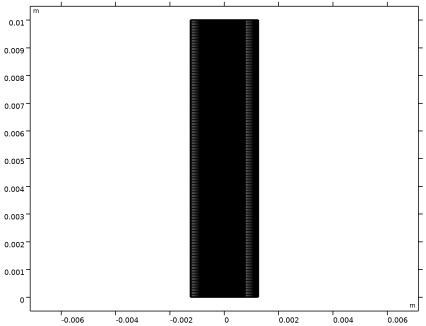
After completion the mesh should resemble the figure below.
Study 1
Step 1: Stationary
1
In the Model Builder window, under Study 1 click Step 1: Stationary.
2
In the Settings window for Stationary, locate the Study Settings section.
3
From the Tolerance list, choose User controlled.
4
In the Relative tolerance text field, type 1e-5.
5
In the Study toolbar, click  Compute.
Results
Concentration, Na (tcd)
Reproduce the figures from the Results and Discussion section in the following way.
1
In the Model Builder window, under Results click Concentration, Na (tcd).
2
In the Settings window for 2D Plot Group, click to expand the Selection section.
3
From the Geometric entity level list, choose Domain.
4
From the Selection list, choose Channels.
Streamline 1
1
In the Model Builder window, expand the Concentration, Na (tcd) node, then click Streamline 1.
2
In the Settings window for Streamline, locate the Streamline Positioning section.
3
From the Positioning list, choose On selected boundaries.
4
In the Number text field, type 5.
5
Locate the Selection section. Click to select the  Activate Selection toggle button.
6
From the Selection list, choose Inlets.
Concentration, Na (tcd)
1
In the Model Builder window, click Concentration, Na (tcd).
2
In the Settings window for 2D Plot Group, click to expand the Title section.
3
Find the Solution subsection. Clear the Solution checkbox.
4
In the Concentration, Na (tcd) toolbar, click  Plot.
Cut Line 2D 1
1
In the Results toolbar, click  Cut Line 2D.
2
In the Settings window for Cut Line 2D, locate the Line Data section.
3
In row Point 1, set X to -W_ch-W_m and y to L/2.
4
In row Point 2, set X to W_ch+W_m and y to L/2.
5
Potential
1
In the Results toolbar, click  1D Plot Group.
2
In the Settings window for 1D Plot Group, type Potential in the Label text field.
3
Locate the Data section. From the Dataset list, choose Cut Line 2D 1.
4
Click to expand the Title section. From the Title type list, choose None.
5
Locate the Plot Settings section.
6
Select the x-axis label checkbox. In the associated text field, type Position.
Line Graph 1
1
In the Potential toolbar, click  Line Graph.
2
Concentrations
1
In the Results toolbar, click  1D Plot Group.
2
In the Settings window for 1D Plot Group, type Concentrations in the Label text field.
3
Locate the Data section. From the Dataset list, choose Cut Line 2D 1.
4
Locate the Title section. From the Title type list, choose None.
5
Locate the Plot Settings section.
6
Select the x-axis label checkbox. In the associated text field, type Position.
7
Select the y-axis label checkbox. In the associated text field, type Concentration (mol/m<sup>3</sup>).
Line Graph 1
1
In the Concentrations toolbar, click  Line Graph.
2
In the Settings window for Line Graph, locate the y-Axis Data section.
3
In the Expression text field, type cNa.
4
Click to expand the Legends section. Select the Show legends checkbox.
5
From the Legends list, choose Manual.
6
Concentrations
In the Model Builder window, click Concentrations.
Line Graph 2
1
In the Concentrations toolbar, click  Line Graph.
2
In the Settings window for Line Graph, locate the y-Axis Data section.
3
In the Expression text field, type cCl.
4
Locate the Legends section. Select the Show legends checkbox.
5
From the Legends list, choose Manual.
6
7
In the Concentrations toolbar, click  Plot.
Fluxes, Na
1
In the Results toolbar, click  1D Plot Group.
2
In the Settings window for 1D Plot Group, type Fluxes, Na in the Label text field.
3
Locate the Data section. From the Dataset list, choose Cut Line 2D 1.
Line Graph 1
1
In the Fluxes, Na toolbar, click  Line Graph.
2
In the Settings window for Line Graph, locate the y-Axis Data section.
3
In the Expression text field, type tcd.tfluxx_cNa.
4
Locate the Legends section. Select the Show legends checkbox.
5
From the Legends list, choose Manual.
6
Line Graph 2
1
Right-click Line Graph 1 and choose Duplicate.
2
In the Settings window for Line Graph, locate the y-Axis Data section.
3
In the Expression text field, type tcd.mflux_cNax.
4
Locate the Legends section. In the table, enter the following settings:
Line Graph 3
1
Right-click Line Graph 2 and choose Duplicate.
2
In the Settings window for Line Graph, locate the y-Axis Data section.
3
In the Expression text field, type tcd.dflux_cNax.
4
Locate the Legends section. In the table, enter the following settings:
Fluxes, Na
1
In the Model Builder window, click Fluxes, Na.
2
In the Settings window for 1D Plot Group, locate the Plot Settings section.
3
Select the x-axis label checkbox. In the associated text field, type Position.
4
Select the y-axis label checkbox. In the associated text field, type Flux.
5
Locate the Title section. From the Title type list, choose Label.
6
Locate the Legend section. From the Position list, choose Upper left.
7
In the Fluxes, Na toolbar, click  Plot.
Fluxes, Cl
1
Right-click Fluxes, Na and choose Duplicate.
2
In the Settings window for 1D Plot Group, type Fluxes, Cl in the Label text field.
Line Graph 1
1
In the Model Builder window, expand the Fluxes, Cl node, then click Line Graph 1.
2
In the Settings window for Line Graph, locate the y-Axis Data section.
3
In the Expression text field, type tcd.tfluxx_cCl.
Line Graph 2
1
In the Model Builder window, click Line Graph 2.
2
In the Settings window for Line Graph, locate the y-Axis Data section.
3
In the Expression text field, type tcd.mflux_cClx.
Line Graph 3
1
In the Model Builder window, click Line Graph 3.
2
In the Settings window for Line Graph, locate the y-Axis Data section.
3
In the Expression text field, type tcd.dflux_cClx.
4
In the Fluxes, Cl toolbar, click  Plot.
Electrolyte current density
1
In the Results toolbar, click  1D Plot Group.
2
In the Settings window for 1D Plot Group, type Electrolyte current density in the Label text field.
Line Graph 1
1
In the Electrolyte current density toolbar, click  Line Graph.
2
In the Settings window for Line Graph, locate the Selection section.
3
Click to select the  Activate Selection toggle button.
4
5
Click Replace Expression in the upper-right corner of the y-Axis Data section. From the menu, choose Component 1 (comp1) > Tertiary Current Distribution, Nernst–Planck > tcd.nIl - Normal electrolyte current density - A/m².
6
Locate the x-Axis Data section. From the Parameter list, choose Expression.
7
In the Expression text field, type y.
8
In the Electrolyte current density toolbar, click  Plot.