PDF

Importing PCBs — Generating Shell Traces
Introduction
This tutorial series demonstrates how to import printed circuit board (PCB) data from the IPC-2581 file format and generate simulation-ready geometry. Key topics include selecting the import type, handling drill layers, creating simplified 3D components and pads, and previewing file content before importing. The tutorials also show how to remove small details, such as short edges, either through Automatic Geometry Cleanup or by simplifying and repairing geometry during import. Geometry finalization is done using Form Union or Form Assembly, followed by mesh generation with adjusted element sizes to resolve small copper trace features using the Free Tetrahedral and Swept mesh generators.
This tutorial, the first part in the series, models the copper traces as shell geometry. For example, in a heat transfer in solids analysis, the difference in thermal conductivity between copper and the surrounding FR4 dielectric is so large that the temperature difference and heat flux across the copper layer can be neglected. You will learn how to model copper traces and drill holes as shell geometry, automatically remove small details such as short edges with Automatic Geometry Cleanup, and use import-generated selections to set up different materials.
The second tutorial, Importing PCBs — Creating Component Domains, demonstrates how to import PCBs with extruded copper traces, simplify and repair geometry during import, and create pads for simplified components. The geometry is finalized with Form Assembly and meshed using the Swept operation.
The third tutorial, Importing PCBs — Working with Nets, shows how to use the 2D Preview to selectively import nets and prepare a simplified geometry. It also demonstrates how to partition the board geometry with a bounding box for selected nets.
The fourth tutorial, Importing PCBs — Using the Add-In, uses the PCB to Material data add-in to prepare a PCB for thermal expansion simulation by replacing its detailed internal structure with a space-dependent interpolation function for the material properties.
Copper Layers
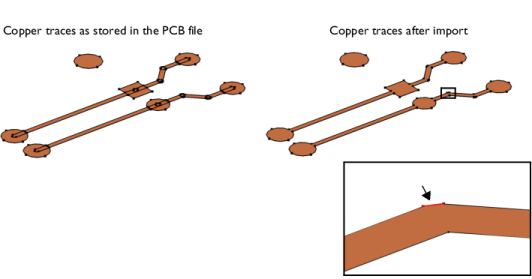
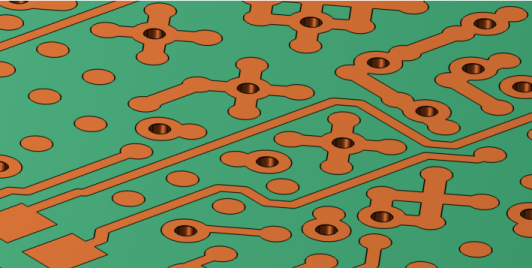
The copper layers in a PCB file contain geometric shapes that when united during import result in the geometric objects for the copper traces. This is illustrated by the example in the figure below, where the copper pads are represented by circles and rectangles and the traces by the elongated rectangles with fully rounded short edges.
During import of the copper layers the individual shapes are united and the interior edges are removed to reduce the complexity of the geometry. The final geometry objects for the copper traces are shown to the right in the figure above. The short edge, which is highlighted above in the magnified section of the copper trace, is the result of two overlapping copper lines.
Edges corresponding to such overlaps can become significantly shorter than the typical line width of the copper, and can be automatically detected and removed before meshing the geometry.
Model Definition
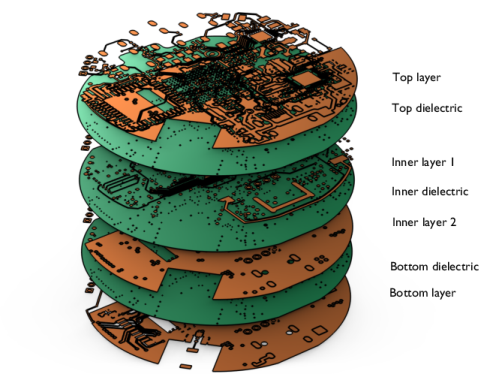
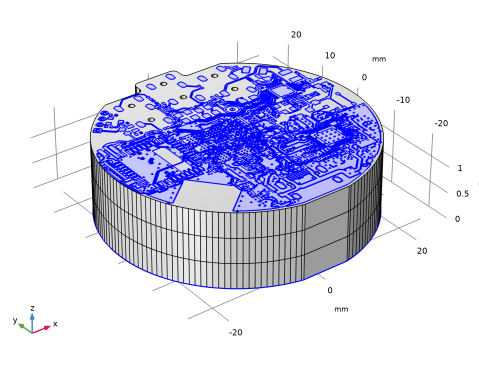
The IPC-2581 file imported in this tutorial contains a PCB with four copper layers connected by vias. During import, geometry objects are generated for the copper layers and the dielectric layer. In this example the copper traces are not extruded during import. The thickness of the board geometry generated this way becomes the sum of the dielectric layer thicknesses. The object for the dielectric layer is created according to the shape of the board as defined in the PCB file.
The import of vias is set up so that their cores remain void and are not covered by copper faces, see the image below. Once imported, the geometry contains a combination of solid dielectric objects and surface objects for the copper layers.
Before defining the material properties, the geometry is automatically analyzed for small features, such as short edges, that could negatively affect meshing. Using the Automatic Geometry Cleanup tool, these details are removed below a specified tolerance, simplifying the geometry while preserving important features.
Next, materials are assigned using the import-generated selections, which automatically separate dielectric domains from copper faces. This step highlights how import-based selections streamline the setup process by removing the need to manually identify desired geometric domains and boundaries.
The PCB featured in this tutorial originates from OtterCastAudioV2, Copyright © 2024 Ottercast, Jana Marie Hemsing, and it is made available under the MIT license.
Reference
1. The Usage of Form Union and Form Assembly
Application Library path: ECAD_Import_Module/Tutorials/pcb_import_shell
Modeling Instructions
From the File menu, choose New.
New
In the New window, click  Model Wizard.
Model Wizard
1
In the Model Wizard window, click  3D.
2
Geometry 1
In the Settings window for Geometry, locate the Advanced section. From the Geometry representation list, if it is visible, choose the COMSOL kernel.
Import 1 (imp1)
1
In the Geometry toolbar, click  Import.
2
In the Settings window for Import, locate the Source section.
3
Click  Browse.
4
5
Locate the Layers section. From the Type of import list, choose Metal shell.
Using this option, the copper traces are generated as surface objects with zero thickness.
6
Since copper layers are approximated with surface objects, you have the option to omit creating domains for the vias. This means the vias will only be represented by the vertical faces of the holes.
7
Click to expand the Drill Holes section. Clear the Create domains for the cores of vias checkbox.
8
Clear the Create domains for the cores of plated holes checkbox.
Clearing these checkboxes sets the cores of the vias and plated holes to become void.
9
Select the Via cores through metal layers checkbox.
Using this option, faces will not be generated where the vias go through the copper layers.
10
Locate the Source section. Click  Import.
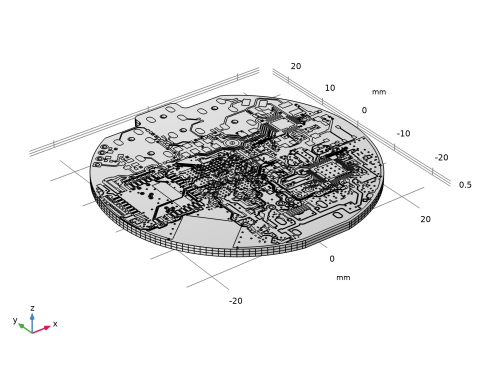
As the geometry import completes, note the information displayed in the Messages window. In total, seven objects are imported: three solid object for the dielectric layers and four surface objects for each of the copper layers.
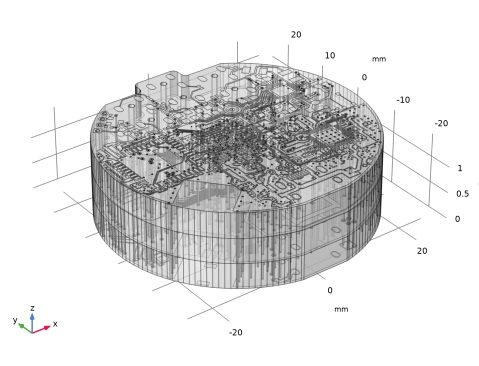
Due to the high aspect ratio of the imported geometry, it is difficult to see the interior structure of the PCB. For a better visualization of the interior create another view, with scaling applied in the vertical direction.
Definitions
View no scaling
1
In the Model Builder window, expand the Component 1 (comp1) > Definitions node, then click View 1.
2
In the Settings window for View, type View no scaling in the Label text field.
View z scale
1
Right-click View no scaling and choose Duplicate.
2
In the Model Builder window, click View no scaling 1.
3
In the Settings window for View, type View z scale in the Label text field.
Camera
1
In the Model Builder window, click Camera.
2
In the Settings window for Camera, locate the Camera section.
3
From the View scale list, choose Manual.
4
In the z scale text field, type 10.
5
Click  Update.
6
Click the  Go to Default View button in the Graphics toolbar.
7
Click the  Transparency button in the Graphics toolbar.
The geometry should now fill the Graphics window, just as it is displayed in the figure below. To get an even clearer view of the interior, you can also hide some domains by using Click and Hide button in the Graphics window.
8
Click the  Transparency button in the Graphics toolbar.
Geometry 1
1
In the Model Builder window, under Component 1 (comp1) click Geometry 1.
2
In the Settings window for Geometry, locate the Cleanup section.
3
Select the Automatic detection of small details checkbox.
4
In the Model Builder window, under Component 1 (comp1) click Materials.
After leaving the geometry sequence, the geometry is automatically analyzed for small details that could influence the meshing. The detected details can be removed automatically or by using a wizard that allows you to modify the tolerance and select the tools to use.
5
In the Geometry Cleanup dialog that opens, click Clean up Automatically to automatically clean up the geometry.
Once the cleanup is completed, the changes made to the model can be reviewed in the Cleanup Log.
Cleanup Log
The table indicates that the Remove details 1 operation was added to the geometry sequence. Under the Information section, the cleanup detail size of 0.0013[mm] indicates that geometric details below this size were removed by the Remove details operation. According to the information in the Geometry statistics table, the minimum edge length is currently 0.00131[mm], which is only slightly longer than the tolerance for removing small details. This information can be useful in deciding whether more entities should be removed from the geometry.
When the cleanup is complete, the geometry is finalized using Form Union, which automatically creates a single geometry object composed of multiple domains. This is equivalent to performing a union of all objects while retaining their interior boundaries. As a result, the mesh will become connected and conforming, ensuring continuity of fields and fluxes across domain interfaces, read more in Ref. 1. In PCB models, this approach typically limits the choice of meshing strategies to unstructured meshes, such as the Free Tetrahedral operation, since the complexity of the internal structures usually prevents the creation of a structured mesh.
Now that the geometry is complete, you can assign materials to the dielectric domain and the copper faces using the selections created during import.
Add Material
1
In the Materials toolbar, click  Add Material to open the Add Material window.
2
Go to the Add Material window.
3
In the tree, select Built-in > FR4 (Circuit Board).
4
Click the Add to Component button in the window toolbar.
Materials
FR4 (Circuit Board) (mat1)
1
In the Settings window for Material, locate the Geometric Entity Selection section.
2
From the Selection list, choose Dielectric (Import 1).
Add Material
1
Go to the Add Material window.
2
In the tree, select Built-in > Copper.
3
Click the Add to Component button in the window toolbar.
4
In the Materials toolbar, click  Add Material to close the Add Material window.
Materials
Copper (mat2)
1
In the Settings window for Material, locate the Geometric Entity Selection section.
2
From the Geometric entity level list, choose Boundary.
3
From the Selection list, choose Metal (Import 1).
4
In the Graphics window toolbar, clicknext to  Go to Default View, then choose Go to View No Scaling.
Mesh 1
1
In the Model Builder window, under Component 1 (comp1) click Mesh 1.
2
In the Settings window for Mesh, locate the Physics-Controlled Mesh section.
3
From the Element size list, choose Extra coarse.
Notice that since we have not added any physics interfaces to the component, the only contributor to the physics-controlled meshing is the Geometric Analysis, Detail Size. This contributor ensures that the mesh size parameters are chosen so that details on the geometry are resolved according to the selected predefined element size setting. When physics interfaces are present, the resulting mesh can differ from the one generated here.
4
Click  Build All.
Information 1
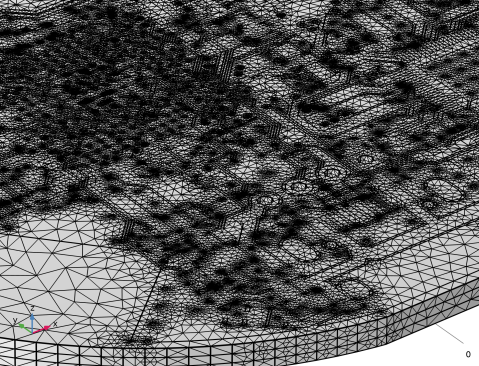
According to the Messages window, the mesher generated a mesh of approximately 1.6 million domain elements, and also resulted in several Information nodes. While these information messages can be overwhelming, they can be expected when meshing a PCB geometry such as the one in this tutorial with one of the coarser predefined element size settings.
In general, it is possible that the mesh element size is tuned to resolve small details and curvature better if material and physics are applied before building the mesh. If the mesher generates smaller elements due to settings for the physics-controlled mesh, it is not sure that any Information node appear or there might be fewer nodes than seen here. To generate a mesh with higher quality, you can allow the mesher to generate smaller elements to better resolve the small details that are needed for the geometry. It is also safe to leave Information nodes in a meshing sequence if you have made sure that the mesh sufficiently resolves the physics and details in the geometry.