PDF

Importing PCBs — Creating Component Domains
Introduction
This tutorial series demonstrates how to import printed circuit board (PCB) data from the IPC-2581 file format and generate simulation-ready geometry. Key topics include selecting the import type, handling drill layers, creating simplified 3D components and pads, and previewing file content before importing. The tutorials also show how to remove small details, such as short edges, either through Automatic Geometry Cleanup or by simplifying and repairing geometry during import. Geometry finalization is done using Form Union or Form Assembly, followed by mesh generation with adjusted element sizes to resolve small copper trace features using the Free Tetrahedral and Swept mesh generators.
This tutorial, the second part in the series, focuses on importing PCBs with extruded copper traces. It demonstrates how to remove small details during import, create simplified PCB components from stored outlines, and generate pads for those components. The geometry is finalized with Form Assembly and meshed using the Swept operation.
The first tutorial in the series, Importing PCBs — Generating Shell Traces, shows how to model copper traces as shell geometry, automatically remove small details with Automatic Geometry Cleanup, and use import-generated selections to assign materials.
The third tutorial, Importing PCBs — Working with Nets, shows how to use the 2D Preview to selectively import nets and prepare a simplified geometry. It also demonstrates how to partition geometry around selected nets with a bounding box for swept meshing, which is especially useful for large boards.
The fourth tutorial, Importing PCBs — Using the Add-In, uses the PCB to Material data add-in to prepare a PCB for thermal expansion simulation by replacing its detailed internal structure with a space-dependent interpolation function for the material properties.
Copper Layers
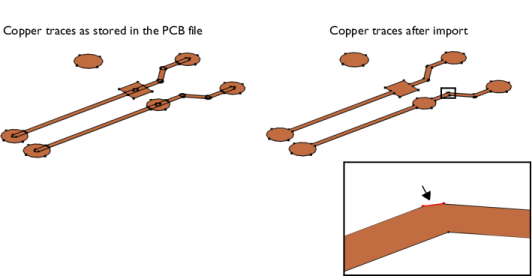
The copper layers in an PCB file contain geometric shapes that when united during import result in the final geometric objects for the copper traces. This is illustrated by the example in the figure below, where the copper pads are represented by circles and rectangles and the traces by the elongated rectangles with fully rounded short edges.
During import of the copper layers the individual shapes are united and the interior edges are removed to reduce the complexity of the geometry. The final geometry objects for the copper traces are shown to the right in the figure above. The short edge, which is highlighted above in the magnified section of the copper trace, is the result of two overlapping copper lines.
Edges corresponding to such overlaps can become significantly shorter than the typical line width of the copper, and can be automatically detected and removed before meshing the geometry.
Model Definition
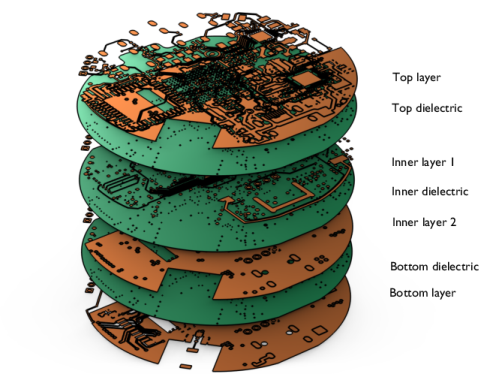
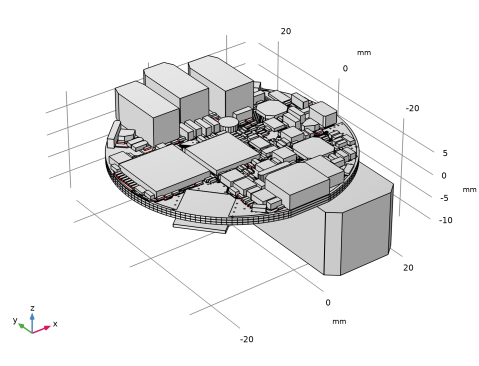
The IPC-2581 file imported in this tutorial contains a PCB with four copper layers connected by vias. During import, geometry objects are generated for the copper and dielectric layers. The objects for the dielectric layers are created according to the shape of the board as defined in the PCB file.
The board geometry is created by extruding all copper and dielectric layers during import. In addition, vias are generated with core and plating domains, and pads are generated for selected components and pins.
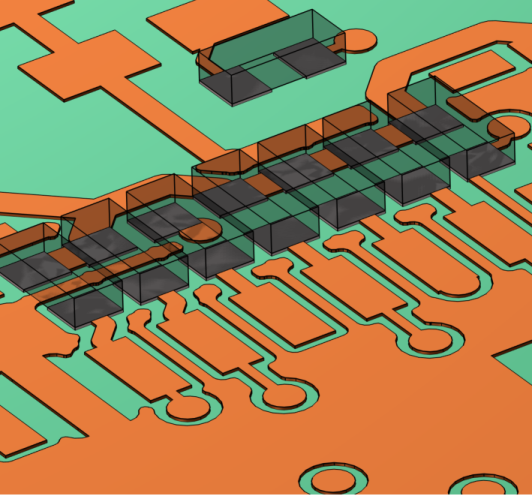
Simplified 3D component domains are also created in the model from the component outlines in the file. This is set up in a separate import node, for greater flexibility. A Logical Expression Selection feature exemplifies how components can be identified and selected using the component attribute.
For a more efficient meshing of the boards layered structure, the final geometry for the meshing and physics is created by forming an assembly. This enables the swept meshing of the copper and dielectric layers.
The PCB featured in this tutorial originates from OtterCastAudioV2, Copyright © 2024 Ottercast, Jana Marie Hemsing, and it is made available under the MIT license.
Reference
1. The Usage of Form Union and Form Assembly
Application Library path: ECAD_Import_Module/Tutorials/pcb_import_components
Modeling Instructions
From the File menu, choose New.
New
In the New window, click  Model Wizard.
Model Wizard
1
In the Model Wizard window, click  3D.
2
Geometry 1
In the Settings window for Geometry, locate the Advanced section. From the Geometry representation list, if it is visible, choose the COMSOL kernel.
Import 1 (imp1)
1
In the Geometry toolbar, click  Import.
2
In the Settings window for Import, locate the Source section.
3
Click  Browse.
4
Notice that the default option, Full 3D, is kept in the Type of import list, which means that the copper layers will be extruded with a thickness according to the table in Layers section.
5
During import, you have the possibility to create pads as distinct geometry domains or boundaries, separate from the copper traces. These pads can be identified by their associated component and pin number.
6
Click to expand the Pads section. In the table, enter the following settings:
The asterisk (*) following the R indicates that the pads will be created for all components that start with that letter (all resistors in this case). In the second column, the asterisk means that pads will be created for all pins associated with the components specified in this row. You can also enter comma separated lists of components and pin numbers in their respective columns in the table.
7
Click to expand the Drill Holes section. Here you can enter the plating thickness for plated holes and vias in the board. The core via domains will be surrounded with copper domains of this thickness. This setting has no effect on non-plated drill holes in the file.
8
In the Plating thickness text field, type 0.01[mm].
9
Click to expand the Simplify and Repair section. Using the tools in this section is important when extruding the copper layers during the import. Since the small geometric details are eliminated before the layers are extruded, this method can be more robust when compared to defeaturing the final geometry.
10
Select the Eliminate short edges checkbox.
11
Find the Ignore vertices in layers subsection. In the Maximum edge length text field, type 0.0032[mm].
12
Locate the Source section. Click  Import.
Selection List
1
In the Geometry toolbar, click  Selection List to open the Selection List window.
2
Go to the Selection List window.
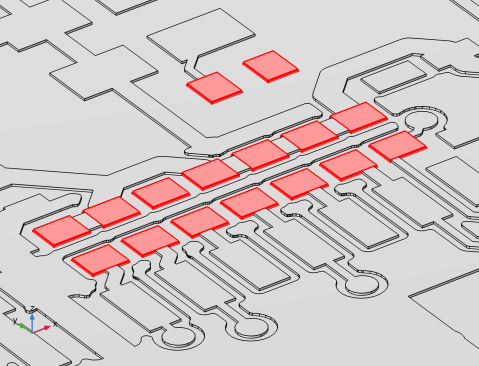
In the selection list, you can view the selections created for different entity levels. Since the import type is set to Full 3D, the created pads will have a domain selection called Pads.
3
In the Graphics window toolbar, clicknext to  Select Objects, then choose Select Domains.
4
In the Domain selections tree, select Import 1 > Pads (Import 1).
In this view, the pads for the resistors are highlighted in red.
5
Click the  Zoom Extents button in the Graphics toolbar.
Geometry 1
Next, we will import the simplified 3D components of the resistors using a separate Import node.
Import 2 (imp2)
1
In the Geometry toolbar, click  Import.
2
In the Settings window for Import, locate the Source section.
3
Click  Browse.
4
5
Locate the Layers section. Click  Clear All Imports.
Even without importing the layers the components will be positioned on the top and bottom copper layers, according to the layer thickness and elevation information from the table.
6
Click to expand the Components section. Select the Import component outlines checkbox.
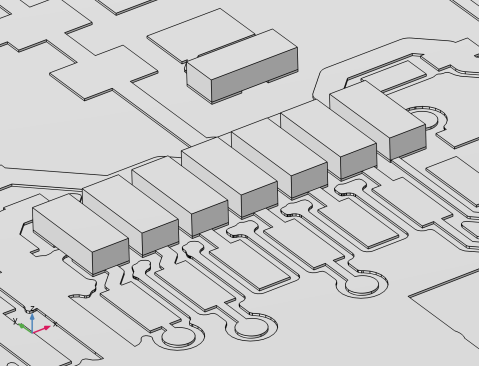
With this setting, domains will be generated for all components in the file. Each component will be assigned an attribute, with the component names as the values assigned to their respective domains. You can control the attribute tag using the text field labeled Component attribute tag.
7
Click  Build Selected.
In the figure above, note that components are present on both sides of the board. In the following steps, extract only the components for which you have created pads.
Union 1 (uni1)
First, unite the objects for the top and bottom components. Then, use the Extract operation to keep only the domains for the resistors.
1
In the Geometry toolbar, click  Booleans and Partitions and choose Union.
2
Select the objects imp2.COMP_BOT and imp2.COMP_TOP only.
3
In the Settings window for Union, click  Build Selected.
Logical Expression Selection 1 (exprsel1)
A Logical Expression Selection defined using the components attributes helps with easily identifying the domains for the resistors.
1
In the Geometry toolbar, click  Selections and choose Logical Expression Selection.
2
In the Settings window for Logical Expression Selection, locate the Expression section.
3
In the Logical expression text area, type imp2.component('R*').
Notice in the expression above the use of the attribute tag to refer to the component attribute. The asterisk (*) in combination with the letter R is used to include all components with a name starting with R.
4
Click  Build Selected.
Extract 1 (extract1)
1
In the Geometry toolbar, click  Extract.
2
In the Settings window for Extract, locate the Entities or Objects to Extract section.
3
From the Geometric entity level list, choose Domain.
4
From the Selection list, choose Logical Expression Selection 1.
5
From the Input object handling list, choose Remove.
6
Click  Build Selected.
From the components, only the domains for the resistors are kept in the geometry.
Form Union (fin)
1
In the Model Builder window, under Component 1 (comp1) > Geometry 1 click Form Union (fin).
2
In the Settings window for Form Union/Assembly, locate the Form Union/Assembly section.
3
From the Action list, choose Form an assembly.
Using Form Assembly to generate the geometry for meshing and setting up the physics can be a better choice for an efficient meshing of boards with many layers. Forming the assembly of the objects means that the objects are collected into an assembly object and touching boundaries are identified and by default Identity pairs are created out of them. Read more about forming the union and assembly of geometry objects in Ref. 1.
When using this method, the geometry can be meshed with the Swept mesh operation to generate a semi-structured mesh. The mesh created will not be connected across the two sides of a boundary pair, and thus it will be nonconforming between disconnected domains. The continuity of the fields and fluxes across a boundary pair is enforced by having Continuity boundary conditions applied for the physics that will approximately enforce continuity of the fields and fluxes across a pair. This is why this method may not be suitable for all physics applications.
4
Click  Build Selected.
Notice that the checkbox for Fast pair detection for stacked objects is selected by default. A set of objects is considered stacked if any two objects can be separated with a plane that is parallel to the xy-plane, which is often the case in PCB geometries. This means that one identity pair is created for each z-coordinate where two objects touch.
Mesh 1
When leaving the geometry sequence, the finalized geometry will be automatically analyzed for small details if the Automatic detection of small details is enabled under Geometry 1 node. Due to the large number of entities, this analysis can take several minutes for many PCB geometries.
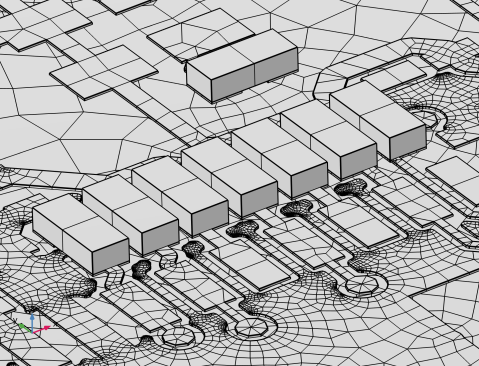
Using the Swept mesh generator makes it easier to capture the details on the copper layers with the mesh, while keeping the number of elements down by limiting the number of element layers in the extrusion direction.
Swept 1
In the Mesh toolbar, click  Swept.
Size
1
In the Model Builder window, click Size.
2
In the Settings window for Size, locate the Element Size section.
3
From the Predefined list, choose Finer.
After configuring the desired mesh size settings, you can build the mesh.
4
Click  Build All.