|
|
|




|
1
|
|
2
|
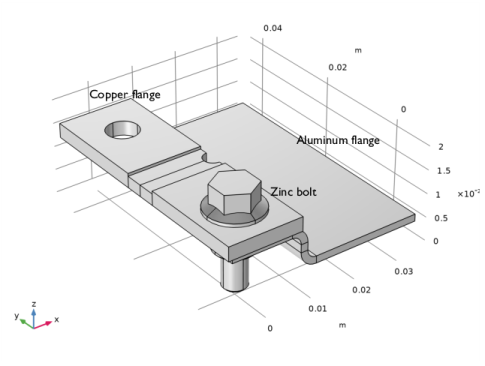
In the Application Libraries window, select Corrosion Module > Atmospheric Corrosion > atmospheric_corrosion_busbar_geom in the tree.
|
|
3
|
Click
 Open. Open. |
|
1
|
|
2
|
Go to the Add Physics window.
|
|
3
|
In the tree, select Electrochemistry > Primary and Secondary Current Distribution > Secondary Current Distribution (cd).
|
|
4
|
Click the Add to Component 1 button in the window toolbar.
|
|
5
|
In the tree, select Electrochemistry > Primary and Secondary Current Distribution > Current Distribution, Shell (cdsh).
|
|
6
|
Click the Add to Component 1 button in the window toolbar.
|
|
7
|
|
1
|
|
2
|
Click
 Load from File. Load from File. |
|
3
|
Browse to the model’s Application Libraries folder and double-click the file atmospheric_corrosion_busbar_parameters.txt.
|
|
1
|
|
2
|
|
3
|
|
1
|
|
2
|
|
3
|
|
1
|
|
2
|
|
3
|
|
4
|
|
1
|
|
2
|
|
3
|
|
4
|
|
1
|
|
2
|
Go to the Add Material window.
|
|
3
|
|
4
|
Click the Add to Component button in the window toolbar.
|
|
5
|
|
6
|
Click the Add to Component button in the window toolbar.
|
|
1
|
|
2
|
|
1
|
|
2
|
|
3
|
|
1
|
|
2
|
|
3
|
|
4
|
Locate the Material Contents section. In the table, enter the following settings:
|
|
5
|
|
6
|
|
1
|
|
2
|
|
1
|
In the Model Builder window, under Component 1 (comp1) > Current Distribution, Shell (cdsh) click Electrolyte 1.
|
|
2
|
|
3
|
|
4
|
|
1
|
|
2
|
|
3
|
|
4
|
|
1
|
|
2
|
|
3
|
|
4
|
Locate the Electrode Kinetics section. From the Kinetics expression type list, choose Anodic Tafel equation.
|
|
5
|
|
6
|
|
1
|
|
2
|
|
3
|
|
4
|
Locate the Electrode Kinetics section. From the Kinetics expression type list, choose Cathodic Tafel equation.
|
|
5
|
|
6
|
|
7
|
Select the Limiting current density checkbox.
|
|
8
|
|
1
|
|
2
|
|
3
|
|
1
|
|
2
|
|
3
|
|
4
|
|
5
|
|
1
|
|
2
|
|
3
|
|
4
|
|
1
|
In the Model Builder window, under Component 1 (comp1) > Current Distribution, Shell (cdsh) right-click Electrode Surface 2 and choose Duplicate.
|
|
2
|
|
3
|
|
1
|
|
2
|
|
3
|
|
4
|
|
5
|
|
1
|
|
2
|
|
3
|
|
4
|
|
1
|
|
2
|
Go to the Add Study window.
|
|
3
|
Find the Studies subsection. In the Select Study tree, select Preset Studies for Selected Physics Interfaces > Stationary with Initialization.
|
|
4
|
Click the Add Study button in the window toolbar.
|
|
5
|
|
1
|
|
2
|
Clear the Generate default plots checkbox.
|
|
1
|
|
2
|
In the Settings window for Current Distribution Initialization, locate the Physics and Variables Selection section.
|
|
3
|
In the Solve for column of the table, under Component 1 (comp1), clear the checkbox for Secondary Current Distribution (cd).
|
|
4
|
|
1
|
|
2
|
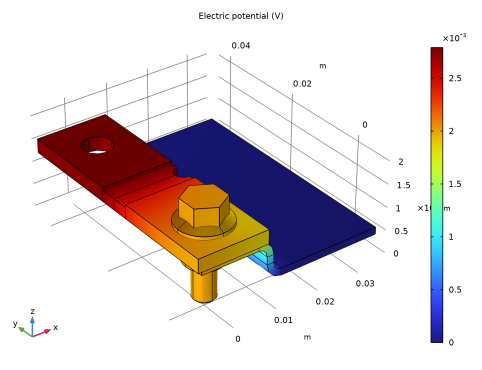
In the Settings window for 3D Plot Group, type Electrode Potential vs. Ground (cd) in the Label text field.
|
|
1
|
|
2
|
In the Settings window for Surface, click Replace Expression in the upper-right corner of the Expression section. From the menu, choose Component 1 (comp1) > Secondary Current Distribution > cd.phis - Electric potential - V.
|
|
3
|
|
1
|
|
2
|
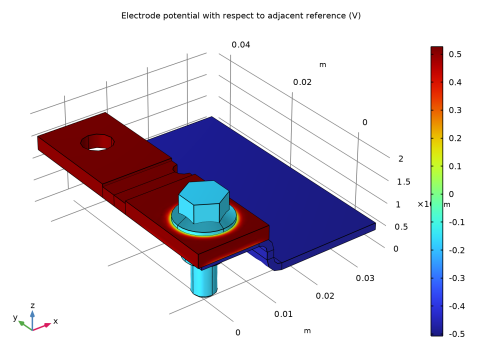
In the Settings window for 3D Plot Group, type Electrode Potential vs. Adjacent Reference (cdsh) in the Label text field.
|
|
1
|
|
2
|
In the Settings window for Surface, click Replace Expression in the upper-right corner of the Expression section. From the menu, choose Component 1 (comp1) > Current Distribution, Shell > cdsh.Evsref - Electrode potential with respect to adjacent reference - V.
|
|
3
|
|
1
|
|
2
|
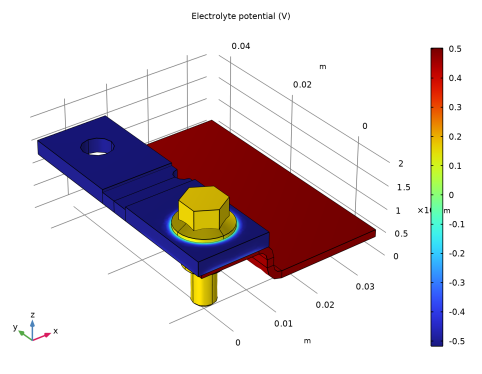
In the Settings window for 3D Plot Group, type Electrolyte Potential in Film (cdsh) in the Label text field.
|
|
1
|
|
2
|
In the Settings window for Surface, click Replace Expression in the upper-right corner of the Expression section. From the menu, choose Component 1 (comp1) > Current Distribution, Shell > phil2 - Electrolyte potential - V.
|
|
3
|
|
1
|
|
2
|
In the Settings window for 3D Plot Group, type Corrosion Current Density (cdsh) in the Label text field.
|
|
1
|
|
2
|
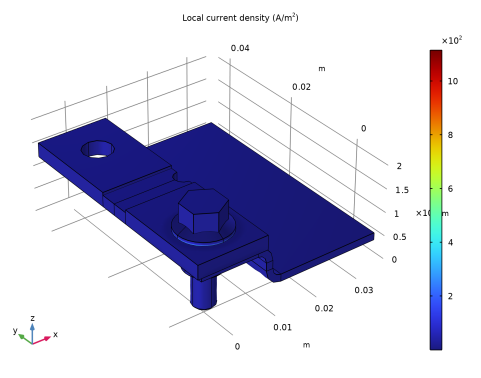
In the Settings window for Surface, click Replace Expression in the upper-right corner of the Expression section. From the menu, choose Component 1 (comp1) > Current Distribution, Shell > Electrode kinetics > cdsh.iloc_er1 - Local current density - A/m².
|
|
3
|
|
1
|
|
2
|
In the Settings window for 3D Plot Group, type Oxygen Reduction Current Density (cdsh) in the Label text field.
|
|
1
|
|
2
|
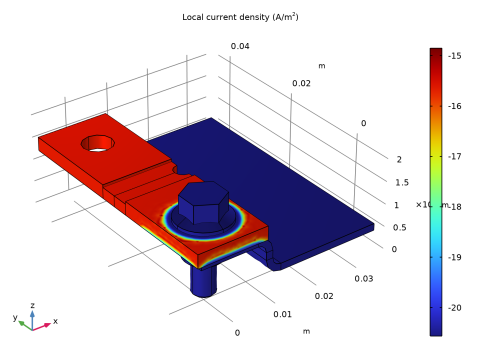
In the Settings window for Surface, click Replace Expression in the upper-right corner of the Expression section. From the menu, choose Component 1 (comp1) > Current Distribution, Shell > Electrode kinetics > cdsh.iloc_er2 - Local current density - A/m².
|
|
3
|