
|
|
|





|
1
|
|
2
|
In the Select Physics tree, select Chemical Species Transport > Precipitation and Crystallization > Precipitation and Crystallization in Fluid Flow.
|
|
3
|
Click Add.
|
|
4
|
|
5
|
Click Remove.
|
|
6
|
Click
 Done. Done. |
|
1
|
|
2
|
|
3
|
Click
 Load from File. Load from File. |
|
4
|
Browse to the model’s Application Libraries folder and double-click the file turbulent_aggregation_parameters.txt.
|
|
1
|
|
2
|
|
3
|
|
4
|
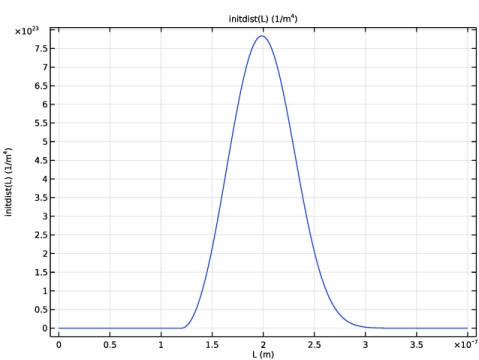
Locate the Definition section. In the Expression text field, type (L>L_offset)*3*(L-L_offset)^2*(N0)/((L_mean-L_offset)^3)*exp(-(L-L_offset)^3/(L_mean-L_offset)^3).
|
|
5
|
|
6
|
|
8
|
Locate the Plot Parameters section. In the table, enter the following settings:
|
|
9
|
Click
 Plot. Plot. |
|
1
|
|
2
|
|
3
|
|
1
|
|
2
|
|
3
|
Click
 Load from File. Load from File. |
|
4
|
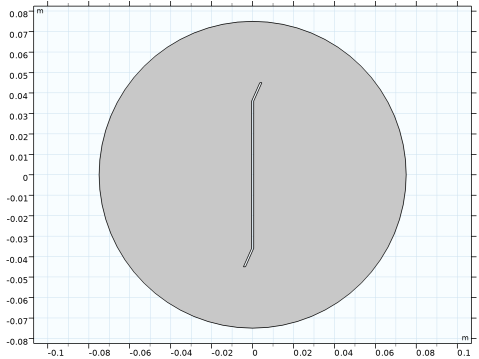
Browse to the model’s Application Libraries folder and double-click the file turbulent_aggregation_impeller_geom.txt.
|
|
1
|
|
2
|
Select the object c1 only.
|
|
3
|
|
4
|
|
5
|
Select the object pol1 only.
|
|
6
|
Click
 Build All Objects. Build All Objects. |
|
7
|
|
1
|
|
2
|
Go to the Add Material window.
|
|
3
|
|
4
|
Click the Add to Component button in the window toolbar.
|
|
1
|
|
2
|
|
3
|
|
4
|
|
5
|
|
1
|
|
2
|
|
3
|
|
1
|
|
2
|
|
3
|
|
1
|
|
1
|
|
1
|
|
2
|
|
3
|
|
4
|
|
5
|
|
6
|
|
7
|
|
8
|
|
9
|
In the K text field, type 1/W*(sqrt(pi/(15*8))*(pop.Lj+pop.Lk)^3*sqrt(max(ep,eps)/spf.nu)+2*k_B_const*T/(3*spf.nu*spf.rho)*(pop.Lj+pop.Lk)*(1/pop.Lj+1/pop.Lk)).
|
|
1
|
In the Model Builder window, under Component 1 (comp1) > Size-Based Population Balance (pbsb) click Initial Values 1.
|
|
2
|
|
3
|
|
1
|
|
2
|
|
3
|
From the list, choose User-controlled mesh.
|
|
1
|
|
1
|
|
2
|
Drag and drop below Size 1.
|
|
3
|
|
4
|
|
6
|
|
7
|
Click the Custom button.
|
|
8
|
Locate the Element Size Parameters section.
|
|
9
|
|
1
|
|
2
|
|
3
|
|
4
|
Click
 Build All. Build All. |
|
1
|
|
2
|
Go to the Add Study window.
|
|
3
|
Find the Multiphysics couplings in study subsection. In the table, clear the Solve checkbox for Precipitation in Fluid Flow 1 (pff1).
|
|
4
|
Find the Physics interfaces in study subsection. In the table, clear the Solve checkbox for Size-Based Population Balance (pbsb).
|
|
5
|
Find the Studies subsection. In the Select Study tree, select Preset Studies for Selected Physics Interfaces > Frozen Rotor.
|
|
6
|
Click the Add Study button in the window toolbar.
|
|
1
|
|
2
|
|
1
|
|
2
|
|
3
|
Select the Modify model configuration for study step checkbox.
|
|
4
|
|
5
|
Click
 Disable in Model. Disable in Model. |
|
6
|
|
7
|
Click
 Disable in Model. Disable in Model. |
|
1
|
Go to the Add Study window.
|
|
2
|
|
3
|
Click the Add Study button in the window toolbar.
|
|
1
|
|
2
|
|
3
|
|
4
|
Locate the Physics and Variables Selection section. Select the Modify model configuration for study step checkbox.
|
|
5
|
|
6
|
Click
 Disable in Model. Disable in Model. |
|
7
|
|
8
|
Click
 Disable in Model. Disable in Model. |
|
9
|
Click to expand the Values of Dependent Variables section. Find the Initial values of variables solved for subsection. From the Settings list, choose User controlled.
|
|
10
|
|
11
|
|
1
|
Go to the Add Study window.
|
|
2
|
Click the Add Study button in the window toolbar.
|
|
1
|
|
2
|
|
3
|
|
4
|
Locate the Physics and Variables Selection section. In the Solve for column of the table, under Component 1 (comp1), clear the checkbox for Turbulent Flow, k-ε (spf).
|
|
5
|
Locate the Values of Dependent Variables section. Find the Values of variables not solved for subsection. From the Settings list, choose User controlled.
|
|
6
|
|
7
|
|
8
|
|
9
|
|
10
|
Click
 Add. Add. |
|
1
|
|
2
|
|
3
|
|
4
|
|
1
|
|
2
|
|
1
|
|
2
|
|
3
|
|
4
|
|
5
|
|
6
|
In the Model Builder window, under Population balance > Solver Configurations > Solution 1 (sol1) click Time-Dependent Solver 1.
|
|
7
|
|
8
|
|
9
|
Click in the Graphics window and then press Ctrl+A to select all domains.
|
|
10
|
|
11
|
|
12
|
Click in the Graphics window and then press Ctrl+A to select all domains.
|
|
13
|
|
14
|
Click to expand the Advanced section. Select the Periodic values of variables not solved for checkbox.
|
|
15
|
|
16
|
|
17
|
Click in the Graphics window and then press Ctrl+A to select all domains.
|
|
18
|
|
1
|
|
2
|
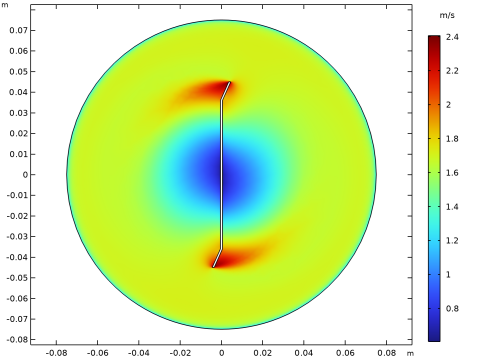
In the Settings window for 2D Plot Group, type Number of Particles and Velocity in the Label text field.
|
|
3
|
|
4
|
|
5
|
|
6
|
|
7
|
|
8
|
Select the Show units checkbox.
|
|
1
|
In the Model Builder window, expand the Number of Particles and Velocity node, then click Surface 1.
|
|
2
|
|
3
|
|
1
|
|
2
|
|
1
|
|
2
|
|
3
|
|
1
|
|
2
|
|
3
|
Select the LaTeX markup checkbox.
|
|
4
|
|
5
|
|
6
|
|
7
|
|
1
|
|
2
|
|
3
|
|
4
|
|
5
|
|
6
|
|
7
|
|
1
|
|
2
|
|
3
|
|
4
|
|
1
|
In the Model Builder window, under Results, Ctrl-click to select Velocity (spf), Pressure (spf), and Wall Resolution (spf).
|
|
2
|
Right-click and choose Group.
|
|
1
|
|
2
|
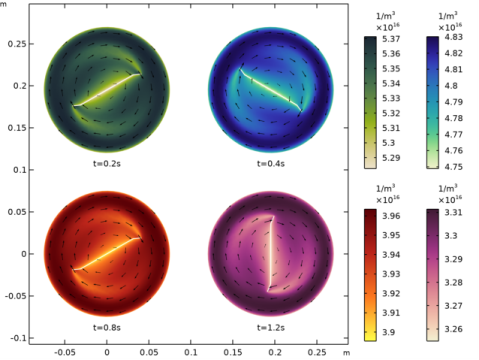
In the Settings window for 2D Plot Group, type Number of Particles at Different Times in the Label text field.
|
|
3
|
|
4
|
|
5
|
|
6
|
|
7
|
|
1
|
In the Model Builder window, expand the Number of Particles at Different Times node, then click Surface 1.
|
|
2
|
|
3
|
|
4
|
|
5
|
|
6
|
|
7
|
|
8
|
|
9
|
|
1
|
|
2
|
|
3
|
|
4
|
|
5
|
|
6
|
|
1
|
|
2
|
|
3
|
|
4
|
|
5
|
|
6
|
|
7
|
|
1
|
In the Model Builder window, under Results > Number of Particles at Different Times, Ctrl-click to select Surface 1, Arrow Surface 1, and Annotation 1.
|
|
2
|
Right-click and choose Duplicate.
|
|
1
|
|
2
|
|
3
|
|
4
|
|
1
|
|
2
|
|
3
|
|
4
|
|
5
|
|
1
|
|
2
|
|
3
|
|
4
|
|
1
|
In the Model Builder window, under Results > Number of Particles at Different Times, Ctrl-click to select Surface 2, Arrow Surface 2, and Annotation 2.
|
|
2
|
Right-click and choose Duplicate.
|
|
1
|
|
2
|
|
3
|
|
4
|
|
5
|
|
1
|
|
2
|
|
3
|
|
4
|
|
5
|
|
1
|
|
2
|
|
3
|
|
4
|
|
5
|
|
1
|
In the Model Builder window, under Results > Number of Particles at Different Times, Ctrl-click to select Surface 3, Arrow Surface 3, and Annotation 3.
|
|
2
|
Right-click and choose Duplicate.
|
|
1
|
|
2
|
|
3
|
|
4
|
|
1
|
|
2
|
|
3
|
|
4
|
|
1
|
|
2
|
|
3
|
|
4
|
|
1
|
Drag and drop below Annotation 1.
|
|
2
|
|
1
|
|
2
|
In the Settings window for 2D Plot Group, type Particle Concentrations of Different Sizes in the Label text field.
|
|
3
|
|
4
|
|
5
|
|
6
|
|
7
|
|
8
|
|
1
|
In the Model Builder window, expand the Particle Concentrations of Different Sizes node, then click Surface 1.
|
|
2
|
|
3
|
|
4
|
|
5
|
|
6
|
|
1
|
|
2
|
|
3
|
|
4
|
|
5
|
|
6
|
|
7
|
|
1
|
In the Model Builder window, under Results > Particle Concentrations of Different Sizes, Ctrl-click to select Surface 1 and Annotation 1.
|
|
2
|
Right-click and choose Duplicate.
|
|
1
|
|
2
|
|
3
|
|
4
|
|
1
|
|
2
|
|
3
|
|
4
|
|
1
|
In the Model Builder window, under Results > Particle Concentrations of Different Sizes, Ctrl-click to select Surface 2 and Annotation 2.
|
|
2
|
Right-click and choose Duplicate.
|
|
1
|
|
2
|
|
3
|
|
4
|
|
5
|
|
1
|
|
2
|
|
3
|
|
4
|
|
5
|
|
1
|
In the Model Builder window, under Results > Particle Concentrations of Different Sizes, Ctrl-click to select Surface 3 and Annotation 3.
|
|
2
|
Right-click and choose Duplicate.
|
|
1
|
|
2
|
|
3
|
|
4
|
|
1
|
|
2
|
|
3
|
|
4
|
|
1
|
Drag and drop below Annotation 1.
|
|
2
|
|
1
|
In the Model Builder window, expand the Average Size Distribution (pbsb) node, then click Line Segments 1.
|
|
2
|
|
3
|
|
4
|
|
5
|
|
6
|
|
7
|
|
8
|
|
9
|
|
1
|
|
2
|
|
3
|
|
4
|
|
5
|
|
6
|
Locate the Coloring and Style section. Find the Line style subsection. From the Line list, choose Dotted.
|
|
7
|
|
8
|
|
1
|
|
2
|
|
3
|
|
4
|
Locate the Coloring and Style section. Find the Line style subsection. From the Line list, choose Dashed.
|
|
1
|
|
2
|
|
3
|
|
4
|
Locate the Coloring and Style section. Find the Line style subsection. From the Line list, choose Dash-dot.
|
|
5
|
|
6
|
|
1
|
|
2
|
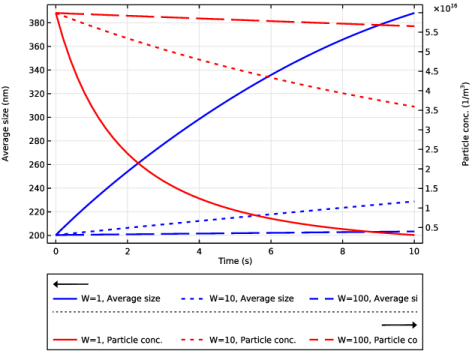
In the Settings window for 1D Plot Group, type Average Size and Number of Particles in the Label text field.
|
|
3
|
|
4
|
|
5
|
|
6
|
|
7
|
|
1
|
|
2
|
|
4
|
Click to expand the Coloring and Style section. Find the Line style subsection. From the Line list, choose Cycle (reset).
|
|
5
|
|
6
|
|
1
|
|
3
|
|
4
|
Locate the Coloring and Style section. Find the Line style subsection. From the Line list, choose Cycle (reset).
|
|
5
|
|
6
|
|
7
|
|
1
|
|
2
|
|
3
|
|
4
|
Select the Keep child nodes checkbox.
|
|
5
|
|
6
|
|
7
|
|
1
|
|
2
|
|
3
|
|
4
|
|
6
|
Locate the Expressions section. In the table, enter the following settings:
|
|
1
|
|
2
|
|
3
|
|
5
|
Locate the Expressions section. In the table, enter the following settings:
|
|
6
|


