









PDF

Hydrocarbon Dehalogenation in a Tortuous Microreactor
Introduction
Removing halogen groups from hydrocarbons is an important reaction step in several chemical processes. One application is water purification. Other examples involve organic synthesis, where the removal of halogen groups serves as a starting point for carbon-carbon coupling reactions. Typically, the carbon-halogen bond scission is activated by precious metal catalysts based on platinum or palladium.
The model presented here shows hydrocarbon dehalogenation as it occurs in a microreactor. The reactants are transported from the fluid bulk to the catalytic surfaces at the reactor walls, where they react. First you set up a space-independent model, analyzing two competing reactions, using the Reaction Engineering interface. Then, you export the reaction kinetics and set up and solve a space-dependent model of the microreactor.
Model Definition
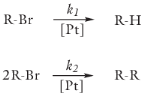
The adsorption of halogenated hydrocarbons onto the surface of a platinum catalyst leads to cleavage of the carbon halogen bond. The hydrocarbon fragments then undergo either hydrogenation or coupling reactions. The scheme below illustrates the overall reactions for a brominated hydrocarbon species.
Figure 1: The dehalogenation of RBr can result either in hydrogenation or coupling of the hydrocarbon fragments.
The reaction rates are:
and
where the rate constants are given by the Arrhenius expression:
(1)
In Equation 1, A is the frequency factor, and E the activation energy (SI unit: J/mol). The bulk species are said to be dissolved in water. The table below lists the values of the Arrhenius parameters for the two reactions.
Ideal reactor model
The mass balance equation for a flow-through reactor is given by
(2)
where F is the molar flow rate (SI unit: mol/s), V the reactor volume (SI unit: m3), and Ri the net reaction term (SI unit: mol/(m3·s)). If the reactor has constant cross-section and constant flow velocity, the left-hand side of Equation 2 can be rewritten as
The reactor mass balance thus becomes
(3)
where τ represents the residence time (SI unit: s). The assumption of constant flow velocity is valid for incompressible liquids or liquids where the effect of temperature on the density is small. Equation 3 is identical to the balance equation of the batch reactor, except that residence time replaces the reaction time. You can therefore make use of the Batch reactor type when solving the model in the Chemical Reaction Engineering Module.
The ideal reactor model assumes by default that reactions take place in the entire reactor volume. In the 3D microreactor model, reactions occur at catalytic surfaces located at the reactor walls. In order to make the ideal model represent a reactor with surface reactions, Equation 3 has to be scaled by the reactive area per reactor volume. Scaling the ideal reactor equations by the dimensions of the microreactor makes the 1D and 3D models comparable. The area to volume ratio is
where W is the width of the channel (SI unit: m), H the channel height (SI unit: m), and L the length of a reactive section (SI unit: m). The scaled ideal reactor equation is then
Note that the net reaction term (Ri) in this case represents surface reactions (SI unit: mol/(m2·s)).
Space-dependent model
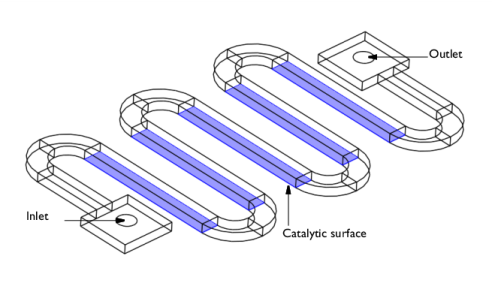
The microreactor considered in this example consists of a tortuous channel, fitted with inlet and outlet adapter sections, as illustrated in Figure 2.
Figure 2: Microreactor geometry.
In the straight sections of the reactor, the channel walls are in part coated with platinum catalyst. As water with small amounts of a brominated hydrocarbon flows through the reactor, dehalogenation reactions occur at the catalytic surfaces.
Momentum Balances
The flow in the channel is modeled with the Laminar Flow interface by solving the stationary incompressible Navier-Stokes equations:
Here, μ denotes the dynamic viscosity (SI unit: N·s/m2), u the velocity (SI unit: m/s), ρ the density of the fluid (SI unit: kg/m3), and p the pressure (SI unit: Pa).
A pressure difference drives the flow through the reactor, as indicated by the boundary conditions
Each pressure condition is specified along with a vanishing viscous stress condition at the boundary
At the wall the velocity is zero
Mass Balances
The mass balances are set up with the Transport of Diluted Species interface and solves the diffusion-convection equations at steady state:
Here Di denotes the diffusion coefficient (SI unit: m2/s), ci is the species concentration (SI unit: mol/m3), and u equals the velocity (SI unit: m/s).
The diffusivity of the reacting species is assumed to depend on the temperature according to
No reactions take place in the fluid bulk. Rather, the reactions take place on the catalytic surfaces. The boundary fluxes at the catalytic surfaces thus become
where Ri represents the reaction term.
Inlet conditions are equal to the inlet concentrations
At the outlet, the mass transport is prescribed to be dominated by convection by setting the diffusive flux to zero.
The same no flux condition is also applied on all boundaries where the velocity is zero.
Results and Discussion
First review the results of the ideal reactor model, which you set up and solve using the Reaction Engineering interface.
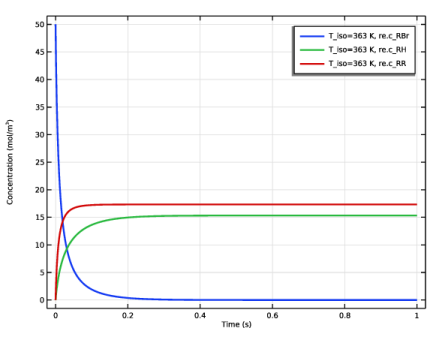
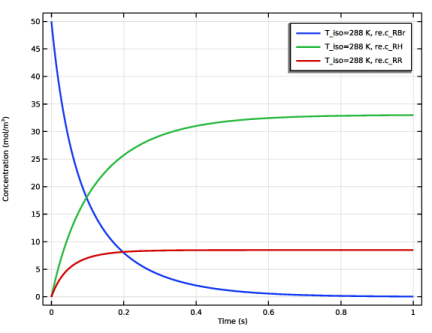
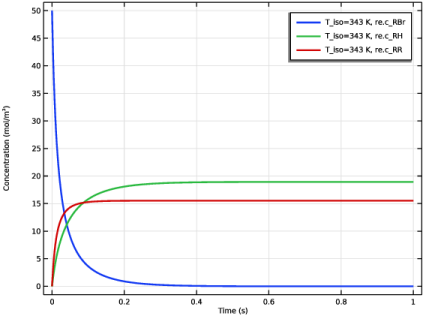
Figure 3 through Figure 5 show concentration profiles of reactant and products as function of residence time, evaluated at 288 K, 343 K, and 363 K.
Figure 3: Concentration of the RBr, RH, and RR species as function of residence time. Reactions occur at 288 K.
Figure 4: Concentration of the RBr, RH, and RR species as function of residence time. Reactions occur at 343 K.
Figure 5: Concentration of the RBr, RH, and RR species as function of residence time. Reactions occur at 363 K.
The hydrocarbon coupling reaction has the higher activation energy and is hence more temperature sensitive than the hydrogenation reaction (see Table 1). The concentration plots of the ideal reactors outline the effect quite clearly. At 288 K, the hydrogenation product RH is dominant, while at 363 K the coupling product is the more prominent. Notably, at 343 K, the concentration dependency on the reaction rates becomes accentuated, so that RBr dominates only at shorter τ and RH at longer τ.
Although the primary goal may be to remove the halogenated reactant, RBr, it may also be important to set reaction conditions in such a way that the most favorable by-product is formed. The present model shows how such design aspects can readily be investigated with the Chemical Reaction Engineering Module.
The next set of results refer to the space-dependent model of a tortuous microreactor.
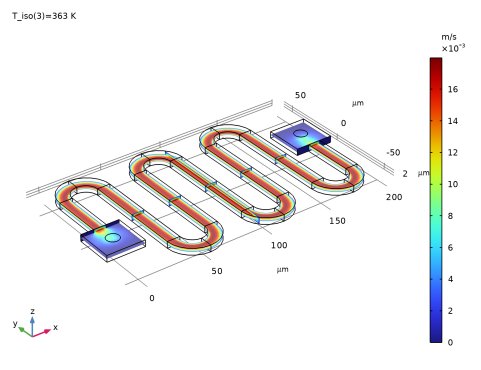
Figure 6 shows the velocity of the laminar flow field in the reactor running at 363 K. The flow is driven by a pressure difference of 1500 Pa between inlet and outlet. The resulting maximum velocity is approximately 18 mm/s.
Figure 6: Velocity field in the reactor where the pressure difference between inlet and outlet is 1500 Pa.
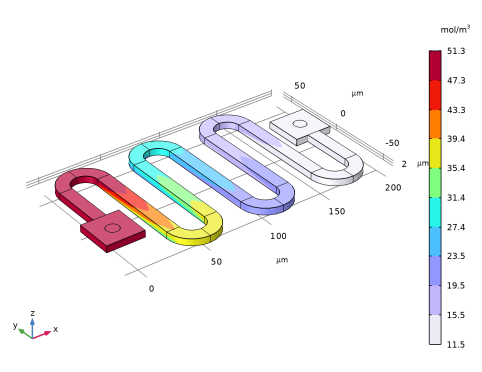
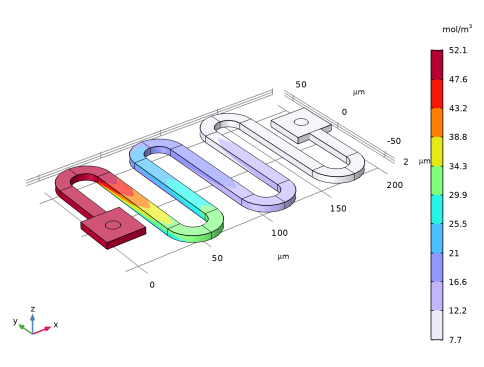
Figure 7 shows the concentration distribution of the reactant RBr in the reactor. At relatively high temperature, 363 K, the outlet concentration is 7.7 mol/m3.
Figure 7: Concentration distribution of the halogenated reactant RBr. Transport properties and reaction rates are evaluated at 363 K.
Running the reactor at 288 K, the outlet concentration of RBr is 11.5 mol/m3.
Figure 8: Concentration distribution of the halogenated reactant RBr. Transport properties and reaction rates are evaluated at 288 K.
Judging from the results of the ideal reactor models, a more pronounced temperature effect would be expected, as both reaction rates and species diffusivities increase notably at higher temperatures. The reason for this apparently moderate influence on conversion is that the increased temperature also affects the flow.
Increasing the temperature from 282 K to 363 K decreases the viscosity of water from 1.2·10-3 to 3.2·10-4 Pa·s. This is automatically taken into account by the temperature-dependent fluid properties. As the flow through the reactor is driven by a constant pressure difference, the velocity increases as viscosity decreases. Results also show that the maximum fluid velocity at 363 K is greater than at 282 K, resulting in a shorter residence time.
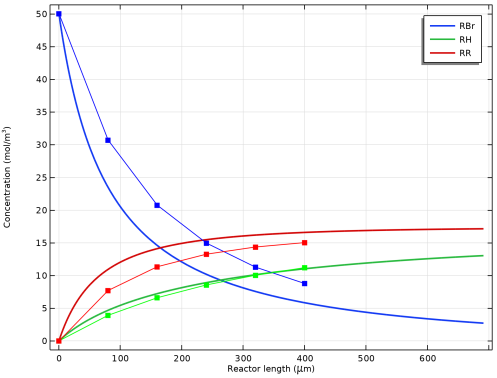
Finally, compare the concentrations of the reactant and products along the reactor length in the 3D model, with those predicted by the 0D model (Figure 9). The overall trends are similar for both the 0D and the 3D model. The results for the concentration of RH in the 3D model closely matches the prediction of the 0D model. However, the concentration of the reactant RBr is higher, and the concentration of RR is lower, in the 3D reactor than in the 0D prediction. The reason is that, in 3D, the diffusion of reactant RBr toward the catalytically active surfaces is modeled. As the reaction at the surface proceeds, the reactant concentration is limited by the diffusion rate. However, in the 0D model, the reactions are assumed to occur at the bulk concentrations. A concentration approaching zero at the catalytic surface reduces the rate for a second-order reaction more than for a first-order reaction. Thus, the real reactor has a higher selectivity for the RH product than what the 0D model predicts.
Figure 9: Concentrations of reactant RBr and products RH and RR, from both the 0D model (lines) and the 3D model (lines with markers). All data is for the highest temperature, 363 K. The reactor length only includes the length of each catalytic section, and not the turns between them where no reaction occurs.
Application Library path: Chemical_Reaction_Engineering_Module/Reactors_with_Mass_Transfer/tortuous_reactor
Modeling Instructions
From the File menu, choose New.
New
In the New window, click  Model Wizard.
Model Wizard
1
In the Model Wizard window, click  0D.
2
In the Select Physics tree, select Chemical Species Transport > Reaction Engineering (re).
3
Click Add.
4
Click  Study.
5
In the Select Study tree, select General Studies > Time Dependent.
6
Global Definitions
Parameters 1
1
In the Model Builder window, under Global Definitions click Parameters 1.
2
In the Settings window for Parameters, locate the Parameters section.
3
Click  Load from File.
4
Reaction Engineering (re)
1
In the Model Builder window, under Component 1 (comp1) click Reaction Engineering (re).
2
In the Settings window for Reaction Engineering, locate the Energy Balance section.
3
In the T text field, type T_iso.
You will solve for an isothermal system at three different temperatures.
4
Locate the Mixture Properties section. From the Phase list, choose Liquid.
As explained by Equation 3, you can use a batch reactor to model a flow-through system if the velocity is constant. The Batch reactor type is the default selection of the Reaction Engineering interface.
In order to set up the chemical reactions describing the dehalogenation process, a surface species AS(ads) is introduced into the following two surface reactions. In Reaction Engineering, a reaction is defined as a surface reaction if there are any surface species participating in the reaction.
Reaction 1
1
In the Reaction Engineering toolbar, click  Reaction.
2
In the Settings window for Reaction, locate the Reaction Formula section.
3
In the Formula text field, type RBr+AS(ads)=>RH.
4
Locate the Reaction Rate section. From the list, choose User defined.
5
In the rj text field, type re.kf_1*re.c_RBr.
6
Locate the Reaction Orders section. Find the Surface overall reaction order subsection. In the Forward text field, type 0.
7
Locate the Rate Constants section. Select the Use Arrhenius expressions checkbox.
8
In the Af text field, type A1.
9
In the Ef text field, type E1.
Reaction 2
1
In the Reaction Engineering toolbar, click  Reaction.
2
In the Settings window for Reaction, locate the Reaction Formula section.
3
In the Formula text field, type 2RBr+AS(ads)=>RR.
4
Locate the Reaction Rate section. From the list, choose User defined.
5
Locate the Reaction Orders section. Find the Surface overall reaction order subsection. In the Forward text field, type 0.
6
Locate the Reaction Rate section. In the rj text field, type re.kf_2*re.c_RBr^2.
7
Locate the Rate Constants section. Select the Use Arrhenius expressions checkbox.
8
In the Af text field, type A2.
9
In the Ef text field, type E2.
Surface species: AS(ads)
The surface species AS(ads) acts as catalyst. Its concentration is constant.
1
In the Model Builder window, click Surface species: AS(ads).
2
In the Settings window for Species, locate the Constant Concentration/Activity section.
3
Select the Keep concentration/activity constant checkbox.
The catalytic reaction only takes place on the reactor walls, and not in the whole reactor volume. This is accounted for by defining the surface area to volume ratio. Doing so allows you to compare this ideal 1D reactor with the 3D reactor that you model in the second part of this example.
4
In the Model Builder window, click Reaction Engineering (re).
5
In the Settings window for Reaction Engineering, locate the Reactor section.
6
Find the Surface reaction area subsection. Click the Surface area to volume ratio button.
7
In the as text field, type 1/H.
Initial Values 1
1
In the Model Builder window, click Initial Values 1.
2
In the Settings window for Initial Values, locate the Volumetric Species Initial Values section.
3
4
Locate the Surface Species Initial Values section. In the table, enter the following settings:
Study 1
With the selection of reactor type and the input of the chemical kinetics you are ready to solve the ideal reactor model. Following the steps below you will set up an auxiliary sweep to solve the model for three different temperatures.
Step 1: Time Dependent
1
In the Model Builder window, under Study 1 click Step 1: Time Dependent.
2
In the Settings window for Time Dependent, click to expand the Study Extensions section.
3
Select the Auxiliary sweep checkbox.
4
5
6
In the Study toolbar, click  Compute.
Results
Concentrations 0D model
In the Settings window for 1D Plot Group, type Concentrations 0D model in the Label text field.
Global 1
1
In the Model Builder window, expand the Concentrations 0D model node, then click Global 1.
2
In the Settings window for Global, locate the Data section.
3
From the Dataset list, choose Study 1/Solution 1 (sol1).
4
Click to expand the Title section. From the Title type list, choose None.
This dataset contains the stored results from the auxiliary sweep. You can review the results by choosing entries in the Parameters selection lists and then clicking Plot button.
5
Locate the Data section. From the Parameter selection (T_iso) list, choose From list.
6
In the Parameter values (T_iso (K)) list box, select 288.
7
Click to expand the Coloring and Style section. From the Width list, choose 2.
This selection will give you the (residence) time on the x-axis of the plot.
8
In the Concentrations 0D model toolbar, click  Plot.
9
Click the  Zoom Extents button in the Graphics toolbar.
10
Locate the Data section. In the Parameter values (T_iso (K)) list box, select 343.
11
In the Concentrations 0D model toolbar, click  Plot.
12
In the Parameter values (T_iso (K)) list box, select 363.
13
In the Concentrations 0D model toolbar, click  Plot.
Reaction Engineering (re)
The Generate Space-Dependent Model feature automatically sets up physics interfaces for modeling space- and time-dependent systems. This process uses the model in the Reaction Engineering interface as reference to set up transport interfaces, transferring variable names, reaction kinetics, as well as property expressions. By default the Generate Space-Dependent Model feature sets up a Transport of Diluted Species interface to describe a space-dependent reacting system and a Chemistry node with all reaction and species properties. The default settings are used in this example.
Generate Space-Dependent Model 1
1
In the Reaction Engineering toolbar, click  Generate Space-Dependent Model.
2
In the Settings window for Generate Space-Dependent Model, locate the Physics Interfaces section.
3
Find the Fluid flow subsection. From the list, choose Laminar Flow: New.
4
Locate the Space-Dependent Model Generation section. Click Create/Refresh.
Note how the model generation creates a new component node, Component 2. By expanding this node you will find the Transport of Diluted Species and Laminar Flow interfaces that have been set up automatically.
Geometry 1(3D)
Import a geometry for the tortuous microreactor.
1
In the Model Builder window, expand the Component 2 (comp2) node, then click Geometry 1(3D).
2
In the Geometry toolbar, click Insert Sequence and choose Insert Sequence.
3
4
In the Geometry toolbar, click  Build All.
5
Click the  Zoom Extents button in the Graphics toolbar.
Add Material
1
In the Home toolbar, click  Add Material to open the Add Material window.
2
Go to the Add Material window.
3
In the tree, select Liquids and Gases > Liquids > Water.
4
Click the Add to Component button in the window toolbar.
5
In the Home toolbar, click  Add Material to close the Add Material window.
By default, the first material you add applies on all domains. Associating a material with the geometry makes the predefined property expressions of the material available to the physics interfaces. In this case the temperature dependent expressions for the density and viscosity of water will be automatically included in the definition of the Laminar Flow interface.
Chemistry (chem)
Species: RBr
1
In the Model Builder window, expand the Chemistry (chem) node, then click Species: RBr.
2
In the Settings window for Species, locate the Chemical Formula section.
3
In the M text field, type Mn_RBr.
Surface species: AS(ads) (Constant)
1
In the Model Builder window, click Surface species: AS(ads) (Constant).
2
In the Settings window for Species, locate the Chemical Formula section.
3
In the M text field, type Mn_As.
Species: RH
1
In the Model Builder window, click Species: RH.
2
In the Settings window for Species, locate the Chemical Formula section.
3
In the M text field, type Mn_RH.
Species: RR
1
In the Model Builder window, click Species: RR.
2
In the Settings window for Species, locate the Chemical Formula section.
3
In the M text field, type Mn_RR.
Transport of Diluted Species (tds)
Fluid 1
1
In the Model Builder window, expand the Transport of Diluted Species (tds) node, then click Fluid 1.
2
In the Settings window for Fluid, locate the Diffusion section.
3
In the DcRBr text field, type D.
4
In the DcRH text field, type D.
5
In the DcRR text field, type D.
Surface Reactions 1
This feature takes surface reaction rates as boundary fluxes. The parameter is a Feature Input and matched automatically with variables from the Chemistry set up by the model generation process.
1
In the Model Builder window, click Surface Reactions 1.
2
In the Settings window for Surface Reactions, locate the Boundary Selection section.
3
From the Selection list, choose Catalytic Surfaces.
Concentration 1
1
In the Physics toolbar, click  Boundaries and choose Concentration.
2
In the Settings window for Concentration, locate the Boundary Selection section.
3
From the Selection list, choose Inlet.
4
Locate the Concentration section. Select the Species cRBr checkbox.
5
In the c0,cRBr text field, type c_RBr0.
6
Select the Species cRH checkbox.
7
In the c0,cRH text field, type c_RH0.
8
Select the Species cRR checkbox.
9
In the c0,cRR text field, type c_RR0.
Outflow 1
1
In the Physics toolbar, click  Boundaries and choose Outflow.
2
In the Settings window for Outflow, locate the Boundary Selection section.
3
From the Selection list, choose Outlet.
Recall that the reactions take place solely on the catalytic surfaces. Therefore the generated Reactions and Flux Discontinuity nodes can be removed.
Reactions 1
In the Model Builder window, right-click Reactions 1 and choose Delete.
Flux Discontinuity 1
In the Model Builder window, right-click Flux Discontinuity 1 and choose Delete.
Laminar Flow (spf)
Fluid Properties 1
1
In the Model Builder window, expand the Component 2 (comp2) > Laminar Flow (spf) node, then click Fluid Properties 1.
2
In the Settings window for Fluid Properties, locate the Model Input section.
3
From the T list, choose User defined. In the associated text field, type T_iso.
Note that both the fluid density and dynamic viscosity are taken from the water material.
Inlet 1
1
In the Physics toolbar, click  Boundaries and choose Inlet.
2
In the Settings window for Inlet, locate the Boundary Selection section.
3
From the Selection list, choose Inlet.
4
Locate the Boundary Condition section. From the list, choose Pressure.
5
Locate the Pressure Conditions section. In the p0 text field, type delta_p.
Outlet 1
1
In the Physics toolbar, click  Boundaries and choose Outlet.
2
In the Settings window for Outlet, locate the Boundary Selection section.
3
From the Selection list, choose Outlet.
This completes the setup of the physics interfaces. Following the steps below, discretize the reactor geometry with a mesh. With chemistry occurring on reactor walls, mass transport gradients are expected to be most pronounced perpendicular to the direction of the flow. Using a swept mesh will allow you to maintain high mesh resolution in the cross section of the reactor channel while setting a lower resolution in the direction of the flow. Analyzing the chemistry and physics of your system and distributing the mesh accordingly will often allow you to reduce memory requirements and computational time.
Mesh 1
Free Triangular 1
1
In the Mesh toolbar, click  More Generators and choose Free Triangular.
2
In the Settings window for Free Triangular, locate the Boundary Selection section.
3
Click  Paste Selection.
4
In the Paste Selection dialog, type 8 in the Selection text field.
5
Size 1
1
Right-click Free Triangular 1 and choose Size.
2
In the Settings window for Size, locate the Element Size section.
3
Click the Custom button.
4
Locate the Element Size Parameters section.
5
Select the Maximum element size checkbox. In the associated text field, type 1.
Swept 1
1
In the Mesh toolbar, click  Swept.
2
In the Settings window for Swept, locate the Domain Selection section.
3
From the Geometric entity level list, choose Domain.
4
From the Selection list, choose Channel.
Distribution 1
1
Right-click Swept 1 and choose Distribution.
2
In the Settings window for Distribution, locate the Distribution section.
3
In the Number of elements text field, type 6.
Free Tetrahedral 1
1
In the Mesh toolbar, click  Free Tetrahedral.
2
In the Settings window for Free Tetrahedral, locate the Domain Selection section.
3
From the Geometric entity level list, choose Domain.
4
From the Selection list, choose Adapter Sections.
Size 1
1
Right-click Free Tetrahedral 1 and choose Size.
2
In the Settings window for Size, locate the Element Size section.
3
Click the Custom button.
4
Locate the Element Size Parameters section.
5
Select the Maximum element size checkbox. In the associated text field, type 2.
6
In the Model Builder window, right-click Mesh 1 and choose Build All.
The instructions below detail how to solve the model. As was the case for the perfectly mixed reactor model, you will set up auxiliary sweeps to solve for three different temperatures. The temperature affects not only reaction rates but also the diffusivity for the mass balance equations. The fluid flow is also affected, as the fluid density and viscosity are both temperature dependent.
Set up two study steps to solve the model. The first step solves for the fluid flow. The second step solves for the mass transport, using the flow field calculated in the first step for the convective mass transport. There is no need to solve the fully coupled problem as the mass transport does not influence the fluid flow in this example.
Study 2
Step 1: Stationary
1
In the Model Builder window, expand the Study 2 node, then click Step 1: Stationary.
2
In the Settings window for Stationary, locate the Physics and Variables Selection section.
3
In the Solve for column of the table, under Component 2 (comp2), clear the checkbox for Transport of Diluted Species (tds).
4
Click to expand the Study Extensions section. Select the Auxiliary sweep checkbox.
5
6
Step 2: Stationary 2
1
In the Study toolbar, click  Stationary.
2
In the Settings window for Stationary, locate the Physics and Variables Selection section.
3
In the Solve for column of the table, under Component 2 (comp2), clear the checkbox for Laminar Flow (spf).
4
Locate the Study Extensions section. Select the Auxiliary sweep checkbox.
5
6
In this study step, do not solve for the laminar flow. However, to have all solutions from the previous step (flow at all temperatures) available when solving for the concentrations at different temperatures in the present step, change the settings for the values of variables not solved for.
7
Click to expand the Values of Dependent Variables section. Find the Values of variables not solved for subsection. From the Settings list, choose User controlled.
8
From the Method list, choose Solution.
9
From the Study list, choose Study 2, Stationary.
10
From the Selection list, choose Automatic (all solutions).
11
In the Study toolbar, click  Compute.
Results
Concentration, RBr, Surface (tds)
1
In the Model Builder window, under Results click Concentration, RBr, Surface (tds).
2
In the Settings window for 3D Plot Group, click to expand the Title section.
3
From the Title type list, choose None.
4
Locate the Color Legend section. Select the Show units checkbox.
Surface 1
1
In the Model Builder window, expand the Concentration, RBr, Surface (tds) node, then click Surface 1.
2
In the Settings window for Surface, locate the Coloring and Style section.
3
From the Color table type list, choose Discrete.
Concentration, RBr, Surface (tds)
The default surface plot shows the concentration of species RBr evaluated at 363 K. Select from the Parameter value list to look at other results.
1
In the Model Builder window, click Concentration, RBr, Surface (tds).
2
In the Settings window for 3D Plot Group, locate the Data section.
3
From the Parameter value (T_iso (K)) list, choose 288.
4
In the Concentration, RBr, Surface (tds) toolbar, click  Plot.
Velocity (spf)
1
In the Model Builder window, click Velocity (spf).
2
In the Settings window for 3D Plot Group, locate the Color Legend section.
3
Select the Show units checkbox.
Multislice 1
1
In the Model Builder window, expand the Velocity (spf) node, then click Multislice 1.
2
In the Settings window for Multislice, click to expand the Title section.
3
From the Title type list, choose None.
4
In the Velocity (spf) toolbar, click  Plot.
5
Click the  Zoom Extents button in the Graphics toolbar.
For future use of Study 1 and the 0D model, turn off all interfaces except Reaction Engineering in the table describing what physics interfaces to solve for.
Study 1
Step 1: Time Dependent
To compare the results of the 3D model with the 0D Reaction Engineering model, first define a number of integration operators, and then use them to calculate the integrated total flux of each species, entering each section of the tortuous reactor. By dividing the resulting flux by the integrated flow velocity at the same position, the concentrations of each species will be obtained. These concentrations will correspond to the 0D concentrations for different residence times.
Prepare integration operators for the cross-sectional boundary at the entrance of each catalytic section of the reactor. The last operator is defined after the last catalytic section.
Definitions (comp2)
Integration 1 (intop1)
1
In the Model Builder window, expand the Component 2 (comp2) > Definitions node.
2
Right-click Component 2 (comp2) > Definitions and choose Nonlocal Couplings > Integration.
3
In the Settings window for Integration, locate the Source Selection section.
4
Click  Paste Selection.
5
In the Paste Selection dialog, type 31 in the Selection text field.
6
7
In the Settings window for Integration, locate the Source Selection section.
8
From the Geometric entity level list, choose Boundary.
9
Click  Copy Selection.
10
Click  Paste Selection.
11
In the Paste Selection dialog, type 31 in the Selection text field.
12
Integration 2 (intop2)
1
In the Definitions toolbar, click  Nonlocal Couplings and choose Integration.
2
In the Settings window for Integration, locate the Source Selection section.
3
From the Geometric entity level list, choose Boundary.
4
Click  Paste Selection.
5
In the Paste Selection dialog, type 40 in the Selection text field.
6
Integration 3 (intop3)
1
In the Definitions toolbar, click  Nonlocal Couplings and choose Integration.
2
In the Settings window for Integration, locate the Source Selection section.
3
From the Geometric entity level list, choose Boundary.
4
Click  Paste Selection.
5
In the Paste Selection dialog, type 61 in the Selection text field.
6
Integration 4 (intop4)
1
In the Definitions toolbar, click  Nonlocal Couplings and choose Integration.
2
In the Settings window for Integration, locate the Source Selection section.
3
From the Geometric entity level list, choose Boundary.
4
Click  Paste Selection.
5
In the Paste Selection dialog, type 70 in the Selection text field.
6
Integration 5 (intop5)
1
In the Definitions toolbar, click  Nonlocal Couplings and choose Integration.
2
In the Settings window for Integration, locate the Source Selection section.
3
From the Geometric entity level list, choose Boundary.
4
Click  Paste Selection.
5
In the Paste Selection dialog, type 91 in the Selection text field.
6
Integration 6 (intop6)
1
In the Definitions toolbar, click  Nonlocal Couplings and choose Integration.
2
In the Settings window for Integration, locate the Source Selection section.
3
From the Geometric entity level list, choose Boundary.
4
Click  Paste Selection.
5
In the Paste Selection dialog, type 85 in the Selection text field.
6
Update the solution to make the integral operators usable in expressions.
Study 2
In the Study toolbar, click  Update Solution.
Now, create three evaluation groups. Each group is used to compute the concentration of one species, creating a table of concentrations for each cross-sectional entrance boundary. For each entrance boundary, the corresponding integration operator is used to calculate the concentration, as the total flux integral divided by the velocity times the Y-axis normal vector. Using just the Y-component works because the catalytic sections are parallel to the Y-axis. In general, for boundaries not aligned with an axis, an expression of the following form can be used for the velocity: u*spf.nx+v*spf.ny+w*spf.nz. Perform the comparison for the last, and highest, temperature in the sweep.
Results
Concentration of RBr
1
In the Results toolbar, click  Evaluation Group.
2
In the Settings window for Evaluation Group, type Concentration of RBr in the Label text field.
Concentration of RH
1
In the Results toolbar, click  Evaluation Group.
2
In the Settings window for Evaluation Group, type Concentration of RH in the Label text field.
Concentration of RR
1
In the Results toolbar, click  Evaluation Group.
2
In the Settings window for Evaluation Group, type Concentration of RR in the Label text field.
Global Evaluation 1
1
In the Model Builder window, right-click Concentration of RBr and choose Global Evaluation.
Next, set the evaluation groups to use the dataset corresponding to the final temperature sweep, and transpose the tables to simplify plotting later on. Then, import the expressions to use in each evaluation group. The last expression has a negative sign, since the normal of the y axis points in the opposite direction, relative to the other positions, at that boundary. Finally, for each case, evaluate each group to display the results.
2
In the Settings window for Global Evaluation, locate the Data section.
3
From the Dataset list, choose Study 2/Solution 2 (3) (sol2).
4
From the Parameter selection (T_iso) list, choose Last.
5
Locate the Expressions section. Click  Clear Table.
6
Click  Load from File.
7
Browse to the model’s Application Libraries folder and double-click the file tortuous_reactor_RBr_evaluation_group_expressions.txt.
Concentration of RBr
1
In the Model Builder window, click Concentration of RBr.
2
In the Settings window for Evaluation Group, locate the Transformation section.
3
Select the Transpose checkbox.
4
Click to expand the Format section. From the Include parameters list, choose Off.
5
In the Concentration of RBr toolbar, click  Evaluate.
Global Evaluation 1
1
In the Model Builder window, right-click Concentration of RH and choose Global Evaluation.
2
In the Settings window for Global Evaluation, locate the Data section.
3
From the Dataset list, choose Study 2/Solution 2 (3) (sol2).
4
From the Parameter selection (T_iso) list, choose Last.
5
Locate the Expressions section. Click  Clear Table.
6
Click  Load from File.
7
Browse to the model’s Application Libraries folder and double-click the file tortuous_reactor_RH_evaluation_group_expressions.txt.
Concentration of RH
1
In the Model Builder window, click Concentration of RH.
2
In the Settings window for Evaluation Group, locate the Transformation section.
3
Select the Transpose checkbox.
4
Locate the Format section. From the Include parameters list, choose Off.
5
In the Concentration of RH toolbar, click  Evaluate.
Global Evaluation 1
1
In the Model Builder window, right-click Concentration of RR and choose Global Evaluation.
2
In the Settings window for Global Evaluation, locate the Data section.
3
From the Dataset list, choose Study 2/Solution 2 (3) (sol2).
4
From the Parameter selection (T_iso) list, choose Last.
5
Locate the Expressions section. Click  Clear Table.
6
Click  Load from File.
7
Browse to the model’s Application Libraries folder and double-click the file tortuous_reactor_RR_evaluation_group_expressions.txt.
Concentration of RR
1
In the Model Builder window, click Concentration of RR.
2
In the Settings window for Evaluation Group, locate the Transformation section.
3
Select the Transpose checkbox.
4
Locate the Format section. From the Include parameters list, choose Off.
5
In the Concentration of RR toolbar, click  Evaluate.
Finally, create a plot comparing the 0D and the 3D results. Compare the results using the distance along the reactor as X axis. However, the 0D model data is a function of time, so to obtain it as a function of distance through the reactor, multiply it with the average value of the y-axis normal vector times the flow velocity. First, create an operator to calculate the average y-axis flow velocity. Since there is a steady flow through the reactor, you can arbitrarily choose to calculate the average at the cross-sectional boundary at the start of the first catalytic section.
Definitions (comp2)
Average 1 (aveop1)
1
In the Definitions toolbar, click  Nonlocal Couplings and choose Average.
2
In the Settings window for Average, locate the Source Selection section.
3
From the Geometric entity level list, choose Boundary.
4
Click  Paste Selection.
5
In the Paste Selection dialog, type 31 in the Selection text field.
6
Update the solution to make the average operator usable in expressions.
Study 2
In the Study toolbar, click  Update Solution.
Now create the 1D plot, with 0D data and 3D data for each species.
Results
0D versus 3D concentrations
1
In the Results toolbar, click  1D Plot Group.
2
In the Settings window for 1D Plot Group, type 0D versus 3D concentrations in the Label text field.
3
Locate the Data section. From the Dataset list, choose None.
4
Click to expand the Title section. From the Title type list, choose None.
5
Locate the Plot Settings section.
6
Select the x-axis label checkbox. In the associated text field, type Reactor length (\mu m).
7
Select the y-axis label checkbox. In the associated text field, type Concentration (mol/m<sup>3</sup>).
Global 1
1
Right-click 0D versus 3D concentrations and choose Global.
2
In the Settings window for Global, locate the Data section.
3
From the Dataset list, choose Study 1/Solution 1 (sol1).
4
From the Parameter selection (T_iso) list, choose Last.
5
From the Time selection list, choose Manual.
6
In the Time indices (1-210) text field, type range(1,1,90).
7
Locate the x-Axis Data section. From the Parameter list, choose Expression.
Convert residence time into distance along the reactor by multiplying residence time by the average flow velocity in the 3D reactor model. Use the withsol operator to select the final temperature dataset of the 3D model to get the velocity.
8
In the Expression text field, type t*withsol('sol3',comp2.aveop1(-comp2.v*comp2.spf.ny)).
9
Locate the Coloring and Style section. From the Width list, choose 2.
10
Click to expand the Legends section. From the Legends list, choose Manual.
11
12
In the 0D versus 3D concentrations toolbar, click  Plot.
Table Graph 1
1
In the Model Builder window, right-click 0D versus 3D concentrations and choose Table Graph.
2
In the Settings window for Table Graph, locate the Data section.
3
From the Source list, choose Evaluation group.
4
From the x-axis data list, choose Row index.
Use linear preprocessing of the x-axis data (the table indices) so that the indices correspond to the increasing cumulative total length along the reactor. Each catalytic section has the length of 80 μm.
5
Click to expand the Preprocessing section. Find the x-axis column subsection. From the Transformation list, choose Linear.
6
In the Scaling text field, type 80.
7
In the Shift text field, type -80.
8
Locate the Coloring and Style section. From the Color list, choose Blue.
9
Find the Line markers subsection. From the Marker list, choose Point.
Table Graph 2
1
Right-click Table Graph 1 and choose Duplicate.
2
In the Settings window for Table Graph, locate the Data section.
3
From the Evaluation group list, choose Concentration of RH.
4
Locate the Coloring and Style section. From the Color list, choose Green.
Table Graph 3
Right-click Table Graph 2 and choose Duplicate.
Table Graph 3
1
In the Model Builder window, expand the Results > 0D versus 3D concentrations > Table Graph 2 node, then click Results > 0D versus 3D concentrations > Table Graph 3.
2
In the Settings window for Table Graph, locate the Data section.
3
From the Evaluation group list, choose Concentration of RR.
4
Locate the Coloring and Style section. From the Color list, choose Red.
Finally, plot the results.
0D versus 3D concentrations
1
In the Model Builder window, click 0D versus 3D concentrations.
2
In the 0D versus 3D concentrations toolbar, click  Plot.
3
Click the  Zoom Extents button in the Graphics toolbar.
Appendix — Geometry Modeling Instructions
From the File menu, choose New.
New
In the New window, click  Blank Model.
Add Component
In the Home toolbar, click  Add Component and choose 3D.
Geometry 1
1
In the Settings window for Geometry, locate the Units section.
2
From the Length unit list, choose µm.
Block 1 (blk1)
1
In the Geometry toolbar, click  Block.
2
In the Settings window for Block, locate the Size and Shape section.
3
In the Width text field, type 10.
4
In the Depth text field, type 80.
5
In the Height text field, type 5.
6
Locate the Position section. In the x text field, type 30.
7
In the y text field, type -40.
8
Locate the Selections of Resulting Entities section. Find the Cumulative selection subsection. Click New.
9
In the New Cumulative Selection dialog, type Channel in the Name text field.
10
Array 1 (arr1)
1
In the Geometry toolbar, click  Transforms and choose Array.
2
In the Settings window for Array, locate the Input section.
3
From the Input objects list, choose Channel.
4
Locate the Selections of Resulting Entities section. Find the Cumulative selection subsection. From the Contribute to list, choose Channel.
5
Locate the Size section. In the x size text field, type 5.
6
Locate the Displacement section. In the x text field, type 30.
Cylinder 1 (cyl1)
1
In the Geometry toolbar, click  Cylinder.
2
In the Settings window for Cylinder, locate the Size and Shape section.
3
In the Radius text field, type 20.
4
In the Height text field, type 5.
5
Locate the Position section. In the x text field, type 50.
6
In the y text field, type -40.
7
Click to expand the Layers section. In the table, enter the following settings:
8
Locate the Selections of Resulting Entities section. Find the Cumulative selection subsection. From the Contribute to list, choose Channel.
Cylinder 2 (cyl2)
1
Right-click Cylinder 1 (cyl1) and choose Duplicate.
2
In the Settings window for Cylinder, locate the Position section.
3
In the x text field, type 20.
4
In the y text field, type 40.
Array 2 (arr2)
1
In the Geometry toolbar, click  Transforms and choose Array.
2
Select the objects cyl1 and cyl2 only.
3
In the Settings window for Array, locate the Selections of Resulting Entities section.
4
Find the Cumulative selection subsection. From the Contribute to list, choose Channel.
5
Locate the Size section. In the x size text field, type 3.
6
Locate the Displacement section. In the x text field, type 60.
Block 2 (blk2)
1
In the Geometry toolbar, click  Block.
2
In the Settings window for Block, locate the Size and Shape section.
3
In the Width text field, type 30.
4
In the Depth text field, type 30.
5
In the Height text field, type 5.
6
Locate the Position section. In the x text field, type -10.
7
In the y text field, type -30.
8
Locate the Selections of Resulting Entities section. Find the Cumulative selection subsection. Click New.
9
In the New Cumulative Selection dialog, type Adapter Sections in the Name text field.
10
Work Plane 1 (wp1)
1
In the Geometry toolbar, click  Work Plane.
2
In the Settings window for Work Plane, locate the Selections of Resulting Entities section.
3
Find the Cumulative selection subsection. From the Contribute to list, choose Adapter Sections.
4
Locate the Plane Definition section. In the z-coordinate text field, type 5.
Work Plane 1 (wp1) > Plane Geometry
In the Model Builder window, click Plane Geometry.
Work Plane 1 (wp1) > Circle 1 (c1)
1
In the Work Plane toolbar, click  Circle.
2
In the Settings window for Circle, locate the Size and Shape section.
3
In the Radius text field, type 5.
4
Locate the Position section. In the xw text field, type 4.6.
5
In the yw text field, type -15.4.
Rotate 1 (rot1)
1
In the Model Builder window, under Component 1 (comp1) > Geometry 1 right-click Work Plane 1 (wp1) and choose Transforms > Rotate.
2
In the Settings window for Rotate, locate the Input section.
3
From the Input objects list, choose Adapter Sections.
4
Select the Keep input objects checkbox.
5
Locate the Rotation section. In the Angle text field, type 180.
6
Locate the Point on Axis of Rotation section. In the x text field, type 95.
7
Locate the Selections of Resulting Entities section. Find the Cumulative selection subsection. From the Contribute to list, choose Adapter Sections.
Block 3 (blk3)
1
In the Geometry toolbar, click  Block.
2
In the Settings window for Block, locate the Size and Shape section.
3
In the Width text field, type 10.
4
In the Depth text field, type 40.
5
In the Height text field, type 5.
6
Locate the Selections of Resulting Entities section. Find the Cumulative selection subsection. From the Contribute to list, choose Channel.
Block 4 (blk4)
1
Right-click Block 3 (blk3) and choose Duplicate.
2
In the Settings window for Block, locate the Position section.
3
In the x text field, type 180.
4
In the y text field, type -40.
5
Click  Build Selected.
6
Click the  Zoom Extents button in the Graphics toolbar.
Delete Entities 1 (del1)
1
In the Geometry toolbar, click  Delete.
2
In the Settings window for Delete Entities, locate the Entities or Objects to Delete section.
3
From the Geometric entity level list, choose Domain.
4
On the object arr2(1,1,1,1), select Domains 2, 3, and 5 only.
5
On the object arr2(1,1,1,2), select Domains 1, 3, and 4 only.
6
On the object arr2(2,1,1,1), select Domains 2, 3, and 5 only.
7
On the object arr2(2,1,1,2), select Domains 1, 3, and 4 only.
8
On the object arr2(3,1,1,1), select Domains 2, 3, and 5 only.
9
On the object arr2(3,1,1,2), select Domains 1, 3, and 4 only.
Form Union (fin)
1
In the Model Builder window, click Form Union (fin).
2
In the Settings window for Form Union/Assembly, click  Build Selected.
Inlet
1
In the Geometry toolbar, click  Selections and choose Explicit Selection.
2
In the Settings window for Explicit Selection, type Inlet in the Label text field.
3
Locate the Entities to Select section. From the Geometric entity level list, choose Boundary.
4
On the object fin, select Boundary 6 only.
Outlet
1
In the Geometry toolbar, click  Selections and choose Explicit Selection.
2
In the Settings window for Explicit Selection, type Outlet in the Label text field.
3
Locate the Entities to Select section. From the Geometric entity level list, choose Boundary.
4
On the object fin, select Boundary 109 only.
Catalytic Surfaces
1
In the Geometry toolbar, click  Selections and choose Box Selection.
2
In the Settings window for Box Selection, locate the Geometric Entity Level section.
3
From the Level list, choose Boundary.
4
Locate the Input Entities section. From the Entities list, choose From selections.
5
6
In the Add dialog, select Channel in the Selections list.
7
8
In the Settings window for Box Selection, locate the Box Limits section.
9
In the x minimum text field, type 20.
10
In the x maximum text field, type 170.
11
In the y minimum text field, type -41.
12
In the y maximum text field, type 41.
13
In the z maximum text field, type 0.01.
14
Locate the Output Entities section. From the Include entity if list, choose Entity inside box.
15
In the Label text field, type Catalytic Surfaces.
Adjacent Selection - Walls
1
In the Geometry toolbar, click  Selections and choose Adjacent Selection.
2
In the Settings window for Adjacent Selection, locate the Input Entities section.
3
4
In the Add dialog, in the Input selections list, choose Channel and Adapter Sections.
5
6
In the Settings window for Adjacent Selection, type Adjacent Selection - Walls in the Label text field.
Exterior Walls
1
In the Geometry toolbar, click  Selections and choose Difference Selection.
2
In the Settings window for Difference Selection, type Exterior Walls in the Label text field.
3
Locate the Geometric Entity Level section. From the Level list, choose Boundary.
4
Locate the Input Entities section. Click the  Add button for Selections to add.
5
In the Add dialog, select Adjacent Selection - Walls in the Selections to add list.
6
7
In the Settings window for Difference Selection, locate the Input Entities section.
8
Click the  Add button for Selections to subtract.
9
In the Add dialog, in the Selections to subtract list, choose Inlet and Outlet.
10