|
|
|
















|
1
|
|
2
|
|
3
|
Click Add.
|
|
4
|
Click
 Study. Study. |
|
5
|
|
6
|
Click
 Done. Done. |
|
1
|
|
2
|
|
3
|
Click
 Load from File. Load from File. |
|
4
|
Browse to the model’s Application Libraries folder and double-click the file ibuprofen_synthesis_parameters.txt.
|
|
1
|
|
2
|
|
3
|
|
1
|
|
2
|
|
3
|
|
4
|
|
1
|
|
2
|
|
3
|
|
4
|
|
1
|
|
2
|
|
3
|
|
4
|
|
1
|
|
2
|
|
3
|
|
4
|
|
1
|
|
2
|
|
3
|
|
4
|
|
1
|
|
2
|
|
3
|
|
4
|
|
1
|
|
2
|
|
3
|
|
4
|
|
1
|
|
2
|
|
3
|
|
4
|
Click Apply.
|
|
5
|
|
6
|
|
1
|
|
2
|
|
1
|
|
2
|
|
1
|
|
2
|
|
3
|
|
4
|
|
5
|
Locate the Physics and Variables Selection section. Select the Modify model configuration for study step checkbox.
|
|
6
|
In the tree, select Component 1 (comp1) > Reaction Engineering (re) > 8: ibu + roh + H+ <=> ester + H2O + H+.
|
|
7
|
Right-click and choose Disable.
|
|
8
|
|
9
|
Right-click and choose Disable.
|
|
10
|
|
1
|
|
2
|
|
3
|
|
1
|
|
2
|
|
3
|
|
4
|
|
5
|
|
6
|
|
8
|
|
1
|
|
2
|
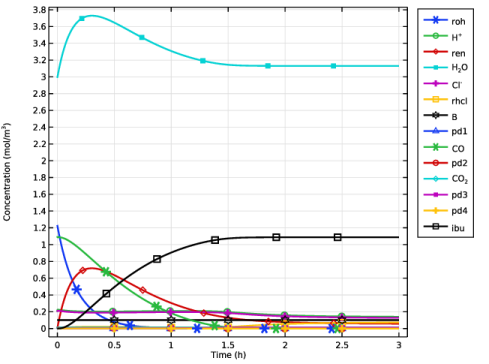
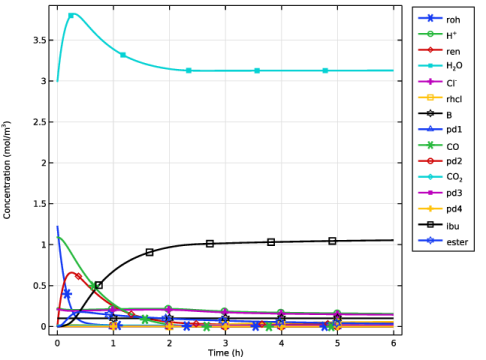
In the Settings window for 1D Plot Group, type Case 1 - Concentrations, Product and Intermediates in the Label text field.
|
|
3
|
|
4
|
|
5
|
|
1
|
|
2
|
|
3
|
Click
 Clear Table. Clear Table. |
|
5
|
|
6
|
|
1
|
|
2
|
Click
 Clear Table. Clear Table. |
|
4
|
|
5
|
|
1
|
|
2
|
|
3
|
|
4
|
|
1
|
|
2
|
Go to the Add Study window.
|
|
3
|
|
4
|
Click the Add Study button in the window toolbar.
|
|
5
|
|
1
|
|
2
|
|
3
|
|
4
|
|
5
|
|
1
|
|
2
|
|
3
|
|
4
|
|
1
|
|
2
|
|
3
|
|
4
|
|
5
|
|
6
|
|
8
|
|
1
|
In the Model Builder window, right-click Case 1 - Concentrations, Product and Intermediates and choose Duplicate.
|
|
2
|
In the Settings window for 1D Plot Group, type Case 2 - Concentrations, Product and Intermediates in the Label text field.
|
|
3
|
|
1
|
In the Model Builder window, expand the Case 2 - Concentrations, Product and Intermediates node, then click Global 1.
|
|
2
|
|
4
|
Locate the Legends section. In the table, enter the following settings:
|
|
5
|