|
|
|


|
1
|
|
2
|
|
3
|
Right-click and choose Add Physics.
|
|
4
|
Click
 Study. Study. |
|
5
|
|
6
|
Click
 Done. Done. |
|
1
|
|
2
|
|
3
|
|
4
|
|
5
|
|
1
|
|
2
|
|
3
|
Click
 Load from File. Load from File. |
|
4
|
Browse to the model’s Application Libraries folder and double-click the file gold_recycling_parameters.txt.
|
|
1
|
In the Model Builder window, under Component 1 (comp1) right-click Definitions and choose Variables.
|
|
2
|
|
3
|
Click
 Load from File. Load from File. |
|
4
|
Browse to the model’s Application Libraries folder and double-click the file gold_recycling_variables_flakes.txt.
|
|
1
|
|
2
|
|
3
|
|
4
|
|
5
|
|
6
|
|
7
|
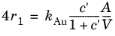
Locate the Reaction Orders section. Find the Volumetric overall reaction order subsection. In the Forward text field, type 4.
|
|
8
|
|
1
|
|
2
|
|
1
|
|
2
|
|
1
|
|
2
|
Go to the Add Physics window.
|
|
3
|
|
4
|
Click the Add to Dissolution of Gold Flakes button in the window toolbar.
|
|
5
|
|
1
|
|
2
|
|
3
|
|
4
|
|
1
|
|
2
|
|
3
|
In the text field, type O2(g).
|
|
4
|
|
1
|
|
2
|
In the text field, type N2(g).
|
|
3
|
|
4
|
In the Show More Options dialog, in the tree, select the checkbox for the node Physics > Equation Contributions.
|
|
5
|
Click OK.
|
|
1
|
|
2
|
In the Settings window for Global Constraint, type Henry's Law for Dioxygen in the Label text field.
|
|
3
|
Locate the Global Constraint section. In the Constraint expression text field, type re.c_O2_aq - H_O2*R_const*T*re2.c_O2_gas.
|
|
1
|
|
2
|
In the Settings window for Global Constraint, type Mass Conservation of Oxygen in the Label text field.
|
|
3
|
Locate the Global Constraint section. In the Constraint expression text field, type V0_gas*(2*re2.c_O2_gas - 2*re2.c0_O2_gas) + V_liquid*(2*re.c_O2_aq + re.c_H2O + re.c_OH_1m - 2*re.c0_O2_aq - re.c0_H2O - re.c0_OH_1m).
|
|
1
|
|
2
|
|
1
|
|
2
|
|
3
|
|
4
|
Click
 Plot. Plot. |
|
1
|
|
1
|
|
2
|
|
3
|
|
1
|
In the Model Builder window, under Dissolution of spherical gold (comp2) > Definitions click Variables 1.
|
|
2
|
|
3
|
Click
 Clear Table. Clear Table. |
|
4
|
Click
 Load from File. Load from File. |
|
5
|
Browse to the model’s Application Libraries folder and double-click the file gold_recycling_variables_spheres.txt.
|
|
1
|
In the Model Builder window, expand the Dissolution of spherical gold (comp2) > Liquid phase (re3) node, then click 1: 4 Au(s) + 8 CN- + O2(aq) + 2 H2O => 4 AuCNCN- + 4 OH-.
|
|
2
|
|
3
|
|
1
|
In the Model Builder window, expand the Dissolution of spherical gold (comp2) > Gas Phase (re4) node, then click Henry’s Law for Dioxygen.
|
|
2
|
|
3
|
|
1
|
|
2
|
|
3
|
In the Constraint expression text field, type V0_gas*(2*re4.c_O2_gas - 2*re4.c0_O2_gas) + V_liquid*(2*re3.c_O2_aq + re3.c_H2O + re3.c_OH_1m - 2*re3.c0_O2_aq - re3.c0_H2O - re3.c0_OH_1m).
|
|
1
|
|
2
|
|
3
|
Clear the Generate default plots checkbox.
|
|
1
|
|
2
|
|
3
|
|
4
|
|
5
|
|
1
|
|
2
|
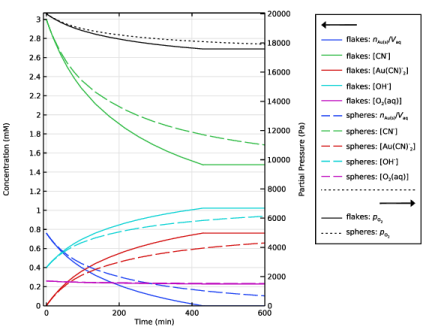
In the Settings window for 1D Plot Group, type Aqueous Gold Dissolution of Flakes and Spheres in the Label text field.
|
|
1
|
|
2
|
|
3
|
|
4
|
Click
 Load from File. Load from File. |
|
5
|
Browse to the model’s Application Libraries folder and double-click the file gold_recycling_plot_global1.txt.
|
|
6
|
|
7
|
Clear the Expression checkbox.
|
|
1
|
In the Model Builder window, right-click Aqueous Gold Dissolution of Flakes and Spheres and choose Global.
|
|
2
|
|
3
|
|
4
|
Click
 Load from File. Load from File. |
|
5
|
Browse to the model’s Application Libraries folder and double-click the file gold_recycling_plot_global2.txt.
|
|
6
|
Click to expand the Coloring and Style section. Find the Line style subsection. From the Line list, choose Dashed.
|
|
7
|
|
8
|
|
9
|
Clear the Expression checkbox.
|
|
1
|
|
2
|
|
3
|
|
4
|
Click
 Load from File. Load from File. |
|
5
|
Browse to the model’s Application Libraries folder and double-click the file gold_recycling_plot_global3.txt.
|
|
6
|
Locate the Coloring and Style section. Find the Line style subsection. From the Line list, choose Cycle.
|
|
7
|
|
8
|
|
9
|
Clear the Expression checkbox.
|
|
1
|
|
2
|
|
3
|
|
4
|
|
5
|
|
6
|
Select the x-axis label checkbox.
|
|
7
|
|
8
|
Select the Secondary y-axis label checkbox. In the associated text field, type Partial Pressure (Pa).
|
|
9
|
|
10
|
|
11
|
|
12
|
|
13
|
|
14
|