









PDF

Drug Release from a Biomaterial Matrix
Introduction
Biomaterial matrices for drug release are useful for in vivo tissue regeneration. The following example describes the release of a drug from a biomaterial matrix into damaged cell tissue. Specifically, a nerve guide delivers a regenerating drug to damaged nerve ends.
This model examines detailed drug-release kinetics, with rate expressions handling drug dissociation/association reactions as well as matrix degradation by enzyme catalysis. The enzyme reaction is described by Michaelis–Menten kinetics. The model enables investigation of design parameters governing the rate of drug release such as drug-to-biomaterial affinity, biomaterial degradation, drug loading, and the influence of geometry and composition of the biomaterial matrix.
Model Definition
The model consists of two parts. The first part uses the batch reactor type in the Reaction Engineering interface. This reactor type specifies the reacting system in a perfectly mixed environment, that is, no space dependency is assumed. The purpose of this part is to study the reaction kinetics. The second part includes a space dependent component generated from the Reaction Engineering interface. It utilizes the Transport of Diluted Species in Porous Catalysts interface and serves to investigate the drug transport from the biomaterial into a region with damaged nerve ends.
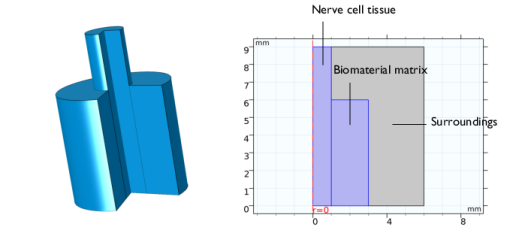
Figure 1 shows the full 3D geometry as well as the 2D modeling domain, reduced by axial symmetry and a mirror plane, for the space-dependent model. The biomaterial holding the drug is assumed to have a strictly cylindrical shape. The three distinct areas (domains) are:
Figure 1: The full 3D geometry (left) and the equivalent modeling domains reduced to 2D by axial symmetry (right). The regions are: the nerve-cell tissue, the biomaterial matrix, and the surrounding medium.
In the biomaterial, a drug molecule, d, binds to a peptide, p, which in turn is anchored to the matrix, m. Matrix-bound species are labeled mpd and mp, respectively, the latter referring to a species where no drug is bound to the peptide. The species mpd and mp are modeled as surface species attached to the matrix surface, and are only present in the biomaterial.
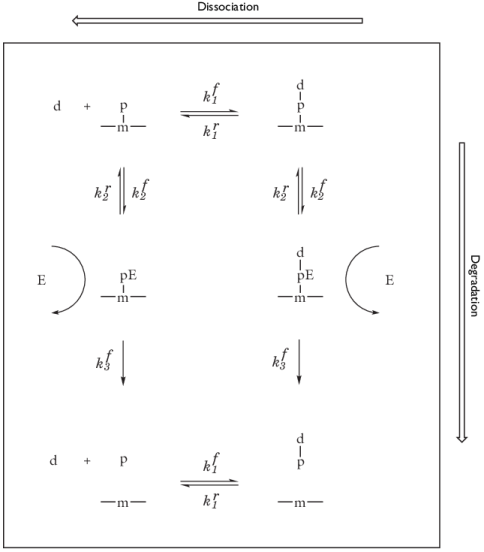
Two mechanisms release the drug from the matrix. First, the drug can simply dissociate from the matrix site mp. Second, matrix degradation by an enzyme, e, originating from the cell-tissue domain, leads to release of the drug-peptide species, pd, from which the drug subsequently dissociates. The unbound species p, d, pd, and e are free bulk species and present in the entire model geometry. Figure 2 illustrates the complete reaction scheme.
Figure 2: Reaction scheme describing drug dissociation/association reactions (horizontal) and matrix-degradation reactions (vertical).
The time-dependent mass balance per species is described by
(1)
where Dik (SI unit: m2/s) is the diffusion coefficient for species i   in the respective medium k. In the right-hand side Rik (SI unit: mol/(m3·s)) is the rate expression for volumetric reactions, involving bulk species only, of species i  in domain k. The second term on the right-hand side results from surface reactions involving matrix-bound species (mpd and mp) in the biomaterial. Rs,i is the surface reaction rate (SI unit: mol/(m2·s)) and Ssa the specific surface area of the biomaterial (SI unit: 1/m).
In the biomaterial (index k = 2), all the reactions described in Figure 2 are possible, leading to the following rate expressions:
The rate terms RMMmp and RMMmpd  refer to the Michaelis–Menten kinetics describing the enzyme catalyzed degradation of the matrix:
with
RMMmp  describes the disappearance of mp sites and the production of p species. RMMmpd  describes the disappearance of mpd sites and the production of pd species. Vmax is the maximum rate and KM the Michaelis–Menten constant. In the cell region (index k = 1) and in the surrounding medium (index k = 3) only dissociation/association reactions occur, leading to the rate expressions
The boundary condition is axial symmetry along the rotational axis and insulation/symmetry elsewhere. Values for diffusion coefficients and rate constants come from the literature (Ref. 1).
Results and Discussion
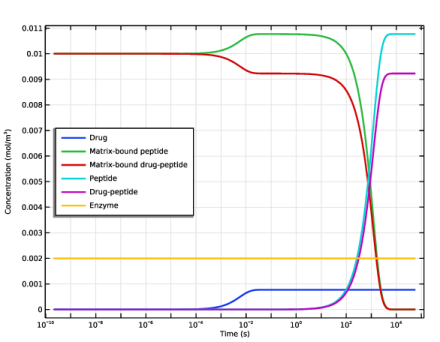
Figure 3 shows the concentration transients of the reacting species in a perfectly mixed (space-independent) system.
Figure 3: Concentrations of all reacting species (mol/m3) as functions of time (s).
The effect of enzyme degradation is clearly visible, with matrix-bound peptide species (mp and mpd) decreasing and free peptide species (p and pd) increasing with time. The matrix is completely degraded after approximately 5000 seconds. As the drug and peptide species have the same association/dissociation kinetics, no matter the peptide is free or matrix-bound, the steady-state concentration of drug is constant during the degradation process.
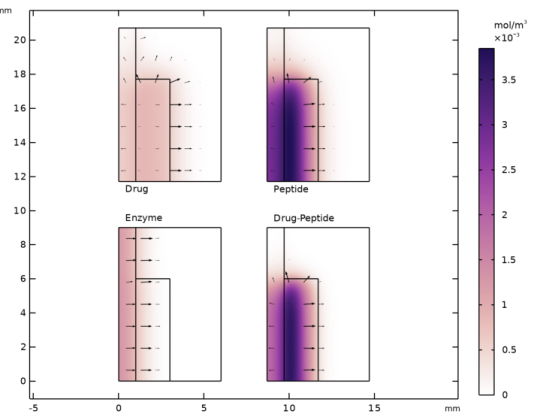
Solving the space-dependent mass balances of Equation 1 results in concentration distributions of all participating species as functions of time. Figure 4 shows the concentration of all bulk species.
Figure 4: Bulk species concentrations after 1.5 h.
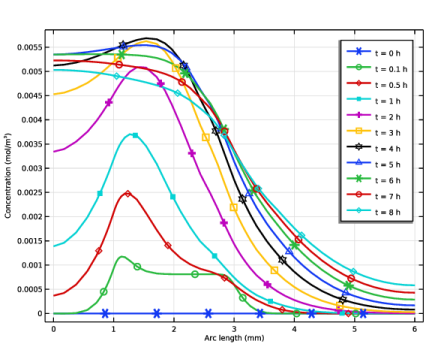
As mentioned earlier, the enzyme originates from the nerve-cell tissue. From Figure 5, where the total drug release is shown, it is clear that matrix degradation has a directing effect on the drug release toward the damaged cell region.
Figure 5: Concentration profiles describing the total drug concentration (cd + cpd) across the modeling domain.
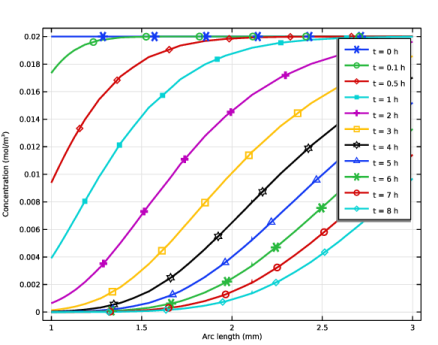
Figure 6 visualizes the biomaterial matrix degradation. The plotted total matrix site concentrations (cmp + cmpd) shows how the degradation front passes through the biomaterial geometry.
Figure 6: Concentration profiles describing the total matrix site concentration (cmp + cmpd).
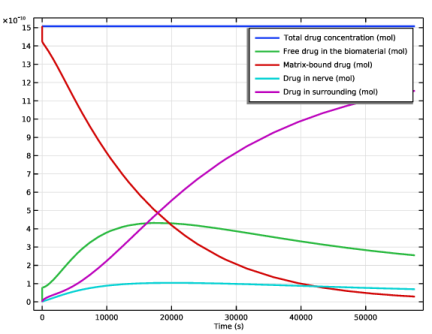
Figure 7 shows how the drug distribution in the different domains vary during the simulation. It can be noted that the drug level in the biomaterial reaches a maximum after about 5 hours. The same is true for the drug level in the nerve.
Figure 7: Drug distribution among the different domains.
The detailed reaction/transport description in this model allows for the investigation of many design parameters relevant to bioengineering. This case presents the effect of matrix degradation on drug release as a function of time and geometry. Furthermore, it is straightforward to study the influence of the drug/peptide affinity by varying the rate constants kf1 and kr1, or the influence of drug loading by varying the cmp : cmpd ratio. The ability to examine alternative geometries and mixed biomaterial domains gives even more design flexibility.
Reference
1. D.J. Maxwell and others, “Development of Rationally Designed Affinity-Based Drug Delivery Systems,” Acta Biomat., vol. 1, no. 1, pp. 101–113, 2005.
Application Library path: Chemical_Reaction_Engineering_Module/Reactors_with_Mass_Transfer/drug_release
Modeling Instructions
From the File menu, choose New.
New
In the New window, click  Model Wizard.
Model Wizard
1
In the Model Wizard window, click  0D.
2
In the Select Physics tree, select Chemical Species Transport > Reaction Engineering (re).
3
Click Add.
4
Click  Study.
5
In the Select Study tree, select General Studies > Time Dependent.
6
Reaction Engineering (re)
Read global parameters from a text file.
Global Definitions
Parameters 1
1
In the Model Builder window, under Global Definitions click Parameters 1.
2
In the Settings window for Parameters, locate the Parameters section.
3
Click  Load from File.
4
Reaction Engineering (re)
First, model the reaction behavior of drug release from the biomaterial matrix, regarding the material as a perfectly mixed batch reactor.
1
In the Model Builder window, under Component 1 (comp1) click Reaction Engineering (re).
2
In the Settings window for Reaction Engineering, locate the Mixture Properties section.
3
From the Phase list, choose Liquid.
Reaction 1
1
In the Reaction Engineering toolbar, click  Reaction.
2
In the Settings window for Reaction, locate the Reaction Formula section.
3
In the Formula text field, type d+mp(ads)<=>mpd(ads).
4
Click Apply.
5
Locate the Rate Constants section. In the kf text field, type kf_d.
6
In the kr text field, type kr_d.
Species: d (drug)
1
In the Model Builder window, click Species: d.
2
In the Settings window for Species, type Species: d (drug) in the Label text field.
Species: mp(ads) (matrix-peptide)
1
In the Model Builder window, under Component 1 (comp1) > Reaction Engineering (re) click Surface species: mp(ads).
2
In the Settings window for Species, type Species: mp(ads) (matrix-peptide) in the Label text field.
Species: mpd(ads) (matrix-peptide-drug)
1
In the Model Builder window, under Component 1 (comp1) > Reaction Engineering (re) click Surface species: mpd(ads).
2
In the Settings window for Species, type Species: mpd(ads) (matrix-peptide-drug) in the Label text field.
Reaction 2
1
In the Reaction Engineering toolbar, click  Reaction.
2
In the Settings window for Reaction, locate the Reaction Formula section.
3
In the Formula text field, type d+p<=>pd.
4
Click Apply.
5
Locate the Rate Constants section. In the kf text field, type kf_d.
6
In the kr text field, type kr_d.
Species: p (peptide)
1
In the Model Builder window, click Species: p.
2
In the Settings window for Species, type Species: p (peptide) in the Label text field.
Species: pd (peptide-drug)
1
In the Model Builder window, click Species: pd.
2
In the Settings window for Species, type Species: pd (peptide-drug) in the Label text field.
Reaction 3
1
In the Reaction Engineering toolbar, click  Reaction.
Add the reactions describing the enzyme catalyzed degradation of the matrix. mp and mpd sites are consumed while producing free p and d species.
2
In the Settings window for Reaction, locate the Reaction Formula section.
3
In the Formula text field, type mp(ads)+e=>p+e.
4
Click Apply.
5
Locate the Reaction Rate section. From the list, choose User defined.
6
In the rj text field, type kf_mm*re.c_e*re.csurf_mp_surf/(Km+re.csurf_mp_surf*Ssa).
Species: e (enzyme)
1
In the Model Builder window, click Species: e.
2
In the Settings window for Species, type Species: e (enzyme) in the Label text field.
Reaction 4
1
In the Reaction Engineering toolbar, click  Reaction.
2
In the Settings window for Reaction, locate the Reaction Formula section.
3
In the Formula text field, type mpd(ads)+e=>pd+e.
4
Click Apply.
5
Locate the Reaction Rate section. From the list, choose User defined.
6
In the rj text field, type kf_mm*re.c_e*re.csurf_mpd_surf/(Km+re.csurf_mpd_surf*Ssa).
Species 1
1
In the Reaction Engineering toolbar, click  Species.
2
In the Settings window for Species, locate the Name section.
3
4
Locate the Type section. From the list, choose Solvent.
5
In the Model Builder window, click Reaction Engineering (re).
6
In the Settings window for Reaction Engineering, locate the Reactor section.
7
Find the Surface reaction area subsection. Click the Surface area to volume ratio button.
8
In the as text field, type Ssa.
Initial Values 1
1
In the Model Builder window, click Initial Values 1.
2
In the Settings window for Initial Values, locate the Volumetric Species Initial Values section.
3
4
Locate the Surface Species Initial Values section. In the table, enter the following settings:
5
In the Γs text field, type (c_mp_init+c_mpd_init).
Study 1
Step 1: Time Dependent
1
In the Model Builder window, under Study 1 click Step 1: Time Dependent.
2
In the Settings window for Time Dependent, locate the Study Settings section.
3
From the Time unit list, choose h.
4
In the Output times text field, type range(0,0.1,16).
5
In the Study toolbar, click  Compute.
Results
Biomaterial Concentrations, 0D model
Follow these steps to create Figure 3.
1
In the Settings window for 1D Plot Group, type Biomaterial Concentrations, 0D model in the Label text field.
2
Click the  x-Axis Log Scale button in the Graphics toolbar.
Global 1
1
In the Model Builder window, expand the Biomaterial Concentrations, 0D model node, then click Global 1.
2
In the Settings window for Global, locate the y-Axis Data section.
3
4
Locate the x-Axis Data section. From the Unit list, choose s.
5
Click to expand the Coloring and Style section. From the Width list, choose 2.
6
In the Biomaterial Concentrations, 0D model toolbar, click  Plot.
7
Click to expand the Legends section. From the Legends list, choose Manual.
8
9
In the Biomaterial Concentrations, 0D model toolbar, click  Plot.
10
Click the  Zoom Extents button in the Graphics toolbar.
Biomaterial Concentrations, 0D model
1
In the Model Builder window, click Biomaterial Concentrations, 0D model.
2
In the Settings window for 1D Plot Group, click to expand the Title section.
3
From the Title type list, choose None.
4
Locate the Plot Settings section.
5
Select the y-axis label checkbox. In the associated text field, type Concentration (mol/m<sup>3</sup>).
6
Locate the Legend section. From the Position list, choose Middle left.
Start setting up the space-dependent model by exporting the settings of the Reaction Engineering interface with the Generate Space-Dependent Model feature.
Reaction Engineering (re)
Generate Space-Dependent Model 1
1
In the Reaction Engineering toolbar, click  Generate Space-Dependent Model.
2
In the Settings window for Generate Space-Dependent Model, locate the Component Settings section.
3
From the Component to use list, choose 2Daxi: New.
4
Locate the Physics Interfaces section. Find the Chemical species transport subsection. From the list, choose Reacting Flow in Porous Media: New.
5
From the list, choose Porous Catalyst.
6
Locate the Study Type section. From the Study type list, choose Time dependent.
7
Locate the Space-Dependent Model Generation section. Click Create/Refresh.
Component 2 (comp2)
In the Model Builder window, expand the Component 2 (comp2) node.
Geometry 1(2Daxi)
1
In the Model Builder window, expand the Component 2 (comp2) > Geometry 1(2Daxi) node, then click Geometry 1(2Daxi).
2
In the Settings window for Geometry, locate the Units section.
3
From the Length unit list, choose mm.
Rectangle 1 (r1)
1
In the Geometry toolbar, click  Rectangle.
2
In the Settings window for Rectangle, locate the Size and Shape section.
3
In the Width text field, type 6.
4
In the Height text field, type 9.
Rectangle 2 (r2)
1
Right-click Rectangle 1 (r1) and choose Duplicate.
2
In the Settings window for Rectangle, locate the Size and Shape section.
3
In the Width text field, type 1.
Rectangle 3 (r3)
1
Right-click Rectangle 2 (r2) and choose Duplicate.
2
In the Settings window for Rectangle, locate the Size and Shape section.
3
In the Width text field, type 2.
4
In the Height text field, type 6.
5
Locate the Position section. In the r text field, type 1.
6
Click  Build All Objects.
In this model, the fluid flow is not taken into account so you can delete the Porous Material, Brinkman Equations and Reacting Flow, Diluted Species nodes.
Materials
Porous Material 1 (pmat1)
1
In the Model Builder window, expand the Component 2 (comp2) > Materials node.
2
Right-click Component 2 (comp2) > Materials > Porous Material 1 (pmat1) and choose Delete.
Brinkman Equations (br)
In the Model Builder window, under Component 2 (comp2) right-click Brinkman Equations (br) and choose Delete.
Multiphysics
Reacting Flow, Diluted Species 1 (rfd1)
1
In the Model Builder window, expand the Multiphysics node.
2
Right-click Component 2 (comp2) > Multiphysics > Reacting Flow, Diluted Species 1 (rfd1) and choose Delete.
Chemistry (chem)
Species matching is used to assign concentration variables to the species in the Chemistry interface. The species solved for by the Porous Catalyst feature (bulk species and surface species) have already been matched by the Generate Space-Dependent Model node. This can be verified by selecting the Chemistry 1 node and inspecting the Species Matching section.
Also define the molar masses. These makes it is possible to compute several transport properties outside the scope of this example.
Species: d
1
In the Model Builder window, expand the Component 2 (comp2) > Chemistry (chem) node, then click Species: d.
2
In the Settings window for Species, locate the Chemical Formula section.
3
In the M text field, type M_d.
Surface species: mp(ads)
1
In the Model Builder window, click Surface species: mp(ads).
2
In the Settings window for Species, locate the Chemical Formula section.
3
In the M text field, type M_p.
Surface species: mpd(ads)
1
In the Model Builder window, click Surface species: mpd(ads).
2
In the Settings window for Species, locate the Chemical Formula section.
3
In the M text field, type M_pd.
Species: p
1
In the Model Builder window, click Species: p.
2
In the Settings window for Species, locate the Chemical Formula section.
3
In the M text field, type M_p.
Species: pd
1
In the Model Builder window, click Species: pd.
2
In the Settings window for Species, locate the Chemical Formula section.
3
In the M text field, type M_pd.
Species: e
1
In the Model Builder window, click Species: e.
2
In the Settings window for Species, locate the Chemical Formula section.
3
In the M text field, type M_e.
Transport of Diluted Species in Porous Catalysts (tds)
1
In the Model Builder window, expand the Component 2 (comp2) > Transport of Diluted Species in Porous Catalysts (tds) node, then click Transport of Diluted Species in Porous Catalysts (tds).
2
In the Settings window for Transport of Diluted Species in Porous Catalysts, locate the Transport Mechanisms section.
3
Clear the Convection checkbox.
Porous Catalyst - Biomaterial
In this model the adsorption process is not considered to be at equilibrium. The built in adsorption functionality is based on the assumption of equilibrium. Therefore, omit this functionality by clearing the checkbox Adsorption/Desorption of bulk species.
1
In the Model Builder window, under Component 2 (comp2) > Transport of Diluted Species in Porous Catalysts (tds) click Porous Catalyst 1.
2
In the Settings window for Porous Catalyst, locate the Adsorbed Species section.
3
Clear the Adsorption/Desorption of bulk species checkbox.
4
Click to collapse the Adsorbed Species section. Locate the Surface Species section. In the table, enter the following settings:
5
In the Label text field, type Porous Catalyst - Biomaterial.
Continue setting the mass transport properties in the biomaterial matrix in the Transport of Diluted Species interface.
Fluid 1
1
In the Model Builder window, click Fluid 1.
2
In the Settings window for Fluid, locate the Diffusion section.
3
In the Dcd text field, type D_d.
4
In the Dce text field, type D_e.
5
In the Dcp text field, type D_p.
6
In the Dcpd text field, type D_pd.
7
From the Effective diffusivity model list, choose No correction.
Porous Matrix 1
1
In the Model Builder window, click Porous Matrix 1.
2
In the Settings window for Porous Matrix, locate the Matrix Properties section.
3
From the εp list, choose User defined. In the associated text field, type epsBio.
Fluid - Surroundings
1
In the Physics toolbar, click  Domains and choose Fluid.
2
3
In the Settings window for Fluid, type Fluid - Surroundings in the Label text field.
4
Locate the Diffusion section. In the Dcd text field, type D_d_s.
5
In the Dce text field, type D_e_s.
6
In the Dcp text field, type D_p_s.
7
In the Dcpd text field, type D_pd_s.
Fluid - Nerve
1
Right-click Fluid - Surroundings and choose Duplicate.
2
3
In the Settings window for Fluid, type Fluid - Nerve in the Label text field.
4
Locate the Diffusion section. In the Dcd text field, type D_d_n.
5
In the Dce text field, type D_e_n.
6
In the Dcp text field, type D_p_n.
7
In the Dcpd text field, type D_pd_n.
Reactions 1
1
In the Physics toolbar, click  Domains and choose Reactions.
2
3
In the Settings window for Reactions, locate the Reaction Rates section.
4
From the Rcd list, choose Reaction rate for species d (chem).
5
From the Rce list, choose Reaction rate for species e (chem).
6
From the Rcp list, choose Reaction rate for species p (chem).
7
From the Rcpd list, choose Reaction rate for species pd (chem).
8
Click to expand the Reacting Volume section.
Reactions 2
1
Right-click Reactions 1 and choose Duplicate.
2
3
In the Settings window for Reactions, locate the Reacting Volume section.
4
Initial Values 2
1
In the Physics toolbar, click  Domains and choose Initial Values.
2
Mesh 1
Set up the mesh. Refine the mesh at the interfaces where the different domains types meet. Sharp gradients will develop here at the start of the simulation due to the initial conditions.
1
In the Model Builder window, under Component 2 (comp2) click Mesh 1.
2
In the Settings window for Mesh, locate the Sequence Type section.
3
From the list, choose User-controlled mesh.
Size
1
In the Model Builder window, under Component 2 (comp2) > Mesh 1 click Size.
2
In the Settings window for Size, locate the Element Size section.
3
From the Calibrate for list, choose Fluid dynamics.
4
From the Predefined list, choose Fine.
5
Click  Build Selected.
Size 1
1
In the Model Builder window, right-click Mesh 1 and choose Size.
2
In the Settings window for Size, locate the Geometric Entity Selection section.
3
From the Geometric entity level list, choose Boundary.
4
5
Locate the Element Size section. Click the Custom button.
6
Locate the Element Size Parameters section.
7
Select the Maximum element size checkbox. In the associated text field, type 0.1.
Free Triangular 1
In the Model Builder window, right-click Free Triangular 1 and choose Build Selected.
Boundary Layers 1
In the Mesh toolbar, click  Boundary Layers.
Boundary Layer Properties
1
In the Model Builder window, click Boundary Layer Properties.
2
3
In the Settings window for Boundary Layer Properties, click  Build All.
In order to compare concentrations, define volumetric concentration variables for the matrix-bound species residing in the biomaterial.
Definitions (comp2)
Biomaterial Concentrations
1
In the Model Builder window, under Component 2 (comp2) right-click Definitions and choose Variables.
2
In the Settings window for Variables, locate the Geometric Entity Selection section.
3
From the Geometric entity level list, choose Domain.
4
5
Locate the Variables section. In the table, enter the following settings:
6
In the Label text field, type Biomaterial Concentrations.
Study 2
1
In the Model Builder window, click Study 2.
2
In the Settings window for Study, locate the Study Settings section.
3
Clear the Generate default plots checkbox.
The results from the space independent model show that the initial drug release is complete after approximately 0.01s. Simulate this process by using a manual initial time step less than this initial transient. By using the option Steps taken by solver for setting Times to store, it is also possible to post process the transient.
Solution 2 (sol2)
1
In the Study toolbar, click  Show Default Solver.
2
In the Model Builder window, expand the Solution 2 (sol2) node, then click Time-Dependent Solver 1.
3
In the Settings window for Time-Dependent Solver, locate the General section.
4
From the Times to store list, choose Steps taken by solver.
5
In the Store every Nth step text field, type 6.
6
Click to expand the Time Stepping section.
7
Select the Initial step checkbox. In the associated text field, type 1e-6.
Step 1: Time Dependent
1
In the Model Builder window, under Study 2 click Step 1: Time Dependent.
2
In the Settings window for Time Dependent, locate the Study Settings section.
3
In the Output times text field, type 0 16 [h].
4
In the Study toolbar, click  Compute.
Use the Result Templates to visualize all the bulk species concentrations in one array plot.
Result Templates
1
In the Home toolbar, click  Result Templates to open the Result Templates window.
2
Go to the Result Templates window.
3
In the tree, select Study 2/Solution 2 (3) (sol2) > Transport of Diluted Species in Porous Catalysts > Plot array: Concentrations, d, e, p, pd (tds).
4
Click the Add Result Template button in the window toolbar.
5
In the Home toolbar, click  Result Templates to close the Result Templates window.
Results
Bulk Concentrations
Follow these steps to set up Figure 4.
1
In the Settings window for 2D Plot Group, type Bulk Concentrations in the Label text field.
2
Locate the Data section. From the Time (s) list, choose Interpolation.
3
In the Time text field, type 1.5[h].
4
Locate the Color Legend section. Clear the Show titles checkbox.
5
Click to expand the Plot Array section.
Surface, d
1
In the Model Builder window, expand the Bulk Concentrations node, then click Surface, d.
2
In the Settings window for Surface, locate the Coloring and Style section.
3
From the Color table list, choose Cerinthe.
d
1
In the Model Builder window, click d.
2
In the Settings window for Annotation, locate the Annotation section.
3
In the Text text field, type Drug.
Surface, e
1
In the Model Builder window, click Surface, e.
2
In the Settings window for Surface, click to expand the Inherit Style section.
3
From the Plot list, choose Surface, d.
e
1
In the Model Builder window, click e.
2
In the Settings window for Annotation, locate the Annotation section.
3
In the Text text field, type Enzyme.
4
Locate the Position section. In the Z text field, type 10.
Surface, p
1
In the Model Builder window, click Surface, p.
2
In the Settings window for Surface, locate the Inherit Style section.
3
From the Plot list, choose Surface, d.
p
1
In the Model Builder window, click p.
2
In the Settings window for Annotation, locate the Annotation section.
3
In the Text text field, type Peptide.
Surface, pd
1
In the Model Builder window, click Surface, pd.
2
In the Settings window for Surface, locate the Inherit Style section.
3
From the Plot list, choose Surface, d.
pd
1
In the Model Builder window, click pd.
2
In the Settings window for Annotation, locate the Annotation section.
3
In the Text text field, type Drug-Peptide.
4
Locate the Position section. In the Z text field, type 10.
Bulk Concentrations
1
In the Model Builder window, click Bulk Concentrations.
2
In the Settings window for 2D Plot Group, click to expand the Title section.
3
From the Title type list, choose None.
Set up a plot for the matrix-bound species concentrations.
Matrix-Bound Species Concentrations
1
Right-click Bulk Concentrations and choose Duplicate.
2
In the Model Builder window, click Bulk Concentrations 1.
3
In the Settings window for 2D Plot Group, type Matrix-Bound Species Concentrations in the Label text field.
Surface, e, Surface, pd, Total Flux, e, Total Flux, pd, e, pd
1
In the Model Builder window, under Results > Matrix-Bound Species Concentrations, Ctrl-click to select Surface, e, Total Flux, e, e, Surface, pd, Total Flux, pd, and pd.
2
Surface, mp
1
In the Model Builder window, under Results > Matrix-Bound Species Concentrations click Surface, d.
2
In the Settings window for Surface, type Surface, mp in the Label text field.
3
Locate the Expression section. In the Expression text field, type cmp.
4
Locate the Coloring and Style section. From the Color table list, choose Arctium.
Total Flux, d
In the Model Builder window, right-click Total Flux, d and choose Delete.
Total Flux, p
In the Model Builder window, right-click Total Flux, p and choose Delete.
mp
1
In the Model Builder window, under Results > Matrix-Bound Species Concentrations click d.
2
In the Settings window for Annotation, type mp in the Label text field.
3
Locate the Annotation section. In the Text text field, type Matrix-Bound Peptide.
Surface, mpd
1
In the Model Builder window, under Results > Matrix-Bound Species Concentrations click Surface, p.
2
In the Settings window for Surface, type Surface, mpd in the Label text field.
3
Locate the Expression section. In the Expression text field, type cmpd.
mpd
1
In the Model Builder window, under Results > Matrix-Bound Species Concentrations click p.
2
In the Settings window for Annotation, type mpd in the Label text field.
3
Locate the Annotation section. In the Text text field, type Matrix-Bound Peptide-Drug.
Matrix-Bound Species Concentrations
Click the  Zoom Extents button in the Graphics toolbar.
The concentration profiles across parts of the modeling domains, as in Figure 5 and Figure 6, require cut line datasets.
Cut Line 2D 1
1
In the Results toolbar, click  Cut Line 2D.
2
In the Settings window for Cut Line 2D, locate the Line Data section.
3
In row Point 1, set Z to 3.
4
In row Point 2, set R to 6.
5
In row Point 2, set Z to 3.
6
1D Plot Group 4
1
In the Results toolbar, click  1D Plot Group.
2
In the Settings window for 1D Plot Group, locate the Data section.
3
From the Dataset list, choose Cut Line 2D 1.
Line Graph 1
1
Right-click 1D Plot Group 4 and choose Line Graph.
Create Figure 5 following these steps.
2
In the Settings window for Line Graph, locate the y-Axis Data section.
3
In the Expression text field, type cpd+cd.
4
Click to expand the Coloring and Style section. From the Width list, choose 2.
5
Find the Line markers subsection. From the Marker list, choose Cycle.
6
From the Positioning list, choose Interpolated.
7
In the Number text field, type 6.
Total Drug Concentration
1
In the Model Builder window, under Results click 1D Plot Group 4.
2
In the Settings window for 1D Plot Group, type Total Drug Concentration in the Label text field.
3
Locate the Data section. From the Time selection list, choose Interpolated.
4
In the Times (s) text field, type 0 0.1[h] 0.5[h] range(1,1,8)[h].
5
Locate the Title section. From the Title type list, choose Manual.
6
In the Title text area, type c<sub>drug</sub> + c<sub>peptide-drug</sub>.
7
Locate the Plot Settings section.
8
Select the y-axis label checkbox. In the associated text field, type Concentration (mol/m<sup>3</sup>).
9
In the Total Drug Concentration toolbar, click  Plot.
Line Graph 1
1
In the Model Builder window, click Line Graph 1.
2
In the Settings window for Line Graph, click to expand the Legends section.
3
From the Legends list, choose Evaluated.
4
In the Legend text field, type t = eval(t/3600) h.
5
In the Total Drug Concentration toolbar, click  Plot.
6
Select the Show legends checkbox.
Total Drug Concentration
Create Figure 6 following these steps.
Total Drug Concentration 1
In the Model Builder window, right-click Total Drug Concentration and choose Duplicate.
Line Graph 1
1
In the Model Builder window, expand the Total Drug Concentration 1 node, then click Line Graph 1.
2
In the Settings window for Line Graph, locate the y-Axis Data section.
3
In the Expression text field, type cmp+cmpd.
Total Matrix Concentration
1
In the Model Builder window, under Results click Total Drug Concentration 1.
2
In the Settings window for 1D Plot Group, type Total Matrix Concentration in the Label text field.
3
Locate the Title section. In the Title text area, type c<sub>mp</sub> + c<sub>mpd</sub>.
4
In the Total Matrix Concentration toolbar, click  Plot.
Now use an Evaluation Group to compute how the drug is distributed among the domains.
Evaluation Group 1
1
In the Results toolbar, click  Evaluation Group.
Create multiple Surface Integration nodes to visualize the concentration in each part of the domain. Note that the free species in the biomaterial needs to be multiplied by the porosity.
2
In the Settings window for Evaluation Group, locate the Data section.
3
From the Dataset list, choose Study 2/Solution 2 (3) (sol2).
Surface Integration 1
1
Right-click Evaluation Group 1 and choose Integration > Surface Integration.
2
3
In the Settings window for Surface Integration, locate the Expressions section.
4
Surface Integration 2
1
Right-click Surface Integration 1 and choose Duplicate.
2
In the Settings window for Surface Integration, locate the Expressions section.
3
Surface Integration 3
1
In the Model Builder window, right-click Evaluation Group 1 and choose Integration > Surface Integration.
2
3
In the Settings window for Surface Integration, locate the Expressions section.
4
Surface Integration 4
1
Right-click Evaluation Group 1 and choose Integration > Surface Integration.
2
3
In the Settings window for Surface Integration, locate the Expressions section.
4
Evaluation Group 1
1
In the Model Builder window, click Evaluation Group 1.
2
In the Settings window for Evaluation Group, locate the Transformation section.
3
From the Transformation type list, choose General.
4
In the Column header text field, type Total drug concentration.
5
In the Evaluation Group 1 toolbar, click  Evaluate.
6
Select the Keep child nodes checkbox.
7
In the Evaluation Group 1 toolbar, click  Evaluate.
Evaluation Group 1
1
Go to the Evaluation Group 1 window.
2
Click the Table Graph button in the window toolbar.
Results
Table Graph 1
1
In the Settings window for Table Graph, locate the Coloring and Style section.
2
From the Width list, choose 2.
3
Click to expand the Legends section. Select the Show legends checkbox.
Drug Distribution
1
In the Model Builder window, click 1D Plot Group 6.
2
In the Settings window for 1D Plot Group, locate the Legend section.
3
From the Position list, choose Middle right.
4
In the Label text field, type Drug Distribution.
5
In the Drug Distribution toolbar, click  Plot.
The following steps show how you can set up animations of your model results.
Animation - Bulk Concentrations
1
In the Results toolbar, click  Animation and choose Player.
2
In the Settings window for Animation, type Animation - Bulk Concentrations in the Label text field.
3
Locate the Scene section. From the Subject list, choose Bulk Concentrations.
4
Locate the Animation Editing section. From the Time selection list, choose Interpolated.
5
In the Times (s) text field, type range(0,0.5,16)[h].
6
Locate the Frames section. From the Frame selection list, choose All.
7
Click the  Play button in the Graphics toolbar.
Animation - Matrix Concentrations
1
Right-click Animation - Bulk Concentrations and choose Duplicate.
2
In the Settings window for Animation, type Animation - Matrix Concentrations in the Label text field.
3
Locate the Scene section. From the Subject list, choose Matrix-Bound Species Concentrations.
4
Click the  Play button in the Graphics toolbar.