
|
|
|

















|
1
|
|
2
|
|
3
|
Click Add.
|
|
4
|
Click
 Study. Study. |
|
5
|
In the Select Study tree, select Preset Studies for Selected Physics Interfaces > Stationary Plug Flow.
|
|
6
|
Click
 Done. Done. |
|
1
|
|
2
|
|
3
|
Click
 Load from File. Load from File. |
|
4
|
Browse to the model’s Application Libraries folder and double-click the file diesel_filter_parameters.txt.
|
|
1
|
In the Model Builder window, under Component 1 (comp1) right-click Definitions and choose Variables.
|
|
2
|
|
1
|
|
2
|
|
3
|
|
4
|
|
5
|
|
6
|
Click to expand the Calculate Transport Properties section. Select the Calculate mixture properties checkbox.
|
|
7
|
|
1
|
|
2
|
|
3
|
|
4
|
Click Apply.
|
|
5
|
|
6
|
|
7
|
|
8
|
|
9
|
|
10
|
Locate the Reaction Orders section. Find the Volumetric overall reaction order subsection. In the Forward text field, type 1.
|
|
1
|
|
2
|
|
3
|
|
4
|
Click Apply.
|
|
5
|
|
6
|
|
7
|
|
8
|
|
9
|
Locate the Reaction Orders section. Find the Volumetric overall reaction order subsection. In the Forward text field, type 1.
|
|
1
|
|
2
|
|
3
|
|
4
|
Click Apply.
|
|
5
|
|
6
|
|
7
|
|
8
|
|
9
|
|
10
|
Locate the Reaction Orders section. Find the Volumetric overall reaction order subsection. In the Forward text field, type 1.
|
|
1
|
|
2
|
|
3
|
|
4
|
Click Apply.
|
|
5
|
|
6
|
|
7
|
|
8
|
|
9
|
|
10
|
Locate the Reaction Orders section. Find the Volumetric overall reaction order subsection. In the Forward text field, type 1.
|
|
1
|
|
2
|
|
3
|
|
4
|
Click Apply.
|
|
5
|
|
6
|
|
7
|
|
8
|
|
9
|
Locate the Reaction Orders section. Find the Volumetric overall reaction order subsection. In the Forward text field, type 2.
|
|
1
|
|
2
|
|
3
|
Select the Keep concentration/activity constant checkbox.
|
|
1
|
|
2
|
|
3
|
|
1
|
|
2
|
|
1
|
|
2
|
|
3
|
In the Volumetric species table, enter the following settings:
|
|
1
|
|
2
|
|
3
|
|
1
|
|
2
|
|
3
|
Click
 Add. Add. |
|
5
|
|
1
|
In the Settings window for 1D Plot Group, type Concentrations plug flow model in the Label text field.
|
|
2
|
|
3
|
|
4
|
Select the y-axis label checkbox. In the associated text field, type Concentration (mol/m<sup>3</sup>).
|
|
1
|
|
2
|
|
3
|
|
4
|
Locate the y-Axis Data section. In the table, enter the following settings:
|
|
6
|
Click
 Delete. Delete. |
|
7
|
Click
 Delete. Delete. |
|
8
|
|
9
|
|
10
|
|
11
|
Clear the Expression checkbox.
|
|
12
|
|
1
|
|
2
|
|
3
|
|
4
|
Locate the Coloring and Style section. Find the Line style subsection. From the Line list, choose Dashed.
|
|
1
|
|
2
|
Select the Two y-axes checkbox.
|
|
3
|
|
4
|
|
5
|
|
6
|
|
1
|
In the Model Builder window, under Results > Concentrations plug flow model right-click Global 1 and choose Duplicate.
|
|
2
|
|
3
|
Click
 Clear Table. Clear Table. |
|
4
|
|
5
|
Locate the y-Axis Data section. In the table, enter the following settings:
|
|
6
|
Locate the Coloring and Style section. Find the Line style subsection. From the Line list, choose Dotted.
|
|
7
|
|
1
|
|
2
|
|
3
|
|
4
|
Locate the Coloring and Style section. Find the Line style subsection. From the Line list, choose Dash-dot.
|
|
5
|
|
1
|
|
2
|
|
1
|
|
2
|
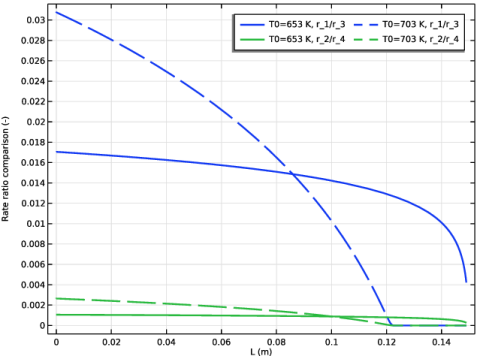
In the Settings window for 1D Plot Group, type Rate comparison plug flow model in the Label text field.
|
|
3
|
Locate the Plot Settings section.
|
|
4
|
|
5
|
|
6
|
|
1
|
|
2
|
|
3
|
|
4
|
Click Replace Expression in the upper-right corner of the y-Axis Data section. From the menu, choose Component 1 (comp1) > Reaction Engineering > re.r_1 - Reaction rate - mol/(m³·s).
|
|
5
|
Locate the y-Axis Data section. In the table, enter the following settings:
|
|
1
|
|
2
|
|
3
|
|
4
|
Click to expand the Coloring and Style section. Find the Line style subsection. From the Line list, choose Dashed.
|
|
5
|
|
1
|
|
2
|
|
3
|
|
4
|
Locate the Physics Interfaces section. Find the Heat transfer subsection. From the list, choose Heat Transfer in Fluids: New.
|
|
5
|
|
6
|
|
1
|
|
1
|
In the Model Builder window, expand the Component 2 (comp2) > Definitions > View 1 node, then click Axis.
|
|
2
|
|
3
|
|
1
|
|
2
|
|
3
|
|
4
|
|
1
|
|
2
|
|
3
|
|
4
|
|
5
|
|
6
|
Click to expand the Layers section. In the table, enter the following settings:
|
|
7
|
Click
 Build Selected. Build Selected. |
|
1
|
|
2
|
|
3
|
|
4
|
|
5
|
|
6
|
Click
 Build Selected. Build Selected. |
|
1
|
|
2
|
|
3
|
Select the object r1 only.
|
|
4
|
|
5
|
Select the Keep input objects checkbox.
|
|
6
|
|
7
|
|
1
|
|
2
|
|
3
|
|
1
|
|
2
|
|
3
|
|
4
|
On the object fin, select Boundary 1 only.
|
|
1
|
|
2
|
|
3
|
|
4
|
On the object fin, select Boundary 18 only.
|
|
1
|
|
2
|
|
3
|
On the object fin, select Domains 1 and 5 only.
|
|
1
|
|
2
|
|
3
|
On the object fin, select Domain 4 only.
|
|
1
|
|
2
|
|
3
|
On the object fin, select Domain 3 only.
|
|
1
|
|
2
|
|
3
|
Click
 Add. Add. |
|
4
|
|
5
|
Click OK.
|
|
6
|
|
1
|
|
2
|
|
3
|
On the object fin, select Domain 2 only.
|
|
1
|
In the Model Builder window, under Component 2 (comp2) right-click Materials and choose More Materials > Porous Material.
|
|
1
|
|
2
|
|
3
|
|
1
|
|
2
|
|
3
|
|
1
|
|
1
|
In the Model Builder window, expand the Porous Material 2 (pmat2) node, then click Solid 1 (pmat2.solid1).
|
|
2
|
|
3
|
|
1
|
In the Model Builder window, expand the Component 2 (comp2) > Chemistry (chem) node, then click 1: C(s) + O2 => CO2.
|
|
2
|
|
3
|
|
4
|
Locate the Reaction Thermodynamic Properties section. From the Enthalpy of reaction list, choose User defined.
|
|
5
|
|
1
|
|
2
|
|
3
|
Clear the Additional source checkbox.
|
|
4
|
|
5
|
|
1
|
|
2
|
|
3
|
Clear the Additional source checkbox.
|
|
4
|
|
5
|
|
1
|
|
2
|
|
3
|
|
4
|
Locate the Reaction Thermodynamic Properties section. From the Enthalpy of reaction list, choose User defined.
|
|
5
|
|
1
|
|
2
|
|
3
|
Clear the Additional source checkbox.
|
|
4
|
|
5
|
|
1
|
|
2
|
|
3
|
|
4
|
Locate the Reaction Thermodynamic Properties section. From the Enthalpy of reaction list, choose User defined.
|
|
5
|
|
1
|
|
2
|
|
3
|
Select the Keep concentration/activity constant checkbox.
|
|
1
|
|
2
|
|
3
|
Select the Keep concentration/activity constant checkbox.
|
|
1
|
|
2
|
|
3
|
|
4
|
Locate the Reaction Thermodynamic Properties section. From the Enthalpy of reaction list, choose User defined.
|
|
5
|
|
1
|
|
2
|
|
3
|
|
4
|
Locate the Reaction Thermodynamic Properties section. From the Enthalpy of reaction list, choose User defined.
|
|
5
|
|
1
|
|
2
|
|
3
|
From the list, choose Solvent.
|
|
4
|
|
5
|
|
6
|
|
7
|
|
8
|
|
9
|
|
10
|
|
11
|
|
12
|
|
13
|
|
14
|
|
1
|
|
2
|
|
3
|
Select the Mass transfer in porous media checkbox.
|
|
4
|
|
5
|
In the Concentrations (mol/m³) table, enter the following settings:
|
|
1
|
|
2
|
|
3
|
Find the Bulk species subsection. In the table, enter the following settings:
|
|
4
|
Find the Solid species subsection. In the table, enter the following settings:
|
|
1
|
In the Model Builder window, expand the Component 2 (comp2) > Transport of Diluted Species (tds) node, then click Fluid 1.
|
|
2
|
|
3
|
|
4
|
|
5
|
|
6
|
|
1
|
|
2
|
|
3
|
|
4
|
|
5
|
|
1
|
|
2
|
|
3
|
|
4
|
|
5
|
|
1
|
|
2
|
|
3
|
|
4
|
|
5
|
|
6
|
|
1
|
|
2
|
|
3
|
|
1
|
|
1
|
|
2
|
|
3
|
|
4
|
|
5
|
|
6
|
|
7
|
|
1
|
In the Model Builder window, under Component 2 (comp2) > Heat Transfer in Fluids (ht) click Fluid 1.
|
|
2
|
|
3
|
|
4
|
|
5
|
|
6
|
|
7
|
|
1
|
|
2
|
|
3
|
|
1
|
|
2
|
|
3
|
|
4
|
|
1
|
|
2
|
|
3
|
|
4
|
|
1
|
|
2
|
|
3
|
|
1
|
|
1
|
|
2
|
|
3
|
|
4
|
|
5
|
|
6
|
From the γ list, choose User defined. In the Model Builder window, right-click Heat Transfer in Fluids (ht) and choose Move Up.
|
|
1
|
|
2
|
|
1
|
|
2
|
|
1
|
In the Model Builder window, expand the Component 2 (comp2) > Free and Porous Media Flow, Brinkman (fp) node, then click Fluid Properties 1.
|
|
2
|
|
3
|
|
1
|
|
2
|
|
3
|
|
4
|
|
5
|
|
1
|
|
2
|
|
3
|
|
4
|
|
1
|
|
2
|
|
3
|
|
1
|
|
2
|
|
3
|
|
1
|
In the Model Builder window, under Component 2 (comp2) > Free and Porous Media Flow, Brinkman (fp) right-click Porous Medium 1 and choose Duplicate.
|
|
2
|
|
3
|
|
1
|
|
2
|
|
1
|
|
2
|
|
1
|
|
1
|
|
3
|
In the Settings window for Prescribed Normal Mesh Velocity, locate the Prescribed Normal Mesh Velocity section.
|
|
4
|
In the vn text field, type (-paco*(u*fp.nx+v*fp.ny)-Mc*((y-Y)+dHsoot)*(comp2.chem.r_1+comp2.chem.r_2+comp2.chem.r_3+ comp2.chem.r_4))/rho_s.
|
|
1
|
|
1
|
|
1
|
|
2
|
|
3
|
|
4
|
|
6
|
|
1
|
|
3
|
|
4
|
|
5
|
|
6
|
|
7
|
Select the Symmetric distribution checkbox.
|
|
1
|
|
3
|
|
4
|
|
5
|
|
6
|
|
1
|
|
3
|
|
4
|
|
5
|
|
6
|
|
7
|
Select the Symmetric distribution checkbox.
|
|
1
|
|
2
|
|
3
|
|
4
|
Click
 Paste Selection. Paste Selection. |
|
5
|
|
6
|
Click OK.
|
|
1
|
|
3
|
|
4
|
|
5
|
Click
 Build Selected. Build Selected. |
|
1
|
|
3
|
|
4
|
|
5
|
|
6
|
|
1
|
|
3
|
|
4
|
|
5
|
|
6
|
|
7
|
Click
 Build All. Build All. |
|
8
|
|
1
|
|
2
|
|
3
|
|
1
|
|
2
|
|
3
|
In the Solve for column of the table, under Component 2 (comp2), clear the checkboxes for Chemistry (chem), Transport of Diluted Species (tds), Heat Transfer in Fluids (ht), Free and Porous Media Flow, Brinkman (fp), and Moving Mesh.
|
|
1
|
|
2
|
|
3
|
In the Solve for column of the table, under Component 1 (comp1), clear the checkbox for Reaction Engineering (re).
|
|
4
|
|
1
|
|
2
|
|
3
|
In the Model Builder window, expand the Study 2 > Solver Configurations > Solution 5 (sol5) > Dependent Variables 2 node, then click Concentration (comp2.cCO).
|
|
4
|
|
5
|
|
6
|
In the Model Builder window, under Study 2 > Solver Configurations > Solution 5 (sol5) > Dependent Variables 2 click Concentration (comp2.cCO2).
|
|
7
|
|
8
|
|
9
|
In the Model Builder window, under Study 2 > Solver Configurations > Solution 5 (sol5) > Dependent Variables 2 click Concentration (comp2.cO2).
|
|
10
|
|
11
|
|
12
|
In the Model Builder window, under Study 2 > Solver Configurations > Solution 5 (sol5) > Dependent Variables 2 click Temperature (comp2.T).
|
|
13
|
|
14
|
|
15
|
In the Model Builder window, expand the Study 2 > Solver Configurations > Solution 5 (sol5) > Time-Dependent Solver 1 > Segregated 1 node.
|
|
16
|
Right-click Study 2 > Solver Configurations > Solution 5 (sol5) > Time-Dependent Solver 1 > Segregated 1 > Temperature and choose Delete.
|
|
17
|
In the Model Builder window, under Study 2 > Solver Configurations > Solution 5 (sol5) > Time-Dependent Solver 1 > Segregated 1 click Concentrations.
|
|
18
|
In the Settings window for Segregated Step, type Concentrations and temperature in the Label text field.
|
|
19
|
|
20
|
|
21
|
Click OK.
|
|
1
|
|
2
|
|
3
|
|
4
|
|
1
|
In the Model Builder window, under Component 2 (comp2) > Transport of Diluted Species (tds) click Inflow 1.
|
|
2
|
|
3
|
|
4
|
|
5
|
|
1
|
In the Model Builder window, expand the Results > Concentration, O2 (tds) node, then click Arrow Surface 1.
|
|
2
|
|
3
|
|
4
|
|
5
|
|
1
|
In the Model Builder window, expand the Results > Concentration, CO2 (tds) node, then click Arrow Surface 1.
|
|
2
|
|
3
|
|
4
|
|
5
|
|
1
|
In the Model Builder window, expand the Results > Concentration, CO (tds) node, then click Arrow Surface 1.
|
|
2
|
|
3
|
|
4
|
|
5
|
|
1
|
|
2
|
|
3
|
|
4
|
|
1
|
|
2
|
|
3
|
|
4
|
Click Replace Expression in the upper-right corner of the Expression section. From the menu, choose Component 2 (comp2) > Free and Porous Media Flow, Brinkman > Velocity and pressure > u,v - Velocity field (spatial frame).
|
|
6
|
Locate the Coloring and Style section. Find the Point style subsection. From the Type list, choose Arrow.
|
|
7
|
|
8
|
|
9
|
|
10
|
|
11
|
|
12
|
|
1
|
|
2
|
|
3
|
|
4
|
|
5
|
|
1
|
|
2
|
|
3
|
|
1
|
|
2
|
|
3
|
|
4
|
|
5
|
Locate the Plot Settings section.
|
|
6
|
|
7
|
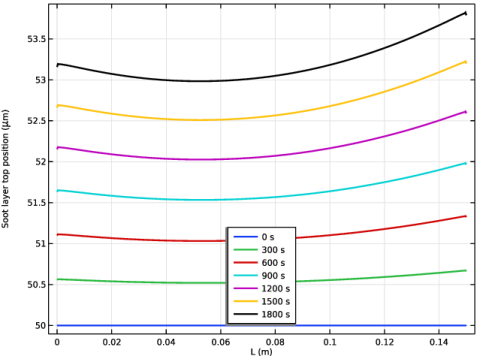
Select the y-axis label checkbox. In the associated text field, type Soot layer top position (\mu m).
|
|
8
|
|
1
|
|
2
|
|
4
|
|
5
|
|
6
|
|
7
|
|
8
|
|
9
|
|
10
|
|
1
|
|
2
|
|
3
|
|
1
|
|
2
|
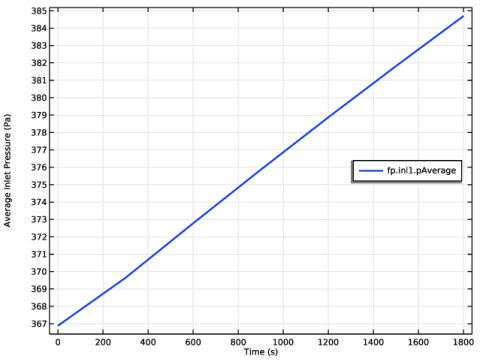
In the Settings window for Global, click Replace Expression in the upper-right corner of the y-Axis Data section. From the menu, choose Component 2 (comp2) > Free and Porous Media Flow, Brinkman > Auxiliary variables > fp.inl1.pAverage - Pressure average over feature selection - Pa.
|
|
3
|
Locate the y-Axis Data section. In the table, enter the following settings:
|
|
4
|
|
5
|
|
1
|
|
2
|
|
3
|
|
4
|
|
5
|
|
1
|
|
2
|
In the Settings window for Stationary Plug Flow, locate the Physics and Variables Selection section.
|
|
3
|
In the Solve for column of the table, under Component 2 (comp2), clear the checkboxes for Chemistry (chem), Transport of Diluted Species (tds), Heat Transfer in Fluids (ht), Free and Porous Media Flow, Brinkman (fp), and Moving Mesh.
|


