






PDF

Startup of a Continuous Stirred Tank Reactor
Introduction
The hydrolysis of propylene oxide into propylene glycol is an important chemical process with 400,000 metric tons produced worldwide each year. Propylene glycol finds wide application as a moisturizer in foods, pharmaceuticals, and cosmetics.
In this example, the startup phase of a continuous stirred tank reactor (CSTR), used to produce propylene glycol, is modeled. The nonisothermal process is described by a set of coupled mass and energy balances that are easily set up and solved in the Chemical Reaction Engineering Module. The model highlights the use of the predefined CSTR reactor type in the Reaction Engineering interface, and also shows how to enter the thermodynamic data needed for the energy balances.
This example reproduces results found in Ref. 1.
Model Description
Propylene glycol (C3H8O2) is produced from the reaction of propylene oxide (C3H6O) with water (H2O) in the presence of an acid catalyst:
The reaction rate (SI unit: mol/(m3·s)) is first order with respect to the activity of propylene oxide:
where the rate constant is temperature dependent according to the Arrhenius expression:
(1)
The Arrhenius parameters in Equation 1 are A1 = 4.71·109 s1 and E1 = 75.358 kJ/mol.
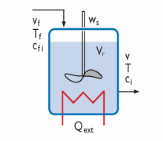
The liquid phase reaction takes place in a continuous stirred tank reactor (CSTR) equipped with a heat-exchanger. Methanol (CH3OH) is also added to the mixture but does not react. It is further assumed that the reactor volume is constant over time.
Figure 1: A perfectly mixed CSTR for the production of propylene glycol. The CSTR is a predefined reactor type in the Chemical Reaction Engineering Module.
The time evolution of the nonisothermal reacting system is given by several coupled balance equations. The species mass balances are:
(2)
In Equation 2, ci is the species molar concentration (SI unit: mol/m3), Vr denotes the reactor volume (SI unit: m3), Ri is the species rate expression (SI unit: mol/(m3·s)), and vf is the volumetric flow rate of the feed inlet (SI unit: m3/s). v is the volumetric flow of the species exiting the reactor and is defined as:
vp is the volumetric production rate, arising due to differences in molar mass, Mi, and densities, ρi, of the species.
For an incompressible and ideally mixed reacting liquid, the energy balance is:
where Cp,i is the species molar heat capacity (SI unit: J/(mol·K)), and T is the temperature (SI unit: K). On the right-hand side, Q represents the heat due to chemical reaction (SI unit: J/s), and Qext denotes heat added to the system (SI unit: J/s), for instance by a heat exchanger. The last term signifies heat added as species flow through the reactor. In this term, hi is the species molar enthalpy (SI unit: J/mol).
This example assumes that the species heat capacities, Cp,i, represent an average over the temperature interval. The associated species’ enthalpies are then given by:
where hi(Tref) is the standard heat of formation at the reference temperature Tref.
The heat of reaction is given by:
where Hj is the enthalpy of reaction (SI unit: J/mol), and rj denotes the reaction rate (SI unit: mol/(m3·s)).
The heat added by the heat exchanger is given by:
where F is the molar flow rate (SI unit: mol/s), U is the overall heat transfer coefficient (SI unit: J/(K·m2·s)), and A represents the heat exchange area (SI unit: m2). The subscript x refers to the heat exchanger medium, which in this case is water. Tx is the inlet temperature of the heat exchanger medium.
The following table summarizes additional parameters describing the reactor setup and process conditions:
Vr
vf
3.47·10-3 m3/s
cf,C3H6O
cf,H2O
cf,CH3OH
c0,H2O
ρC3H6O
ρH2O
ρC3H8O2
ρCH3OH
Cp,C3H6O
Cp,H2O
Cp,C3H8O2
Cp,CH3OH
Cpx
href,C3H6O
-153.5·103 J/mol
href,H2O
-286.1·103 J/mol
href,C3H8O2
-525.6·103 J/mol
href,CH3OH
Tf
T0
Tref
Tx
Fx
UA
The model described here is readily set up and solved using the predefined CSTR reactor with constant volume in the Reaction Engineering interface available in the Chemical Reaction Engineering Module.
Results and Discussion
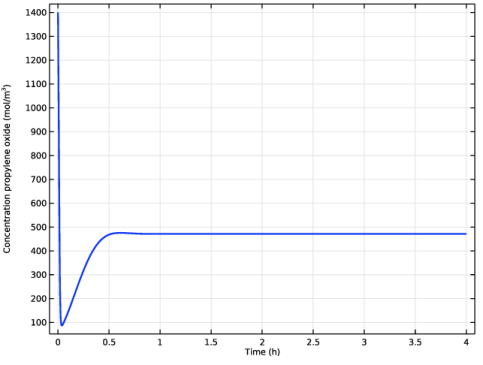
Figure 2 shows the concentration of propylene oxide (SI unit: mol/m3) as a function of reaction time.
Figure 2: Concentrations of reactant propylene oxide (mol/m3) during the first 4 hours of operation.
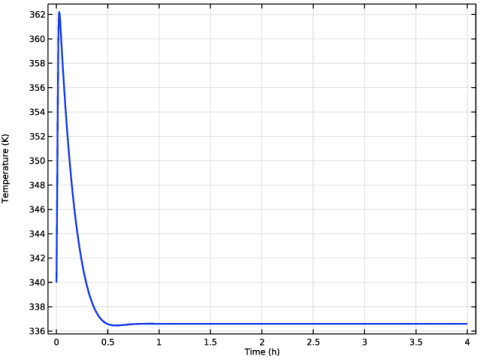
The corresponding development of the reactor temperature is shown in Figure 3.
Figure 3: Reactor temperature (K) during the first 4 hours of operation.
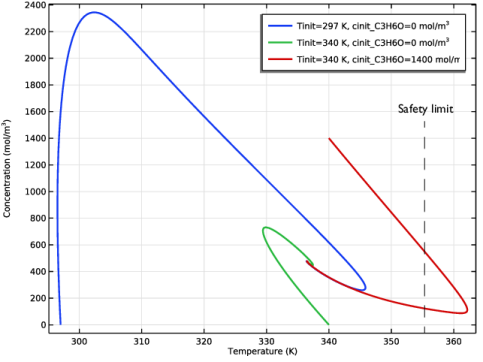
Initially both the reactant concentration and the temperature oscillate around their respective steady-state values (472 mol/m3 and 337 K, respectively). The model predicts that the reactor temperature passes a maximum value higher than the steady-state temperature. From a safety perspective it is therefore relevant to look closer at possible sets of initial conditions to see if process operation limits are violated. In the process modeled here, it is undesirable to exceed a reactor temperature of 355 K to avoid undesirable side reactions and not damage reactor equipment. Figure 4 shows the concentration-temperature phase plane for three initial condition scenarios: (cC3H6O = 0, T0 = 297 K), (cC3H6O = 0, T0 = 340 K), and (cC3H6O = 1400, T0 = 340 K).
Figure 4: Trajectories in the concentration-temperature phase plane for three sets of initial conditions.
The plot shows that all investigated initial conditions converge to the same steady state. However, starting with cC3H6O = 1400 mol/m3 and T0 = 340 K leads to violation of the temperature safety limits.
Reference
1. H.S. Fogler, Elements of Chemical Reaction Engineering, 3rd ed., Prentice Hall PTR, Example 9-4, pp. 553–559, 1999.
Application Library path: Chemical_Reaction_Engineering_Module/Tutorials/cstr_startup
From the File menu, choose New.
New
In the New window, click  Model Wizard.
Model Wizard
1
In the Model Wizard window, click  0D.
2
In the Select Physics tree, select Chemical Species Transport > Reaction Engineering (re).
3
Click Add.
4
Click  Study.
5
In the Select Study tree, select General Studies > Time Dependent.
6
Global Definitions
Add a set of model parameters by importing their definitions from a data text file provided with the Application Library.
Parameters 1
1
In the Model Builder window, under Global Definitions click Parameters 1.
2
In the Settings window for Parameters, locate the Parameters section.
3
Click  Load from File.
4
Definitions
Similarly, variables for the concentration-dependent and temperature-dependent enthalpies are available in a text file.
Variables 1
1
In the Model Builder window, under Component 1 (comp1) right-click Definitions and choose Variables.
2
In the Settings window for Variables, locate the Variables section.
3
Click  Load from File.
4
Select the Reactor Type-CSTR, constant volume for a liquid mixture and include the Energy Balance. That is, nonisothermal conditions apply.
Reaction Engineering (re)
1
In the Model Builder window, under Component 1 (comp1) click Reaction Engineering (re).
2
In the Settings window for Reaction Engineering, locate the Reactor section.
3
From the Reactor type list, choose CSTR, constant volume.
4
Locate the Energy Balance section. From the Energy balance list, choose Include.
5
In the Qext text field, type Q_xch.
6
Click to expand the Mixture Properties section. From the Phase list, choose Liquid.
7
Locate the Reactor section. Find the Mass balance subsection. In the Vr text field, type Vr_tank.
Reaction 1
1
In the Reaction Engineering toolbar, click  Reaction.
Add the reaction. Note that the reaction in this example is of first order in regard to propylene oxide, not the default stoichiometric reaction order.
2
In the Settings window for Reaction, locate the Reaction Formula section.
3
In the Formula text field, type C3H6O+H2O=>C3H8O2.
4
Locate the Reaction Rate section. From the list, choose User defined.
5
In the rj text field, type re.kf_1*re.c_C3H6O.
6
Locate the Reaction Orders section. Find the Volumetric overall reaction order subsection. In the Forward text field, type 1.
7
Locate the Rate Constants section. Select the Use Arrhenius expressions checkbox.
8
In the Af text field, type Af_reaction.
9
In the Ef text field, type Ea_reaction.
Species 1
1
In the Reaction Engineering toolbar, click  Species.
2
In the Settings window for Species, locate the Name section.
3
Species: C3H6O
1
In the Model Builder window, click Species: C3H6O.
2
In the Settings window for Species, locate the Chemical Formula section.
3
In the ρ text field, type rho_C3H6O.
Species: H2O
1
In the Model Builder window, click Species: H2O.
2
In the Settings window for Species, locate the Chemical Formula section.
3
In the ρ text field, type rho_H2O.
Species: C3H8O2
1
In the Model Builder window, click Species: C3H8O2.
2
In the Settings window for Species, locate the Chemical Formula section.
3
In the ρ text field, type rho_C3H8O2.
Species: CH3OH
1
In the Model Builder window, click Species: CH3OH.
2
In the Settings window for Species, locate the Chemical Formula section.
3
In the ρ text field, type rho_CH3OH.
Feed Inlet 1
1
In the Reaction Engineering toolbar, click  Feed Inlet.
Define the inlet feed stream of the CSTR.
2
In the Settings window for Feed Inlet, locate the Feed Inlet Properties section.
3
In the vf text field, type v_feed.
4
In the Tf text field, type Tfeed.
5
Locate the Feed Inlet Concentration and Enthalpy section. In the table, enter the following settings (clear all the checkboxes in the rightmost column):
Initial Values 1
1
In the Model Builder window, click Initial Values 1.
2
In the Settings window for Initial Values, locate the General Parameters section.
3
In the T0 text field, type Tinit.
4
Locate the Volumetric Species Initial Values section. In the table, enter the following settings:
Species: C3H6O
1
In the Model Builder window, click Species: C3H6O.
2
In the Settings window for Species, click to expand the Thermodynamic Expressions section.
3
4
In the Cp text field, type cp_C3H6O.
5
In the h text field, type h_C3H6O.
Species: H2O
1
In the Model Builder window, click Species: H2O.
2
In the Settings window for Species, locate the Thermodynamic Expressions section.
3
4
In the Cp text field, type cp_H2O.
5
In the h text field, type h_H2O.
Species: C3H8O2
1
In the Model Builder window, click Species: C3H8O2.
2
In the Settings window for Species, locate the Thermodynamic Expressions section.
3
4
In the Cp text field, type cp_C3H8O2.
5
In the h text field, type h_C3H8O2.
Species: CH3OH
1
In the Model Builder window, click Species: CH3OH.
2
In the Settings window for Species, locate the Thermodynamic Expressions section.
3
4
In the Cp text field, type cp_CH3OH.
5
In the h text field, type h_CH3OH.
Study 1
Step 1: Time Dependent
1
In the Model Builder window, under Study 1 click Step 1: Time Dependent.
2
In the Settings window for Time Dependent, locate the Study Settings section.
3
From the Time unit list, choose h.
4
In the Output times text field, type 4.
First, compute the temperature and concentrations.
5
In the Study toolbar, click  Compute.
The following instructions generate Figure 2 and Figure 3.
Results
Concentration (re)
1
In the Settings window for 1D Plot Group, click to expand the Title section.
2
From the Title type list, choose None.
3
Locate the Plot Settings section.
4
Select the y-axis label checkbox. In the associated text field, type Concentration propylene oxide (mol/m<sup>3</sup>).
Global 1
1
In the Model Builder window, expand the Concentration (re) node, then click Global 1.
2
In the Settings window for Global, click Replace Expression in the upper-right corner of the y-Axis Data section. From the menu, choose Component 1 (comp1) > Reaction Engineering > re.c_C3H6O - Concentration - mol/m³.
3
Click to expand the Coloring and Style section. From the Width list, choose 2.
4
Click to expand the Legends section. Clear the Show legends checkbox.
5
In the Concentration (re) toolbar, click  Plot.
Temperature (re)
1
In the Model Builder window, under Results click Temperature (re).
2
In the Settings window for 1D Plot Group, locate the Title section.
3
From the Title type list, choose None.
Global 1
1
In the Model Builder window, expand the Temperature (re) node, then click Global 1.
2
In the Settings window for Global, locate the Coloring and Style section.
3
From the Width list, choose 2.
4
Locate the Legends section. Clear the Show legends checkbox.
Study 1
Next, compute the corresponding solutions for a set of initial temperatures and propylene-oxide concentrations.
Parametric Sweep
1
In the Study toolbar, click  Parametric Sweep.
2
In the Settings window for Parametric Sweep, locate the Study Settings section.
3
4
5
6
7
In the Study toolbar, click  Compute.
The following instructions generate Figure 4.
Results
Concentration vs. Temperature (re)
1
In the Settings window for 1D Plot Group, type Concentration vs. Temperature (re) in the Label text field.
2
Locate the Title section. From the Title type list, choose None.
Global 1
1
In the Model Builder window, expand the Concentration vs. Temperature (re) node, then click Global 1.
2
In the Settings window for Global, click Replace Expression in the upper-right corner of the y-Axis Data section. From the menu, choose Component 1 (comp1) > Reaction Engineering > re.c_C3H6O - Concentration - mol/m³.
3
Click Replace Expression in the upper-right corner of the x-Axis Data section. From the menu, choose Component 1 (comp1) > Reaction Engineering > re.T - Temperature - K.
4
Locate the Coloring and Style section. From the Width list, choose 2.
5
Locate the Legends section. Find the Include subsection. Clear the Expression checkbox.
6
Click the  Zoom Extents button in the Graphics toolbar.
7
In the Concentration vs. Temperature (re) toolbar, click  Plot.
Temperature vs. Time (re)
1
In the Settings window for 1D Plot Group, type Temperature vs. Time (re) in the Label text field.
2
Click to expand the Title section. From the Title type list, choose None.
Global 1
1
In the Model Builder window, expand the Temperature (re) 1 node, then click Results > Temperature vs. Time (re) > Global 1.
2
In the Settings window for Global, locate the Coloring and Style section.
3
From the Width list, choose 2.
4
Locate the Legends section. Find the Include subsection. Clear the Expression checkbox.
5
In the Temperature vs. Time (re) toolbar, click  Plot.