|
|
|

|
d1
|
d2
|
dt
|
dnd
|
dm
|
dd
|
|
L1
|
L2
|
L3
|
Lm
|
Ld
|
|
 |
 |
 |
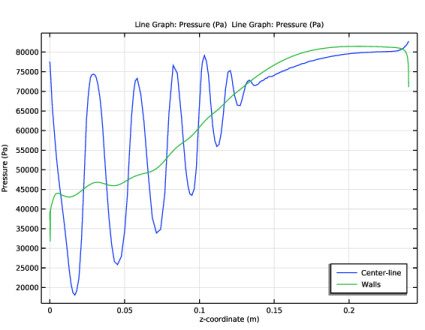
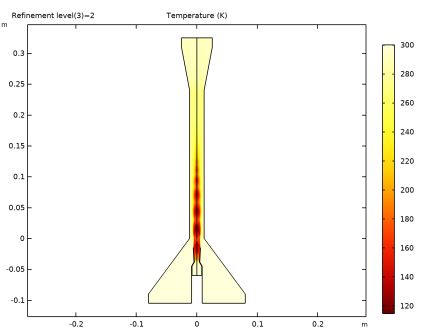
|
1
|
|
2
|
In the Select Physics tree, select Fluid Flow > High Mach Number Flow > Turbulent Flow > High Mach Number Flow, k-ε (hmnf).
|
|
3
|
Click Add.
|
|
4
|
Click
 Study. Study. |
|
5
|
|
6
|
Click
 Done. Done. |
|
1
|
|
2
|
Browse to the model’s Application Libraries folder and double-click the file supersonic_ejector_geom_sequence.mph.
|
|
3
|
|
1
|
|
2
|
|
4
|
|
5
|
In the Show More Options dialog, in the tree, select the checkbox for the node Physics > Stabilization.
|
|
6
|
Click OK.
|
|
1
|
|
2
|
In the Settings window for High Mach Number Flow, k-ε, click to expand the Inconsistent Stabilization section.
|
|
3
|
|
4
|
|
5
|
|
6
|
|
1
|
In the Model Builder window, under Component 1 (comp1) > High Mach Number Flow, k-ε (hmnf) click Fluid 1.
|
|
2
|
|
3
|
|
4
|
|
5
|
|
1
|
|
2
|
|
3
|
Specify the u vector as
|
|
4
|
|
1
|
|
2
|
|
3
|
|
4
|
|
5
|
|
6
|
|
7
|
|
1
|
|
2
|
|
3
|
|
4
|
|
5
|
|
6
|
|
7
|
|
1
|
|
2
|
|
3
|
|
4
|
|
5
|
|
6
|
|
1
|
|
2
|
|
3
|
|
4
|
Click
 Build All. Build All. |
|
1
|
|
2
|
|
3
|
|
5
|
|
6
|
|
1
|
|
2
|
|
3
|
|
4
|
|
5
|
|
6
|
Click
 Remove from Selection. Remove from Selection. |
|
8
|
|
9
|
|
1
|
|
2
|
|
3
|
|
5
|
|
6
|
|
1
|
|
2
|
|
3
|
|
5
|
|
6
|
|
1
|
|
2
|
|
3
|
|
4
|
|
1
|
|
2
|
|
3
|
Click to select the
 Activate Selection toggle button. Activate Selection toggle button. |
|
4
|
|
1
|
|
2
|
|
3
|
|
4
|
|
5
|
Click
 Remove from Selection. Remove from Selection. |
|
7
|
|
8
|
|
9
|
|
1
|
|
2
|
|
3
|
|
4
|
|
5
|
|
7
|
Click
 Build All. Build All. |
|
1
|
|
2
|
|
4
|
|
5
|
Click
 Add. Add. |
|
7
|
Click
 Add. Add. |
|
9
|
|
10
|
|
1
|
|
2
|
|
4
|
Click to expand the Adaptation and Error Estimates section. From the Adaptation and error estimates list, choose Adaptation and error estimates.
|
|
1
|
|
2
|
|
3
|
In the Model Builder window, expand the Study 1 > Solver Configurations > Solution 1 (sol1) > Stationary Solver 2 > Segregated 1 node, then click Flow Variables u, p, T.
|
|
4
|
|
5
|
|
6
|
In the Model Builder window, under Study 1 > Solver Configurations > Solution 1 (sol1) > Stationary Solver 2 click Adaptive Mesh Refinement.
|
|
7
|
|
8
|
Clear the Allow coarsening checkbox.
|
|
9
|
In the Model Builder window, under Study 1 > Solver Configurations > Solution 1 (sol1) > Stationary Solver 2 > Segregated 1 click Turbulence Variables.
|
|
10
|
|
11
|
|
12
|
|
1
|
|
2
|
In the Settings window for Evaluation Group, type Evaluation mass flow group in the Label text field.
|
|
1
|
|
2
|
|
1
|
|
3
|
Locate the Expressions section. In the table, enter the following settings:
|
|
1
|
|
2
|
|
4
|
Locate the Expressions section. In the table, enter the following settings:
|
|
1
|
|
2
|
|
4
|
Locate the Expressions section. In the table, enter the following settings:
|
|
1
|
|
2
|
|
3
|
|
4
|
|
5
|
Select the Keep child nodes checkbox.
|
|
6
|
|
7
|
|
1
|
|
2
|
|
3
|
Locate the Data section. From the Dataset list, choose Study 1/Adaptive Mesh Refinement Solutions 1 (sol3).
|
|
4
|
|
5
|
|
6
|
Locate the Expressions section. In the table, enter the following settings:
|
|
7
|
Click
 Evaluate. Evaluate. |
|
1
|
|
2
|
|
3
|
Locate the Data section. From the Dataset list, choose Study 1/Adaptive Mesh Refinement Solutions 1 (sol3).
|
|
4
|
|
5
|
|
6
|
Locate the Expressions section. In the table, enter the following settings:
|
|
7
|
Click
 Evaluate. Evaluate. |
|
1
|
Go to the Table 2 window.
|
|
1
|
|
2
|
|
3
|
|
4
|
Click
 Plot. Plot. |
|
1
|
|
2
|
|
3
|
|
1
|
|
2
|
|
3
|
|
1
|
|
2
|
|
3
|
|
1
|
|
2
|
|
3
|
|
4
|
|
1
|
|
2
|
|
3
|
Locate the Data section. From the Dataset list, choose Study 1/Adaptive Mesh Refinement Solutions 1 (sol3).
|
|
4
|
|
5
|
|
6
|
Click
 Plot. Plot. |
|
1
|
|
2
|
|
3
|
Locate the Data section. From the Dataset list, choose Study 1/Adaptive Mesh Refinement Solutions 1 (sol3).
|
|
4
|
|
5
|
|
6
|
|
7
|
Click
 Plot. Plot. |
|
1
|
|
2
|
|
3
|
|
1
|
|
2
|
|
3
|
|
4
|
|
5
|
|
6
|
|
7
|
|
8
|
|
9
|
|
1
|
|
2
|
|
3
|
|
4
|
|
5
|
|
6
|
|
7
|
|
8
|
|
9
|
|
1
|
|
1
|
|
2
|
|
3
|
|
4
|
|
1
|
|
2
|
|
3
|
|
4
|