
|
|
|

 ,
,  , and
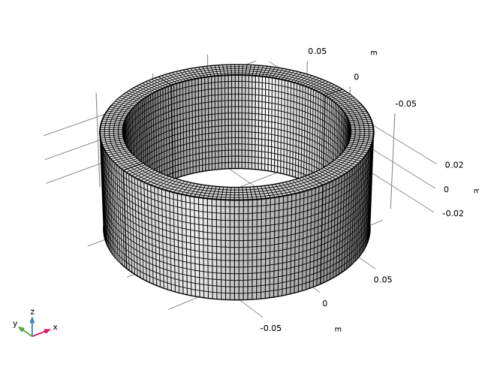
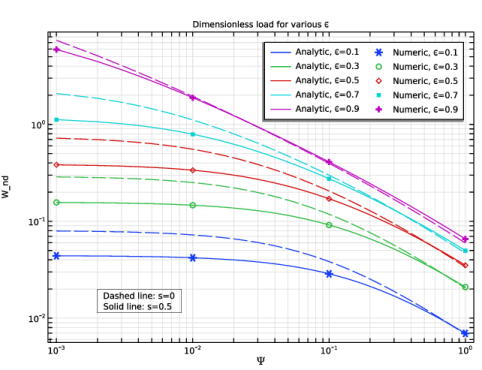
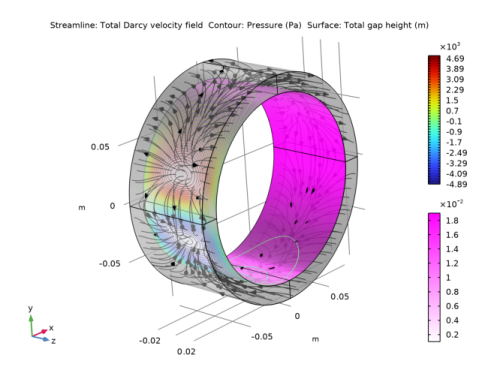
, and  . It compares the numerical solution with those obtained from the analytic expressions in Ref. 1 for the short-bearing approximation, where the radius is much larger than the bearing length. Further, the flow field is visualized for a typical bearing without the short-bearing assumption.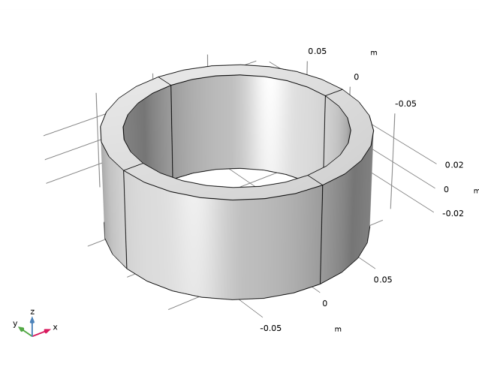







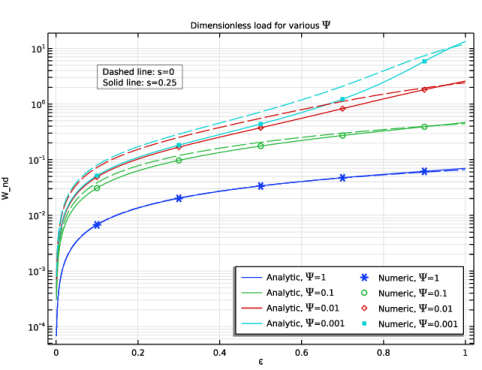
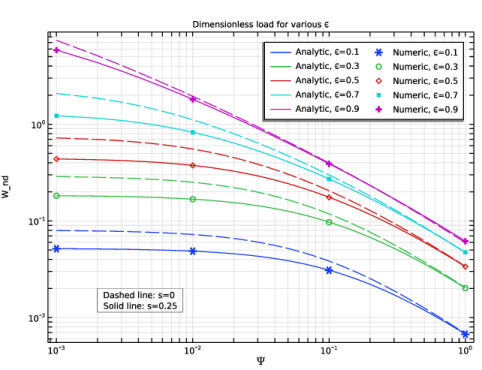
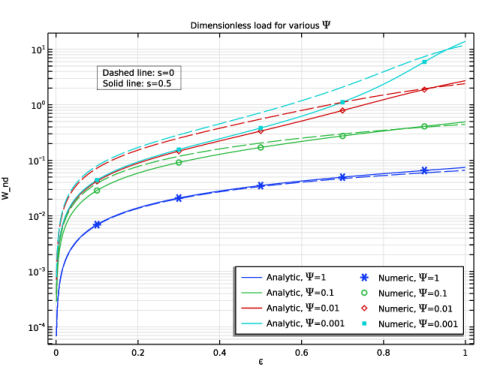
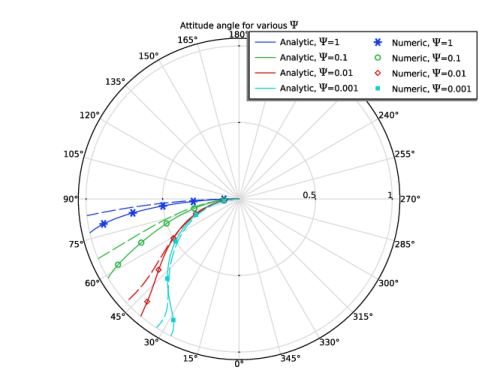
 versus the eccentricity for various values of the permeability parameter. Again, the dotted lines show the load capacity with no slip at the interface. The attitude angle is the angle formed by the line joining the centers of the journal and the bearing with the load line. It is computed from the numerical solution as

|
1
|
|
2
|
In the Select Physics tree, select Fluid Flow > Porous Media and Subsurface Flow > Thin-Film and Porous Media Flow.
|
|
3
|
Click Add.
|
|
4
|
Click
 Study. Study. |
|
5
|
|
6
|
Click
 Done. Done. |
|
1
|
|
2
|
|
3
|
Click
 Load from File. Load from File. |
|
4
|
Browse to the model’s Application Libraries folder and double-click the file self_lubricating_bearing_parameters.txt.
|
|
1
|
In the Model Builder window, under Component 1 (comp1) right-click Definitions and choose Variables.
|
|
2
|
|
3
|
Click
 Load from File. Load from File. |
|
4
|
Browse to the model’s Application Libraries folder and double-click the file self_lubricating_bearing_variables.txt.
|
|
1
|
|
2
|
|
3
|
|
4
|
|
5
|
Locate the Plot Parameters section. In the table, enter the following settings:
|
|
1
|
|
2
|
|
3
|
Locate the Definition section. In the Expression text field, type sin(theta)*(2*s^2+2*s*(1+ep*cos(theta))+(1+ep*cos(theta))^2)/((s+1+ep*cos(theta))*(((6*(alpha^2)*(s^2)+4*s*(1+ep*cos(theta))+(1+ep*cos(theta))^2)*(1+ep*cos(theta))^2)+(12*Psi*(s+1+ep*cos(theta))*tanh(pi*beta_n(n)*H/L)/(pi*beta_n(n)*H/L)))).
|
|
4
|
|
5
|
Locate the Plot Parameters section. In the table, enter the following settings:
|
|
1
|
|
2
|
|
3
|
Locate the Definition section. In the Expression text field, type (-1)^(n+1)*ep*g_n(ep,n,Psi,s,theta)*cos(pi*beta_n(n)*z/L)/(2*n-1)^3.
|
|
4
|
|
5
|
Locate the Plot Parameters section. In the table, enter the following settings:
|
|
1
|
|
2
|
|
3
|
|
4
|
|
5
|
|
6
|
|
7
|
Click to expand the Layers section. In the table, enter the following settings:
|
|
1
|
|
2
|
|
3
|
Click
 Clear Selection. Clear Selection. |
|
4
|
Click
 Paste Selection. Paste Selection. |
|
5
|
|
6
|
Click OK.
|
|
7
|
|
8
|
|
1
|
In the Model Builder window, under Component 1 (comp1) > Thin-Film Flow (tff) click Fluid-Film Properties 1.
|
|
2
|
|
3
|
|
4
|
|
5
|
Locate the Fluid Properties section. From the μ list, choose User defined. In the associated text field, type mu.
|
|
6
|
|
1
|
|
2
|
|
3
|
|
1
|
In the Model Builder window, under Component 1 (comp1) > Darcy’s Law (dl) > Porous Medium 1 click Fluid 1.
|
|
2
|
|
3
|
|
4
|
|
1
|
|
2
|
|
3
|
|
4
|
|
1
|
|
2
|
|
3
|
Click
 Paste Selection. Paste Selection. |
|
4
|
|
5
|
Click OK.
|
|
1
|
In the Model Builder window, under Component 1 (comp1) > Multiphysics click Thin-Film and Porous Media Flow 1 (tfpf1).
|
|
2
|
|
3
|
|
4
|
|
5
|
|
1
|
|
2
|
|
3
|
From the list, choose User-controlled mesh.
|
|
1
|
|
2
|
|
3
|
Click
 Paste Selection. Paste Selection. |
|
4
|
|
5
|
Click OK.
|
|
1
|
|
2
|
|
3
|
|
4
|
Select the Equidistant checkbox.
|
|
1
|
|
2
|
|
3
|
Click
 Paste Selection. Paste Selection. |
|
4
|
|
5
|
Click OK.
|
|
1
|
|
2
|
|
3
|
Click
 Paste Selection. Paste Selection. |
|
4
|
|
5
|
Click OK.
|
|
1
|
|
2
|
|
3
|
|
1
|
In the Model Builder window, under Component 1 (comp1) > Mesh 1 right-click Free Tetrahedral 1 and choose Disable.
|
|
2
|
|
1
|
|
2
|
|
3
|
|
4
|
Click
 Paste Selection. Paste Selection. |
|
5
|
|
6
|
Click OK.
|
|
1
|
|
2
|
|
3
|
|
4
|
Click
 Paste Selection. Paste Selection. |
|
5
|
|
6
|
Click OK.
|
|
1
|
|
2
|
|
1
|
|
2
|
|
3
|
Click
 Add. Add. |
|
5
|
Click
 Add. Add. |
|
7
|
Click
 Add. Add. |
|
9
|
|
10
|
|
11
|
|
12
|
Clear the Generate default plots checkbox.
|
|
13
|
|
1
|
|
2
|
|
1
|
|
2
|
Go to the Add Study window.
|
|
3
|
|
4
|
Click the Add Study button in the window toolbar.
|
|
5
|
|
1
|
|
2
|
Clear the Generate default plots checkbox.
|
|
3
|
|
1
|
|
2
|
|
3
|
Select the Only plot when requested checkbox.
|
|
1
|
|
2
|
|
3
|
|
4
|
|
5
|
|
6
|
|
1
|
|
2
|
|
3
|
|
4
|
|
1
|
|
2
|
|
3
|
|
4
|
|
5
|
|
6
|
|
7
|
|
8
|
Locate the Expressions section. In the table, enter the following settings:
|
|
1
|
|
2
|
|
3
|
|
1
|
|
2
|
|
3
|
|
1
|
|
2
|
|
3
|
|
1
|
|
2
|
|
3
|
|
4
|
|
5
|
|
6
|
|
7
|
|
8
|
Locate the Expressions section. In the table, enter the following settings:
|
|
1
|
|
2
|
|
3
|
|
1
|
|
2
|
|
3
|
|
1
|
|
2
|
|
3
|
|
1
|
|
2
|
|
3
|
|
1
|
|
2
|
|
3
|
|
4
|
|
5
|
|
6
|
|
7
|
|
8
|
Locate the Expressions section. In the table, enter the following settings:
|
|
1
|
|
2
|
|
3
|
|
1
|
|
2
|
|
3
|
|
1
|
|
2
|
|
3
|
|
1
|
|
2
|
|
3
|
|
4
|
|
5
|
|
6
|
|
7
|
|
8
|
Locate the Expressions section. In the table, enter the following settings:
|
|
1
|
|
2
|
|
3
|
|
1
|
|
2
|
|
3
|
|
1
|
|
2
|
|
3
|
|
1
|
|
2
|
|
3
|
|
4
|
|
1
|
|
2
|
In the Settings window for 1D Plot Group, type Dimensionless Load vs. ep: s=0.25 in the Label text field.
|
|
3
|
|
4
|
|
5
|
|
6
|
Locate the Plot Settings section.
|
|
7
|
|
8
|
|
9
|
|
10
|
|
11
|
|
12
|
|
1
|
|
2
|
|
3
|
|
4
|
Locate the y-Axis Data section. In the Expression text field, type sqrt((integrate(integrate((24/pi^3)*sum(pbar_summand(ep,n,1,0.25,theta,z),n,1,n_upper_lim)*cos(theta),theta,0,pi),z,-L/2,L/2))^2+(integrate(integrate((24/pi^3)*sum(pbar_summand(ep,n,1,0.25,theta,z),n,1,n_upper_lim)*sin(theta),theta,0,pi),z,-L/2,L/2))^2)/L.
|
|
5
|
|
6
|
|
7
|
|
8
|
|
1
|
|
2
|
|
3
|
In the Expression text field, type sqrt((integrate(integrate((24/pi^3)*sum(pbar_summand(ep,n,0.1,0.25,theta,z),n,1,n_upper_lim)*cos(theta),theta,0,pi),z,-L/2,L/2))^2+(integrate(integrate((24/pi^3)*sum(pbar_summand(ep,n,0.1,0.25,theta,z),n,1,n_upper_lim)*sin(theta),theta,0,pi),z,-L/2,L/2))^2)/L.
|
|
4
|
|
5
|
Locate the Legends section. In the table, enter the following settings:
|
|
1
|
|
2
|
|
3
|
In the Expression text field, type sqrt((integrate(integrate((24/pi^3)*sum(pbar_summand(ep,n,0.01,0.25,theta,z),n,1,n_upper_lim)*cos(theta),theta,0,pi),z,-L/2,L/2))^2+(integrate(integrate((24/pi^3)*sum(pbar_summand(ep,n,0.01,0.25,theta,z),n,1,n_upper_lim)*sin(theta),theta,0,pi),z,-L/2,L/2))^2)/L.
|
|
4
|
Locate the Legends section. In the table, enter the following settings:
|
|
1
|
|
2
|
|
3
|
In the Expression text field, type sqrt((integrate(integrate((24/pi^3)*sum(pbar_summand(ep,n,0.001,0.25,theta,z),n,1,n_upper_lim)*cos(theta),theta,0,pi),z,-L/2,L/2))^2+(integrate(integrate((24/pi^3)*sum(pbar_summand(ep,n,0.001,0.25,theta,z),n,1,n_upper_lim)*sin(theta),theta,0,pi),z,-L/2,L/2))^2)/L.
|
|
4
|
Locate the Legends section. In the table, enter the following settings:
|
|
1
|
|
2
|
|
3
|
In the Expression text field, type sqrt((integrate(integrate((24/pi^3)*sum(pbar_summand(ep,n,1,0,theta,z),n,1,n_upper_lim)*cos(theta),theta,0,pi),z,-L/2,L/2))^2+(integrate(integrate((24/pi^3)*sum(pbar_summand(ep,n,1,0,theta,z),n,1,n_upper_lim)*sin(theta),theta,0,pi),z,-L/2,L/2))^2)/L.
|
|
4
|
Locate the Coloring and Style section. Find the Line style subsection. From the Line list, choose Dashed.
|
|
5
|
|
6
|
|
1
|
|
2
|
|
3
|
In the Expression text field, type sqrt((integrate(integrate((24/pi^3)*sum(pbar_summand(ep,n,0.1,0,theta,z),n,1,n_upper_lim)*cos(theta),theta,0,pi),z,-L/2,L/2))^2+(integrate(integrate((24/pi^3)*sum(pbar_summand(ep,n,0.1,0,theta,z),n,1,n_upper_lim)*sin(theta),theta,0,pi),z,-L/2,L/2))^2)/L.
|
|
4
|
|
1
|
|
2
|
|
3
|
In the Expression text field, type sqrt((integrate(integrate((24/pi^3)*sum(pbar_summand(ep,n,0.01,0,theta,z),n,1,n_upper_lim)*cos(theta),theta,0,pi),z,-L/2,L/2))^2+(integrate(integrate((24/pi^3)*sum(pbar_summand(ep,n,0.01,0,theta,z),n,1,n_upper_lim)*sin(theta),theta,0,pi),z,-L/2,L/2))^2)/L.
|
|
1
|
|
2
|
|
3
|
In the Expression text field, type sqrt((integrate(integrate((24/pi^3)*sum(pbar_summand(ep,n,0.001,0,theta,z),n,1,n_upper_lim)*cos(theta),theta,0,pi),z,-L/2,L/2))^2+(integrate(integrate((24/pi^3)*sum(pbar_summand(ep,n,0.001,0,theta,z),n,1,n_upper_lim)*sin(theta),theta,0,pi),z,-L/2,L/2))^2)/L.
|
|
1
|
|
2
|
|
3
|
|
4
|
|
5
|
In the Columns list box, select (C^2/(mu*U*L^3))*sqrt((intop1(pfilm*cos(theta)))^2+(intop1(pfilm*sin(theta)))^2) (1).
|
|
6
|
Locate the Coloring and Style section. Find the Line style subsection. From the Line list, choose None.
|
|
7
|
|
8
|
|
9
|
|
10
|
|
1
|
|
2
|
|
3
|
|
4
|
|
5
|
|
6
|
Locate the Legends section. In the table, enter the following settings:
|
|
1
|
|
2
|
|
3
|
|
4
|
Locate the Legends section. In the table, enter the following settings:
|
|
1
|
|
2
|
|
3
|
|
4
|
Locate the Legends section. In the table, enter the following settings:
|
|
1
|
|
2
|
|
3
|
|
4
|
|
5
|
Select the LaTeX markup checkbox.
|
|
6
|
|
7
|
|
8
|
|
9
|
Select the Show frame checkbox.
|
|
1
|
|
2
|
|
1
|
|
2
|
In the Settings window for 1D Plot Group, type Dimensionless Load vs. Psi: s=0.25 in the Label text field.
|
|
3
|
|
4
|
|
5
|
|
6
|
Locate the Plot Settings section.
|
|
7
|
|
8
|
|
9
|
|
10
|
Select the y-axis log scale checkbox.
|
|
11
|
|
12
|
|
1
|
|
2
|
|
3
|
|
4
|
Locate the y-Axis Data section. In the Expression text field, type sqrt((integrate(integrate((24/pi^3)*sum(pbar_summand(0.1,n,Psi,0.25,theta,z),n,1,n_upper_lim)*cos(theta),theta,0,pi),z,-L/2,L/2))^2+(integrate(integrate((24/pi^3)*sum(pbar_summand(0.1,n,Psi,0.25,theta,z),n,1,n_upper_lim)*sin(theta),theta,0,pi),z,-L/2,L/2))^2)/L.
|
|
5
|
|
6
|
|
7
|
|
8
|
|
9
|
|
1
|
|
2
|
|
3
|
In the Expression text field, type sqrt((integrate(integrate((24/pi^3)*sum(pbar_summand(0.3,n,Psi,0.25,theta,z),n,1,n_upper_lim)*cos(theta),theta,0,pi),z,-L/2,L/2))^2+(integrate(integrate((24/pi^3)*sum(pbar_summand(0.3,n,Psi,0.25,theta,z),n,1,n_upper_lim)*sin(theta),theta,0,pi),z,-L/2,L/2))^2)/L.
|
|
4
|
|
5
|
Locate the Legends section. In the table, enter the following settings:
|
|
1
|
|
2
|
|
3
|
In the Expression text field, type sqrt((integrate(integrate((24/pi^3)*sum(pbar_summand(0.5,n,Psi,0.25,theta,z),n,1,n_upper_lim)*cos(theta),theta,0,pi),z,-L/2,L/2))^2+(integrate(integrate((24/pi^3)*sum(pbar_summand(0.5,n,Psi,0.25,theta,z),n,1,n_upper_lim)*sin(theta),theta,0,pi),z,-L/2,L/2))^2)/L.
|
|
4
|
Locate the Legends section. In the table, enter the following settings:
|
|
1
|
|
2
|
|
3
|
In the Expression text field, type sqrt((integrate(integrate((24/pi^3)*sum(pbar_summand(0.7,n,Psi,0.25,theta,z),n,1,n_upper_lim)*cos(theta),theta,0,pi),z,-L/2,L/2))^2+(integrate(integrate((24/pi^3)*sum(pbar_summand(0.7,n,Psi,0.25,theta,z),n,1,n_upper_lim)*sin(theta),theta,0,pi),z,-L/2,L/2))^2)/L.
|
|
4
|
Locate the Legends section. In the table, enter the following settings:
|
|
1
|
|
2
|
|
3
|
In the Expression text field, type sqrt((integrate(integrate((24/pi^3)*sum(pbar_summand(0.9,n,Psi,0.25,theta,z),n,1,n_upper_lim)*cos(theta),theta,0,pi),z,-L/2,L/2))^2+(integrate(integrate((24/pi^3)*sum(pbar_summand(0.9,n,Psi,0.25,theta,z),n,1,n_upper_lim)*sin(theta),theta,0,pi),z,-L/2,L/2))^2)/L.
|
|
4
|
Locate the Legends section. In the table, enter the following settings:
|
|
1
|
|
2
|
|
3
|
|
4
|
Locate the y-Axis Data section. In the Expression text field, type sqrt((integrate(integrate((24/pi^3)*sum(pbar_summand(0.1,n,Psi,0,theta,z),n,1,n_upper_lim)*cos(theta),theta,0,pi),z,-L/2,L/2))^2+(integrate(integrate((24/pi^3)*sum(pbar_summand(0.1,n,Psi,0,theta,z),n,1,n_upper_lim)*sin(theta),theta,0,pi),z,-L/2,L/2))^2)/L.
|
|
5
|
|
6
|
|
7
|
Locate the Coloring and Style section. Find the Line style subsection. From the Line list, choose Dashed.
|
|
8
|
|
1
|
|
2
|
|
3
|
In the Expression text field, type sqrt((integrate(integrate((24/pi^3)*sum(pbar_summand(0.3,n,Psi,0,theta,z),n,1,n_upper_lim)*cos(theta),theta,0,pi),z,-L/2,L/2))^2+(integrate(integrate((24/pi^3)*sum(pbar_summand(0.3,n,Psi,0,theta,z),n,1,n_upper_lim)*sin(theta),theta,0,pi),z,-L/2,L/2))^2)/L.
|
|
4
|
|
1
|
|
2
|
|
3
|
In the Expression text field, type sqrt((integrate(integrate((24/pi^3)*sum(pbar_summand(0.5,n,Psi,0,theta,z),n,1,n_upper_lim)*cos(theta),theta,0,pi),z,-L/2,L/2))^2+(integrate(integrate((24/pi^3)*sum(pbar_summand(0.5,n,Psi,0,theta,z),n,1,n_upper_lim)*sin(theta),theta,0,pi),z,-L/2,L/2))^2)/L.
|
|
1
|
|
2
|
|
3
|
In the Expression text field, type sqrt((integrate(integrate((24/pi^3)*sum(pbar_summand(0.7,n,Psi,0,theta,z),n,1,n_upper_lim)*cos(theta),theta,0,pi),z,-L/2,L/2))^2+(integrate(integrate((24/pi^3)*sum(pbar_summand(0.7,n,Psi,0,theta,z),n,1,n_upper_lim)*sin(theta),theta,0,pi),z,-L/2,L/2))^2)/L.
|
|
1
|
|
2
|
|
3
|
In the Expression text field, type sqrt((integrate(integrate((24/pi^3)*sum(pbar_summand(0.9,n,Psi,0,theta,z),n,1,n_upper_lim)*cos(theta),theta,0,pi),z,-L/2,L/2))^2+(integrate(integrate((24/pi^3)*sum(pbar_summand(0.9,n,Psi,0,theta,z),n,1,n_upper_lim)*sin(theta),theta,0,pi),z,-L/2,L/2))^2)/L.
|
|
1
|
|
2
|
|
3
|
|
4
|
|
5
|
|
6
|
In the Columns list box, select (C^2/(mu*U*L^3))*sqrt((intop1(pfilm*cos(theta)))^2+(intop1(pfilm*sin(theta)))^2) (1).
|
|
7
|
Locate the Coloring and Style section. Find the Line style subsection. From the Line list, choose None.
|
|
8
|
|
9
|
|
10
|
|
11
|
|
1
|
|
2
|
|
3
|
|
4
|
|
5
|
|
6
|
Locate the Legends section. In the table, enter the following settings:
|
|
1
|
|
2
|
|
3
|
|
4
|
Locate the Legends section. In the table, enter the following settings:
|
|
1
|
|
2
|
|
3
|
|
4
|
Locate the Legends section. In the table, enter the following settings:
|
|
1
|
|
2
|
|
3
|
|
4
|
Locate the Legends section. In the table, enter the following settings:
|
|
1
|
|
2
|
|
3
|
|
4
|
|
5
|
Select the LaTeX markup checkbox.
|
|
6
|
|
7
|
|
8
|
|
9
|
Select the Show frame checkbox.
|
|
1
|
|
2
|
|
1
|
|
2
|
In the Settings window for 1D Plot Group, type Dimensionless Load vs. ep: s=0.5 in the Label text field.
|
|
3
|
|
4
|
|
5
|
|
6
|
Locate the Plot Settings section.
|
|
7
|
|
8
|
|
9
|
|
10
|
|
11
|
|
12
|
|
1
|
|
2
|
|
3
|
|
4
|
Locate the y-Axis Data section. In the Expression text field, type (C^2/(mu*U*L^3))*sqrt((integrate(integrate(((mu*U*L^2)/(R*C^2))*(24/pi^3)*sum((-1)^(n+1)*ep*g_n(ep,n,1,0.5,theta)*cos(pi*beta_n(n)*z/L)/(2*n-1)^3,n,1,n_upper_lim)*cos(theta)*R,theta,0,pi),z,-L/2,L/2))^2+(integrate(integrate(((mu*U*L^2)/(R*C^2))*(24/pi^3)*sum((-1)^(n+1)*ep*g_n(ep,n,1,0.5,theta)*cos(pi*beta_n(n)*z/L)/(2*n-1)^3,n,1,n_upper_lim)*sin(theta)*R,theta,0,pi),z,-L/2,L/2))^2).
|
|
5
|
|
6
|
|
7
|
|
8
|
|
1
|
|
2
|
|
3
|
In the Expression text field, type (C^2/(mu*U*L^3))*sqrt((integrate(integrate(((mu*U*L^2)/(R*C^2))*(24/pi^3)*sum((-1)^(n+1)*ep*g_n(ep,n,0.1,0.5,theta)*cos(pi*beta_n(n)*z/L)/(2*n-1)^3,n,1,n_upper_lim)*cos(theta)*R,theta,0,pi),z,-L/2,L/2))^2+(integrate(integrate(((mu*U*L^2)/(R*C^2))*(24/pi^3)*sum((-1)^(n+1)*ep*g_n(ep,n,0.1,0.5,theta)*cos(pi*beta_n(n)*z/L)/(2*n-1)^3,n,1,n_upper_lim)*sin(theta)*R,theta,0,pi),z,-L/2,L/2))^2).
|
|
4
|
|
5
|
Locate the Legends section. In the table, enter the following settings:
|
|
1
|
|
2
|
|
3
|
In the Expression text field, type (C^2/(mu*U*L^3))*sqrt((integrate(integrate(((mu*U*L^2)/(R*C^2))*(24/pi^3)*sum((-1)^(n+1)*ep*g_n(ep,n,0.01,0.5,theta)*cos(pi*beta_n(n)*z/L)/(2*n-1)^3,n,1,n_upper_lim)*cos(theta)*R,theta,0,pi),z,-L/2,L/2))^2+(integrate(integrate(((mu*U*L^2)/(R*C^2))*(24/pi^3)*sum((-1)^(n+1)*ep*g_n(ep,n,0.01,0.5,theta)*cos(pi*beta_n(n)*z/L)/(2*n-1)^3,n,1,n_upper_lim)*sin(theta)*R,theta,0,pi),z,-L/2,L/2))^2).
|
|
4
|
Locate the Legends section. In the table, enter the following settings:
|
|
1
|
|
2
|
|
3
|
In the Expression text field, type (C^2/(mu*U*L^3))*sqrt((integrate(integrate(((mu*U*L^2)/(R*C^2))*(24/pi^3)*sum((-1)^(n+1)*ep*g_n(ep,n,0.001,0.5,theta)*cos(pi*beta_n(n)*z/L)/(2*n-1)^3,n,1,n_upper_lim)*cos(theta)*R,theta,0,pi),z,-L/2,L/2))^2+(integrate(integrate(((mu*U*L^2)/(R*C^2))*(24/pi^3)*sum((-1)^(n+1)*ep*g_n(ep,n,0.001,0.5,theta)*cos(pi*beta_n(n)*z/L)/(2*n-1)^3,n,1,n_upper_lim)*sin(theta)*R,theta,0,pi),z,-L/2,L/2))^2).
|
|
4
|
Locate the Legends section. In the table, enter the following settings:
|
|
1
|
In the Model Builder window, under Results > Dimensionless Load vs. ep: s=0.25, Ctrl-click to select Function 5, Function 6, Function 7, Function 8, Table Graph 1, Table Graph 2, Table Graph 3, Table Graph 4, and Annotation 1.
|
|
2
|
Right-click and choose Copy.
|
|
1
|
|
2
|
|
1
|
|
2
|
|
3
|
|
1
|
|
2
|
|
3
|
|
1
|
|
2
|
|
3
|
|
1
|
|
2
|
|
3
|
|
1
|
|
2
|
|
1
|
|
2
|
In the Settings window for 1D Plot Group, type Dimensionless Load vs. Psi: s=0.5 in the Label text field.
|
|
3
|
|
4
|
|
5
|
|
6
|
Locate the Plot Settings section.
|
|
7
|
|
8
|
|
9
|
|
10
|
Select the x-axis log scale checkbox.
|
|
11
|
|
12
|
|
1
|
|
2
|
|
3
|
|
4
|
Locate the y-Axis Data section. In the Expression text field, type (C^2/(mu*U*L^3))*sqrt((integrate(integrate(((mu*U*L^2)/(R*C^2))*(24/pi^3)*sum((-1)^(n+1)*0.1*g_n(0.1,n,Psi,0.5,theta)*cos(pi*beta_n(n)*z/L)/(2*n-1)^3,n,1,n_upper_lim)*cos(theta)*R,theta,0,pi),z,-L/2,L/2))^2+(integrate(integrate(((mu*U*L^2)/(R*C^2))*(24/pi^3)*sum((-1)^(n+1)*0.1*g_n(0.1,n,Psi,0.5,theta)*cos(pi*beta_n(n)*z/L)/(2*n-1)^3,n,1,n_upper_lim)*sin(theta)*R,theta,0,pi),z,-L/2,L/2))^2).
|
|
5
|
|
6
|
|
7
|
|
8
|
|
9
|
|
1
|
|
2
|
|
3
|
In the Expression text field, type (C^2/(mu*U*L^3))*sqrt((integrate(integrate(((mu*U*L^2)/(R*C^2))*(24/pi^3)*sum((-1)^(n+1)*0.3*g_n(0.3,n,Psi,0.5,theta)*cos(pi*beta_n(n)*z/L)/(2*n-1)^3,n,1,n_upper_lim)*cos(theta)*R,theta,0,pi),z,-L/2,L/2))^2+(integrate(integrate(((mu*U*L^2)/(R*C^2))*(24/pi^3)*sum((-1)^(n+1)*0.3*g_n(0.3,n,Psi,0.5,theta)*cos(pi*beta_n(n)*z/L)/(2*n-1)^3,n,1,n_upper_lim)*sin(theta)*R,theta,0,pi),z,-L/2,L/2))^2).
|
|
4
|
|
5
|
Locate the Legends section. In the table, enter the following settings:
|
|
1
|
|
2
|
|
3
|
In the Expression text field, type (C^2/(mu*U*L^3))*sqrt((integrate(integrate(((mu*U*L^2)/(R*C^2))*(24/pi^3)*sum((-1)^(n+1)*0.5*g_n(0.5,n,Psi,0.5,theta)*cos(pi*beta_n(n)*z/L)/(2*n-1)^3,n,1,n_upper_lim)*cos(theta)*R,theta,0,pi),z,-L/2,L/2))^2+(integrate(integrate(((mu*U*L^2)/(R*C^2))*(24/pi^3)*sum((-1)^(n+1)*0.5*g_n(0.5,n,Psi,0.5,theta)*cos(pi*beta_n(n)*z/L)/(2*n-1)^3,n,1,n_upper_lim)*sin(theta)*R,theta,0,pi),z,-L/2,L/2))^2).
|
|
4
|
Locate the Legends section. In the table, enter the following settings:
|
|
1
|
|
2
|
|
3
|
In the Expression text field, type (C^2/(mu*U*L^3))*sqrt((integrate(integrate(((mu*U*L^2)/(R*C^2))*(24/pi^3)*sum((-1)^(n+1)*0.7*g_n(0.7,n,Psi,0.5,theta)*cos(pi*beta_n(n)*z/L)/(2*n-1)^3,n,1,n_upper_lim)*cos(theta)*R,theta,0,pi),z,-L/2,L/2))^2+(integrate(integrate(((mu*U*L^2)/(R*C^2))*(24/pi^3)*sum((-1)^(n+1)*0.7*g_n(0.7,n,Psi,0.5,theta)*cos(pi*beta_n(n)*z/L)/(2*n-1)^3,n,1,n_upper_lim)*sin(theta)*R,theta,0,pi),z,-L/2,L/2))^2).
|
|
4
|
Locate the Legends section. In the table, enter the following settings:
|
|
1
|
|
2
|
|
3
|
In the Expression text field, type (C^2/(mu*U*L^3))*sqrt((integrate(integrate(((mu*U*L^2)/(R*C^2))*(24/pi^3)*sum((-1)^(n+1)*0.9*g_n(0.9,n,Psi,0.5,theta)*cos(pi*beta_n(n)*z/L)/(2*n-1)^3,n,1,n_upper_lim)*cos(theta)*R,theta,0,pi),z,-L/2,L/2))^2+(integrate(integrate(((mu*U*L^2)/(R*C^2))*(24/pi^3)*sum((-1)^(n+1)*0.9*g_n(0.9,n,Psi,0.5,theta)*cos(pi*beta_n(n)*z/L)/(2*n-1)^3,n,1,n_upper_lim)*sin(theta)*R,theta,0,pi),z,-L/2,L/2))^2).
|
|
4
|
Locate the Legends section. In the table, enter the following settings:
|
|
1
|
In the Model Builder window, under Results > Dimensionless Load vs. Psi: s=0.25, Ctrl-click to select Function 6, Function 7, Function 8, Function 9, Function 10, Table Graph 1, Table Graph 2, Table Graph 3, Table Graph 4, Table Graph 5, and Annotation 1.
|
|
2
|
Right-click and choose Copy.
|
|
1
|
|
2
|
|
1
|
|
2
|
|
3
|
|
1
|
|
2
|
|
3
|
|
1
|
|
2
|
|
3
|
|
1
|
|
2
|
|
3
|
|
1
|
|
2
|
|
3
|
|
1
|
|
2
|
|
1
|
|
2
|
|
3
|
|
4
|
|
5
|
|
6
|
|
7
|
|
8
|
|
9
|
|
10
|
Click to expand the Window Settings section. In the Label text field, type Attitude Angle vs. ep: s=0.25.
|
|
1
|
|
2
|
|
3
|
|
4
|
|
5
|
|
6
|
In the Expression text field, type atan(-(integrate(integrate((24/pi^3)*sum(pbar_summand(ep,n,1,0.25,theta,z),n,1,n_upper_lim)*sin(theta),theta,0,pi),z,-L/2,L/2))/(integrate(integrate((24/pi^3)*sum(pbar_summand(ep,n,1,0.25,theta,z),n,1,n_upper_lim)*cos(theta),theta,0,pi),z,-L/2,L/2))).
|
|
7
|
|
8
|
|
9
|
|
1
|
|
2
|
|
3
|
In the Expression text field, type atan(-(integrate(integrate((24/pi^3)*sum(pbar_summand(ep,n,0.1,0.25,theta,z),n,1,n_upper_lim)*sin(theta),theta,0,pi),z,-L/2,L/2))/(integrate(integrate((24/pi^3)*sum(pbar_summand(ep,n,0.1,0.25,theta,z),n,1,n_upper_lim)*cos(theta),theta,0,pi),z,-L/2,L/2))).
|
|
4
|
|
5
|
Locate the Legends section. In the table, enter the following settings:
|
|
1
|
|
2
|
|
3
|
In the Expression text field, type atan(-(integrate(integrate((24/pi^3)*sum(pbar_summand(ep,n,0.01,0.25,theta,z),n,1,n_upper_lim)*sin(theta),theta,0,pi),z,-L/2,L/2))/(integrate(integrate((24/pi^3)*sum(pbar_summand(ep,n,0.01,0.25,theta,z),n,1,n_upper_lim)*cos(theta),theta,0,pi),z,-L/2,L/2))).
|
|
4
|
Locate the Legends section. In the table, enter the following settings:
|
|
1
|
|
2
|
|
3
|
In the Expression text field, type atan(-(integrate(integrate((24/pi^3)*sum(pbar_summand(ep,n,0.001,0.25,theta,z),n,1,n_upper_lim)*sin(theta),theta,0,pi),z,-L/2,L/2))/(integrate(integrate((24/pi^3)*sum(pbar_summand(ep,n,0.001,0.25,theta,z),n,1,n_upper_lim)*cos(theta),theta,0,pi),z,-L/2,L/2))).
|
|
4
|
Locate the Legends section. In the table, enter the following settings:
|
|
1
|
|
2
|
|
3
|
|
4
|
|
5
|
|
6
|
In the Expression text field, type atan(-(integrate(integrate((24/pi^3)*sum(pbar_summand(ep,n,1,0,theta,z),n,1,n_upper_lim)*sin(theta),theta,0,pi),z,-L/2,L/2))/(integrate(integrate((24/pi^3)*sum(pbar_summand(ep,n,1,0,theta,z),n,1,n_upper_lim)*cos(theta),theta,0,pi),z,-L/2,L/2))).
|
|
7
|
Locate the Coloring and Style section. Find the Line style subsection. From the Line list, choose Dashed.
|
|
8
|
|
1
|
|
2
|
|
3
|
|
4
|
Locate the θ Angle Data section. In the Expression text field, type atan(-(integrate(integrate((24/pi^3)*sum(pbar_summand(ep,n,0.1,0,theta,z),n,1,n_upper_lim)*sin(theta),theta,0,pi),z,-L/2,L/2))/(integrate(integrate((24/pi^3)*sum(pbar_summand(ep,n,0.1,0,theta,z),n,1,n_upper_lim)*cos(theta),theta,0,pi),z,-L/2,L/2))).
|
|
1
|
|
2
|
|
3
|
In the Expression text field, type atan(-(integrate(integrate((24/pi^3)*sum(pbar_summand(ep,n,0.01,0,theta,z),n,1,n_upper_lim)*sin(theta),theta,0,pi),z,-L/2,L/2))/(integrate(integrate((24/pi^3)*sum(pbar_summand(ep,n,0.01,0,theta,z),n,1,n_upper_lim)*cos(theta),theta,0,pi),z,-L/2,L/2))).
|
|
1
|
|
2
|
|
3
|
In the Expression text field, type atan(-(integrate(integrate((24/pi^3)*sum(pbar_summand(ep,n,0.001,0,theta,z),n,1,n_upper_lim)*sin(theta),theta,0,pi),z,-L/2,L/2))/(integrate(integrate((24/pi^3)*sum(pbar_summand(ep,n,0.001,0,theta,z),n,1,n_upper_lim)*cos(theta),theta,0,pi),z,-L/2,L/2))).
|
|
1
|
|
2
|
|
3
|
From the θ angle data list, choose atan(-(intop1(pfilm*sin(theta)))/(intop1(pfilm*cos(theta)))) (rad).
|
|
4
|
|
5
|
|
6
|
Locate the Coloring and Style section. Find the Line style subsection. From the Line list, choose None.
|
|
7
|
|
8
|
|
9
|
|
10
|
|
1
|
|
2
|
|
3
|
|
4
|
|
5
|
|
6
|
Locate the Legends section. In the table, enter the following settings:
|
|
1
|
|
2
|
|
3
|
|
4
|
Locate the Legends section. In the table, enter the following settings:
|
|
1
|
|
2
|
|
3
|
|
4
|
Locate the Legends section. In the table, enter the following settings:
|
|
1
|
|
2
|
|
1
|
|
2
|
|
3
|
|
4
|
In the Label text field, type Darcy's Velocity Streamlines, Film Pressure Contour and Film Thickness.
|
|
5
|
|
1
|
Right-click Darcy’s Velocity Streamlines, Film Pressure Contour and Film Thickness and choose Streamline.
|
|
2
|
|
3
|
|
4
|
|
5
|
|
6
|
Click to expand the Title section. Locate the Streamline Positioning section. From the Positioning list, choose Uniform density.
|
|
7
|
Locate the Coloring and Style section. Find the Point style subsection. From the Type list, choose Arrow.
|
|
8
|
|
9
|
|
1
|
In the Model Builder window, right-click Darcy’s Velocity Streamlines, Film Pressure Contour and Film Thickness and choose Contour.
|
|
2
|
|
3
|
|
4
|
|
1
|
|
2
|
|
3
|
Click
 Paste Selection. Paste Selection. |
|
4
|
|
5
|
Click OK.
|
|
1
|
In the Model Builder window, right-click Darcy’s Velocity Streamlines, Film Pressure Contour and Film Thickness and choose Surface.
|
|
2
|
|
3
|
|
4
|
Click to expand the Title section. Locate the Coloring and Style section. From the Coloring list, choose Gradient.
|
|
5
|
|
6
|
|
7
|
|
1
|
|
2
|
|
3
|
Click
 Paste Selection. Paste Selection. |
|
4
|
|
5
|
Click OK.
|
|
1
|
|
2
|
|
3
|
|
1
|
In the Model Builder window, right-click Darcy’s Velocity Streamlines, Film Pressure Contour and Film Thickness and choose Surface.
|
|
2
|
|
3
|
|
4
|
|
5
|
|
6
|
|
1
|
|
2
|
|
3
|
Click
 Paste Selection. Paste Selection. |
|
4
|
|
5
|
Click OK.
|
|
1
|
|
2
|
|
3
|


