

PDF

Contaminant-Removal from Wastewater in a Secondary Clarifier by Sedimentation
Introduction
Wastewater treatment is a several-step process for removing contaminants. First, large, solid particles are removed through sedimentation, flotation, and filtration. In a second step, biological treatment causes the smaller particles to aggregate, forming so-called flocs. These flocs can more easily be removed, for instance through sedimentation. The present example studies the separation of flocs from water in a circular secondary clarifier. To model the turbulent multiphase flow in the tank, this example uses the Phase Transport Mixture Model, Turbulent Flow, k-ε multiphysics interface.
Model Definition
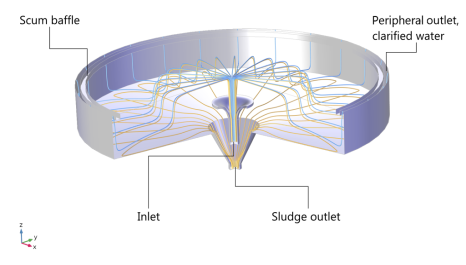
The model geometry is shown in Figure 1.
Figure 1: Cross section of the circular clarifier.
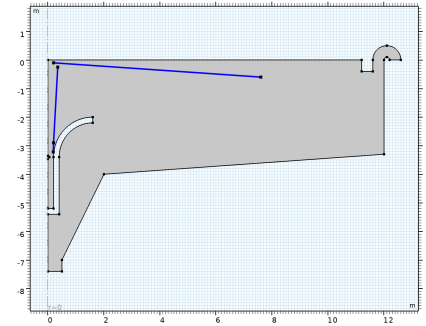
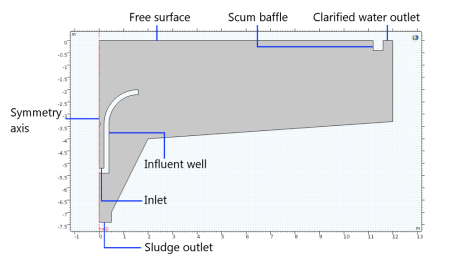
The clarifier has a diameter of 24 m and a gently sloping bottom, which makes the dept vary between 3.3 and 4 m, attached to a funnel at the center of the tank. The incoming sludge, consisting of a mixture of solid flocs and water, enters through the inlet in the middle of the tank. In the clarifier, gravity causes the flocs to settle to the bottom of the tank. The tank contains two outlets. One is located at the center, at the bottom of the funnel. The purpose of this outlet is to remove the sedimented flocs from the tank. There is also a peripheral outlet for the purified water as shown in the figure. Figure 2 shows the corresponding 2D axisymmetric model.
Figure 2: Axisymmetric representation of the clarifier geometry.
The mixture enters the clarifier in the form of a jet. The Reynolds number based on the inlet velocity and diameter is 5·105, which means that the flow is turbulent. Upon impact with the free surface, the mixture spreads out, causing the turbulence production to diminish with radial distance from the inlet. The turbulent flow in the tank tends to mix the phases together, and thus has a negative effect on the separation process. The aim of this example is to study the turbulent multiphase flow within the circular secondary clarifier.
For simplicity, you can model the flocs as spherical solid particles of equal size. To solve for the mixture velocity and pressure you can use the Turbulent Flow Model, k-ε interface. Phase Transport interface can be used to solve the phase volume fractions. See the theory in the CFD Module User’s Guide for more information.
Boundary Conditions
At the inlet, the velocity is fixed to 1.25 m/s and the dispersed phase volume fraction is 0.003. The turbulence intensity is set to 5% (medium) and the turbulence length scale is automatically computed from the geometry. The velocity at the bottom outlet is set to 0.05 m/s, while a constant pressure is set at the peripheral outlet. A slip condition is applied on the free surface and an axial symmetry condition on the centerline.
Initial Conditions
Initially, the velocity as well as the solid phase volume fraction is zero in the entire clarifier.
Results and Discussion
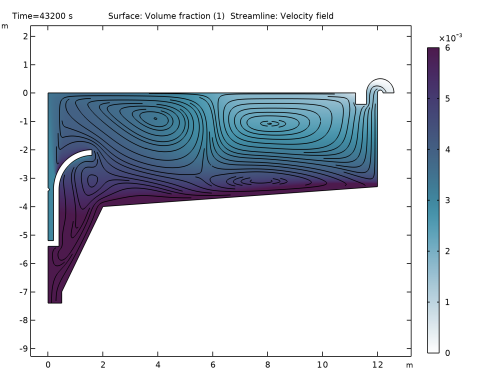
Figure 3 shows streamlines of the mixture velocity and the dispersed phase volume fraction after 12 hours, at which time the solution is close to steady state. Opposing effects of gravity settling and turbulence-induced particle dispersion produce volume-fraction gradients in the interior. The magnitude of the mixture strain rate (and hence the turbulence production) decreases with radial distance from the centerline, and at the peripheral outlet settling dominates over turbulent dispersion. This allows for a relatively clear efflux.
Figure 3: Mixture-velocity streamlines and solid phase volume fraction after 12 hours, when the flow has reached a steady-state solution.
As you can see in Figure 3, the maximum volume fraction is less than 1%.
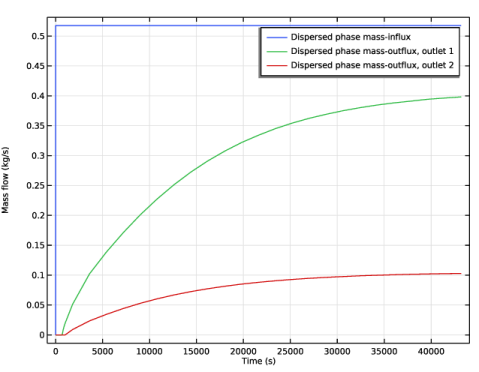
Figure 4 shows the dispersed phase mass flux at the inlet and the two outlets.
Figure 4: Mass flux of the dispersed phase at the inlet (blue), peripheral outlet (green), and central outlet (red).
The mass flux of the dispersed phase at the outlets is given by
where ud is the convective velocity of the dispersed phase
Computing the removal rate from the results shows that the clarifier removes 0.52 − 0.10.42 kg solid particles per second. The separation efficiency is about 81%.
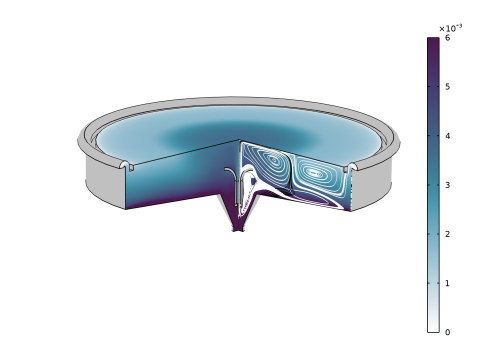
Figure 5 shows a cut through the swept-out volume of the clarifier with streamlines for each phase after 12 hours.
Figure 5: Volume fraction of the dispersed phase and streamlines for the dispersed (black) and continuous (white) velocity fields.
To further examine the performance of the clarifier, you can easily modify the model in several ways. You can, for instance, modify the geometry by adding baffles, changing the inlet and outlet velocities, increasing the dispersed-phase volume fraction in the incoming sludge, or changing the density and size of the dispersed particles.
Notes About the COMSOL Implementation
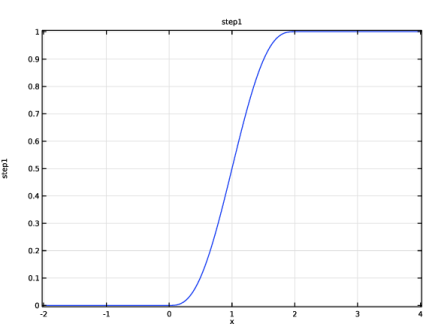
It is straightforward to set up a multiphase flow model with the Phase Transport Mixture Model, Turbulent Flow interface. To simplify the startup of the transient calculation, you can gradually increase the inlet and outlet velocities from zero to their constant values. For this purpose, use a Step function feature to implement a smooth step function that gradually increases from zero to one.
Application Library path: CFD_Module/Multiphase_Flow/sedimentation_ptmm
Modeling Instructions
From the File menu, choose New.
New
In the New window, click  Model Wizard.
Model Wizard
1
In the Model Wizard window, click  2D Axisymmetric.
2
In the Select Physics tree, select Fluid Flow > Multiphase Flow > Phase Transport Mixture Model > Turbulent Flow > Turbulent Flow, k-ε.
3
Click Add.
4
Click  Study.
5
In the Select Study tree, select General Studies > Time Dependent.
6
Geometry 1
To simplify the instructions, import a ready-made geometry sequence. The complete step-by-step instructions for the geometry can be found in the Appendix — Geometry Modeling Instructions.
1
In the Geometry toolbar, click Insert Sequence and choose Insert Sequence.
2
3
In the Geometry toolbar, click  Build All.
Use Mesh Control Edges to obtain a mesh that is aligned with the turbulent shear.
Mesh Control Edges 1 (mce1)
1
In the Geometry toolbar, click  Virtual Operations and choose Mesh Control Edges.
2
On the object fin, select Boundaries 8, 10, and 11 only.
It might be easier to select the boundaries by using the Selection List window. To open this window, in the Home toolbar click Windows and choose Selection List. (If you are running the cross-platform desktop, you find Windows in the main menu.)
3
In the Geometry toolbar, click  Build All.
4
Click the  Zoom Extents button in the Graphics toolbar.
Global Definitions
Parameters 1
1
In the Model Builder window, under Global Definitions click Parameters 1.
2
In the Settings window for Parameters, locate the Parameters section.
3
Add a Step function feature to use for implementing a gradual increase of the inlet and outlet velocities from zero to their constant values.
Definitions
Step 1 (step1)
1
In the Definitions toolbar, click  More Functions and choose Step.
2
In the Settings window for Step, click to expand the Smoothing section.
3
Locate the Parameters section. In the Location text field, type 1.
4
Locate the Smoothing section. In the Size of transition zone text field, type 2.
5
Variables 1
1
In the Definitions toolbar, click  Local Variables.
2
In the Settings window for Variables, locate the Variables section.
3
Turbulent Flow, k-ε (spf)
1
In the Model Builder window, under Component 1 (comp1) click Turbulent Flow, k-ε (spf).
2
In the Settings window for Turbulent Flow, k-ε, locate the Physical Model section.
3
Select the Include gravity checkbox.
Initial Values 1
1
In the Model Builder window, under Component 1 (comp1) > Turbulent Flow, k-ε (spf) click Initial Values 1.
2
In the Settings window for Initial Values, locate the Initial Values section.
3
In the p text field, type -g_const*z*rho_c.
4
Clear the Compensate for hydrostatic pressure approximation checkbox.
Wall 2
1
In the Physics toolbar, click  Boundaries and choose Wall.
2
In the Settings window for Wall, locate the Boundary Condition section.
3
From the Wall condition list, choose Slip.
4
Inlet 1
1
In the Physics toolbar, click  Boundaries and choose Inlet.
2
3
In the Settings window for Inlet, locate the Velocity section.
4
In the U0 text field, type v_in.
5
Locate the Turbulence Conditions section. From the IT list, choose User defined.
6
From the LT list, choose User defined.
7
8
Click the  Show More Options button in the Model Builder toolbar.
9
In the Show More Options dialog, select Physics > Advanced Physics Options in the tree.
10
In the tree, select the checkbox for the node Physics > Advanced Physics Options.
11
12
In the Settings window for Inlet, click to expand the Constraint Settings section.
13
From the Apply reaction terms on list, choose All physics (symmetric).
Outlet 1
1
In the Physics toolbar, click  Boundaries and choose Outlet.
2
3
In the Settings window for Outlet, locate the Boundary Condition section.
4
5
Locate the Velocity section. In the U0 text field, type v_out.
6
Click to expand the Constraint Settings section. From the Apply reaction terms on list, choose All physics (symmetric).
Outlet 2
1
In the Physics toolbar, click  Boundaries and choose Outlet.
2
3
In the Settings window for Outlet, locate the Constraint Settings section.
4
From the Apply reaction terms on list, choose All physics (symmetric).
Phase Transport (phtr)
Volume Fraction 1
1
In the Physics toolbar, click  Boundaries and choose Volume Fraction.
2
3
In the Settings window for Volume Fraction, locate the Volume Fraction section.
4
Select the Phase s2 checkbox.
5
In the s0,s2 text field, type phid_in.
Outflow 1
1
In the Physics toolbar, click  Boundaries and choose Outflow.
2
Multiphysics
Mixture Model 1 (mfmm1)
1
In the Model Builder window, under Component 1 (comp1) > Multiphysics click Mixture Model 1 (mfmm1).
2
3
In the Settings window for Mixture Model, locate the Physical Model section.
4
From the Slip model list, choose Hadamard–Rybczynski.
5
Locate the Continuous Phase Properties section. From the ρc list, choose User defined. In the associated text field, type rho_c.
6
From the μc list, choose User defined. In the associated text field, type mu_c.
7
Locate the Dispersed Phase 2 Properties section. From the ρs2 list, choose User defined. In the associated text field, type rho_d.
8
In the ds2 text field, type d_d.
Mesh 1
1
In the Model Builder window, under Component 1 (comp1) click Mesh 1.
2
In the Settings window for Mesh, locate the Sequence Type section.
3
From the list, choose User-controlled mesh.
Size
1
In the Model Builder window, under Component 1 (comp1) > Mesh 1 click Size.
2
In the Settings window for Size, locate the Element Size section.
3
From the Predefined list, choose Extra fine.
Size 1
1
In the Model Builder window, click Size 1.
2
In the Settings window for Size, locate the Element Size section.
3
From the Predefined list, choose Extremely fine.
Corner Refinement 1
In the Model Builder window, right-click Corner Refinement 1 and choose Disable.
Size 2
1
In the Model Builder window, right-click Mesh 1 and choose Size.
2
Drag and drop Size 2 below Size 1.
3
In the Settings window for Size, locate the Geometric Entity Selection section.
4
From the Geometric entity level list, choose Boundary.
5
6
Locate the Element Size section. From the Calibrate for list, choose Fluid dynamics.
7
From the Predefined list, choose Extremely fine.
Free Triangular 1
1
In the Model Builder window, click Free Triangular 1.
2
In the Settings window for Free Triangular, click to expand the Control Entities section.
3
From the Smooth across removed control entities list, choose On.
4
In the Number of iterations text field, type 8.
5
In the Maximum element depth to process text field, type 8.
Boundary Layers 1
1
In the Model Builder window, click Boundary Layers 1.
2
In the Settings window for Boundary Layers, click to expand the Corner Settings section.
3
From the Handling of sharp corners list, choose Splitting.
4
Click to expand the Transition section. In the Number of iterations text field, type 8.
5
In the Maximum element depth to process text field, type 16.
Boundary Layer Properties 1
1
In the Model Builder window, expand the Boundary Layers 1 node, then click Boundary Layer Properties 1.
2
In the Settings window for Boundary Layer Properties, locate the Layers section.
3
In the Number of layers text field, type 12.
4
In the Thickness adjustment factor text field, type 1.
5
Click  Build All.
Study 1
Step 1: Time Dependent
1
In the Model Builder window, under Study 1 click Step 1: Time Dependent.
2
In the Settings window for Time Dependent, locate the Study Settings section.
3
In the Output times text field, type range(0,0.01,0.1) range(1,10) 100*range(1,10) 1800*range(1,24).
Solution 1 (sol1)
1
In the Study toolbar, click  Show Default Solver.
2
In the Model Builder window, expand the Solution 1 (sol1) node.
3
In the Model Builder window, expand the Study 1 > Solver Configurations > Solution 1 (sol1) > Dependent Variables 1 node, then click Turbulent Dissipation Rate (comp1.ep).
4
In the Settings window for Field, locate the Scaling section.
5
From the Method list, choose Manual.
6
In the Scale text field, type 0.1.
7
In the Model Builder window, under Study 1 > Solver Configurations > Solution 1 (sol1) > Dependent Variables 1 click Turbulent Kinetic Energy (comp1.k).
8
In the Settings window for Field, locate the Scaling section.
9
From the Method list, choose Manual.
10
In the Scale text field, type 0.1.
11
In the Model Builder window, under Study 1 > Solver Configurations > Solution 1 (sol1) > Dependent Variables 1 click Pressure (comp1.p).
12
In the Settings window for Field, locate the Scaling section.
13
From the Method list, choose Manual.
14
In the Scale text field, type 1e4.
15
In the Model Builder window, under Study 1 > Solver Configurations > Solution 1 (sol1) > Dependent Variables 1 click Velocity Field (comp1.u).
16
In the Settings window for Field, locate the Scaling section.
17
From the Method list, choose Manual.
18
In the Model Builder window, under Study 1 > Solver Configurations > Solution 1 (sol1) click Time-Dependent Solver 1.
19
In the Settings window for Time-Dependent Solver, click to expand the Time Stepping section.
20
Select the Initial step checkbox. In the associated text field, type 0.005.
21
In the Model Builder window, expand the Study 1 > Solver Configurations > Solution 1 (sol1) > Time-Dependent Solver 1 node, then click Segregated 1.
22
In the Settings window for Segregated, locate the General section.
23
Select the Limit on nonlinear convergence rate checkbox. In the associated text field, type 10.
24
In the Study toolbar, click  Compute.
Results
Line Integration 1
1
In the Results toolbar, click  More Derived Values and choose Integration > Line Integration.
2
3
In the Settings window for Line Integration, click Replace Expression in the upper-right corner of the Expressions section. From the menu, choose Component 1 (comp1) > Phase Transport > Mass flux, phase s2 - kg/(m²·s) > phtr.Nz_s2 - Mass flux, phase s2, z-component.
4
Click  Evaluate.
Line Integration 2
1
In the Results toolbar, click  More Derived Values and choose Integration > Line Integration.
2
3
In the Settings window for Line Integration, click Replace Expression in the upper-right corner of the Expressions section. From the menu, choose Component 1 (comp1) > Phase Transport > Mass flux, phase s2 - kg/(m²·s) > phtr.Nz_s2 - Mass flux, phase s2, z-component.
4
Locate the Expressions section. In the table, enter the following settings:
5
Clicknext to  Evaluate, then choose Table 1 - Line Integration 1.
Line Integration 3
1
In the Results toolbar, click  More Derived Values and choose Integration > Line Integration.
2
3
In the Settings window for Line Integration, click Replace Expression in the upper-right corner of the Expressions section. From the menu, choose Component 1 (comp1) > Phase Transport > Mass flux, phase s2 - kg/(m²·s) > phtr.Nz_s2 - Mass flux, phase s2, z-component.
4
Locate the Expressions section. In the table, enter the following settings:
5
Clicknext to  Evaluate, then choose Table 1 - Line Integration 1.
Dispersed Phase In and Out Mass Fluxes
1
In the Results toolbar, click  1D Plot Group.
2
In the Model Builder window, right-click Results and choose Rename.
3
In the Rename 1D Plot Group dialog, type Dispersed Phase In and Out Mass Fluxes in the New label text field.
4
5
In the Model Builder window, click Dispersed Phase In and Out Mass Fluxes.
6
In the Settings window for 1D Plot Group, locate the Plot Settings section.
7
Select the y-axis label checkbox. In the associated text field, type Mass flow (kg/s).
Table Graph 1
1
Right-click Dispersed Phase In and Out Mass Fluxes and choose Table Graph.
2
In the Settings window for Table Graph, click to expand the Legends section.
3
Select the Show legends checkbox.
4
From the Legends list, choose Manual.
5
6
In the Dispersed Phase In and Out Mass Fluxes toolbar, click  Plot.
Surface
1
In the Model Builder window, expand the Volume Fraction (phtr) node, then click Surface.
2
In the Settings window for Surface, locate the Expression section.
3
In the Expression text field, type s2.
4
In the Volume Fraction (phtr) toolbar, click  Plot.
5
Click to expand the Range section. Select the Manual color range checkbox.
6
In the Minimum text field, type 0.
7
In the Maximum text field, type 0.006.
Streamline 1
1
In the Model Builder window, right-click Volume Fraction (phtr) and choose Streamline.
2
In the Settings window for Streamline, locate the Streamline Positioning section.
3
From the Positioning list, choose Uniform density.
4
In the Density level text field, type 8.
5
In the Volume Fraction (phtr) toolbar, click  Plot.
Revolution 2D
1
In the Model Builder window, expand the Results > Datasets node, then click Revolution 2D.
2
In the Settings window for Revolution 2D, click to expand the Revolution Layers section.
3
In the Start angle text field, type 0.
4
In the Revolution angle text field, type 270.
Surface
1
In the Model Builder window, expand the Volume Fraction (phtr) 1 node, then click Surface.
2
In the Settings window for Surface, locate the Expression section.
3
In the Expression text field, type s2.
4
Click to expand the Range section. Select the Manual color range checkbox.
5
In the Minimum text field, type 0.
6
In the Maximum text field, type 0.006.
Surface 2
1
In the Model Builder window, right-click Volume Fraction (phtr) 1 and choose Surface.
2
In the Settings window for Surface, click Replace Expression in the upper-right corner of the Expression section. From the menu, choose Component 1 (comp1) > Turbulent Flow, k-ε > Turbulence variables > spf.Delta_wPlus - Wall resolution in viscous units - 1.
3
Locate the Coloring and Style section. From the Coloring list, choose Uniform.
4
From the Color list, choose Gray.
Streamline 1
1
Right-click Volume Fraction (phtr) 1 and choose Streamline.
2
In the Settings window for Streamline, click Replace Expression in the upper-right corner of the Expression section. From the menu, choose Component 1 (comp1) > Phase Transport > mfmm1.u_s2r,...,mfmm1.u_s2z - Convective velocity dispersed phase s2.
3
Locate the Expression section. In the phi-component text field, type 0.
4
Select the Description checkbox. In the associated text field, type Dispersed phase (black).
5
Locate the Streamline Positioning section. From the Entry method list, choose Coordinates.
6
In the x text field, type range(0.01,0.02,0.19).
7
In the y text field, type 0.
8
In the z text field, type -1*1^range(1,10).
9
Locate the Coloring and Style section. Find the Point style subsection. From the Color list, choose Black.
Streamline 2
1
Right-click Volume Fraction (phtr) 1 and choose Streamline.
2
In the Settings window for Streamline, click Replace Expression in the upper-right corner of the Expression section. From the menu, choose Component 1 (comp1) > Phase Transport > mfmm1.ucontr,...,mfmm1.ucontz - Velocity field, continuous phase.
3
Locate the Expression section. In the phi-component text field, type 0.
4
Select the Description checkbox. In the associated text field, type Continuous phase (white).
5
Locate the Streamline Positioning section. From the Entry method list, choose Coordinates.
6
In the x text field, type range(0,0.02,0.2) range(0.5,0.5,12).
7
In the y text field, type 0.
8
In the z text field, type -1^range(1,35).
9
Locate the Coloring and Style section. Find the Point style subsection. From the Color list, choose White.
Volume Fraction (phtr) 1
1
In the Model Builder window, click Volume Fraction (phtr) 1.
2
In the Settings window for 3D Plot Group, click to expand the Title section.
3
From the Title type list, choose None.
4
In the Volume Fraction (phtr) 1 toolbar, click  Plot.
5
Click the  Zoom Extents button in the Graphics toolbar.
6
Click the  Scene Light button in the Graphics toolbar.
7
Click the  Show Grid button in the Graphics toolbar.
8
Click the  Show Axis Orientation button in the Graphics toolbar.
Appendix — Geometry Modeling Instructions
Geometry 1
Polygon 1 (pol1)
1
In the Geometry toolbar, click  Polygon.
2
In the Settings window for Polygon, locate the Coordinates section.
3
4
Click  Build Selected.
Polygon 2 (pol2)
1
In the Geometry toolbar, click  Polygon.
2
In the Settings window for Polygon, locate the Object Type section.
3
From the Type list, choose Open curve.
4
Locate the Coordinates section. From the Data source list, choose Vectors.
5
In the r text field, type 0 0.4 0.4 0.4.
6
In the z text field, type -5.4 -5.4 -5.4 -3.4.
Circular Arc 1 (ca1)
1
In the Geometry toolbar, click  More Primitives and choose Circular Arc.
2
In the Settings window for Circular Arc, locate the Properties section.
3
From the Specify list, choose Endpoints and start angle.
4
Locate the Starting Point section. In the r text field, type 1.6.
5
In the z text field, type -2.2.
6
Locate the Endpoint section. In the r text field, type 0.4.
7
In the z text field, type -3.4.
8
Locate the Angles section. In the Start angle text field, type 90.
Line Segment 1 (ls1)
1
In the Geometry toolbar, click  More Primitives and choose Line Segment.
2
In the Settings window for Line Segment, locate the Starting Point section.
3
From the Specify list, choose Coordinates.
4
Locate the Endpoint section. From the Specify list, choose Coordinates.
5
Locate the Starting Point section. In the r text field, type 1.6.
6
Locate the Endpoint section. In the r text field, type 1.6.
7
Locate the Starting Point section. In the z text field, type -2.2.
8
Locate the Endpoint section. In the z text field, type -2.
Circular Arc 2 (ca2)
1
In the Geometry toolbar, click  More Primitives and choose Circular Arc.
2
In the Settings window for Circular Arc, locate the Properties section.
3
From the Specify list, choose Endpoints and start angle.
4
Locate the Starting Point section. In the r text field, type 1.6.
5
In the z text field, type -2.
6
Locate the Endpoint section. In the r text field, type 0.2.
7
In the z text field, type -3.4.
8
Locate the Angles section. In the Start angle text field, type 90.
Polygon 3 (pol3)
1
In the Geometry toolbar, click  Polygon.
2
In the Settings window for Polygon, locate the Object Type section.
3
From the Type list, choose Open curve.
4
Locate the Coordinates section. From the Data source list, choose Vectors.
5
In the r text field, type 0.2 0.2 0.2 0 0 0.
6
In the z text field, type -3.4 -5.2 -5.2 -5.2 -5.2 -5.4.
Convert to Solid 1 (csol1)
1
In the Geometry toolbar, click  Conversions and choose Convert to Solid.
2
Select the objects ca1, ca2, ls1, pol2, and pol3 only.
Circle 1 (c1)
1
In the Geometry toolbar, click  Circle.
2
In the Settings window for Circle, locate the Size and Shape section.
3
In the Radius text field, type 0.05.
4
Locate the Position section. In the z text field, type -3.4.
5
Click  Build Selected.
Rectangle 1 (r1)
1
In the Geometry toolbar, click  Rectangle.
2
In the Settings window for Rectangle, locate the Size and Shape section.
3
In the Width text field, type 0.4.
4
In the Height text field, type 0.4.
5
Locate the Position section. In the r text field, type 11.2.
6
In the z text field, type -0.4.
7
Click  Build Selected.
Difference 1 (dif1)
1
In the Geometry toolbar, click  Booleans and Partitions and choose Difference.
2
Select the object pol1 only to add it to the Objects to add list.
3
In the Settings window for Difference, locate the Difference section.
4
Click to select the  Activate Selection toggle button for Objects to subtract.
5
Select the objects c1, csol1, and r1 only.
Rectangle 2 (r2)
1
In the Geometry toolbar, click  Rectangle.
2
In the Settings window for Rectangle, locate the Size and Shape section.
3
In the Height text field, type 0.5.
4
Locate the Position section. In the r text field, type 11.6.
Fillet 1 (fil1)
1
In the Geometry toolbar, click  Fillet.
2
On the object r2, select Points 3 and 4 only.
3
In the Settings window for Fillet, locate the Radius section.
4
In the Radius text field, type 0.5.
Circle 2 (c2)
1
In the Geometry toolbar, click  Circle.
2
In the Settings window for Circle, locate the Size and Shape section.
3
In the Radius text field, type 0.1.
4
Locate the Position section. In the r text field, type 12.1.
Difference 2 (dif2)
1
In the Geometry toolbar, click  Booleans and Partitions and choose Difference.
2
Select the objects dif1 and fil1 only.
3
In the Settings window for Difference, locate the Difference section.
4
Click to select the  Activate Selection toggle button for Objects to subtract.
5
6
Clear the Keep interior boundaries checkbox.
7
Click  Build Selected.
Add a few lines to obtain a better control of the mesh in the turbulent shear regions.
Polygon 4 (pol4)
1
In the Geometry toolbar, click  Polygon.
2
In the Settings window for Polygon, locate the Coordinates section.
3
4
Click  Build Selected.
Polygon 5 (pol5)
1
In the Geometry toolbar, click  Polygon.
2
In the Settings window for Polygon, locate the Coordinates section.
3
4
Click  Build Selected.
Polygon 6 (pol6)
1
In the Geometry toolbar, click  Polygon.
2
In the Settings window for Polygon, locate the Coordinates section.
3
4
Click  Build Selected.
Form Union (fin)
1
In the Model Builder window, click Form Union (fin).
2
In the Settings window for Form Union/Assembly, click  Build Selected.