
|
|
|
 , and are considered pure when
  . The initial mixture is created by putting
  equal to a random number with zero mean and a standard deviation of 0.05. The initial random perturbation initiates the separation into pure phases.
 is the dimensionless phase field variable, so that the volume fractions of the components of the fluid are
  and
and  . The variable γ is the mobility (m3·s/kg), the quantity λ is the mixing energy density (N), and ε is a capillary width that scales with the thickness of the interface (m). The latter two parameters are related to the surface tension coefficient through the equation





 . By t = 1 s the phases have started to separate. At t = 2 s, pure phases have started to form, and two seconds later only pure phases exist. After t = 4 s, the pure phases begin to coalesce to form large phase domains.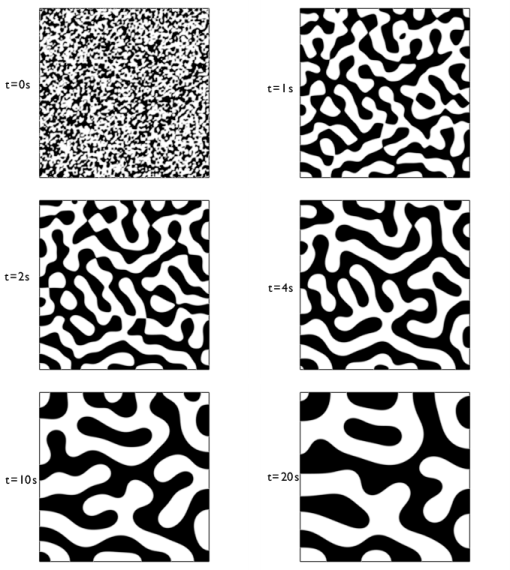
|
1
|
|
2
|
|
3
|
Click Add.
|
|
4
|
Click
 Study. Study. |
|
5
|
In the Select Study tree, select Preset Studies for Selected Physics Interfaces > Time Dependent with Phase Initialization.
|
|
6
|
Click
 Done. Done. |
|
1
|
|
2
|
|
3
|
|
4
|
Click
 Build All Objects. Build All Objects. |
|
1
|
|
2
|
|
3
|
|
4
|
|
1
|
|
2
|
|
3
|
|
1
|
In the Model Builder window, under Component 1 (comp1) > Phase Field in Fluids (pf) click Phase Field Model 1.
|
|
2
|
|
3
|
|
1
|
|
2
|
|
3
|
|
4
|
|
1
|
|
2
|
|
3
|
|
4
|
Click
 Build All. Build All. |
|
1
|
|
2
|
|
3
|
|
4
|
|
1
|
|
2
|
|
3
|
|
4
|
Clear the Description checkbox.
|
|
5
|
Clear the Unit checkbox.
|
|
1
|
|
2
|
|
3
|
Select the Manual color range checkbox.
|
|
4
|
|
5
|
|
6
|
|
7
|
|
1
|
|
2
|
|
3
|
|
4
|
|
1
|
|
3
|
In the Settings window for Surface Average, click Replace Expression in the upper-right corner of the Expressions section. From the menu, choose Component 1 (comp1) > Phase Field in Fluids > Phase field variables > phipf - Phase field variable - 1.
|
|
4
|
Click
 Evaluate. Evaluate. |
|
1
|
Go to the Table 1 window.
|
|
2
|
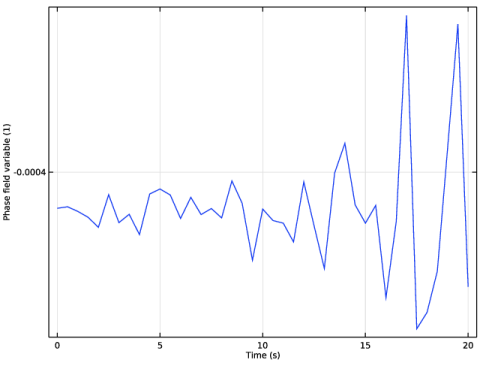
Click the Table Graph button in the window toolbar.
|


