





PDF

Large Eddy Simulation of a 3D Hill Geometry
Introduction
Flow prediction in the case of separating flows from blunt surfaces are computationally challenging. Such scenarios are frequently encountered in a variety of engineering simulations of external and internal flows, for instance, flow around highly-loaded swept wings and duct flows with surface deformations and curved geometries. They demonstrate a high sensitivity to upstream flow and turbulence conditions for detachment and reattachment phenomena, both spatially and temporally. Moreover, three-dimensional flows admit convoluted separation patterns and leaner recirculation regions.
The present model demonstrates the application of the Large Eddy Simulation (LES) method with automatic wall modeling to predict flow quantities for a well-studied laboratory experiment of flow around an axisymmetric 3D hill feature in a duct system; see Ref. 1 and Ref. 2. The Reynolds number of the flow, ReH is equal to 130,000 based on the hill height, H. Synthetic turbulence inlet condition option is enabled to generate isotropic turbulence at the inlet boundary. The nondimensional quantity, coefficient of pressure, denoted as Cp, is validated with those reported in the experiments. Velocity fields at the leeward side and in the wake region of the hill are compared with those obtained in the experiments.
Model Definition
The present section describes the details of the geometry and the flow problem setup. Details required to build the geometry, mesh the domain of interest, and apply suitable solution postprocessing are presented.
Geometry
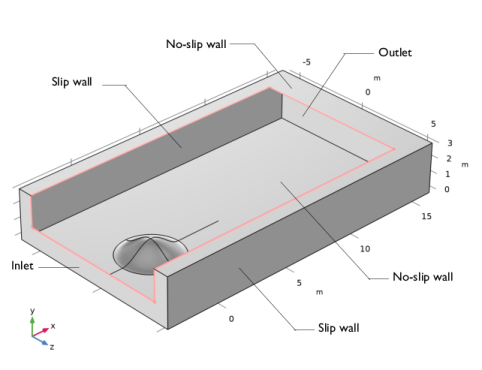
The domain of interest is a block of dimensions 19.8H, 3.2H, and 11.7H in the x, y, and z directions. It represents a long rectangular duct with large aspect ratio. The base of the axisymmetric hill is located in the plane defined by y = 0. It is centered at a distance of 4.1H and 5.85H along the x and z directions. The hill has a radius of 2H at the base and the crest is located at y = H. The hill profile, h, as a function of the hill radius, r, is given by
(1)
Here, J0 is the Bessel function of the first kind and I0 is the modified Bessel function of the first kind. The final geometry is shown in Figure 1.
Figure 1: Geometry setup of the model shown with a cut-box to reveal the hill profile. Boundary conditions for the LES problem are also annotated.
Physics Interface Settings
In the model, H = 1 m, the density of the fluid, ρ = 1 kg/m3, the velocity of the fluid, U = 2 m/s, and the dynamic viscosity of the fluid is calculated from the Reynolds number as μ = ρUH/(ReH) kg/(m·s).
As a first step, the potential flow problem which describes an incompressible, irrotational flow is solved. The potential flow problem takes the form of the Laplace equation for the velocity potential, φ, as
(2)
The boundary conditions are:
(3)
(4)
(5)
The LES problem uses the Residual Based Variational Multiscale (RBVM) LES model with automatic wall treatment. The initial values of the velocity and pressure fields for the LES problem are obtained from the potential flow solution as
(6)
(7)
Figure 1 shows the boundary conditions as applied to the problem. A normal inflow velocity condition is prescribed at the inlet. Since the inlet boundary is located close to the hill feature, it has the prescribed velocity profile of the (1/7)th power law for turbulent flows, given by
(8)
The velocity profile is adjusted to ensure that the mass flow rate is equivalent to that produced by a uniform inlet velocity of value U. The synthetic turbulence option at the inlet is enabled and the turbulence length scale is specified as 0.1H. The number of Fourier modes is chosen to be 600. The outlet condition has the “suppress backflow” option disabled. This permits backflow, which is a common feature in turbulent wake regions.
Meshing
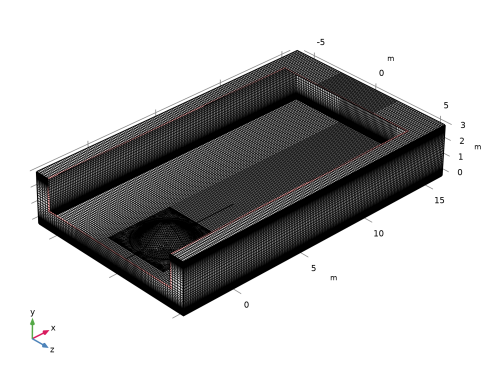
Element sizes close to the hill are chosen so as to obtain a good spatial resolution to capture the geometric feature. The LES simulation requires high resolution mesh elements to transport turbulence generated at the inlet, obtain a good flow representation in the boundary layers, and capture flow features in the wake of the hill. In this context, triangular elements for the hill boundary and mapped quadrilateral elements for the boundary at y = 0 are constructed. Further on, a swept mesh for the volume is generated with appropriate element spacing for the boundary layers, see Figure 2. Although such high resolution mesh is not necessary for the potential flow solution, the same mesh is employed as the computational penalty is not restrictive.
The first boundary layer element is of thickness, measured in wall units, equal to y+ ≈ 4. The distance from the wall in wall units, y+, is computed using the friction velocity, uτ, the kinematic viscosity, ν, the wall shear stress, τw, and the skin-friction coefficient, cf, as
(9).
The skin-friction coefficient as a function of the Reynolds number for channel flows is taken from Ref. 5.
Figure 2: The mesh shown with a cut-box to reveal the surface mesh on the hill profile.
sTudy
The potential flow problem is solved with a stationary study step. The LES problem is solved with a time-dependent study step with the end time equal to 40H/U, which is the average time taken for a fluid parcel to traverse nearly twice the length of the domain. Four hundred solution time steps are recorded in the latter half of the time interval. These are time-averaged and used for comparison with experiments.
Results and Discussion
The first quantity of postprocess is the coefficient of pressure, given by
(10)
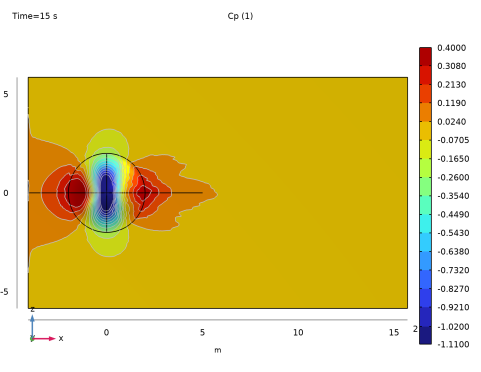
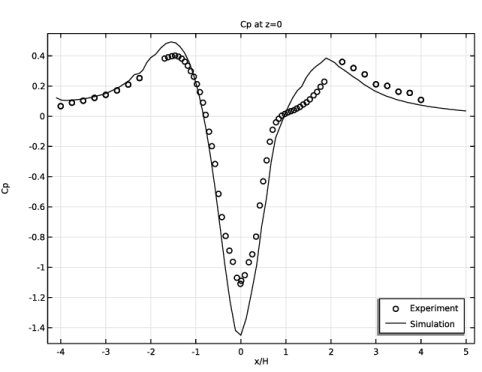
A contour plot of Cp on the hill surface is shown in Figure 3. The variation of Cp along the line defined by z = 0, as a function of x/H, is plotted in Figure 4. The experimental data reported in Ref. 1 is obtained from Ref. 6, courtesy of Gwibo Byun, Research Scientist, Department of Aerospace and Ocean Engineering, Virginia Tech. The simulation correctly predicts the zone of high suction pressure at the crest of the hill and the zone of the low suction pressure at the base. These zones are slightly larger in the simulation when compared to experiments in Ref. 1. However, they show good correspondence to simulations reported in Ref. 4.
Figure 3: Contour plot of Cp on the hill surface.
Figure 4: One-dimensional plot of Cp as a function of x/H along the line z = 0.
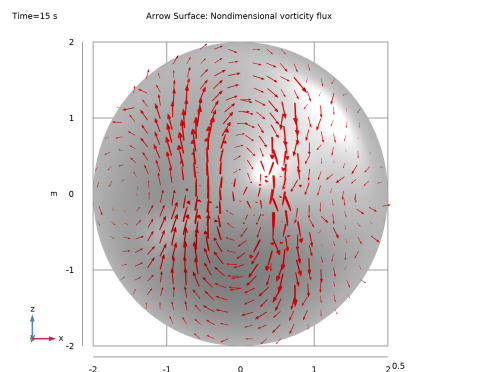
The nondimensional vorticity flux vector, given by the quantity (n × ∇Cp), is plotted in Figure 5 and shows good qualitative correlation to experimental measurements in Ref. 1. It demonstrates nonuniformity of vorticity on the hill which is observed in the experiments in the form of streamwise and spanwise variations in the separation pattern on the hill surface.
Figure 5: Vector plot of the nondimensional vorticity flux on the hill surface.
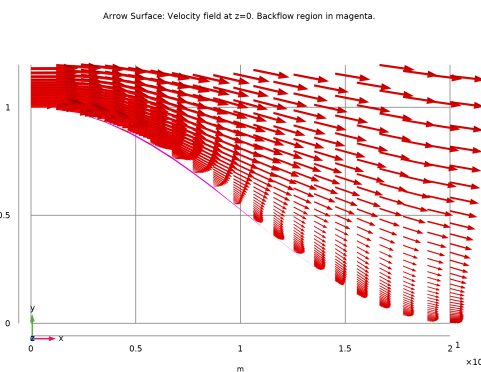
The velocity field on the plane defined by z = 0 is visualized in Figure 6. The flow is shown to accelerate at the crest of the hill where the suction pressure is the highest. The adverse pressure gradient in the leeward side of the hill results in a backflow region, shown here in magenta color. The simulation overpredicts the length and underpredicts the height of the separation zone at the hill base as reported in experiments (see Ref. 2).
Figure 6: Vector plot of the velocity on the plane defined by z = 0. The region of backflow is shown in magenta.
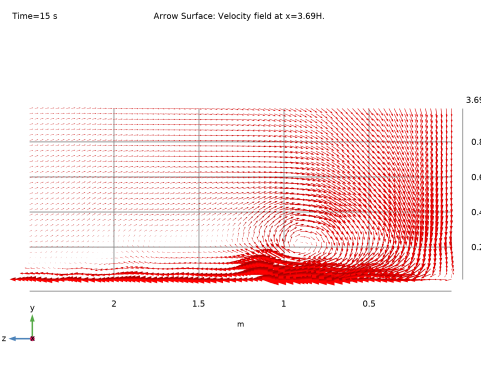
Similarly, the velocity field in the wake region on the plane defined by x = 3.69H is shown in Figure 7. The recirculation bubble is seen attached to the bottom surface as a result of fluid roll-up from the sides of the hill and the down-wash from the top of the hill. The position of the recirculation region is predicted correctly, however, the width is under-predicted when compared to Ref. 4.
Figure 7: Vector plot of the velocity on the plane defined by x = 3.69H.
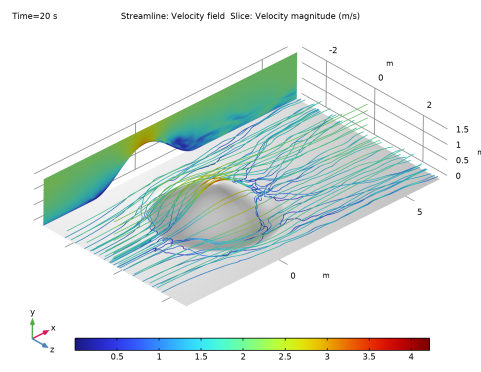
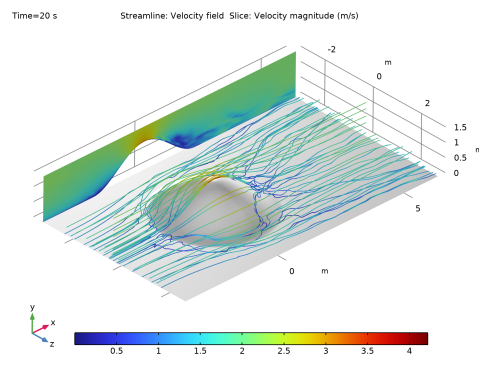
Finally, the unsteady nature of the flow-field is demonstrated in the plot of instantaneous streamlines, corresponding to the end of the time interval, given in Figure 8. Also shown in the plot is the velocity magnitude on the plane defined by z = 0.
Figure 8: Instantaneous streamlines corresponding to the solution at the end of the simulation. Also shown is the velocity magnitude at the domain midplane defined by z = 0.
References
1. R.L. Simpson, C.H. Long, and G. Byun, “Study of Vortical Separation from an Axisymmetric Hill,” Int. J. Heat Fluid Flow, vol. 23, pp. 582–591, 2002.
2. G. Byun and R.L. Simpson, “Structure of Three-Dimensional Separated Flow on an Axisymmetric Bump,” AIAA J., vol. 44, no. 5, 2006.
3. L. Davidson, “Using Isotropic Synthetic Fluctuations as Inlet Boundary Conditions for Unsteady Simulations,” Adv. Appl. Fluid Mech., vol. 1, no. 1, pp. 1–35, 2007.
4. T. Persson and others, “Numerical Investigation of the Flow over an Axisymmetric Hill Using LES, DES, and RANS,” J. Turbul., vol. 7, no. 4, 2006.
5. S. Pope, “Turbulent Flows,” Cambridge University Press, 2000.
6. G. Byun, Structure of Vortical Separations, archive.aoe.vt.edu/gbyun/.
Application Library path: CFD_Module/Single-Phase_Flow/les_3d_hill
Modeling Instructions
From the File menu, choose New.
New
In the New window, click  Model Wizard.
Model Wizard
1
In the Model Wizard window, click  3D.
2
In the Select Physics tree, select Fluid Flow > Single-Phase Flow > Large Eddy Simulation > LES RBVM (spf).
3
Click Add.
4
In the Select Physics tree, select Fluid Flow > Single-Phase Flow > Potential Flow > Incompressible Potential Flow (ipf).
5
Click Add.
6
Click  Study.
7
In the Select Study tree, select Preset Studies for Some Physics Interfaces > Stationary.
8
Global Definitions
Parameters 1
1
In the Model Builder window, under Global Definitions click Parameters 1.
2
In the Settings window for Parameters, locate the Parameters section.
3
Definitions
Create an analytic function that defines the hill profile.
Axisymmetric Hill Profile
1
In the Definitions toolbar, click  Analytic.
2
In the Settings window for Analytic, type Axisymmetric Hill Profile in the Label text field.
3
In the Function name text field, type hill.
4
Locate the Definition section. In the Expression text field, type -(besselj(0,3.1962)*besseli(0, 3.1962*x/(2*H))-besseli(0,3.1962)*besselj(0, 3.1962*x/(2*H)))*H/6.04844.
5
Locate the Plot Parameters section. In the table, enter the following settings:
Geometry 1
Block 1 (blk1)
1
In the Geometry toolbar, click  Block.
2
In the Settings window for Block, locate the Size and Shape section.
3
In the Width text field, type 19.8*H.
4
In the Depth text field, type 3.2*H.
5
In the Height text field, type 11.7*H.
6
Locate the Position section. In the x text field, type -4.1*H.
7
In the z text field, type -11.7*H/2.
Work Plane 1 (wp1)
1
In the Geometry toolbar, click  Work Plane.
2
In the Settings window for Work Plane, locate the Plane Definition section.
3
From the Plane list, choose xz-plane.
4
Click  Go to Plane Geometry.
Work Plane 1 (wp1) > Square 1 (sq1)
1
In the Work Plane toolbar, click  Square.
2
In the Settings window for Square, locate the Size section.
3
In the Side length text field, type 4.5*H.
4
Locate the Position section. From the Base list, choose Center.
Work Plane 1 (wp1) > Rectangle 1 (r1)
1
In the Work Plane toolbar, click  Rectangle.
2
In the Settings window for Rectangle, locate the Size and Shape section.
3
In the Width text field, type 19.8*H.
4
In the Height text field, type 4.5*H.
5
Locate the Position section. In the yw text field, type -2.25*H.
6
In the xw text field, type -4.1*H.
Line Segment 1 (ls1)
1
In the Model Builder window, right-click Geometry 1 and choose More Primitives > Line Segment.
2
In the Settings window for Line Segment, locate the Starting Point section.
3
Click to clear the  Activate Selection toggle button for Start vertex.
4
From the Specify list, choose Coordinates.
5
In the x text field, type -4.1*H.
6
Locate the Endpoint section. From the Specify list, choose Coordinates.
7
In the x text field, type 5*H.
8
Locate the Selections of Resulting Entities section. Select the Resulting objects selection checkbox.
Work Plane 2 (wp2)
1
In the Geometry toolbar, click  Work Plane.
2
In the Settings window for Work Plane, locate the Plane Definition section.
3
From the Plane list, choose zy-plane.
4
Click  Go to Plane Geometry.
Work Plane 2 (wp2) > Parametric Curve 1 (pc1)
1
In the Work Plane toolbar, click  More Primitives and choose Parametric Curve.
2
In the Settings window for Parametric Curve, locate the Parameter section.
3
In the Maximum text field, type 2*H.
4
Locate the Expressions section. In the xw text field, type s.
5
In the yw text field, type hill(s).
Work Plane 2 (wp2) > Line Segment 1 (ls1)
1
In the Work Plane toolbar, click  More Primitives and choose Line Segment.
2
In the Settings window for Line Segment, locate the Starting Point section.
3
From the Specify list, choose Coordinates.
4
Locate the Endpoint section. From the Specify list, choose Coordinates.
5
In the xw text field, type 2*H.
Work Plane 2 (wp2) > Line Segment 2 (ls2)
1
In the Work Plane toolbar, click  More Primitives and choose Line Segment.
2
In the Settings window for Line Segment, locate the Starting Point section.
3
From the Specify list, choose Coordinates.
4
Locate the Endpoint section. From the Specify list, choose Coordinates.
5
In the yw text field, type H.
Work Plane 2 (wp2) > Convert to Solid 1 (csol1)
1
In the Work Plane toolbar, click  Conversions and choose Convert to Solid.
2
In the Settings window for Convert to Solid, locate the Input section.
3
Click the  Paste Selection button for Input objects.
4
In the Paste Selection dialog, type ls1 ls2 pc1 in the Selection text field.
5
Revolve 1 (rev1)
In the Model Builder window, under Component 1 (comp1) > Geometry 1 right-click Work Plane 2 (wp2) and choose Revolve.
Difference 1 (dif1)
1
In the Geometry toolbar, click  Booleans and Partitions and choose Difference.
2
In the Settings window for Difference, locate the Difference section.
3
Click the  Paste Selection button for Objects to add.
4
In the Paste Selection dialog, type blk1 wp1 ls1 in the Selection text field.
5
6
In the Settings window for Difference, locate the Difference section.
7
Click the  Paste Selection button for Objects to subtract.
8
In the Paste Selection dialog, type rev1 in the Selection text field.
9
Mesh Control Edges 1 (mce1)
Designate as mesh control entities those edges that are only used in mesh creation.
1
In the Geometry toolbar, click  Virtual Operations and choose Mesh Control Edges.
2
In the Settings window for Mesh Control Edges, locate the Input section.
3
Click the  Paste Selection button for Edges to include.
4
In the Paste Selection dialog, type 5, 9, 15-17, 19, 29-31, 33 in the Selection text field.
5
6
In the Geometry toolbar, click  Build All.
Definitions
Create an edge selection for plotting Cp values.
Edge for Cp plot
1
In the Definitions toolbar, click  Explicit.
2
In the Settings window for Explicit, type Edge for Cp plot in the Label text field.
3
Locate the Input Entities section. From the Geometric entity level list, choose Edge.
4
Incompressible Potential Flow (ipf)
Set up the Incompressible Potential Flow interface to solve for the velocity potential and to get an initial approximation for the velocity and pressure. Use a linear approximation to reduce the memory requirements.
1
In the Model Builder window, under Component 1 (comp1) click Incompressible Potential Flow (ipf).
2
In the Settings window for Incompressible Potential Flow, locate the Pressure section.
3
In the Uscale text field, type U.
4
Click to expand the Discretization section. From the Velocity potential list, choose Linear.
Fluid Properties 1
1
In the Model Builder window, under Component 1 (comp1) > Incompressible Potential Flow (ipf) click Fluid Properties 1.
2
In the Settings window for Fluid Properties, locate the Fluid Properties section.
3
From the ρ list, choose User defined. In the associated text field, type rho.
Velocity 1
1
In the Physics toolbar, click  Boundaries and choose Velocity.
2
3
In the Settings window for Velocity, locate the Velocity section.
4
In the Uin text field, type U.
Open Boundary 1
1
In the Physics toolbar, click  Boundaries and choose Open Boundary.
2
LES RBVM (spf)
Set up the Large Eddy Simulation problem.
1
In the Model Builder window, under Component 1 (comp1) click LES RBVM (spf).
2
In the Settings window for LES RBVM, locate the Turbulence section.
3
From the Wall treatment list, choose Automatic.
Fluid Properties 1
1
In the Model Builder window, under Component 1 (comp1) > LES RBVM (spf) click Fluid Properties 1.
2
In the Settings window for Fluid Properties, locate the Fluid Properties section.
3
From the ρ list, choose User defined. In the associated text field, type rho.
4
From the μ list, choose User defined. In the associated text field, type mu.
Initial Values 1
Use the stationary solution of the potential-flow problem to compute the initial values.
Initial Values 2
1
In the Model Builder window, under Component 1 (comp1) > LES RBVM (spf) right-click Initial Values 1 and choose Duplicate.
2
In the Settings window for Initial Values, locate the Initial Values section.
3
Specify the u vector as
4
In the p text field, type ipf.p.
Wall 2
1
In the Physics toolbar, click  Boundaries and choose Wall.
Use a slip wall condition on the lateral sides of the channel.
2
In the Settings window for Wall, locate the Boundary Condition section.
3
From the Wall condition list, choose Slip.
4
Inlet 1
Specify the inlet velocity profile based on the (1/7)th power law for turbulent flows. Include synthetic turbulence effects.
1
In the Physics toolbar, click  Boundaries and choose Inlet.
2
3
In the Settings window for Inlet, locate the Velocity section.
4
In the U0 text field, type U*abs(y/(3.2*H))^(1/7)*abs(1-(y/(3.2*H)))^(1/7)/0.75644.
5
Select the Include synthetic turbulence checkbox.
6
Locate the Turbulence Conditions section. From the IT list, choose Low (0.01).
7
From the LT list, choose User defined.
8
9
In the N text field, type 600.
Outlet 1
1
In the Physics toolbar, click  Boundaries and choose Outlet.
2
3
In the Settings window for Outlet, locate the Pressure Conditions section.
4
Clear the Suppress backflow checkbox.
Mesh 1
Create a mesh suitable for the LES simulation.
Identical Mesh 1
1
In the Mesh toolbar, click  Sizing and choose Identical Mesh.
2
3
In the Settings window for Identical Mesh, locate the Second Entity Group section.
4
Click to select the  Activate Selection toggle button.
5
Size
1
In the Model Builder window, click Size.
2
In the Settings window for Size, locate the Element Size section.
3
From the Calibrate for list, choose Fluid dynamics.
4
Click the Custom button.
5
Locate the Element Size Parameters section. In the Maximum element size text field, type 0.1222*H.
6
In the Minimum element size text field, type 0.0390*H.
Mapped 1
Create a boundary mesh with Mapped and Triangular meshes.
1
In the Mesh toolbar, click  More Generators and choose Mapped.
2
Distribution 1
1
Right-click Mapped 1 and choose Distribution.
2
3
In the Settings window for Distribution, locate the Distribution section.
4
In the Number of elements text field, type 25.
Distribution 2
1
In the Model Builder window, right-click Mapped 1 and choose Distribution.
2
3
In the Settings window for Distribution, locate the Distribution section.
4
From the Distribution type list, choose Predefined.
5
In the Number of elements text field, type 25.
6
In the Element ratio text field, type 2.5.
7
From the Growth rate list, choose Exponential.
8
Select the Reverse direction checkbox.
Distribution 3
1
Right-click Distribution 2 and choose Duplicate.
2
In the Settings window for Distribution, locate the Edge Selection section.
3
Click  Clear Selection.
4
5
Locate the Distribution section. Clear the Reverse direction checkbox.
Free Triangular 1
1
In the Mesh toolbar, click  More Generators and choose Free Triangular.
2
Swept 1
Sweep the boundary mesh to obtain the volume mesh.
In the Mesh toolbar, click  Swept.
Distribution 1
1
Right-click Swept 1 and choose Distribution.
2
In the Settings window for Distribution, locate the Distribution section.
3
From the Distribution type list, choose Predefined.
4
In the Number of elements text field, type 82.
5
In the Element ratio text field, type 82.
6
From the Growth rate list, choose Exponential.
7
Select the Symmetric distribution checkbox.
8
In the Model Builder window, right-click Mesh 1 and choose Build All.
Study 1: Stationary Potential-Flow Solution
Solve for a stationary solution to the potential-flow problem. This solution is used in the initial value for the LES problem.
1
In the Model Builder window, click Study 1.
2
In the Settings window for Study, locate the Study Settings section.
3
Clear the Generate default plots checkbox.
4
In the Label text field, type Study 1: Stationary Potential-Flow Solution.
Step 1: Stationary
1
In the Model Builder window, under Study 1: Stationary Potential-Flow Solution click Step 1: Stationary.
2
In the Settings window for Stationary, locate the Physics and Variables Selection section.
3
In the Solve for column of the table, under Component 1 (comp1), clear the checkbox for LES RBVM (spf).
4
In the Study toolbar, click  Compute.
Disable the Initial Values 2 node of the LES RBVM interface in the potential-flow study.
5
Select the Modify model configuration for study step checkbox.
6
In the tree, select Component 1 (comp1) > LES RBVM (spf) > Initial Values 2.
7
Click  Disable.
Add Study
Solve the time-dependent study for the LES problem.
1
In the Home toolbar, click  Add Study to open the Add Study window.
2
Go to the Add Study window.
3
Find the Physics interfaces in study subsection. In the table, clear the Solve checkbox for Incompressible Potential Flow (ipf).
4
Find the Studies subsection. In the Select Study tree, select General Studies > Time Dependent.
5
Click the Add Study button in the window toolbar.
6
In the Home toolbar, click  Add Study to close the Add Study window.
Study 2: Time-Dependent LES Solution
1
In the Settings window for Study, locate the Study Settings section.
2
Clear the Generate default plots checkbox.
3
In the Label text field, type Study 2: Time-Dependent LES Solution.
4
Locate the Study Settings section. Select the Store solution for all intermediate study steps checkbox.
Step 1: Time Dependent
Set the end time of the time-dependent study to 40H/U = 20 seconds. Store solutions in the range 10–20 s
1
In the Model Builder window, under Study 2: Time-Dependent LES Solution click Step 1: Time Dependent.
2
In the Settings window for Time Dependent, locate the Study Settings section.
3
In the Output times text field, type range(0,20*H/U,20*H/U) range(20*H/U,(20*H/U)/400,40*H/U).
4
Click to expand the Values of Dependent Variables section. Find the Initial values of variables solved for subsection. From the Settings list, choose User controlled.
5
From the Study list, choose Study 1: Stationary Potential-Flow Solution, Stationary.
6
Find the Values of variables not solved for subsection. From the Settings list, choose User controlled.
7
From the Method list, choose Solution.
8
From the Study list, choose Study 1: Stationary Potential-Flow Solution, Stationary.
Step 2: Combine Solutions
1
In the Study toolbar, click  More Study Extensions and choose Combine Solutions.
2
In the Settings window for Combine Solutions, locate the Combine Solutions Settings section.
3
From the Solution operation list, choose Remove solutions.
4
From the Selection list, choose Manual.
5
In the Index text field, type 1 2.
6
Select the Clear source solution checkbox.
Solution 2 (sol2)
Use automatic time-stepping to speed up the simulation.
1
In the Study toolbar, click  Show Default Solver.
2
In the Model Builder window, expand the Solution 2 (sol2) node, then click Time-Dependent Solver 1.
3
In the Settings window for Time-Dependent Solver, click to expand the Time Stepping section.
4
From the Maximum step constraint list, choose Automatic.
5
In the Study toolbar, click  Compute.
Add Study
Compute the average of the stored solutions from the previous step.
1
In the Home toolbar, click  Add Study to open the Add Study window.
2
Go to the Add Study window.
3
Find the Studies subsection. In the Select Study tree, select Empty Study.
4
Click the Add Study button in the window toolbar.
5
In the Home toolbar, click  Add Study to close the Add Study window.
Study 3: Time-Averaged LES Solution
1
In the Settings window for Study, type Study 3: Time-Averaged LES Solution in the Label text field.
2
Locate the Study Settings section. Clear the Generate convergence plots checkbox.
3
Clear the Generate default plots checkbox.
Step 1: Combine Solutions
1
In the Study toolbar, click  More Study Extensions and choose Combine Solutions.
2
In the Settings window for Combine Solutions, locate the Combine Solutions Settings section.
3
From the Solution operation list, choose Weighted summation.
4
From the Solution list, choose Study 2: Time-Dependent LES Solution/Solution 2 (sol2).
5
In the Expression text field, type 1.0/401.
6
In the Study toolbar, click  Compute.
Study 2: Time-Dependent LES Solution
Remove the solution except for the last time step to reduce file size.
Step 3: Combine Solutions 2
1
In the Study toolbar, click  More Study Extensions and choose Combine Solutions.
2
In the Settings window for Combine Solutions, locate the Combine Solutions Settings section.
3
From the Solution operation list, choose Remove solutions.
4
From the Exclude or include list, choose Include.
5
From the Time (s) list, choose Manual.
6
In the Index text field, type 401.
7
Select the Clear source solution checkbox.
8
Right-click Step 3: Combine Solutions 2 and choose Reset Solver to Default for Selected Step.
9
Right-click Step 3: Combine Solutions 2 and choose Compute Selected Step.
Results
Create 1D and 2D datasets from the solution dataset for use in plotting.
Exterior Walls
1
In the Model Builder window, expand the Results node.
2
Right-click Results > Datasets and choose Surface.
3
In the Settings window for Surface, type Exterior Walls in the Label text field.
4
Locate the Data section. From the Dataset list, choose Study 3: Time-Averaged LES Solution/Solution 4 (sol4).
5
Locate the Selection section. From the Selection list, choose All boundaries.
Edge at z=0
1
In the Results toolbar, click  More Datasets and choose Edge 3D.
2
In the Settings window for Edge 3D, type Edge at z=0 in the Label text field.
3
Locate the Data section. From the Dataset list, choose Study 3: Time-Averaged LES Solution/Solution 4 (sol4).
4
Locate the Selection section. Click  Paste Selection.
5
In the Paste Selection dialog, type 5 13 18 19 in the Selection text field.
6
Cut Plane at z=0
1
In the Results toolbar, click  Cut Plane.
2
In the Settings window for Cut Plane, type Cut Plane at z=0 in the Label text field.
3
Locate the Data section. From the Dataset list, choose Study 3: Time-Averaged LES Solution/Solution 4 (sol4).
4
Locate the Plane Data section. From the Plane list, choose xy-planes.
Cut Plane at x=3.69*H
1
In the Results toolbar, click  Cut Plane.
2
In the Settings window for Cut Plane, type Cut Plane at x=3.69*H in the Label text field.
3
Locate the Data section. From the Dataset list, choose Study 3: Time-Averaged LES Solution/Solution 4 (sol4).
4
Locate the Plane Data section. In the x-coordinate text field, type 3.69*H.
Experimental data
Import experimental data.
1
In the Results toolbar, click  Table.
2
In the Settings window for Table, type Experimental data in the Label text field.
3
Locate the Data section. Click  Import.
4
Create a 1D plot of the coefficient of pressure along the edge at z=0.
5
In the Model Builder window, click Results.
6
In the Settings window for Results, locate the Update of Results section.
7
Select the Only plot when requested checkbox.
Cp at z=0
1
In the Results toolbar, click  1D Plot Group.
2
In the Settings window for 1D Plot Group, type Cp at z=0 in the Label text field.
3
Locate the Data section. From the Dataset list, choose Study 2: Time-Dependent LES Solution/Solution 2 (sol2).
4
Click to expand the Title section. From the Title type list, choose Manual.
5
In the Title text area, type Cp at z=0.
6
Locate the Plot Settings section.
7
Select the x-axis label checkbox. In the associated text field, type x/H.
8
Select the y-axis label checkbox. In the associated text field, type Cp.
9
Locate the Legend section. From the Position list, choose Lower right.
Experiment
1
Right-click Cp at z=0 and choose Table Graph.
2
In the Settings window for Table Graph, type Experiment in the Label text field.
3
Locate the Data section. From the x-axis data list, choose x/H.
4
Locate the Coloring and Style section. Find the Line style subsection. From the Line list, choose None.
5
From the Color list, choose Black.
6
Find the Line markers subsection. From the Marker list, choose Circle.
7
Click to expand the Legends section. Select the Show legends checkbox.
8
From the Legends list, choose Manual.
9
Simulation
1
In the Model Builder window, right-click Cp at z=0 and choose Line Graph.
2
In the Settings window for Line Graph, type Simulation in the Label text field.
3
Locate the Data section. From the Dataset list, choose Edge at z=0.
4
Locate the y-Axis Data section. In the Expression text field, type p/(0.5*rho*U^2).
5
Locate the x-Axis Data section. From the Parameter list, choose Expression.
6
In the Expression text field, type x/H.
7
Click to expand the Coloring and Style section. From the Color list, choose Black.
8
Click to expand the Legends section. Select the Show legends checkbox.
9
From the Legends list, choose Manual.
10
Cp at z=0
1
In the Model Builder window, click Cp at z=0.
2
In the Cp at z=0 toolbar, click  Plot.
Cp Contours on the hill
Create a 2D contour plot of the coefficient of pressure on the 3D hill.
1
In the Results toolbar, click  3D Plot Group.
2
In the Settings window for 3D Plot Group, type Cp Contours on the hill in the Label text field.
3
Locate the Data section. From the Dataset list, choose Study 3: Time-Averaged LES Solution/Solution 4 (sol4).
4
Locate the Plot Settings section. From the View list, choose New view.
5
In the Cp Contours on the hill toolbar, click  Plot.
6
Click to expand the Number Format section. Select the Manual color legend settings checkbox.
7
Select the Show trailing zeros checkbox.
8
In the Precision text field, type 5.
Contour 1
1
Right-click Cp Contours on the hill and choose Contour.
2
In the Settings window for Contour, locate the Expression section.
3
In the Expression text field, type p/(0.5*rho*U^2).
4
Select the Description checkbox. In the associated text field, type Cp.
5
Locate the Levels section. From the Entry method list, choose Levels.
6
In the Levels text field, type 3.08E-01 2.13E-01 1.19E-01 2.40E-02 -7.05E-02 -1.65E-01 -2.60E-01 -3.54E-01 -4.49E-01 -5.43E-01 -6.38E-01 -7.32E-01 -8.27E-01 -9.21E-01 -1.02E+00.
7
Locate the Coloring and Style section. From the Contour type list, choose Filled.
8
From the Legend type list, choose Filled.
Contour 2
1
In the Model Builder window, right-click Cp Contours on the hill and choose Contour.
2
In the Settings window for Contour, locate the Expression section.
3
In the Expression text field, type p/(0.5*rho*U^2).
4
Select the Description checkbox. In the associated text field, type Cp.
5
Click to expand the Title section. From the Title type list, choose None.
6
Locate the Levels section. From the Entry method list, choose Levels.
7
In the Levels text field, type 3.08E-01 2.13E-01 1.19E-01 2.40E-02 -7.05E-02 -1.65E-01 -2.60E-01 -3.54E-01 -4.49E-01 -5.43E-01 -6.38E-01 -7.32E-01 -8.27E-01 -9.21E-01 -1.02E+00.
8
Locate the Coloring and Style section. From the Coloring list, choose Uniform.
9
From the Color list, choose Gray.
10
Clear the Color legend checkbox.
Cp Contours on the hill
1
In the Model Builder window, click Cp Contours on the hill.
2
In the Cp Contours on the hill toolbar, click  Plot.
Modify the view to obtain Figure 3.
Nondimensional Vorticity Flux
Create a 2D contour plot of the nondimensional vorticity flux.
1
In the Home toolbar, click  Add Plot Group and choose 3D Plot Group.
2
In the Settings window for 3D Plot Group, type Nondimensional Vorticity Flux in the Label text field.
3
Locate the Data section. From the Dataset list, choose Study 3: Time-Averaged LES Solution/Solution 4 (sol4).
4
Locate the Plot Settings section. From the View list, choose New view.
5
In the Nondimensional Vorticity Flux toolbar, click  Plot.
6
Clear the Plot dataset edges checkbox.
7
Click to expand the Selection section. From the Geometric entity level list, choose Boundary.
8
Click  Paste Selection.
9
In the Paste Selection dialog, type 6 7 8 9 in the Selection text field.
10
Surface 1
1
Right-click Nondimensional Vorticity Flux and choose Surface.
2
In the Settings window for Surface, locate the Expression section.
3
In the Expression text field, type 1.
4
Click to expand the Title section. From the Title type list, choose None.
5
Locate the Coloring and Style section. From the Coloring list, choose Uniform.
6
From the Color list, choose Gray.
Arrow Surface 1
1
In the Model Builder window, right-click Nondimensional Vorticity Flux and choose Arrow Surface.
2
In the Settings window for Arrow Surface, locate the Expression section.
3
In the x-component text field, type (nz*dtang(p, y)-ny*dtang(p, z))/(0.5*rho*U^2).
4
In the y-component text field, type (nx*dtang(p, z)-nz*dtang(p, x))/(0.5*rho*U^2).
5
In the z-component text field, type (ny*dtang(p, x)-nx*dtang(p, y))/(0.5*rho*U^2).
6
From the Components to plot list, choose Tangential.
7
Click to expand the Title section. From the Title type list, choose Manual.
8
In the Title text area, type Arrow Surface: Nondimensional vorticity flux.
9
Locate the Arrow Positioning section. In the Number of arrows text field, type 400.
10
Locate the Coloring and Style section.
11
Select the Scale factor checkbox. In the associated text field, type 0.25.
Nondimensional Vorticity Flux
1
In the Model Builder window, click Nondimensional Vorticity Flux.
2
In the Nondimensional Vorticity Flux toolbar, click  Plot.
Modify the view to obtain Figure 5.
Velocity Vectors at z=0
Create a 2D plot showing the velocity vectors on the leeward side of the hill and the region of backward flow on the plane defined by z = 0.
1
In the Home toolbar, click  Add Plot Group and choose 3D Plot Group.
2
In the Settings window for 3D Plot Group, type Velocity Vectors at z=0 in the Label text field.
3
Locate the Data section. From the Dataset list, choose None.
4
Locate the Plot Settings section. From the View list, choose New view.
5
In the Velocity Vectors at z=0 toolbar, click  Plot.
Arrow Surface 1
1
Right-click Velocity Vectors at z=0 and choose Arrow Surface.
2
In the Settings window for Arrow Surface, locate the Data section.
3
From the Dataset list, choose Cut Plane at z=0.
4
Locate the Expression section. In the x-component text field, type u.
5
In the y-component text field, type v.
6
In the z-component text field, type w.
7
From the Components to plot list, choose Tangential.
8
Locate the Title section. From the Title type list, choose Manual.
9
In the Title text area, type Arrow Surface: Velocity field at z=0..
10
Locate the Arrow Positioning section. From the Placement list, choose Mesh vertices.
11
Locate the Coloring and Style section.
12
Select the Scale factor checkbox. In the associated text field, type 0.08.
Filter 1
1
Right-click Arrow Surface 1 and choose Filter.
2
In the Settings window for Filter, locate the Element Selection section.
3
In the Logical expression for inclusion text field, type (x>=0) && (x<=2*H) && (y<= 1.2*H).
Surface 1
1
In the Model Builder window, right-click Velocity Vectors at z=0 and choose Surface.
2
In the Settings window for Surface, locate the Data section.
3
From the Dataset list, choose Cut Plane at z=0.
4
Locate the Expression section. In the Expression text field, type 1.
5
Locate the Title section. From the Title type list, choose Manual.
6
In the Title text area, type Backflow region in magenta..
7
Locate the Coloring and Style section. From the Coloring list, choose Uniform.
8
From the Color list, choose Magenta.
Filter 1
1
Right-click Surface 1 and choose Filter.
2
In the Settings window for Filter, locate the Element Selection section.
3
In the Logical expression for inclusion text field, type (u<=0) && (x>=0) && (x<=2*H) && (y<= 1.2*H).
Velocity Vectors at z=0
1
In the Model Builder window, under Results click Velocity Vectors at z=0.
2
In the Velocity Vectors at z=0 toolbar, click  Plot.
Modify the view to obtain Figure 6.
Velocity Vectors at x=3.69H
Create a 2D plot showing the velocity vectors in the wake region of the hill on the plane defined by x = 3.69H.
1
In the Home toolbar, click  Add Plot Group and choose 3D Plot Group.
2
In the Settings window for 3D Plot Group, type Velocity Vectors at x=3.69H in the Label text field.
3
Locate the Data section. From the Dataset list, choose None.
4
Locate the Plot Settings section. From the View list, choose New view.
5
In the Velocity Vectors at x=3.69H toolbar, click  Plot.
Arrow Surface 1
1
Right-click Velocity Vectors at x=3.69H and choose Arrow Surface.
2
In the Settings window for Arrow Surface, locate the Data section.
3
From the Dataset list, choose Cut Plane at x=3.69*H.
4
Locate the Expression section. In the x-component text field, type u.
5
In the y-component text field, type v.
6
In the z-component text field, type w.
7
From the Components to plot list, choose Tangential.
8
Locate the Title section. From the Title type list, choose Manual.
9
In the Title text area, type Arrow Surface: Velocity field at x=3.69H..
10
Locate the Arrow Positioning section. In the Number of arrows text field, type 4e4.
11
Locate the Coloring and Style section.
12
Select the Scale factor checkbox. In the associated text field, type 0.6.
Filter 1
1
Right-click Arrow Surface 1 and choose Filter.
2
In the Settings window for Filter, locate the Element Selection section.
3
In the Logical expression for inclusion text field, type (y>=0) && (y<=H) && (z>=0) && (z<=2.5*H).
Velocity Vectors at x=3.69H
1
In the Model Builder window, under Results click Velocity Vectors at x=3.69H.
2
In the Velocity Vectors at x=3.69H toolbar, click  Plot.
Modify the view to obtain Figure 7.
Instantaneous Streamlines
Create a 3D plot showing instantaneous streamlines.
1
In the Home toolbar, click  Add Plot Group and choose 3D Plot Group.
2
In the Settings window for 3D Plot Group, type Instantaneous Streamlines in the Label text field.
3
Locate the Data section. From the Dataset list, choose Study 2: Time-Dependent LES Solution/Solution 2 (sol2).
4
Locate the Plot Settings section. From the View list, choose New view.
5
In the Instantaneous Streamlines toolbar, click  Plot.
6
Locate the Color Legend section. From the Position list, choose Bottom.
Surface 1
1
Right-click Instantaneous Streamlines and choose Surface.
2
In the Settings window for Surface, locate the Expression section.
3
In the Expression text field, type 1.
4
Locate the Title section. From the Title type list, choose None.
5
Locate the Coloring and Style section. From the Coloring list, choose Uniform.
6
From the Color list, choose White.
Filter 1
1
Right-click Surface 1 and choose Filter.
2
In the Settings window for Filter, locate the Element Selection section.
3
In the Logical expression for inclusion text field, type (x>=-4*H) && (x<=6*H) && (z>=-3*H) && (z<=3*H) && (y>=0) && (y<=1.5*H).
Instantaneous Streamlines
1
In the Model Builder window, under Results click Instantaneous Streamlines.
2
In the Settings window for 3D Plot Group, locate the Plot Settings section.
3
Clear the Plot dataset edges checkbox.
Streamline 1
1
Right-click Instantaneous Streamlines and choose Streamline.
2
In the Settings window for Streamline, locate the Streamline Positioning section.
3
From the Positioning list, choose Starting-point controlled.
4
From the Entry method list, choose Coordinates.
5
In the x text field, type -4*H.
6
In the y text field, type 0.01*H.
7
In the z text field, type range(-2*H,4*H/10,2*H).
8
Locate the Coloring and Style section. Find the Line style subsection. From the Type list, choose Tube.
9
In the Tube radius expression text field, type 0.01*H.
10
Select the Radius scale factor checkbox.
Color Expression 1
Right-click Streamline 1 and choose Color Expression.
Filter 1
1
In the Model Builder window, right-click Streamline 1 and choose Filter.
2
In the Settings window for Filter, locate the Element Selection section.
3
In the Logical expression for inclusion text field, type (x>=-4*H) && (x<=6*H) && (z>=-3*H) && (z<=3*H) && (y>=0) && (y<=1.5*H).
Streamline 2
1
Right-click Streamline 1 and choose Duplicate.
2
In the Settings window for Streamline, click to expand the Title section.
3
From the Title type list, choose None.
4
Locate the Streamline Positioning section. In the y text field, type range(0,0.2*H,1.6*H).
5
In the z text field, type 0.
6
Click to expand the Inherit Style section. From the Plot list, choose Streamline 1.
Streamline 3
1
Right-click Streamline 2 and choose Duplicate.
2
In the Settings window for Streamline, locate the Streamline Positioning section.
3
In the x text field, type 2*H.
4
In the y text field, type 0.01*H.
5
In the z text field, type range(-2*H,4*H/10,2*H).
Streamline 4
1
Right-click Streamline 3 and choose Duplicate.
2
In the Settings window for Streamline, locate the Streamline Positioning section.
3
In the y text field, type 0.1*H.
Streamline 5
1
Right-click Streamline 4 and choose Duplicate.
2
In the Settings window for Streamline, locate the Streamline Positioning section.
3
In the y text field, type 0.3*H.
Slice 1
1
In the Model Builder window, right-click Instantaneous Streamlines and choose Slice.
2
In the Settings window for Slice, locate the Plane Data section.
3
From the Plane list, choose xy-planes.
4
In the Planes text field, type 1.
5
Click to expand the Inherit Style section. From the Plot list, choose Streamline 1.
Transformation 1
1
Right-click Slice 1 and choose Transformation.
2
In the Settings window for Transformation, locate the Transformation section.
3
In the z text field, type -2.9*H.
Filter 1
1
In the Model Builder window, right-click Slice 1 and choose Filter.
2
In the Settings window for Filter, locate the Element Selection section.
3
In the Logical expression for inclusion text field, type (x>=-4*H) && (x<=6*H) && (z>=-3*H) && (z<=3*H) && (y>=0) && (y<=1.5*H).
Instantaneous Streamlines
1
In the Model Builder window, under Results click Instantaneous Streamlines.
2
In the Instantaneous Streamlines toolbar, click  Plot.
Modify the view to obtain Figure 8.