

PDF

Eppler Airfoil Transition
Introduction
This example simulates the flow around the Eppler 387 airfoil using the SST turbulence model both with and without the transition model. The results are compared with experimental values from Ref. 1.
Model Definition
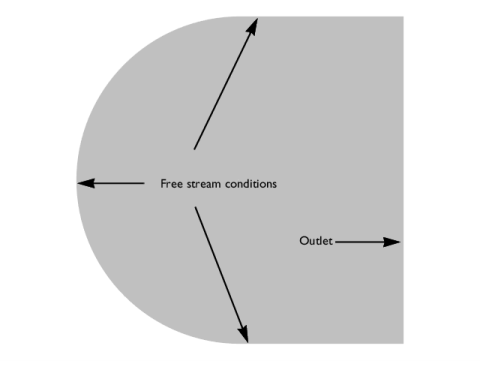
The geometry of the Eppler 387 airfoil is taken from Ref. 2. The flow domain is composed of a semicircle with radius 100 m and a rectangle with width 100 m.
Figure 1 shows the flow domain and the applied far-field boundary conditions,
Figure 1: Flow domain and far-field boundary conditions.
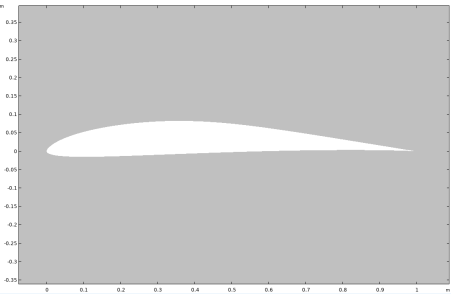
Figure 2 shows a close-up of the airfoil profile. A no-slip condition with low-Re wall treatment is applied on the surface of the airfoil for the SST simulations.
Figure 2: Close-up of the airfoil section.
A potential-flow solution was used to initialize the stationary SST simulation for the case without transition. Stationary solutions could not be obtained when the transition model was activated. Instead, transient simulations initialized with the stationary solutions without transition, were performed. An initial period of 4 s (roughly 4 by-pass times) was first simulated, and following that, data was collected during an additional period of 4 s. Time-averaging was then used to compare the results with the transition model to those without it.
Results and Discussion
The study performs a Parametric Sweep with the angle of attack taking the values
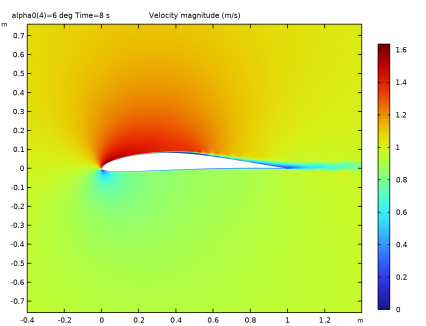
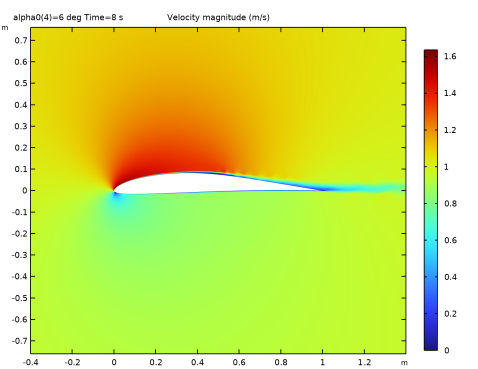
Figure 3 shows the velocity magnitude around the Eppler 387 airfoil profile at the angle of attack α = 6°.
Figure 3: Flow field around the E387 airfoil at t = 8 s and α = 6°.
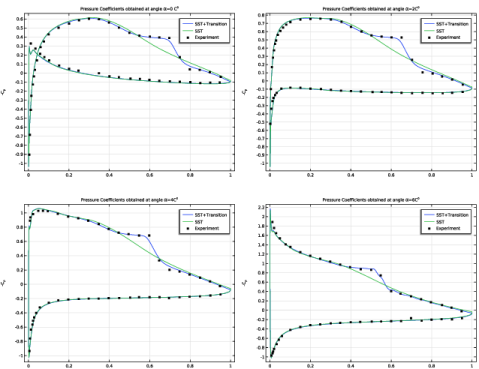
Comparisons of pressure coefficients are presented at different angles of attack. The pressure coefficient is defined as
Figure 4 shows comparisons between the computed pressure coefficients, with and without the transition model, and the experimental results, Ref. 2, at different α.
Figure 4: Comparison of pressure coefficients obtained with experimental data at different angles of attack α.
The SST turbulence model with transition modeling is able to capture the separation induced transition, and shows good agreement with the experimental results.
References
1. S. Karabay, “Implementation and assessment of K-Omega-Gamma transition model for turbulent flows,” NASA Langley Research Center Hampton, Virginia, 1990.
2. G.M. Cole and T.J. Muller, “Experimental measurements of the laminar separation bubble on an Eppler 387 airfoil at low Reynolds numbers,” NASA Langley Research Center Hampton, Virginia, 1990; ntrs.nasa.gov/citations/19900006064.
Application Library path: CFD_Module/Verification_Examples/eppler_airfoil_transition
Modeling Instructions
From the File menu, choose New.
New
In the New window, click  Model Wizard.
Model Wizard
1
In the Model Wizard window, click  2D.
2
In the Select Physics tree, select Fluid Flow > Single-Phase Flow > Potential Flow > Incompressible Potential Flow (ipf).
3
Click Add.
4
Click  Study.
5
In the Select Study tree, select General Studies > Stationary.
6
Global Definitions
Parameters 1
1
In the Model Builder window, under Global Definitions click Parameters 1.
2
In the Settings window for Parameters, locate the Parameters section.
3
Geometry 1
Interpolation Curve 1 (ic1)
1
In the Geometry toolbar, click  More Primitives and choose Interpolation Curve.
2
In the Settings window for Interpolation Curve, locate the Object Type section.
3
From the Type list, choose Solid.
4
Locate the Interpolation Points section. Click  Load from File.
5
6
Click  Build Selected.
Offset 1 (off1)
1
In the Geometry toolbar, click  Offset.
2
3
In the Settings window for Offset, locate the Options section.
4
In the Distance text field, type 0.25.
5
Click  Build Selected.
Circle 1 (c1)
1
In the Geometry toolbar, click  Circle.
2
In the Settings window for Circle, locate the Size and Shape section.
3
In the Radius text field, type 100.
4
In the Sector angle text field, type 180.
5
Locate the Position section. In the x text field, type 1.
6
Locate the Rotation Angle section. In the Rotation text field, type 90.
7
Click  Build Selected.
Rectangle 1 (r1)
1
In the Geometry toolbar, click  Rectangle.
2
In the Settings window for Rectangle, locate the Size and Shape section.
3
In the Width text field, type 100.
4
In the Height text field, type 200.
5
Locate the Position section. In the x text field, type 1.
6
In the y text field, type -100.
7
Click  Build Selected.
Line Segment 1 (ls1)
1
In the Geometry toolbar, click  More Primitives and choose Line Segment.
2
In the Settings window for Line Segment, locate the Starting Point section.
3
From the Specify list, choose Coordinates.
4
In the x text field, type -0.25.
5
Locate the Endpoint section. From the Specify list, choose Coordinates.
6
In the x text field, type 0.005.
7
Click  Build Selected.
Difference 1 (dif1)
1
In the Geometry toolbar, click  Booleans and Partitions and choose Difference.
2
Select the objects c1, ls1, off1, and r1 only.
3
In the Settings window for Difference, locate the Difference section.
4
Click to select the  Activate Selection toggle button for Objects to subtract.
5
6
Click  Build All Objects.
Ignore Vertices 1 (igv1)
1
In the Geometry toolbar, click  Virtual Operations and choose Ignore Vertices.
2
On the object fin, select Points 3, 5, 6, and 12 only.
3
Right-click Ignore Vertices 1 (igv1) and choose Build All Objects.
Definitions
Integration 1 (intop1)
1
In the Model Builder window, expand the Component 1 (comp1) > Definitions node.
2
Right-click Definitions and choose Nonlocal Couplings > Integration.
3
In the Settings window for Integration, locate the Source Selection section.
4
From the Geometric entity level list, choose Boundary.
5
Variables 1
1
Right-click Definitions and choose Variables.
2
In the Settings window for Variables, locate the Variables section.
3
Incompressible Potential Flow (ipf)
1
In the Model Builder window, under Component 1 (comp1) click Incompressible Potential Flow (ipf).
2
In the Settings window for Incompressible Potential Flow, locate the Pressure section.
3
In the Uscale text field, type U0.
Fluid Properties 1
1
In the Model Builder window, expand the Incompressible Potential Flow (ipf) node, then click Fluid Properties 1.
2
In the Settings window for Fluid Properties, locate the Fluid Properties section.
3
From the ρ list, choose User defined. In the associated text field, type rho0.
Velocity 1
1
In the Physics toolbar, click  Boundaries and choose Velocity.
2
Click the  Zoom Extents button in the Graphics toolbar.
3
4
In the Settings window for Velocity, locate the Velocity section.
5
In the Uin text field, type U0*(nxmesh*cos(alpha0)+nymesh*sin(alpha0)).
Open Boundary 1
1
In the Physics toolbar, click  Boundaries and choose Open Boundary.
2
Mesh 1
1
In the Model Builder window, under Component 1 (comp1) click Mesh 1.
2
In the Settings window for Mesh, locate the Sequence Type section.
3
From the list, choose User-controlled mesh.
Size
1
In the Model Builder window, under Component 1 (comp1) > Mesh 1 click Size.
2
In the Settings window for Size, locate the Element Size section.
3
Click the Custom button.
4
Locate the Element Size Parameters section. In the Maximum element size text field, type 5.
5
In the Maximum element growth rate text field, type 1.2.
Free Quad 1
1
In the Mesh toolbar, click  Free Quad.
2
Right-click Free Quad 1 and choose Move Up.
3
In the Settings window for Free Quad, locate the Domain Selection section.
4
From the Geometric entity level list, choose Domain.
5
Size 1
1
Right-click Free Quad 1 and choose Size.
2
In the Settings window for Size, locate the Element Size section.
3
From the Calibrate for list, choose Fluid dynamics.
4
From the Predefined list, choose Extremely fine.
5
Click the Custom button.
6
Locate the Element Size Parameters section.
7
Select the Maximum element size checkbox. In the associated text field, type 0.005.
8
Select the Minimum element size checkbox. In the associated text field, type 0.001.
Boundary Layers 1
1
In the Mesh toolbar, click  Boundary Layers.
2
In the Settings window for Boundary Layers, locate the Domain Selection section.
3
From the Geometric entity level list, choose Domain.
4
Boundary Layer Properties
1
In the Model Builder window, expand the Boundary Layers 1 node, then click Boundary Layer Properties.
2
3
In the Settings window for Boundary Layer Properties, locate the Layers section.
4
In the Number of layers text field, type 60.
5
In the Stretching factor text field, type 1.075.
6
From the Thickness specification list, choose First layer.
7
In the Thickness text field, type 1e-5.
8
Click  Build All.
Study 1
In the Study toolbar, click  Compute.
Add Physics
1
In the Home toolbar, click  Add Physics to open the Add Physics window.
2
Go to the Add Physics window.
3
In the tree, select Fluid Flow > Single-Phase Flow > Turbulent Flow > Turbulent Flow, SST (spf).
4
Find the Physics interfaces in study subsection. In the table, clear the Solve checkbox for Study 1.
5
Click the Add to Component 1 button in the window toolbar.
6
In the Home toolbar, click  Add Physics to close the Add Physics window.
Turbulent Flow, SST (spf)
1
In the Settings window for Turbulent Flow, SST, locate the Turbulence section.
2
From the Wall treatment list, choose Low Re.
Fluid Properties 1
1
In the Model Builder window, under Component 1 (comp1) > Turbulent Flow, SST (spf) click Fluid Properties 1.
2
In the Settings window for Fluid Properties, locate the Fluid Properties section.
3
From the ρ list, choose User defined. In the associated text field, type rho0.
4
From the μ list, choose User defined. In the associated text field, type mu0.
5
Locate the Distance Equation section. From the lref list, choose Manual.
6
Initial Values 1
1
In the Model Builder window, click Initial Values 1.
2
In the Settings window for Initial Values, locate the Initial Values section.
3
Specify the u vector as
4
In the p text field, type ipf.p.
5
In the k text field, type k0.
6
In the om text field, type om0.
Inlet 1
1
In the Physics toolbar, click  Boundaries and choose Inlet.
2
3
In the Settings window for Inlet, locate the Velocity section.
4
Click the Velocity field button.
5
Specify the u0 vector as
6
Locate the Turbulence Conditions section. Click the Specify turbulence variables button.
7
In the k0 text field, type k0.
8
In the ω0 text field, type om0.
Open Boundary 1
1
In the Physics toolbar, click  Boundaries and choose Open Boundary.
2
3
In the Settings window for Open Boundary, locate the Turbulence Conditions section.
4
Click the Specify turbulence variables button.
5
In the k0 text field, type k0.
6
In the ω0 text field, type om0.
Add Study
1
In the Home toolbar, click  Add Study to open the Add Study window.
2
Go to the Add Study window.
3
Find the Studies subsection. In the Select Study tree, select Preset Studies for Selected Physics Interfaces > Turbulent Flow, SST > Stationary with Initialization.
4
Click the Add Study button in the window toolbar.
5
Find the Physics interfaces in study subsection. In the table, enter the following settings:
6
In the Home toolbar, click  Add Study to close the Add Study window.
Study 2
Step 2: Stationary
1
In the Settings window for Stationary, locate the Physics and Variables Selection section.
2
In the Solve for column of the table, under Component 1 (comp1), clear the checkbox for Incompressible Potential Flow (ipf).
3
Click to expand the Study Extensions section. Select the Auxiliary sweep checkbox.
4
5
Step 1: Wall Distance Initialization
1
In the Model Builder window, click Step 1: Wall Distance Initialization.
2
In the Settings window for Wall Distance Initialization, click to expand the Values of Dependent Variables section.
3
Find the Values of variables not solved for subsection. From the Settings list, choose User controlled.
4
From the Study list, choose Study 1, Stationary.
Solution 2 (sol2)
1
In the Study toolbar, click  Show Default Solver.
2
In the Model Builder window, expand the Solution 2 (sol2) node.
3
In the Model Builder window, expand the Study 2 > Solver Configurations > Solution 2 (sol2) > Stationary Solver 2 node, then click Segregated 1.
4
In the Settings window for Segregated, locate the General section.
5
In the Maximum number of iterations text field, type 400.
6
In the PID controller - derivative text field, type 0.03.
7
In the Target error estimate text field, type 0.08.
8
Clear the Anderson acceleration checkbox.
9
In the Model Builder window, expand the Study 2 > Solver Configurations > Solution 2 (sol2) > Stationary Solver 2 > Segregated 1 node, then click Turbulence Variables.
10
In the Settings window for Segregated Step, click to expand the Method and Termination section.
11
Clear the Use adaptive tolerance in the linear solver checkbox.
12
In the Study toolbar, click  Compute.
Add Physics
1
In the Home toolbar, click  Add Physics to open the Add Physics window.
2
Go to the Add Physics window.
3
In the tree, select Fluid Flow > Single-Phase Flow > Turbulent Flow > Turbulent Flow, SST (spf).
4
Find the Physics interfaces in study subsection. In the table, clear the Solve checkboxes for Study 1 and Study 2.
5
Click the Add to Component 1 button in the window toolbar.
6
In the Home toolbar, click  Add Physics to close the Add Physics window.
Turbulent Flow, SST 2 (spf2)
1
In the Settings window for Turbulent Flow, SST, locate the Turbulence section.
2
Select the Include transition modeling checkbox.
Fluid Properties 1
1
In the Model Builder window, under Component 1 (comp1) > Turbulent Flow, SST 2 (spf2) click Fluid Properties 1.
2
In the Settings window for Fluid Properties, locate the Fluid Properties section.
3
From the ρ list, choose User defined. In the associated text field, type rho0.
4
From the μ list, choose User defined. In the associated text field, type mu0.
5
Locate the Distance Equation section. From the lref list, choose Manual.
6
Initial Values 1
1
In the Model Builder window, click Initial Values 1.
2
In the Settings window for Initial Values, locate the Initial Values section.
3
Specify the u vector as
4
In the p text field, type p.
5
In the k text field, type k.
6
In the om text field, type spf.om_global.
Inlet 1
1
In the Physics toolbar, click  Boundaries and choose Inlet.
2
3
In the Settings window for Inlet, locate the Velocity section.
4
Click the Velocity field button.
5
Specify the u0 vector as
6
Locate the Turbulence Conditions section. Click the Specify turbulence variables button.
7
In the k0 text field, type k0.
8
In the ω0 text field, type om0.
Open Boundary 1
1
In the Physics toolbar, click  Boundaries and choose Open Boundary.
2
3
In the Settings window for Open Boundary, locate the Turbulence Conditions section.
4
Click the Specify turbulence variables button.
5
In the k0 text field, type k0.
6
In the ω0 text field, type om0.
7
In the γ0 text field, type 1.
Add Study
1
In the Home toolbar, click  Add Study to open the Add Study window.
2
Go to the Add Study window.
3
Find the Studies subsection. In the Select Study tree, select Preset Studies for Some Physics Interfaces > Time Dependent with Initialization.
4
Click the Add Study button in the window toolbar.
5
Find the Physics interfaces in study subsection. In the table, clear the Solve checkboxes for Incompressible Potential Flow (ipf) and Turbulent Flow, SST (spf).
6
In the Home toolbar, click  Add Study to close the Add Study window.
Study 3
Parametric Sweep
1
In the Study toolbar, click  Parametric Sweep.
2
In the Settings window for Parametric Sweep, locate the Study Settings section.
3
4
Step 1: Wall Distance Initialization
1
In the Model Builder window, click Step 1: Wall Distance Initialization.
2
In the Settings window for Wall Distance Initialization, locate the Physics and Variables Selection section.
3
In the Solve for column of the table, under Component 1 (comp1), clear the checkbox for Turbulent Flow, SST (spf).
4
Locate the Values of Dependent Variables section. Find the Values of variables not solved for subsection. From the Settings list, choose User controlled.
5
From the Study list, choose Study 2, Stationary.
6
From the Solution list, choose Solution 2 (sol2).
Step 2: Time Dependent
1
In the Model Builder window, click Step 2: Time Dependent.
2
In the Settings window for Time Dependent, locate the Study Settings section.
3
In the Output times text field, type range(0,1,4), range(4,0.1,8).
4
Locate the Physics and Variables Selection section. In the Solve for column of the table, under Component 1 (comp1), clear the checkbox for Turbulent Flow, SST (spf).
Solution 4 (sol4)
1
In the Study toolbar, click  Show Default Solver.
2
In the Model Builder window, expand the Solution 4 (sol4) node, then click Time-Dependent Solver 1.
3
In the Settings window for Time-Dependent Solver, click to expand the Time Stepping section.
4
From the Maximum step constraint list, choose Constant.
5
In the Maximum step text field, type 0.0025.
6
From the Minimum BDF order list, choose 2.
7
Select the Rescale after initialization checkbox.
8
In the Study toolbar, click  Compute.
Results
Exterior Walls
1
In the Model Builder window, expand the Results > Datasets node.
2
Right-click Results > Datasets and choose Edge 2D.
3
In the Settings window for Edge 2D, locate the Data section.
4
From the Dataset list, choose Study 2/Solution 2 (sol2).
5
In the Label text field, type Exterior Walls.
6
Exterior Walls 1
1
Right-click Exterior Walls and choose Duplicate.
2
In the Settings window for Edge 2D, locate the Data section.
3
From the Dataset list, choose Study 3/Parametric Solutions 1 (sol6).
Time Average 1
1
In the Results toolbar, click  More Datasets and choose Evaluation > Time Average.
2
In the Settings window for Time Average, locate the Data section.
3
From the Dataset list, choose Exterior Walls 1.
4
From the Parameter selection (alpha0) list, choose First.
5
From the Time selection list, choose From list.
6
In the Times (s) list, choose 4 (2), 4.1, 4.2, 4.3, 4.4, 4.5, 4.6, 4.7, 4.8, 4.9, 5, 5.1, 5.2, 5.3, 5.4, 5.5, 5.6, 5.7, 5.8, 5.9, 6, 6.1, 6.2, 6.3, 6.4, 6.5, 6.6, 6.7, 6.8, 6.9, 7, 7.1, 7.2, 7.3, 7.4, 7.5, 7.6, 7.7, 7.8, 7.9, and 8.
Time Average 2
1
In the Results toolbar, click  More Datasets and choose Evaluation > Time Average.
2
In the Settings window for Time Average, locate the Data section.
3
From the Dataset list, choose Exterior Walls 1.
4
From the Parameter selection (alpha0) list, choose From list.
5
In the Parameter values (alpha0 (deg)) list box, select 2.
6
From the Time selection list, choose From list.
7
In the Times (s) list, choose 4 (2), 4.1, 4.2, 4.3, 4.4, 4.5, 4.6, 4.7, 4.8, 4.9, 5, 5.1, 5.2, 5.3, 5.4, 5.5, 5.6, 5.7, 5.8, 5.9, 6, 6.1, 6.2, 6.3, 6.4, 6.5, 6.6, 6.7, 6.8, 6.9, 7, 7.1, 7.2, 7.3, 7.4, 7.5, 7.6, 7.7, 7.8, 7.9, and 8.
Time Average 3
1
In the Results toolbar, click  More Datasets and choose Evaluation > Time Average.
2
In the Settings window for Time Average, locate the Data section.
3
From the Dataset list, choose Exterior Walls 1.
4
From the Parameter selection (alpha0) list, choose From list.
5
In the Parameter values (alpha0 (deg)) list box, select 4.
6
From the Time selection list, choose From list.
7
In the Times (s) list, choose 4 (2), 4.1, 4.2, 4.3, 4.4, 4.5, 4.6, 4.7, 4.8, 4.9, 5, 5.1, 5.2, 5.3, 5.4, 5.5, 5.6, 5.7, 5.8, 5.9, 6, 6.1, 6.2, 6.3, 6.4, 6.5, 6.6, 6.7, 6.8, 6.9, 7, 7.1, 7.2, 7.3, 7.4, 7.5, 7.6, 7.7, 7.8, 7.9, and 8.
Time Average 4
1
In the Results toolbar, click  More Datasets and choose Evaluation > Time Average.
2
In the Settings window for Time Average, locate the Data section.
3
From the Dataset list, choose Exterior Walls 1.
4
From the Parameter selection (alpha0) list, choose From list.
5
In the Parameter values (alpha0 (deg)) list box, select 6.
6
From the Time selection list, choose From list.
7
In the Times (s) list, choose 4 (2), 4.1, 4.2, 4.3, 4.4, 4.5, 4.6, 4.7, 4.8, 4.9, 5, 5.1, 5.2, 5.3, 5.4, 5.5, 5.6, 5.7, 5.8, 5.9, 6, 6.1, 6.2, 6.3, 6.4, 6.5, 6.6, 6.7, 6.8, 6.9, 7, 7.1, 7.2, 7.3, 7.4, 7.5, 7.6, 7.7, 7.8, 7.9, and 8.
Lift coefficient stationary Aoa=0
1
In the Results toolbar, click  Global Evaluation.
2
In the Settings window for Global Evaluation, locate the Data section.
3
From the Dataset list, choose Study 2/Solution 2 (sol2).
4
From the Parameter selection (alpha0) list, choose First.
5
Locate the Expressions section. In the table, enter the following settings:
6
In the Label text field, type Lift coefficient stationary Aoa=0.
Lift coefficient stationary Aoa=2
1
Right-click Lift coefficient stationary Aoa=0 and choose Duplicate.
2
In the Settings window for Global Evaluation, type Lift coefficient stationary Aoa=2 in the Label text field.
3
Locate the Data section. From the Parameter selection (alpha0) list, choose From list.
4
In the Parameter values (alpha0 (deg)) list box, select 2.
Lift coefficient stationary Aoa=4
1
Right-click Lift coefficient stationary Aoa=2 and choose Duplicate.
2
In the Settings window for Global Evaluation, locate the Data section.
3
In the Parameter values (alpha0 (deg)) list box, select 4.
4
In the Label text field, type Lift coefficient stationary Aoa=4.
Lift coefficient stationary Aoa=6
1
Right-click Lift coefficient stationary Aoa=4 and choose Duplicate.
2
In the Settings window for Global Evaluation, locate the Data section.
3
In the Parameter values (alpha0 (deg)) list box, select 6.
4
In the Label text field, type Lift coefficient stationary Aoa=6.
Lift coefficient transient Aoa=0
1
Right-click Lift coefficient stationary Aoa=6 and choose Duplicate.
2
In the Settings window for Global Evaluation, locate the Data section.
3
From the Dataset list, choose Time Average 1.
4
In the Label text field, type Lift coefficient transient Aoa=0.
5
Locate the Expressions section. In the table, enter the following settings:
Lift coefficient transient Aoa=2
1
Right-click Lift coefficient transient Aoa=0 and choose Duplicate.
2
In the Settings window for Global Evaluation, type Lift coefficient transient Aoa=2 in the Label text field.
3
Locate the Data section. From the Dataset list, choose Time Average 2.
Lift coefficient transient Aoa=4
1
Right-click Lift coefficient transient Aoa=2 and choose Duplicate.
2
In the Settings window for Global Evaluation, type Lift coefficient transient Aoa=4 in the Label text field.
3
Locate the Data section. From the Dataset list, choose Time Average 3.
Lift coefficient transient Aoa=6
1
Right-click Lift coefficient transient Aoa=4 and choose Duplicate.
2
In the Settings window for Global Evaluation, type Lift coefficient transient Aoa=6 in the Label text field.
3
Locate the Data section. From the Dataset list, choose Time Average 4.
Exp. Aoa=0
1
In the Results toolbar, click  Table.
2
In the Settings window for Table, type Exp. Aoa=0 in the Label text field.
3
Locate the Data section. Click  Import.
4
Exp. Aoa=2
1
In the Results toolbar, click  Table.
2
In the Settings window for Table, type Exp. Aoa=2 in the Label text field.
3
Locate the Data section. Click  Import.
4
Exp. Aoa=4
1
In the Results toolbar, click  Table.
2
In the Settings window for Table, type Exp. Aoa=4 in the Label text field.
3
Locate the Data section. Click  Import.
4
Exp. Aoa=6
1
In the Results toolbar, click  Table.
2
In the Settings window for Table, type Exp. Aoa=6 in the Label text field.
3
Locate the Data section. Click  Import.
4
Wall Resolution (spf)
1
In the Model Builder window, under Results click Wall Resolution (spf).
2
In the Settings window for 2D Plot Group, locate the Data section.
3
From the Parameter value (alpha0 (deg)) list, choose 0.
Line 1
1
In the Model Builder window, expand the Wall Resolution (spf) node, then click Line 1.
2
In the Settings window for Line, locate the Coloring and Style section.
3
In the Tube radius expression text field, type 0.01.
4
Select the Radius scale factor checkbox. In the associated text field, type 1.
5
In the Wall Resolution (spf) toolbar, click  Plot.
Velocity (spf2)
1
In the Model Builder window, under Results click Velocity (spf2).
2
In the Settings window for 2D Plot Group, locate the Plot Settings section.
3
Clear the Plot dataset edges checkbox.
4
In the Velocity (spf2) toolbar, click  Plot.
Click the Zoom In button in the Graphics toolbar a few times and then use the right mouse button to center the airfoil.
Line 1
1
In the Model Builder window, expand the Wall Resolution (spf2) node, then click Line 1.
2
In the Settings window for Line, locate the Coloring and Style section.
3
In the Tube radius expression text field, type 0.01.
4
Select the Radius scale factor checkbox. In the associated text field, type 1.
5
In the Wall Resolution (spf2) toolbar, click  Plot.
Aoa=0
1
In the Results toolbar, click  1D Plot Group.
2
In the Settings window for 1D Plot Group, type Aoa=0 in the Label text field.
3
Locate the Plot Settings section.
4
Select the y-axis label checkbox. In the associated text field, type -C<sub>p</sub>.
5
Click to expand the Title section. From the Title type list, choose Manual.
6
In the Title text area, type Pressure Coefficients obtained at angle \alpha =0 C<sup>0</sup>.
Line Graph 1
Right-click Aoa=0 and choose Line Graph.
SST+Transition
1
In the Model Builder window, expand the Results > Wall Resolution (spf2) > Line 1 node, then click Results > Aoa=0 > Line Graph 1.
2
In the Settings window for Line Graph, type SST+Transition in the Label text field.
3
Locate the Data section. From the Dataset list, choose Time Average 1.
4
Locate the y-Axis Data section. In the Expression text field, type -p2/(rho0*U0^2/2).
5
Locate the x-Axis Data section. From the Parameter list, choose Expression.
6
In the Expression text field, type x.
7
Click to expand the Legends section. Select the Show legends checkbox.
8
From the Legends list, choose Manual.
9
SST
1
In the Model Builder window, right-click Aoa=0 and choose Line Graph.
2
In the Settings window for Line Graph, type SST in the Label text field.
3
Locate the Data section. From the Dataset list, choose Exterior Walls.
4
From the Parameter selection (alpha0) list, choose First.
5
Locate the y-Axis Data section. In the Expression text field, type -p/(rho0*U0^2/2).
6
Locate the x-Axis Data section. From the Parameter list, choose Expression.
7
In the Expression text field, type x.
8
Locate the Legends section. Select the Show legends checkbox.
9
From the Legends list, choose Manual.
10
Experiment
1
Right-click Aoa=0 and choose Table Graph.
2
In the Settings window for Table Graph, type Experiment in the Label text field.
3
Locate the Coloring and Style section. Find the Line style subsection. From the Line list, choose None.
4
From the Color list, choose Black.
5
Find the Line markers subsection. From the Marker list, choose Point.
6
Click to expand the Legends section. Select the Show legends checkbox.
7
From the Legends list, choose Manual.
8
9
In the Aoa=0 toolbar, click  Plot.
Aoa=2
1
Right-click Aoa=0 and choose Duplicate.
2
In the Settings window for 1D Plot Group, type Aoa=2 in the Label text field.
3
Locate the Title section. In the Title text area, type Pressure Coefficients obtained at angle \alpha =2C<sup>0</sup>.
SST+Transition
1
In the Model Builder window, expand the Aoa=2 node, then click SST+Transition.
2
In the Settings window for Line Graph, locate the Data section.
3
From the Dataset list, choose Time Average 2.
SST
1
In the Model Builder window, click SST.
2
In the Settings window for Line Graph, locate the Data section.
3
From the Parameter selection (alpha0) list, choose From list.
4
In the Parameter values (alpha0 (deg)) list box, select 2.
Experiment
1
In the Model Builder window, click Experiment.
2
In the Settings window for Table Graph, locate the Data section.
3
From the Table list, choose Exp. Aoa=2.
4
In the Aoa=2 toolbar, click  Plot.
Aoa=4
1
In the Model Builder window, right-click Aoa=2 and choose Duplicate.
2
In the Settings window for 1D Plot Group, type Aoa=4 in the Label text field.
3
Locate the Title section. In the Title text area, type Pressure Coefficients obtained at angle \alpha =4C<sup>0</sup>.
SST+Transition
1
In the Model Builder window, expand the Aoa=4 node, then click SST+Transition.
2
In the Settings window for Line Graph, locate the Data section.
3
From the Dataset list, choose Time Average 3.
SST
1
In the Model Builder window, click SST.
2
In the Settings window for Line Graph, locate the Data section.
3
In the Parameter values (alpha0 (deg)) list box, select 4.
Experiment
1
In the Model Builder window, click Experiment.
2
In the Settings window for Table Graph, locate the Data section.
3
From the Table list, choose Exp. Aoa=4.
4
In the Aoa=4 toolbar, click  Plot.
Aoa=6
1
In the Model Builder window, right-click Aoa=4 and choose Duplicate.
2
In the Settings window for 1D Plot Group, type Aoa=6 in the Label text field.
3
Locate the Title section. In the Title text area, type Pressure Coefficients obtained at angle \alpha =6C<sup>0</sup>.
SST+Transition
1
In the Model Builder window, expand the Aoa=6 node, then click SST+Transition.
2
In the Settings window for Line Graph, locate the Data section.
3
From the Dataset list, choose Time Average 4.
SST
1
In the Model Builder window, click SST.
2
In the Settings window for Line Graph, locate the Data section.
3
In the Parameter values (alpha0 (deg)) list box, select 6.
Experiment
1
In the Model Builder window, click Experiment.
2
In the Settings window for Table Graph, locate the Data section.
3
From the Table list, choose Exp. Aoa=6.
4
In the Aoa=6 toolbar, click  Plot.