
|
|
|
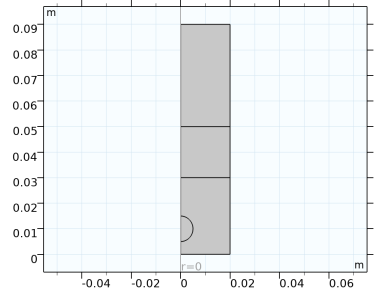
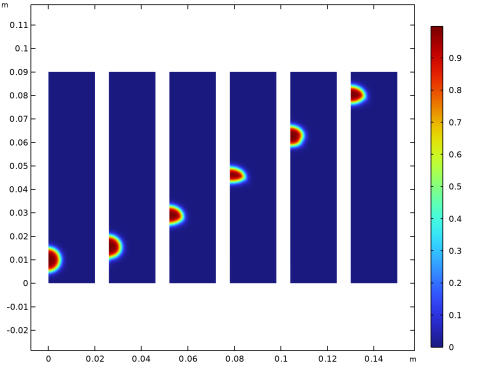
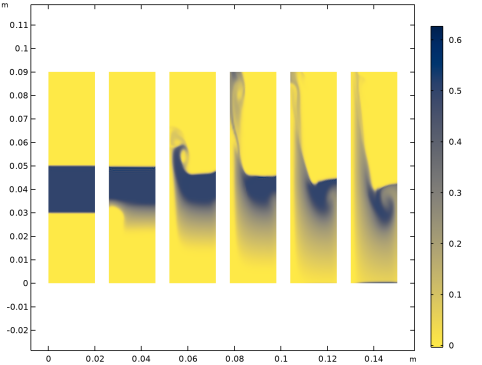
|
1
|
|
2
|
In the Select Physics tree, select Fluid Flow > Multiphase Flow > Two-Phase Flow, Level Set > Laminar Flow.
|
|
3
|
Click Add.
|
|
4
|
In the Select Physics tree, select Fluid Flow > Multiphase Flow > Phase Transport > Phase Transport (phtr).
|
|
5
|
Click Add.
|
|
6
|
Click
 Study. Study. |
|
7
|
In the Select Study tree, select Preset Studies for Selected Multiphysics > Time Dependent with Phase Initialization.
|
|
8
|
Click
 Done. Done. |
|
1
|
|
2
|
|
3
|
|
4
|
|
5
|
Click to expand the Layers section. In the table, enter the following settings:
|
|
1
|
|
2
|
|
3
|
|
4
|
|
5
|
|
6
|
|
1
|
|
2
|
Go to the Add Material window.
|
|
3
|
|
4
|
Click the Add to Component button in the window toolbar.
|
|
5
|
|
6
|
Click the Add to Component button in the window toolbar.
|
|
7
|
|
1
|
|
2
|
|
3
|
|
1
|
|
2
|
|
3
|
Select the Include gravity checkbox.
|
|
1
|
|
3
|
|
4
|
Clear the Compensate for hydrostatic pressure approximation checkbox.
|
|
5
|
Clear the Suppress backflow checkbox.
|
|
1
|
|
2
|
|
3
|
Clear the Compensate for hydrostatic pressure approximation checkbox.
|
|
1
|
In the Model Builder window, under Component 1 (comp1) > Level Set (ls) click Initial Values, Fluid 2.
|
|
1
|
|
1
|
|
2
|
|
1
|
|
3
|
|
4
|
|
1
|
In the Model Builder window, under Component 1 (comp1) > Multiphysics click Two-Phase Flow, Level Set 1 (tpf1).
|
|
2
|
|
3
|
|
4
|
|
5
|
|
6
|
Locate the Surface Tension section. Select the Include surface tension force in momentum equation checkbox.
|
|
7
|
From the Surface tension coefficient list, choose User defined. In the σ text field, type 3.2e-2[N/m].
|
|
1
|
|
1
|
|
2
|
|
3
|
|
4
|
Locate the Continuous Phase Properties section. From the Continuous phase list, choose Water, liquid (mat1).
|
|
5
|
Locate the Dispersed Phase 2 Properties section. From the ρs2 list, choose User defined. In the associated text field, type 1100[kg/m^3].
|
|
6
|
|
1
|
|
2
|
|
3
|
|
1
|
|
2
|
|
3
|
|
1
|
|
2
|
|
3
|
|
4
|
Find the Algebraic variable settings subsection. In the Fraction of initial step for Backward Euler text field, type 1.
|
|
5
|
|
1
|
|
2
|
|
3
|
|
1
|
|
2
|
|
3
|
Click Yes to confirm.
|
|
1
|
|
2
|
|
3
|
|
4
|
|
5
|
Click
 Plot First. Plot First. |
|
1
|
|
2
|
|
3
|
|
1
|
|
2
|
|
3
|
|
4
|
|
5
|
|
1
|
In the Model Builder window, expand the Results > Volume Fraction of Fluid 1 (ls) 1 node, then click Volume Fraction of Fluid 1 (ls) 1.
|
|
2
|
|
3
|
|
4
|
|
5
|
|
6
|
|
7
|
|
8
|
|
1
|
|
2
|
|
3
|
|
4
|
|
5
|
Click Define custom colors.
|
|
7
|
Click Add to custom colors.
|
|
8
|
|
1
|
|
2
|
|
3
|
|
4
|
|
5
|
|
6
|
|
1
|
|
2
|
|
3
|


