
|
|
|
|
1
|
|
2
|
|
3
|
Click Add.
|
|
4
|
Click
 Study. Study. |
|
5
|
|
6
|
Click
 Done. Done. |
|
1
|
|
2
|
|
3
|
Click
 Load from File. Load from File. |
|
4
|
Browse to the model’s Application Libraries folder and double-click the file lumped_li_battery_capacity_loss_parameters.txt.
|
|
1
|
|
2
|
|
3
|
|
4
|
Click
 Load from File. Load from File. |
|
5
|
Browse to the model’s Application Libraries folder and double-click the file lumped_li_battery_capacity_loss_E_OCP_data.txt.
|
|
1
|
|
2
|
|
3
|
|
4
|
|
5
|
|
6
|
|
1
|
In the Model Builder window, under Component 1 (comp1) > Lumped Battery (lb) click Cell Equilibrium Potential 1.
|
|
2
|
|
3
|
|
4
|
|
1
|
|
2
|
|
3
|
|
4
|
|
5
|
|
6
|
Locate the Concentration Overpotential section. Select the Include concentration overpotential checkbox.
|
|
7
|
|
1
|
|
2
|
|
3
|
|
4
|
|
5
|
Select the Voltage checkbox.
|
|
6
|
|
7
|
|
8
|
Select the Aging history checkbox.
|
|
9
|
|
1
|
|
2
|
|
1
|
|
2
|
|
3
|
Click
 Add. Add. |
|
1
|
|
2
|
|
3
|
|
4
|
|
5
|
|
6
|
Clear the Generate default plots checkbox.
|
|
7
|
|
1
|
|
2
|
|
3
|
Locate the Data section. From the Dataset list, choose Study 1: Calendar Life/Parametric Solutions 1 (sol2).
|
|
1
|
|
2
|
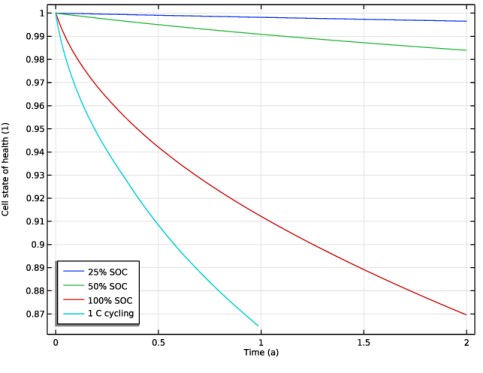
In the Settings window for Global, click Replace Expression in the upper-right corner of the y-Axis Data section. From the menu, choose Component 1 (comp1) > Lumped Battery > lb.SOH_cell - Cell state of health - 1.
|
|
3
|
|
4
|
|
5
|
|
1
|
|
2
|
|
3
|
|
4
|
|
5
|
|
1
|
|
2
|
|
3
|
|
4
|
From the list, choose C-rate multiple.
|
|
5
|
|
6
|
Select the Include rest period checkbox.
|
|
7
|
|
8
|
From the list, choose C-rate multiple.
|
|
9
|
|
10
|
Select the Include rest period checkbox.
|
|
11
|
|
1
|
|
2
|
|
3
|
Select the Current checkbox.
|
|
4
|
|
1
|
|
2
|
Go to the Add Study window.
|
|
3
|
|
4
|
Click the Add Study button in the window toolbar.
|
|
5
|
|
1
|
|
2
|
|
3
|
|
4
|
|
1
|
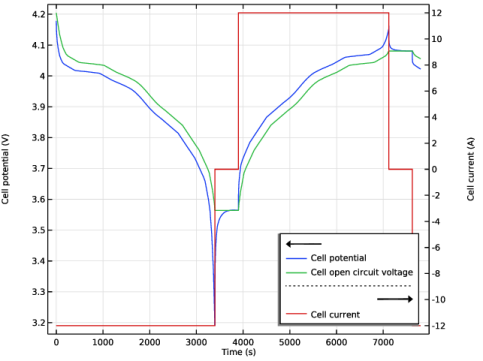
In the Settings window for 1D Plot Group, type Cell Potential and Load (Single Load Cycle) in the Label text field.
|
|
2
|
|
3
|
|
1
|
|
2
|
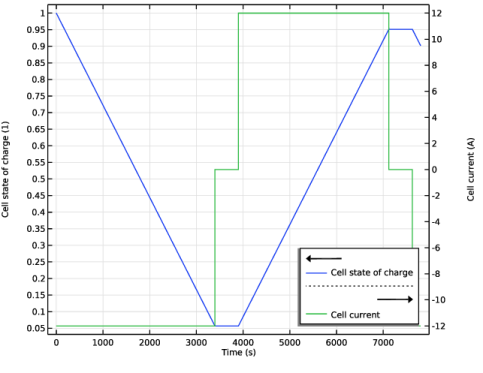
In the Settings window for 1D Plot Group, type Cell State of Charge (Single Load Cycle) in the Label text field.
|
|
3
|
|
4
|
|
1
|
|
2
|
Go to the Add Study window.
|
|
3
|
|
4
|
Click the Add Study button in the window toolbar.
|
|
5
|
|
1
|
|
2
|
|
3
|
|
4
|
|
5
|
|
6
|
Clear the Generate default plots checkbox.
|
|
7
|
|
1
|
In the Model Builder window, under Results > Cell State-of-Health right-click Global 1 and choose Duplicate.
|
|
2
|
|
3
|
|
4
|
|
1
|
|
2
|


