
PDF

Thermoacoustic Engine and Heat Pump
Introduction
Thermoacoustic devices are interesting systems which can generate sound waves from temperature gradients or use sound waves to create temperature gradients. The devices have no moving parts; this feature not only makes the devices look mysterious but also allow the systems to keep working without frequent maintenance. Although a thermoacoustic engine has a long history from pioneering work in the 1970s (Ref. 1), the research field is still active and developing; see, for example, Ref. 2 and Ref. 3.
There are two types of thermoacoustic systems: those that use standing waves and those that use traveling waves. In this model, a standing wave-type thermoacoustic system is simulated. The thermoacoustic system in the model consists of both a thermoacoustic engine and a thermoacoustic heat pump, and the heat pump is driven by the power generated by the engine. The Heat Transfer in Fluids interface is used to simulate the steady temperature field around the engine, and then the Thermoviscous Acoustics, Transient interface is coupled with the Heat Transfer in Solids interface to reproduce the pressure amplification by the engine and the cooling effect by the heat pump. In the Thermoviscous Acoustics, Transient interface, nonlinear terms are taken into consideration by using the Nonlinear Thermoviscous Acoustics Contributions feature, which is necessary for simulating the heat pump effect.
Model Definition
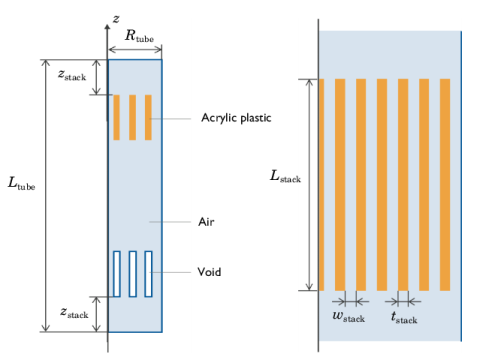
The model is a 2D axisymmetric thermoacoustic device, as shown in Figure 1. The geometry dimensions are listed in Table 1. The device consists of an 8 m-long tube and two sets of thermal stacks made of acrylic. In the figure, it is also noted that one of the stacks is omitted from the simulation. This is because the temperature distribution in the stack which functions as an engine is determined by an external input and can be modeled simply by giving boundary conditions on the surface. The model uses the same geometry as the pipe and stack of the Simple Thermoacoustic Engine tutorial model available in the on-line COMSOL Application Gallery, which refers to the geometry in Ref. 4.
Figure 1: Sketch of the analysis domain (left) and the thermal stack (right). For sake of visibility the figures are not to scale, and some of the plates in the thermal stacks are omitted from the left figure.
The spacing between the plates of the stacks is 1.5 mm, which is roughly two and a half time the thickness of the thermal boundary layer
(1)
where κ, ρ, and Cp are the thermal conductivity, density, and isobaric heat capacity of the air, respectively, and ω is the angular frequency of the standing wave.
Ltube
Lstack
Rtube
tstack
wstack
zstack
The relevant physical quantities are listed in Table 2. The boundary temperature of the engine stack varies by 270 K in the axial direction, which generates a temperature gradient large enough to amplify the oscillation. In the other stack, the temperature is fixed at a portion of the surface at 293.15 K, while the plates and the air are thermally coupled elsewhere. Around the heat pump stack, the Nonlinear Thermoviscous Acoustics Contributions node is enabled. It adds the nonlinear advection term to the governing equations, this term is important for modeling the thermoacoustic heat pump.
p0
T0
Tengine
In actual applications, the oscillation would be initiated by an external device, such as a speaker. In this model, however, the initial pressure is given a sinusoidal distribution whose wave length is half the pipe length. The upper end of the pipe is set to the maximum pressure, 1 kPa, while the minimum pressure, 1 kPa, is set at the lower end. This condition enables the model to reach a steady acoustic pressure amplitude in a few oscillations.
Results and Discussion
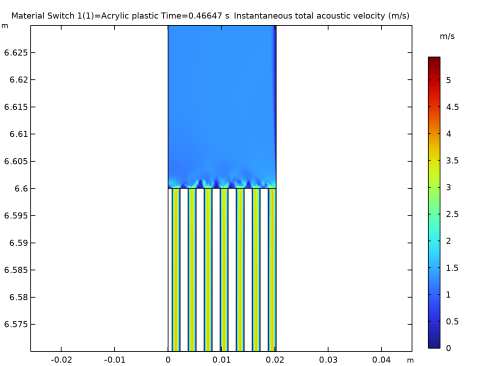
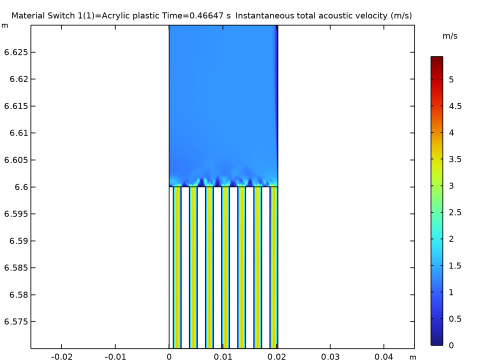
Figure 2 shows the instantaneous distribution of the magnitude of the acoustic velocity around the heat pump stack. Because the Thermoviscous Acoustics interface solves the transportation equation of the velocity, the flow field induced by the oscillation is resolved. It is confirmed that the air flows through the stack due to the oscillation, and the magnitude of the velocity becomes large inside the stack passages. Capturing the behavior of the acoustic velocity is important for thermoacoustic simulations, because the advection due to the oscillatory flow plays a key role in transporting heat.
Figure 2: Instantaneous acoustic velocity around the heat pump stack which is induced by the standing wave.
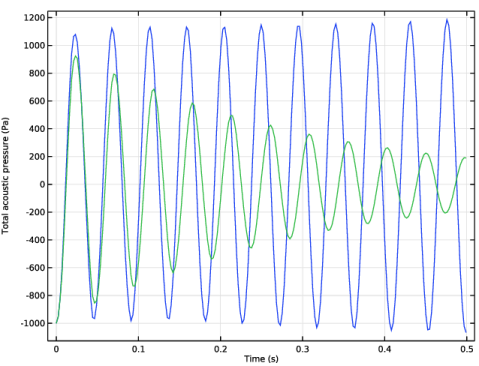
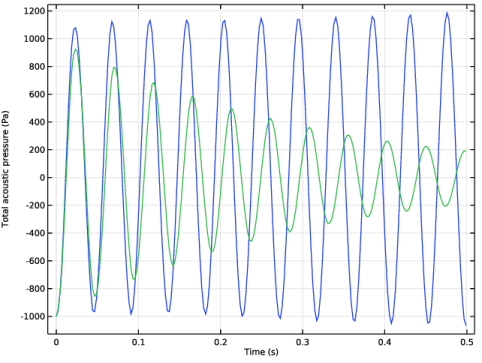
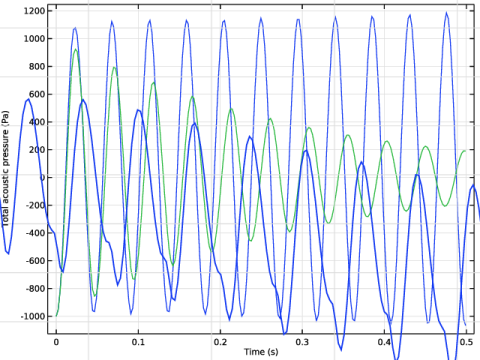
In Figure 3, the pressure history at a point on the lower face of the heat pump stacks (z = 6.46 m) is plotted. The figure compares two different conditions: the blue line corresponds to the original setting, while the green line shows the result without any temperature gradient in the engine stack. It is confirmed that the temperature gradient in the engine stack is maintaining the pressure amplitude. Without the temperature gradient in the engine stack, the pressure oscillation is damped by viscous losses.
Figure 3: The pressure as a function of time at the heat pump stack for a temperature gradient in the engine stack (blue) and without the temperature gradient (green).
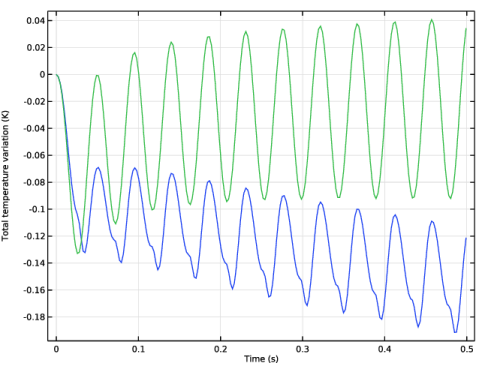
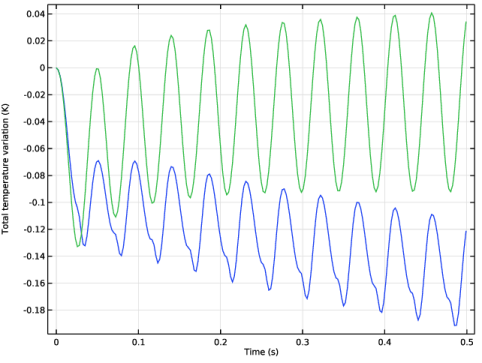
Figure 4 shows the temperature at the lower end of the heat pump stack (where the temperature becomes lowest). The figure also shows how the temperature is affected by the nonlinear terms. It is shown that the nonlinear terms must be considered when simulating the cooling effect by the heat pump. The nonlinear terms include a convection term responsible for the heat transport due to the coupling between the acoustic velocity field and the acoustic temperature field. Therefore, the temperature will not be decreased without the nonlinear terms.
Figure 4: The temperature as a function of time at the heat pump stack with the nonlinear contributions included (blue) and without the nonlinear contribution (green).
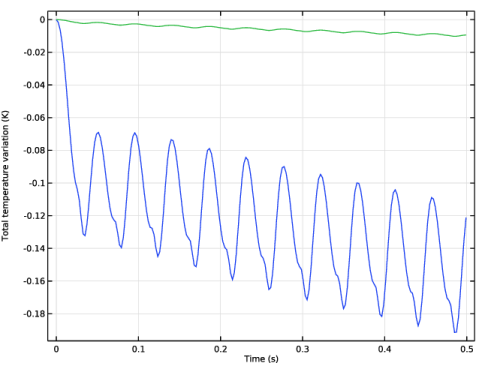
In a thermoacoustic heat pump the material of the stack is important, especially the thermal conductivity. In Figure 5 the temperature at the cooling end of the heat stack is shown for two different stack materials, acrylic plastic and copper. The temperature decrease is largest for the acrylic plastic. If the model with acrylic plastic is run for 60 s the temperature at the heat pump is cooled down with approximately 2 K.
Figure 5: The temperature as a function of time at the heat pump stack for two different stack materials, copper (green) and acrylic plastic (blue).
References
1. P.H. Ceperley, “A pistonless Stirling engine — The traveling wave heat engine,” J. Acoust. Soc. Am., vol. 66, no. 5, pp. 1508–1513, 1979.
2. M. McGaughy, C. Wang, E. Boessneck, T. Salem, and J. Wagner, “A Traveling Wave Thermoacoustic Engine — Design and Test,” ASME Lett. Dyn. Syst. Control, vol. 31, no. 031006, 2021.
3. Z. Bouramdane, A. Bah, M. Alaoui, and N. Martaj, “Design optimization and CFD analysis of the dynamic behavior of a standing wave thermoacoustic engine with various geometry parameters and boundary conditions,” Int. J. Air-Cond. Refrig., vol. 31, no. 1, 2023.
4. K. Kuzuu and S. Hasegawa, “Effect of non-linear flow behavior on heat transfer in a thermoacoustic engine core,” Int. J. Heat Mass Transfer, vol. 108, pp. 1591–1601, 2017.
Application Library path: Acoustics_Module/Nonlinear_Acoustics/thermoacoustic_engine_heat_pump
Modeling Instructions
From the File menu, choose New.
New
In the New window, click  Model Wizard.
Model Wizard
1
In the Model Wizard window, click  2D Axisymmetric.
2
In the Select Physics tree, select Heat Transfer > Heat Transfer in Solids (ht).
3
Click Add.
4
In the Select Physics tree, select Heat Transfer > Heat Transfer in Fluids (ht).
5
Click Add.
6
In the Select Physics tree, select Acoustics > Thermoviscous Acoustics > Thermoviscous Acoustics, Transient (tatd).
7
Click Add.
8
Click  Study.
9
In the Select Study tree, select Preset Studies for Some Physics Interfaces > Stationary.
10
Global Definitions
Parameters 1
1
In the Model Builder window, under Global Definitions click Parameters 1.
2
In the Settings window for Parameters, locate the Parameters section.
3
Click  Load from File.
4
Geometry 1
Rectangle 1 (r1)
1
In the Geometry toolbar, click  Rectangle.
2
In the Settings window for Rectangle, locate the Size and Shape section.
3
In the Width text field, type tube_R.
4
In the Height text field, type tube_L*2.
Rectangle 2 (r2)
1
In the Geometry toolbar, click  Rectangle.
2
In the Settings window for Rectangle, locate the Size and Shape section.
3
In the Width text field, type stack_w.
4
In the Height text field, type stack_L.
5
Locate the Position section. In the r text field, type 3/2*stack_w.
6
In the z text field, type stack_z.
Array 1 (arr1)
1
In the Geometry toolbar, click  Transforms and choose Array.
An array is used to create two stacks, one for the thermoacoustic engine and one for heat pump.
2
3
In the Settings window for Array, locate the Size section.
4
In the r size text field, type 6.
5
In the z size text field, type 2.
6
Locate the Displacement section. In the r text field, type 2*stack_w.
7
In the z text field, type 2*tube_L-2*stack_z-stack_L.
Rectangle 3 (r3)
1
In the Geometry toolbar, click  Rectangle.
2
In the Settings window for Rectangle, locate the Size and Shape section.
3
In the Width text field, type stack_w*0.5.
4
In the Height text field, type stack_L.
5
Locate the Position section. In the z text field, type stack_z.
Array 2 (arr2)
1
In the Geometry toolbar, click  Transforms and choose Array.
2
3
In the Settings window for Array, locate the Size section.
4
In the z size text field, type 2.
5
Locate the Displacement section. In the z text field, type 2*tube_L-2*stack_z-stack_L.
Difference 1 (dif1)
1
In the Geometry toolbar, click  Booleans and Partitions and choose Difference.
Subtract the heat engine stack since it is not modeled.
2
3
In the Settings window for Difference, locate the Difference section.
4
Click to select the  Activate Selection toggle button for Objects to subtract.
5
Select the objects arr1(1,1), arr1(2,1), arr1(3,1), arr1(4,1), arr1(5,1), arr1(6,1), and arr2(1,1) only.
Line Segment 1 (ls1)
1
In the Geometry toolbar, click  More Primitives and choose Line Segment.
2
In the Settings window for Line Segment, locate the Starting Point section.
3
From the Specify list, choose Coordinates.
4
In the z text field, type 2*tube_L-stack_z-stack_end.
5
Locate the Endpoint section. From the Specify list, choose Coordinates.
6
In the r text field, type tube_R.
7
In the z text field, type 2*tube_L-stack_z-stack_end.
Line Segment 2 (ls2)
1
Right-click Line Segment 1 (ls1) and choose Duplicate.
2
In the Settings window for Line Segment, locate the Starting Point section.
3
In the z text field, type stack_z.
4
Locate the Endpoint section. In the z text field, type stack_z.
Line Segment 3 (ls3)
1
Right-click Line Segment 2 (ls2) and choose Duplicate.
2
In the Settings window for Line Segment, locate the Starting Point section.
3
In the z text field, type stack_z+stack_L.
4
Locate the Endpoint section. In the z text field, type stack_z+stack_L.
Line Segment 4 (ls4)
1
Right-click Line Segment 3 (ls3) and choose Duplicate.
2
In the Settings window for Line Segment, locate the Starting Point section.
3
In the z text field, type 2*tube_L-stack_z-stack_L.
4
Locate the Endpoint section. In the z text field, type 2*tube_L-stack_z-stack_L.
Line Segment 5 (ls5)
1
Right-click Line Segment 4 (ls4) and choose Duplicate.
2
In the Settings window for Line Segment, locate the Starting Point section.
3
In the z text field, type 2*tube_L-stack_z.
4
Locate the Endpoint section. In the z text field, type 2*tube_L-stack_z.
Line Segment 6 (ls6)
1
Right-click Line Segment 5 (ls5) and choose Duplicate.
2
In the Settings window for Line Segment, locate the Starting Point section.
3
In the z text field, type 2*tube_L-stack_z+stack_L.
4
Locate the Endpoint section. In the z text field, type 2*tube_L-stack_z+stack_L.
Line Segment 7 (ls7)
1
Right-click Line Segment 6 (ls6) and choose Duplicate.
2
In the Settings window for Line Segment, locate the Starting Point section.
3
In the z text field, type 2*tube_L-stack_z-2*stack_L.
4
Locate the Endpoint section. In the z text field, type 2*tube_L-stack_z-2*stack_L.
Form Union (fin)
1
In the Geometry toolbar, click  Build All.
The geometry is parameterized so that it can be changed by changing the parameters.
Definitions
Two selections are made for the air and stack domains.
Heat stack
1
In the Definitions toolbar, click  Explicit.
2
In the Settings window for Explicit, type Heat stack in the Label text field.
3
Air
1
In the Definitions toolbar, click  Complement.
2
In the Settings window for Complement, locate the Input Entities section.
3
Under Selections to invert, click  Add.
4
In the Label text field, type Air.
5
In the Add dialog, select Heat stack in the Selections to invert list.
6
Add Material
1
In the Materials toolbar, click  Add Material to open the Add Material window.
2
Go to the Add Material window.
3
In the tree, select Built-in > Air.
4
Click the Add to Component button in the window toolbar.
Materials
Air (mat1)
1
In the Settings window for Material, locate the Geometric Entity Selection section.
2
From the Selection list, choose Air.
Add a material switch to easy switch between acrylic plastic and copper for the heat pump stack.
Material Switch 1 (sw1)
In the Model Builder window, right-click Materials and choose More Materials > Material Switch.
Add Material
1
Go to the Add Material window.
2
In the tree, select Built-in > Acrylic plastic and Built-in > Copper.
3
Click the right end of the Add to Component split button in the window toolbar.
4
From the menu, choose Add to Material Switch 1 (sw1).
5
In the Materials toolbar, click  Add Material to close the Add Material window.
Materials
1
In the Model Builder window, under Component 1 (comp1) > Materials click Material Switch 1 (sw1).
2
In the Settings window for Material Switch, locate the Geometric Entity Selection section.
3
From the Selection list, choose Heat stack.
Global Definitions
Ramp 1 (rm1)
1
In the Home toolbar, click  Functions and choose Global > Ramp.
2
In the Settings window for Ramp, locate the Parameters section.
3
In the Location text field, type stack_z+stack_end.
4
In the Slope text field, type -1/(stack_L-2*stack_end).
5
Select the Cutoff checkbox. In the associated text field, type -1.
6
Click to expand the Smoothing section.
7
Select the Size of transition zone at start checkbox. In the associated text field, type 0.02.
8
Select the Size of transition zone at cutoff checkbox. In the associated text field, type 0.02.
Tstack
1
In the Home toolbar, click  Functions and choose Global > Analytic.
The function describes the temperature distribution in the thermoacoustic engine.
2
In the Settings window for Analytic, type Tstack in the Label text field.
3
In the Function name text field, type Tstack.
4
Locate the Definition section. In the Expression text field, type (1+rm1(z/1[m]))*DeltaT.
5
In the Arguments text field, type z.
6
Locate the Units section. In the Function text field, type K.
7
p_initial
1
In the Home toolbar, click  Functions and choose Global > Analytic.
The function prescribes the initial condition of the pressure. A half wave resonance node in the length of the thermoacoustic system.
2
In the Settings window for Analytic, type p_initial in the Label text field.
3
In the Function name text field, type p_initial.
4
Locate the Definition section. In the Expression text field, type sin((z-tube_L)/(2*tube_L)*pi).
5
In the Arguments text field, type z.
6
Locate the Units section. In the table, enter the following settings:
Heat Transfer in Solids (ht)
1
In the Model Builder window, under Component 1 (comp1) click Heat Transfer in Solids (ht).
2
In the Settings window for Heat Transfer in Solids, locate the Domain Selection section.
3
From the Selection list, choose Heat stack.
Temperature 1
1
In the Physics toolbar, click  Boundaries and choose Temperature.
2
In the Settings window for Temperature, locate the Temperature section.
3
In the T0 text field, type T0.
4
Heat Transfer in Fluids 2 (ht2)
1
In the Model Builder window, under Component 1 (comp1) click Heat Transfer in Fluids 2 (ht2).
2
In the Settings window for Heat Transfer in Fluids, locate the Domain Selection section.
3
From the Selection list, choose Air.
4
In the Physics toolbar, click  Boundaries and choose Temperature.
Initial Values 1
1
In the Model Builder window, under Component 1 (comp1) > Heat Transfer in Fluids 2 (ht2) click Initial Values 1.
2
In the Settings window for Initial Values, locate the Initial Values section.
3
In the T2 text field, type T0.
Temperature - Engine stack
1
In the Model Builder window, click Temperature 1.
2
3
In the Settings window for Temperature, locate the Temperature section.
4
In the T0 text field, type T0+Tstack(z).
5
In the Label text field, type Temperature - Engine stack.
Temperature - Outer and heat pump stack
1
In the Physics toolbar, click  Boundaries and choose Temperature.
2
In the Settings window for Temperature, locate the Temperature section.
3
In the T0 text field, type T0.
4
5
In the Label text field, type Temperature - Outer and heat pump stack.
Thermoviscous Acoustics, Transient (tatd)
1
In the Model Builder window, under Component 1 (comp1) click Thermoviscous Acoustics, Transient (tatd).
2
In the Settings window for Thermoviscous Acoustics, Transient, locate the Domain Selection section.
3
From the Selection list, choose Air.
Linear shape functions are used for modeling the acoustic fields.
4
Click to expand the Discretization section. From the Element order for velocity list, choose Linear.
5
From the Element order for temperature list, choose Linear.
6
Locate the Transient Solver and Mesh Settings section. In the fmax text field, type f0.
When using linear shape functions it is necessary to use stabilization. In this case the SUPG stabilization is used.
7
Click the  Show More Options button in the Model Builder toolbar.
8
In the Show More Options dialog, select Physics > Stabilization in the tree.
9
10
11
In the Settings window for Thermoviscous Acoustics, Transient, click to expand the Stabilization section.
12
From the Stabilization method list, choose Streamline upwind Petrov–Galerkin (SUPG) stabilization.
Thermoviscous Acoustics Model 1
1
In the Model Builder window, expand the Thermoviscous Acoustics, Transient (tatd) node, then click Thermoviscous Acoustics Model 1.
2
In the Settings window for Thermoviscous Acoustics Model, locate the Model Input section.
3
From the T0 list, choose Temperature (ht2).
Initial Values 1
1
In the Model Builder window, click Initial Values 1.
2
In the Settings window for Initial Values, locate the Initial Values section.
3
In the p text field, type p0*p_initial(z).
Wall - Adiabatic
1
In the Model Builder window, under Component 1 (comp1) > Thermoviscous Acoustics, Transient (tatd) click Wall 1.
2
In the Settings window for Wall, type Wall - Adiabatic in the Label text field.
3
Locate the Thermal section. From the Thermal condition list, choose Adiabatic.
Nonlinear Thermoviscous Acoustics Contributions 1
1
In the Physics toolbar, click  Domains and choose Nonlinear Thermoviscous Acoustics Contributions.
Include the nonlinear contributions near the thermoacoustic heat pump where they are important.
2
3
In the Settings window for Nonlinear Thermoviscous Acoustics Contributions, locate the Model Input section.
4
From the T0 list, choose Temperature (ht2).
Wall - Isothermal
1
In the Physics toolbar, click  Boundaries and choose Wall.
2
3
In the Settings window for Wall, type Wall - Isothermal in the Label text field.
No Slip 1
1
In the Physics toolbar, click  Boundaries and choose No Slip.
2
Multiphysics
Thermoviscous Acoustic–Thermal Perturbation Boundary 1 (tatpb1)
1
In the Physics toolbar, click  Multiphysics Couplings and choose Boundary > Thermoviscous Acoustic–Thermal Perturbation Boundary.
2
The coupling feature couples the temperature fields in the air and heat pump stack.
Mesh 1
Mapped - Heat engine
1
In the Mesh toolbar, click  Mapped.
2
In the Settings window for Mapped, type Mapped - Heat engine in the Label text field.
3
Locate the Domain Selection section. From the Geometric entity level list, choose Domain.
4
Distribution 1
1
Right-click Mapped - Heat engine and choose Distribution.
2
3
In the Settings window for Distribution, locate the Distribution section.
4
In the Number of elements text field, type 10.
Distribution 2
1
In the Model Builder window, right-click Mapped - Heat engine and choose Distribution.
2
3
In the Settings window for Distribution, locate the Distribution section.
4
In the Number of elements text field, type 15.
Mapped - Heat pump
1
In the Mesh toolbar, click  Mapped.
2
In the Settings window for Mapped, type Mapped - Heat pump in the Label text field.
3
Locate the Domain Selection section. From the Geometric entity level list, choose Domain.
4
Distribution 1
1
Right-click Mapped - Heat pump and choose Distribution.
2
3
In the Settings window for Distribution, locate the Distribution section.
4
In the Number of elements text field, type 10.
Distribution 2
1
In the Model Builder window, right-click Mapped - Heat pump and choose Distribution.
2
In the Settings window for Distribution, locate the Distribution section.
3
In the Number of elements text field, type 4.
4
Distribution 3
1
Right-click Mapped - Heat pump and choose Distribution.
2
In the Settings window for Distribution, locate the Distribution section.
3
In the Number of elements text field, type 11.
4
Distribution 4
1
Right-click Mapped - Heat pump and choose Distribution.
2
3
In the Settings window for Distribution, locate the Distribution section.
4
In the Number of elements text field, type 2.
Boundary Layers 1
1
In the Mesh toolbar, click  Boundary Layers.
2
In the Settings window for Boundary Layers, click to expand the Transition section.
3
Clear the Smooth transition to interior mesh checkbox.
Boundary Layer Properties
1
In the Model Builder window, click Boundary Layer Properties.
2
3
4
In the Settings window for Boundary Layer Properties, locate the Layers section.
5
In the Number of layers text field, type 3.
Size
1
In the Model Builder window, under Component 1 (comp1) > Mesh 1 click Size.
2
In the Settings window for Size, locate the Element Size section.
3
Click the Custom button.
4
Locate the Element Size Parameters section. In the Maximum element size text field, type tube_R.
5
Click  Build All.
Study 1 - Steady Temperature Field
In study 1 the stationary temperature field induced by the engine stack is modeled.
1
In the Model Builder window, click Study 1.
2
In the Settings window for Study, type Study 1 - Steady Temperature Field in the Label text field.
Step 1: Stationary
1
In the Model Builder window, under Study 1 - Steady Temperature Field click Step 1: Stationary.
2
In the Settings window for Stationary, locate the Physics and Variables Selection section.
3
In the Solve for column of the table, under Component 1 (comp1), clear the checkbox for Heat Transfer in Solids (ht).
Add Study
1
In the Study toolbar, click  Add Study to open the Add Study window.
2
Go to the Add Study window.
3
Find the Studies subsection. In the Select Study tree, select General Studies > Time Dependent.
4
Click the Add Study button in the window toolbar.
5
In the Study toolbar, click  Add Study to close the Add Study window.
Study 2 - Time Dependent Acoustics - Stack Material
In study 2 the acoustics is modeled for the two different stack materials.
1
In the Settings window for Study, type Study 2 - Time Dependent Acoustics - Stack Material in the Label text field.
Material Sweep
1
In the Study toolbar, click  More Study Extensions and choose Material Sweep.
2
In the Settings window for Material Sweep, locate the Study Settings section.
3
Step 1: Time Dependent
1
In the Model Builder window, click Step 1: Time Dependent.
2
In the Settings window for Time Dependent, locate the Physics and Variables Selection section.
3
In the Solve for column of the table, under Component 1 (comp1), clear the checkbox for Heat Transfer in Fluids 2 (ht2).
4
Locate the Study Settings section. In the Output times text field, type range(0,t0/20,0.5).
5
Click to expand the Values of Dependent Variables section. Find the Values of variables not solved for subsection. From the Settings list, choose User controlled.
6
From the Method list, choose Solution.
7
From the Study list, choose Study 1 - Steady Temperature Field, Stationary.
Add Study
1
In the Study toolbar, click  Add Study to open the Add Study window.
2
Go to the Add Study window.
In study 3 we model the system with the thermoacoustic engine turned off.
3
Find the Studies subsection. In the Select Study tree, select General Studies > Time Dependent.
4
Click the Add Study button in the window toolbar.
5
In the Study toolbar, click  Add Study to close the Add Study window.
Study 3 - Time Dependent Acoustics - Engine off
1
In the Settings window for Study, type Study 3 - Time Dependent Acoustics - Engine off in the Label text field.
2
Locate the Study Settings section. Clear the Generate default plots checkbox.
1
In the Model Builder window, under Study 3 - Time Dependent Acoustics - Engine off click Step 1: Time Dependent.
2
In the Settings window for Time Dependent, locate the Physics and Variables Selection section.
3
In the Solve for column of the table, under Component 1 (comp1), clear the checkbox for Heat Transfer in Fluids 2 (ht2).
4
Locate the Study Settings section. In the Output times text field, type range(0,t0/20,0.5).
Add Study
1
In the Study toolbar, click  Add Study to open the Add Study window.
2
Go to the Add Study window.
In study 4 we model the system without including the nonlinear contributions.
3
Find the Studies subsection. In the Select Study tree, select General Studies > Time Dependent.
4
Click the Add Study button in the window toolbar.
5
In the Study toolbar, click  Add Study to close the Add Study window.
Study 4 - Time Dependent Acoustics - No Nonlinear Contributions
1
In the Settings window for Study, type Study 4 - Time Dependent Acoustics - No Nonlinear Contributions in the Label text field.
2
Locate the Study Settings section. Clear the Generate default plots checkbox.
1
In the Model Builder window, under Study 4 - Time Dependent Acoustics - No Nonlinear Contributions click Step 1: Time Dependent.
2
In the Settings window for Time Dependent, locate the Physics and Variables Selection section.
3
In the Solve for column of the table, under Component 1 (comp1), clear the checkbox for Heat Transfer in Fluids 2 (ht2).
4
Locate the Study Settings section. In the Output times text field, type range(0,t0/20,0.5).
5
Click to expand the Values of Dependent Variables section. Find the Values of variables not solved for subsection. From the Settings list, choose User controlled.
6
From the Method list, choose Solution.
7
From the Study list, choose Study 1 - Steady Temperature Field, Stationary.
8
Locate the Physics and Variables Selection section. Select the Modify model configuration for study step checkbox.
9
In the tree, select Component 1 (comp1) > Thermoviscous Acoustics, Transient (tatd) > Nonlinear Thermoviscous Acoustics Contributions 1.
10
Study 1 - Steady Temperature Field
In the Study toolbar, click  Compute.
Study 2 - Time Dependent Acoustics - Stack Material
Click  Compute.
Study 3 - Time Dependent Acoustics - Engine off
Click  Compute.
Study 4 - Time Dependent Acoustics - No Nonlinear Contributions
Click  Compute.
Results
Pressure - Engine on/off
1
In the Results toolbar, click  1D Plot Group.
2
In the Settings window for 1D Plot Group, type Pressure - Engine on/off in the Label text field.
3
Locate the Data section. From the Dataset list, choose Study 2 - Time Dependent Acoustics - Stack Material/Parametric Solutions 1 (sol3).
4
From the Material Switch 1 list, choose First.
5
Click to expand the Title section. From the Title type list, choose None.
Point Graph 1
1
Right-click Pressure - Engine on/off and choose Point Graph.
2
3
In the Settings window for Point Graph, locate the y-Axis Data section.
4
In the Expression text field, type tatd.p_t.
Point Graph 2
1
In the Model Builder window, right-click Pressure - Engine on/off and choose Point Graph.
2
In the Settings window for Point Graph, locate the Data section.
3
From the Dataset list, choose Study 3 - Time Dependent Acoustics - Engine off/Solution 6 (sol6).
4
Locate the y-Axis Data section. In the Expression text field, type tatd.p_t.
5
6
In the Pressure - Engine on/off toolbar, click  Plot.
Temperature - Nonlinear Contributions On/Off
1
In the Results toolbar, click  1D Plot Group.
2
In the Settings window for 1D Plot Group, type Temperature - Nonlinear Contributions On/Off in the Label text field.
3
Locate the Data section. From the Dataset list, choose Study 2 - Time Dependent Acoustics - Stack Material/Parametric Solutions 1 (sol3).
4
From the Material Switch 1 list, choose First.
5
Click to expand the Title section. From the Title type list, choose None.
Point Graph 1
1
Right-click Temperature - Nonlinear Contributions On/Off and choose Point Graph.
2
3
In the Settings window for Point Graph, locate the y-Axis Data section.
4
In the Expression text field, type tatd.T_t.
Point Graph 2
1
In the Model Builder window, right-click Temperature - Nonlinear Contributions On/Off and choose Point Graph.
2
3
In the Settings window for Point Graph, locate the Data section.
4
From the Dataset list, choose Study 4 - Time Dependent Acoustics - No Nonlinear Contributions/Solution 7 (sol7).
5
Locate the y-Axis Data section. In the Expression text field, type tatd.T_t.
6
In the Temperature - Nonlinear Contributions On/Off toolbar, click  Plot.
Temperature - Stack Material
1
In the Results toolbar, click  1D Plot Group.
2
In the Settings window for 1D Plot Group, type Temperature - Stack Material in the Label text field.
3
Locate the Data section. From the Dataset list, choose Study 2 - Time Dependent Acoustics - Stack Material/Parametric Solutions 1 (sol3).
4
Click to expand the Title section. From the Title type list, choose None.
Point Graph 1
1
Right-click Temperature - Stack Material and choose Point Graph.
2
3
In the Settings window for Point Graph, locate the y-Axis Data section.
4
In the Expression text field, type tatd.T_t.
5
Locate the x-Axis Data section. From the Axis source data list, choose Time.
6
In the Temperature - Stack Material toolbar, click  Plot.
Acoustic Velocity (tatd)
1
In the Model Builder window, under Results click Acoustic Velocity (tatd).
2
In the Settings window for 2D Plot Group, locate the Data section.
3
From the Material Switch 1 list, choose Acrylic plastic.
4
In the Acoustic Velocity (tatd) toolbar, click  Plot.
5
From the Time (s) list, choose 0.46647.
6
In the Acoustic Velocity (tatd) toolbar, click  Plot.