
PDF

Resonant Spiral Coil in 2D Axisymmetry
Introduction
This application presents an axisymmetric model of a self-resonating, 5-turn spiral coil of copper wire with 1 mm square cross section. The wire is equipped with a thin epoxy varnish insulation layer, tightly wound and mounted on a printed circuit board (PCB). The coil is modeled using the Magnetic and Electric Fields interface and the RLC Coil Group feature that captures the combination of inductive effects from currents flowing in the azimuthal direction and displacement and conduction currents flowing from one turn to another in the meridional direction. In order to efficiently resolve the small skin depth in the copper a Boundary Layer mesh is used. The modeling of thin insulation layers effectively becomes intractable in 3D if traditional volumetric meshing has to be employed. In the 3D variant of this model, Resonant Spiral Coil in 3D, it is done by using a special 3D boundary condition in the Magnetic and Electric Fields interface. Here the insulation layers are resolved by a mapped, quadrilateral mesh with a single mesh element through the thickness.
The purpose of the application is to investigate the self-resonance of the coil. This is done by sweeping the frequency through the regime where the coil reactance transitions from inductive at frequencies below resonance to capacitive at frequencies above resonance.
Model Definition
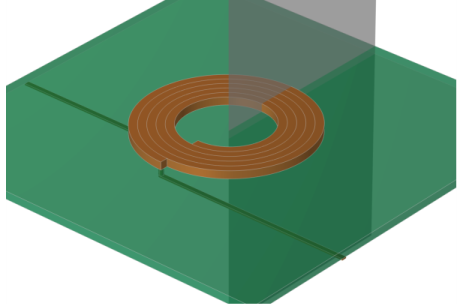
The model geometry consists of the spiral-shaped copper inductor with feed lines, the printed circuit board (PCB), and the surrounding air. Figure 1 shows the copper and PCB domains. The axisymmetric cross section used in the model is indicated. The outer diameter of the coil is about 20 mm.
Figure 1: 3D geometry of the spiral coil including the PCB and feed lines on the back side. The feed lines are not included in the axisymmetric model. The axisymmetric cross section used in the model is indicated.
The application uses the Magnetic and Electric Fields interface, taking meridional electric currents and azimuthal magnetically induced currents into account. The formulation solves for the azimuthal component of the magnetic vector potential A and the electric potential V. This way the model is inherently gauged. Using the definitions of the electric and magnetic potentials, the system of equations becomes
In the equations, A denotes the magnetic vector potential, V the electric scalar potential, Je the externally generated or prescribed azimuthal current density vector, σ the electric conductivity, ε0 the permittivity in vacuum, εr the relative permittivity, μ0 the permeability in vacuum, μr the relative permeability, r the radial coordinate, and z the axial coordinate. The first equation is Maxwell–Ampère’s law for azimuthal currents only as indicated by the second equation. The third equation is the equation of continuity for meridional currents, stating the meridional conservation of charge. The magnetic vector potential and the electric scalar potential are decoupled everywhere save on the boundaries of the domain selection for the RLC Coil Group feature where additional equations and state variables impose a, turn to turn, current balance between the flow of meridional currents represented by the scalar electric potential and the flow of azimuthal currents represented by the magnetic vector potential. The externally generated azimuthal current density, Je, is formally zero everywhere though the current balancing is introduced by a similar term not shown in the equations above. The current balancing can be seen as being performed in an azimuthal, turn-to-turn average sense.
The application uses a 5 mV Voltage excitation of the RLC Coil Group feature. The feed impedance Z is then obtained from the resulting coil current.
Results
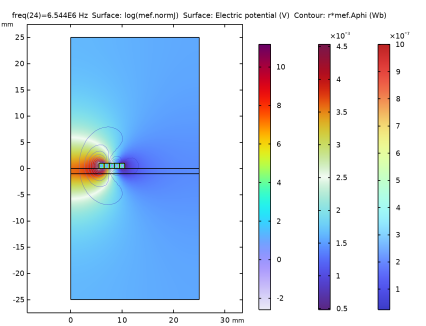
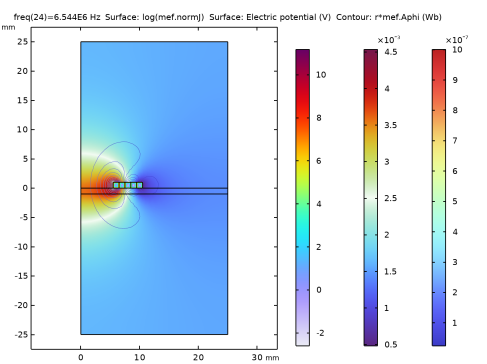
Figure 2 shows the current density (logarithmic), the magnetic flux density norm, and the electric potential distribution in the coil at the resonance frequency. The skin and proximity effects are pronounced with the current flow concentrated to the edges of the turns.
Figure 2: Current density (logarithm), magnetic flux density norm, and electric potential distribution in the resonating coil exhibiting pronounced skin and proximity effects.
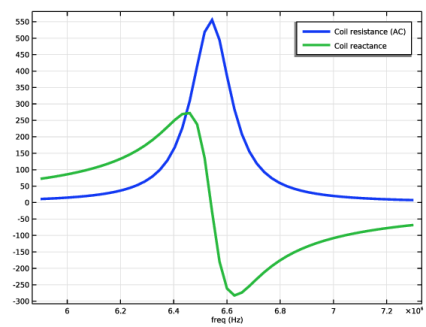
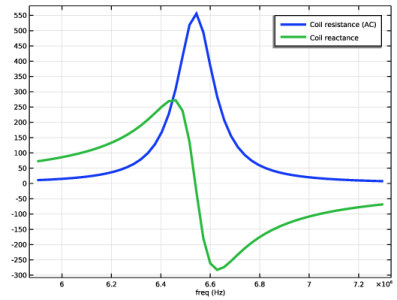
Figure 3 displays the feed impedance of the coil where the reactance transitions from inductive at frequencies below resonance to capacitive at frequencies above resonance.
Figure 3: The feed impedance (resistance and reactance) is shown. Note the transition from inductive (positive) to capacitive (negative) reactance at the resonance frequency.
Application Library path: ACDC_Module/Tutorials,_Coils/resonant_spiral_coil_2daxi
Modeling Instructions
From the File menu, choose New.
New
In the New window, click  Model Wizard.
Model Wizard
1
In the Model Wizard window, click  2D Axisymmetric.
2
In the Select Physics tree, select AC/DC > Electromagnetic Fields > Vector Formulations > Magnetic and Electric Fields (mef).
3
Click Add.
4
Click  Study.
5
In the Select Study tree, select General Studies > Frequency Domain.
6
Define all the required parameters.
Global Definitions
Parameters 1
1
In the Model Builder window, under Global Definitions click Parameters 1.
2
In the Settings window for Parameters, locate the Parameters section.
3
Geometry 1
The following instructions explain how to build the model geometry.
1
In the Model Builder window, under Component 1 (comp1) click Geometry 1.
2
In the Settings window for Geometry, locate the Units section.
3
Select the Scale values when changing units checkbox.
4
From the Length unit list, choose mm.
Rectangle 1 (r1)
1
In the Geometry toolbar, click  Rectangle.
2
In the Settings window for Rectangle, locate the Position section.
3
From the Base list, choose Center.
4
In the r text field, type 6.
5
In the z text field, type 0.5.
6
Click to expand the Layers section. In the table, enter the following settings:
7
Select the Layers to the left checkbox.
8
Select the Layers to the right checkbox.
9
Select the Layers on top checkbox.
10
Click  Build Selected.
Rectangle 2 (r2)
1
In the Geometry toolbar, click  Rectangle.
2
In the Settings window for Rectangle, locate the Position section.
3
From the Base list, choose Center.
4
In the r text field, type 7.
5
In the z text field, type 0.5.
6
Locate the Layers section. In the table, enter the following settings:
7
Select the Layers to the left checkbox.
8
Select the Layers to the right checkbox.
9
Select the Layers on top checkbox.
10
Click  Build Selected.
Rectangle 3 (r3)
1
In the Geometry toolbar, click  Rectangle.
2
In the Settings window for Rectangle, locate the Position section.
3
From the Base list, choose Center.
4
In the r text field, type 8.
5
In the z text field, type 0.5.
6
Locate the Layers section. In the table, enter the following settings:
7
Select the Layers to the left checkbox.
8
Select the Layers to the right checkbox.
9
Select the Layers on top checkbox.
10
Click  Build Selected.
Rectangle 4 (r4)
1
In the Geometry toolbar, click  Rectangle.
2
In the Settings window for Rectangle, locate the Position section.
3
From the Base list, choose Center.
4
In the r text field, type 9.
5
In the z text field, type 0.5.
6
Locate the Layers section. In the table, enter the following settings:
7
Select the Layers to the left checkbox.
8
Select the Layers to the right checkbox.
9
Select the Layers on top checkbox.
Rectangle 5 (r5)
1
In the Geometry toolbar, click  Rectangle.
2
In the Settings window for Rectangle, locate the Position section.
3
From the Base list, choose Center.
4
In the r text field, type 10.
5
In the z text field, type 0.5.
6
Locate the Layers section. In the table, enter the following settings:
7
Select the Layers to the left checkbox.
8
Select the Layers to the right checkbox.
9
Select the Layers on top checkbox.
10
Click  Build Selected.
Rectangle 6 (r6)
1
In the Geometry toolbar, click  Rectangle.
2
In the Settings window for Rectangle, locate the Size and Shape section.
3
In the Width text field, type 25.
4
Locate the Position section. In the z text field, type -1.
5
Click  Build Selected.
Rectangle 7 (r7)
1
In the Geometry toolbar, click  Rectangle.
2
In the Settings window for Rectangle, locate the Size and Shape section.
3
In the Width text field, type 25.
4
In the Height text field, type 50.
5
Locate the Position section. In the z text field, type -25.
6
Click  Build Selected.
7
In the Model Builder window, collapse the Geometry 1 node.
Definitions
Copper
1
In the Model Builder window, expand the Component 1 (comp1) > Definitions node.
2
Right-click Definitions and choose Selections > Explicit.
3
In the Settings window for Explicit, type Copper in the Label text field.
4
Locate the Input Entities section. Click  Paste Selection.
5
In the Paste Selection dialog, type 8, 17, 26, 35, 44 in the Selection text field.
6
Layer Corner Boundaries
1
In the Definitions toolbar, click  Explicit.
2
In the Settings window for Explicit, type Layer Corner Boundaries in the Label text field.
3
Locate the Input Entities section. Click  Paste Selection.
4
In the Paste Selection dialog, type 4, 6, 10, 12, 13, 15, 19, 21, 22, 24, 28, 30, 31, 33, 37, 39, 40, 42, 46, 48 in the Selection text field.
5
6
In the Settings window for Explicit, locate the Output Entities section.
7
From the Output entities list, choose Adjacent boundaries.
Layer Side Boundaries
1
In the Definitions toolbar, click  Explicit.
2
In the Settings window for Explicit, type Layer Side Boundaries in the Label text field.
3
Locate the Input Entities section. Click  Paste Selection.
4
In the Paste Selection dialog, type 5, 7, 9, 11, 14, 16, 18, 20, 23, 25, 27, 29, 32, 34, 36, 38, 41, 43, 45, 47 in the Selection text field.
5
6
In the Settings window for Explicit, locate the Output Entities section.
7
From the Output entities list, choose Adjacent boundaries.
Varnish
1
In the Definitions toolbar, click  Explicit.
2
In the Settings window for Explicit, type Varnish in the Label text field.
3
Locate the Input Entities section. Click  Paste Selection.
4
In the Paste Selection dialog, type 4-7, 9-16, 18-25, 27-34, 36-43, 45-48 in the Selection text field.
5
Difference 1
1
In the Definitions toolbar, click  Difference.
2
In the Settings window for Difference, locate the Geometric Entity Level section.
3
From the Level list, choose Boundary.
4
Locate the Input Entities section. Under Selections to add, click  Add.
5
In the Add dialog, select Layer Side Boundaries in the Selections to add list.
6
7
In the Settings window for Difference, locate the Input Entities section.
8
Under Selections to subtract, click  Add.
9
In the Add dialog, select Layer Corner Boundaries in the Selections to subtract list.
10
Add Material
1
In the Materials toolbar, click  Add Material to open the Add Material window.
2
Go to the Add Material window.
3
In the tree, select AC/DC > FR4 (Circuit Board).
4
Click the Add to Component button in the window toolbar.
5
In the tree, select AC/DC > Copper.
6
Click the Add to Component button in the window toolbar.
7
In the Materials toolbar, click  Add Material to close the Add Material window.
Materials
FR4 (Circuit Board) (mat1)
1
In the Settings window for Material, locate the Geometric Entity Selection section.
2
From the Selection list, choose Varnish.
3
4
Locate the Material Contents section. In the table, enter the following settings:
Copper (mat2)
1
In the Model Builder window, click Copper (mat2).
2
In the Settings window for Material, locate the Geometric Entity Selection section.
3
From the Selection list, choose Copper.
4
In the Model Builder window, collapse the Component 1 (comp1) > Materials node.
Magnetic and Electric Fields (mef)
1
In the Model Builder window, under Component 1 (comp1) click Magnetic and Electric Fields (mef).
2
In the Settings window for Magnetic and Electric Fields, click to expand the Discretization section.
3
From the Magnetic vector potential list, choose Linear.
4
From the Electric potential list, choose Linear.
Magnetic Insulation 1
In the Model Builder window, under Component 1 (comp1) > Magnetic and Electric Fields (mef) click Magnetic Insulation 1.
Electric Insulation 1
1
In the Physics toolbar, click  Attributes and choose Electric Insulation.
2
In the Settings window for Electric Insulation, locate the Boundary Selection section.
3
From the Selection list, choose All boundaries.
Ampère’s Law and Current Conservation in Solids 1
1
In the Physics toolbar, click  Domains and choose Ampère’s Law and Current Conservation in Solids.
2
Ampère’s Law 1
1
In the Physics toolbar, click  Domains and choose Ampère’s Law.
2
In the Settings window for Ampère’s Law, locate the Domain Selection section.
3
From the Selection list, choose Copper.
RLC Coil Group 1
1
In the Physics toolbar, click  Domains and choose RLC Coil Group.
2
In the Settings window for RLC Coil Group, locate the Domain Selection section.
3
From the Selection list, choose Copper.
4
Locate the RLC Coil Group section. From the Coil excitation list, choose Voltage.
5
In the Vcoil text field, type 5[mV].
6
Locate the Geometry section. From the Domain ordering list, choose Manual.
7
In the Domain list text field, type 44 35 26 17 8.
8
In the Model Builder window, collapse the Magnetic and Electric Fields (mef) node.
Mesh 1
1
In the Model Builder window, under Component 1 (comp1) click Mesh 1.
2
In the Settings window for Mesh, locate the Sequence Type section.
3
From the list, choose User-controlled mesh.
Size
1
In the Model Builder window, under Component 1 (comp1) > Mesh 1 click Size.
2
In the Settings window for Size, locate the Element Size section.
3
Click the Custom button.
4
Locate the Element Size Parameters section. In the Maximum element size text field, type 1.
5
In the Minimum element size text field, type 0.3.
6
In the Maximum element growth rate text field, type 1.5.
7
In the Curvature factor text field, type 0.6.
8
Click  Build Selected.
Size 1
1
In the Model Builder window, right-click Mesh 1 and choose Size.
2
In the Settings window for Size, locate the Geometric Entity Selection section.
3
From the Geometric entity level list, choose Domain.
4
From the Selection list, choose Copper.
5
Locate the Element Size section. Click the Custom button.
6
Locate the Element Size Parameters section.
7
Select the Maximum element size checkbox. In the associated text field, type 1.
8
Click  Build Selected.
Edge 1
1
In the Mesh toolbar, click  More Generators and choose Edge.
2
In the Settings window for Edge, locate the Boundary Selection section.
3
From the Selection list, choose Layer Corner Boundaries.
Distribution 1
1
Right-click Edge 1 and choose Distribution.
2
In the Settings window for Distribution, locate the Boundary Selection section.
3
From the Selection list, choose Layer Corner Boundaries.
4
Locate the Distribution section. In the Number of elements text field, type 1.
5
Click  Build Selected.
Edge 2
1
In the Mesh toolbar, click  More Generators and choose Edge.
2
In the Settings window for Edge, locate the Boundary Selection section.
3
From the Selection list, choose Difference 1.
Distribution 1
1
Right-click Edge 2 and choose Distribution.
2
In the Settings window for Distribution, locate the Boundary Selection section.
3
From the Selection list, choose Difference 1.
4
Locate the Distribution section. In the Number of elements text field, type 1000.
5
Click  Build Selected.
Mapped 1
1
In the Mesh toolbar, click  Mapped.
2
In the Settings window for Mapped, locate the Domain Selection section.
3
From the Geometric entity level list, choose Domain.
4
From the Selection list, choose Varnish.
5
Click to expand the Reduce Element Skewness section. Click  Build Selected.
Free Triangular 1
1
In the Model Builder window, click Free Triangular 1.
2
In the Settings window for Free Triangular, click to expand the Scale Geometry section.
3
Click to expand the Mesh Generation section. Click  Build Selected.
4
In the Model Builder window, collapse the Mesh 1 node.
Study 1
1
In the Model Builder window, click Study 1.
2
In the Settings window for Study, locate the Study Settings section.
3
Clear the Generate default plots checkbox.
Step 1: Frequency Domain
1
In the Model Builder window, under Study 1 click Step 1: Frequency Domain.
2
In the Settings window for Frequency Domain, locate the Study Settings section.
3
In the Frequencies text field, type range(5900000,28000,7300000).
Definitions
Global Variable Probe 1 (var1)
1
In the Definitions toolbar, click  Probes and choose Global Variable Probe.
2
In the Settings window for Global Variable Probe, locate the Expression section.
3
In the Expression text field, type mef.RCoil_1.
Global Variable Probe 2 (var2)
1
In the Definitions toolbar, click  Probes and choose Global Variable Probe.
2
In the Settings window for Global Variable Probe, locate the Expression section.
3
In the Expression text field, type mef.XCoil_1.
4
In the Table and plot unit field, type [Omega].
5
In the Model Builder window, collapse the Definitions node.
Study 1
In the Study toolbar, click  Compute.
Results
Study 1/Solution 1 (3) (sol1)
1
In the Model Builder window, expand the Results > Datasets node.
2
Right-click Results > Datasets and choose Solution.
3
Drag and drop Study 1/Solution 1 (3) (sol1) below Study 1/Solution 1 (3) (sol1).
Selection
1
In the Results toolbar, click  Attributes and choose Selection.
2
In the Settings window for Selection, locate the Geometric Entity Selection section.
3
From the Geometric entity level list, choose Boundary.
4
Click  Paste Selection.
5
In the Paste Selection dialog, type 24, 31, 38, 45, 52, 59, 66, 73, 80, 87, 94, 101 in the Selection text field.
6
Study 1/Solution 1 (4) (sol1)
In the Results toolbar, click  More Datasets and choose Solution.
Selection
1
In the Results toolbar, click  Attributes and choose Selection.
2
In the Settings window for Selection, locate the Geometric Entity Selection section.
3
From the Geometric entity level list, choose Domain.
4
Click  Paste Selection.
5
In the Paste Selection dialog, type 8, 17, 26, 35, 44 in the Selection text field.
6
Study 1/Solution 1 (5) (sol1)
In the Results toolbar, click  More Datasets and choose Solution.
Selection
1
In the Results toolbar, click  Attributes and choose Selection.
2
In the Settings window for Selection, locate the Geometric Entity Selection section.
3
From the Geometric entity level list, choose Domain.
4
Revolution 2D 1
1
In the Results toolbar, click  More Datasets and choose Revolution 2D.
2
In the Settings window for Revolution 2D, locate the Data section.
3
From the Dataset list, choose Study 1/Solution 1 (3) (sol1).
Revolution 2D 2
1
In the Results toolbar, click  More Datasets and choose Revolution 2D.
2
In the Settings window for Revolution 2D, locate the Data section.
3
From the Dataset list, choose Study 1/Solution 1 (4) (sol1).
4
Click to expand the Revolution Layers section. In the Start angle text field, type -90.
5
In the Revolution angle text field, type 270.
6
Click to expand the Advanced section. Click  Plot.
Revolution 2D 1
1
In the Model Builder window, click Revolution 2D 1.
2
In the Settings window for Revolution 2D, click  Plot.
Revolution 2D 3
1
In the Results toolbar, click  More Datasets and choose Revolution 2D.
2
In the Settings window for Revolution 2D, locate the Data section.
3
From the Dataset list, choose Study 1/Solution 1 (5) (sol1).
4
Locate the Revolution Layers section. In the Start angle text field, type -90.
5
In the Revolution angle text field, type 270.
6
Revolution 2D 4
1
In the Results toolbar, click  More Datasets and choose Revolution 2D.
2
In the Settings window for Revolution 2D, locate the Revolution Layers section.
3
In the Start angle text field, type -90.
4
In the Revolution angle text field, type 270.
5
6
In the Model Builder window, collapse the Results > Datasets node.
J, B and V
1
In the Results toolbar, click  2D Plot Group.
2
In the Settings window for 2D Plot Group, type J, B and V in the Label text field.
3
Locate the Data section. From the Parameter value (freq (Hz)) list, choose 6.544E6.
Surface 1
1
Right-click J, B and V and choose Surface.
2
In the Settings window for Surface, locate the Expression section.
3
In the Expression text field, type log(mef.normJ).
4
Locate the Coloring and Style section. From the Color table list, choose Prism.
5
Click to expand the Inherit Style section.
Selection 1
1
Right-click Surface 1 and choose Selection.
2
In the Settings window for Selection, locate the Selection section.
3
Click  Paste Selection.
4
In the Paste Selection dialog, type 8, 17, 26, 35, 44 in the Selection text field.
5
Surface 2
1
In the Model Builder window, right-click J, B and V and choose Surface.
2
In the Settings window for Surface, locate the Coloring and Style section.
3
From the Color table list, choose Dipole.
Contour 1
1
Right-click J, B and V and choose Contour.
2
In the Settings window for Contour, locate the Expression section.
3
In the Expression text field, type r*mef.Aphi.
4
Locate the Coloring and Style section. From the Contour type list, choose Tube.
5
Select the Radius scale factor checkbox. In the associated text field, type 0.025.
6
Click to expand the Quality section.
Color Expression 1
1
Right-click Contour 1 and choose Color Expression.
2
In the Settings window for Color Expression, locate the Expression section.
3
In the Expression text field, type mef.normB.
4
Locate the Coloring and Style section. From the Color table list, choose RainbowLight.
Selection 1
1
In the Model Builder window, right-click Contour 1 and choose Selection.
2
In the Settings window for Selection, locate the Selection section.
3
Click  Paste Selection.
4
In the Paste Selection dialog, type 1-3 in the Selection text field.
5
J, B and V
1
In the Model Builder window, under Results click J, B and V.
2
In the J, B and V toolbar, click  Plot.
3
Click the  Go to Default View button in the Graphics toolbar.
The first Surface shows the norm of the Current density. The second Surface shows the Electric potential.
4
In the Model Builder window, collapse the J, B and V node.
J, B and V, 3D
1
In the Results toolbar, click  3D Plot Group.
2
In the Settings window for 3D Plot Group, type J, B and V, 3D in the Label text field.
3
Locate the Data section. From the Dataset list, choose Revolution 2D 2.
Surface 1
1
Right-click J, B and V, 3D and choose Surface.
2
In the Settings window for Surface, locate the Expression section.
3
In the Expression text field, type log(mef.normJ).
4
Locate the Coloring and Style section. From the Color table list, choose Prism.
Surface 2
1
In the Model Builder window, right-click J, B and V, 3D and choose Surface.
2
In the Settings window for Surface, locate the Data section.
3
From the Dataset list, choose Revolution 2D 3.
4
Locate the Coloring and Style section. From the Color table list, choose Dipole.
Transparency 1
Right-click Surface 2 and choose Transparency.
Arrow Volume 1
1
In the Model Builder window, right-click J, B and V, 3D and choose Arrow Volume.
2
In the Settings window for Arrow Volume, locate the Data section.
3
From the Dataset list, choose Revolution 2D 4.
4
Locate the Arrow Positioning section. Find the x grid points subsection. In the Points text field, type 50.
5
Find the y grid points subsection. From the Entry method list, choose Coordinates.
6
In the Coordinates text field, type 1e-4.
7
Find the z grid points subsection. In the Points text field, type 50.
8
Locate the Coloring and Style section. From the Arrow type list, choose Cone.
9
From the Arrow length list, choose Logarithmic.
10
In the Range quotient text field, type 1000.
11
From the Arrow base list, choose Center.
Color Expression 1
1
Right-click Arrow Volume 1 and choose Color Expression.
2
In the Settings window for Color Expression, locate the Expression section.
3
In the Expression text field, type mef.normB.
4
Locate the Coloring and Style section. From the Color table list, choose PrismDark.
5
Clear the Color legend checkbox.
6
Click the  Go to Default View button in the Graphics toolbar.
J, B and V, 3D
1
In the Model Builder window, under Results click J, B and V, 3D.
2
In the J, B and V, 3D toolbar, click  Plot.
3
Click the  Go to Default View button in the Graphics toolbar.
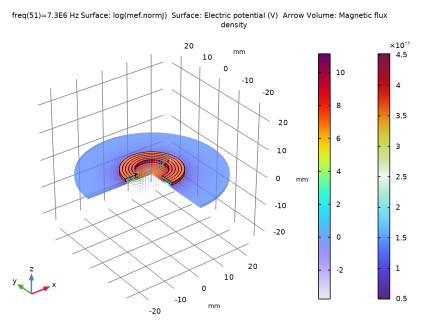
The first Surface shows the norm of the Current density. The second Surface shows the Electric potential. The Arrow Volume shows the Magnetic flux density.
4
In the Model Builder window, collapse the J, B and V, 3D node.
|nJ|
1
In the Results toolbar, click  2D Plot Group.
2
In the Settings window for 2D Plot Group, type |nJ| in the Label text field.
3
Locate the Data section. From the Parameter value (freq (Hz)) list, choose 6.544E6.
Line 1
1
Right-click |nJ| and choose Line.
2
In the Settings window for Line, locate the Expression section.
3
In the Expression text field, type abs(V_lm[A/m])/(2*pi*r).
4
In the Unit field, type A/mm^2.
5
Locate the Coloring and Style section. From the Line type list, choose Tube.
6
Select the Radius scale factor checkbox. In the associated text field, type 0.05.
7
From the Color table list, choose RainbowLightClassic.
Selection 1
1
Right-click Line 1 and choose Selection.
2
In the Settings window for Selection, locate the Selection section.
3
Click  Paste Selection.
4
In the Paste Selection dialog, type 24, 38, 45, 59, 66, 80, 87, 101 in the Selection text field.
5
Filter 1
1
In the Model Builder window, right-click Line 1 and choose Filter.
2
In the Settings window for Filter, locate the Element Selection section.
3
In the Logical expression for inclusion text field, type (s>0.01)&&(s<0.99).
|nJ|
1
In the Model Builder window, under Results click |nJ|.
2
In the |nJ| toolbar, click  Plot.
3
In the Model Builder window, collapse the |nJ| node.
|nJ|, 3D
1
In the Results toolbar, click  3D Plot Group.
2
In the Settings window for 3D Plot Group, type |nJ|, 3D in the Label text field.
3
Locate the Data section. From the Parameter value (freq (Hz)) list, choose 6.544E6.
Surface 1
1
Right-click |nJ|, 3D and choose Surface.
2
In the Settings window for Surface, locate the Expression section.
3
In the Expression text field, type abs(V_lm[A/m])/(2*pi*r).
4
In the Unit field, type A/mm^2.
5
Locate the Coloring and Style section. From the Color table list, choose RainbowLightClassic.
Filter 1
1
Right-click Surface 1 and choose Filter.
2
In the Settings window for Filter, locate the Element Selection section.
3
In the Logical expression for inclusion text field, type (s>0.01)&&(s<0.99).
|nJ|, 3D
1
In the Model Builder window, collapse the Results > |nJ|, 3D node.
2
In the Model Builder window, click |nJ|, 3D.
3
In the |nJ|, 3D toolbar, click  Plot.
4
Click the  Go to Default View button in the Graphics toolbar.
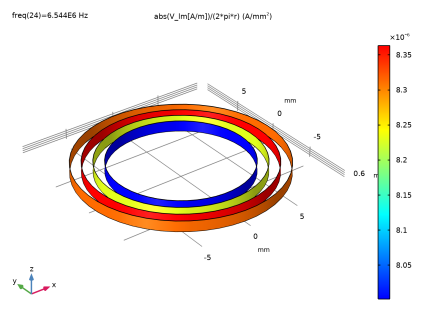
The Arrow Volume shows the Magnetic flux density.
Coil Current
1
In the Results toolbar, click  1D Plot Group.
2
In the Settings window for 1D Plot Group, type Coil Current in the Label text field.
3
Locate the Plot Settings section.
4
Select the x-axis label checkbox. In the associated text field, type freq (Hz).
5
Clear the x-axis label checkbox.
Global 1
1
Right-click Coil Current and choose Global.
2
In the Settings window for Global, locate the y-Axis Data section.
3
Coil Current
In the Model Builder window, collapse the Coil Current node.
Feed Impedance
1
In the Results toolbar, click  1D Plot Group.
2
In the Settings window for 1D Plot Group, type Feed Impedance in the Label text field.
3
Locate the Plot Settings section.
4
Select the x-axis label checkbox. In the associated text field, type freq (Hz).
5
Clear the x-axis label checkbox.
Global 1
1
Right-click Feed Impedance and choose Global.
2
In the Settings window for Global, locate the y-Axis Data section.
3
4
Click to expand the Coloring and Style section. From the Width list, choose 3.
Feed Impedance
1
In the Model Builder window, click Feed Impedance.
2
In the Feed Impedance toolbar, click  Plot.
3
In the Model Builder window, collapse the Feed Impedance node.
Probe Plot Group 1
1
In the Model Builder window, click Probe Plot Group 1.
2
Drag and drop below Feed Impedance.
3
In the Settings window for 1D Plot Group, locate the Legend section.
4
Clear the Show legends checkbox.
Probe Table Graph 1
1
In the Model Builder window, expand the Probe Plot Group 1 node, then click Probe Table Graph 1.
2
In the Settings window for Table Graph, locate the Coloring and Style section.
3
Find the Line markers subsection. From the Marker list, choose Cycle.
4
From the Positioning list, choose In data points.
Results
Probe Plot Group 1
In the Model Builder window, collapse the Results > Probe Plot Group 1 node.