
PDF

Permanent Magnet Motor in Steady State
Introduction
This tutorial covers the fundamentals of modeling an electrical machine with the Magnetic Machinery, Rotating, Time Periodic (MMTP) interface. MMTP solves for the steady-state operation directly while fully including the effects of nonlinear materials and induced currents. Concepts for determining the minimum temporal and spatial periodicities are discussed.
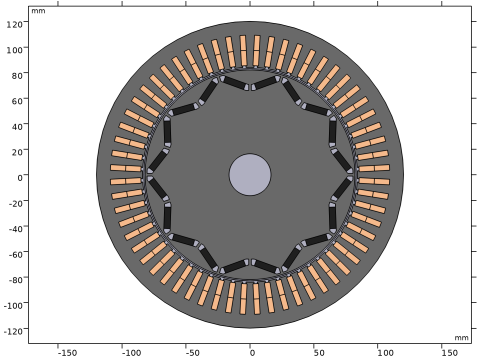
The geometry of a distributed wound interior permanent magnet machine is imported and configured with materials and winding layout before finding the current angle which gives peak torque production. Following this, overall results such as shaft power, loss per component and efficiency are evaluated together with plots of magnetic flux density, torque, voltages, and electromagnetic loss distribution.
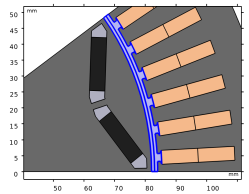
Figure 1: Complete geometry of motor design.
Model Definition
The Magnetic Machinery, Rotating, Time Periodic (MMTP) interface solves for a time period with the condition that field variations are periodic, or will repeat in subsequent time periods. The time period is the reciprocal of the Time periodic electrical frequency which is specified in the MMTP interface. The handle for time in this framework is the phase angle which always spans from 0 to 2π.
When modeling an electrical machine it can be beneficial to determine some aspects of the design a priori to conserve computational resources. Evaluation of a few expressions gives an understanding of the minimum spatial and temporal extents necessary for a reduced model to produce the same result as a full model.
Spatial Periodicity
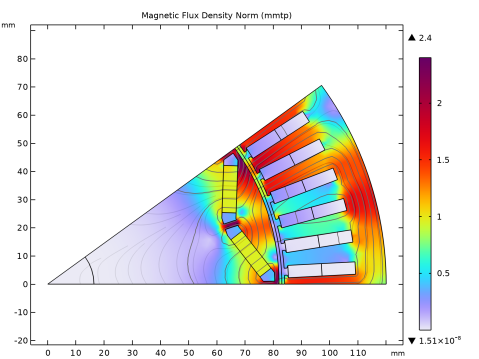
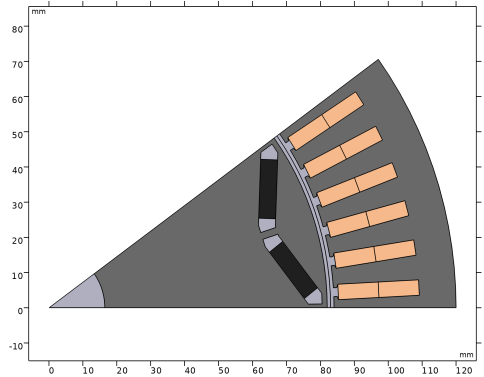
The motor topology is a 10 pole 60 slot distributed wound interior permanent magnet synchronous machine. For most motor designs the spatial periodicity of the electromagnetic field can be found by evaluating Nsec = gcd(Np, Ns), where Np and Ns are the number of poles and stator slots, and where gcd() finds the greatest common divisor of these integers. In this case, Nsec = 10 and hence it is sufficient to represent one tenth of the geometry to capture all spatial field variations. Field variations in neighboring sectors are identical although perhaps with an opposite polarity depending on the periodicity type.
Figure 2: Sector symmetric geometry of motor design.
As a rule of thumb when there is an odd number of poles inside the modeled sector the periodicity type is antiperiodic, meaning the field variations in adjacent sectors have opposite sign. With an even number of poles in the sector the periodicity is symmetric. In this case there are two magnets arranged in a v-shape making out a single pole and hence the periodicity is antiperiodic.
Having created a sector symmetric geometry and specified the number of poles, the periodicity type and necessary rotational boundary features can be automatically configured by MMTP.
Temporal Periodicity
The MMTP interface solves directly for the steady-state operation without resolving any startup transients. For most synchronous machines the time period in which fields are periodic is equivalent to the electrical excitation period.
It is not always however the rotor eddy currents will have the same time periodicity as the excitation even for a synchronous machine. A rather safe assumption is that the eddy currents are periodic with the spatial periodicity, meaning they will at least repeat after rotation has completed an angle of 360°/Nsec.
Generally, the MMTP time period should be the least common multiple of the periods of all fields being modeled. In this case the temporal periodicity of any induced currents will be at least twice that of the excitation period, since 360°/Nsec · Np/2 = 180°E (electrical degrees). Hence, setting the time periodic frequency equal to the excitation frequency will capture all field oscillations correctly.
Temporal Resolution
The cogging torque or torque due to reluctance variations as the rotor magnets are passing by stator teeth, will in this design occur on the 12'th harmonic of the fundamental electrical frequency according to the formula;
To obtain data for consistent analysis of the torque output it is a good idea to ensure the cogging torque is sufficiently resolved. With, for example, six frames per cogging period this will result in 72 time frames per excitation period. The software will calculate the solution to all time frames simultaneously while including effects of time derivatives.
Initial Electrical Angle
The default behavior of the MMTP interface assumes rotational synchronization between the Rotating Domain and the field excited by the Multiphase Winding. To obtain peak torque production however a specific angle offset between the rotating magnetic field and the rotor has to be found.
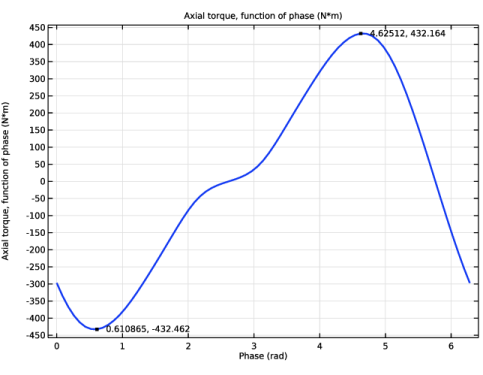
The optimal angle offset, or Initial electrical angle in MMTP, depends on several factors such as geometry, electrical steel grade or magnet strength, any of which will alter the magnetic reluctance of the design. While there are many motor control strategies deducing this offset analytically, the initial electrical angle can also be determined rather easily by letting the rotor remain stationary while stator field is rotating. The resulting torque output will resemble a sine curve where the maximum corresponds to peak torque in motoring mode, and the minimum to peak torque in generating mode.
Torque Accuracy
The same result yielding initial angle for peak torque production can also be used to evaluate the accuracy of torque calculation. If no induced currents are present, the net torque experienced by a locked rotor when stator field is revolved exactly one electrical period should be zero. Hence calculating the average torque from this result and comparing it with the peak torque gives an idea of the torque accuracy in the model.
Results and Discussion
The first simulation is run with stationary rotor and no induced currents to determine the initial electrical angle giving peak torque as shown in Figure 3.
Figure 3: Torque curve with locked rotor.
Evaluating the average torque and dividing it by the peak value shows that the error in torque calculation is less than 0.1%.
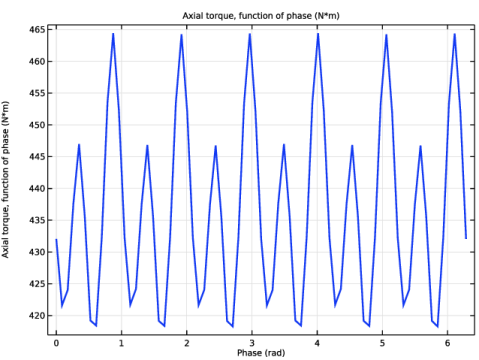
Having updated the initial electrical angle, a second simulation with rotation produces steady-state torque as shown in Figure 4 and magnetic flux density distributions as shown in Figure 5 and Figure 6.
Figure 4: Steady-state torque.
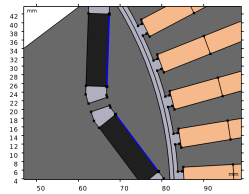
Figure 5: Magnetic flux density distribution at phase angle 0°E.
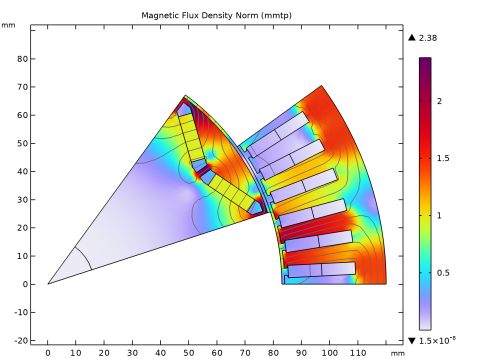
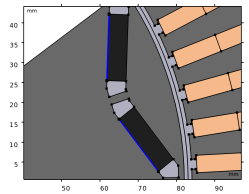
Figure 6: Magnetic flux density distribution at phase angle 90°E.
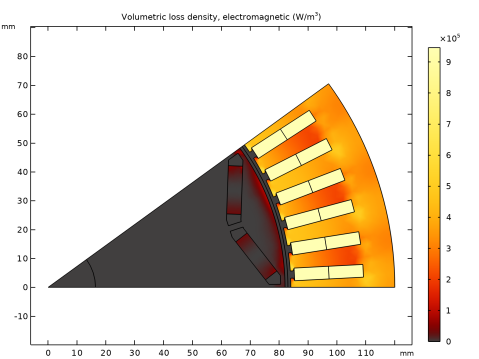
While the temporal variation of electromagnetic loss typically is not relevant in a thermal time scale, the spatial distribution can be of significance. Figure 7 shows this distribution across all motor components.
Figure 7: Distribution of time averaged electromagnetic loss.
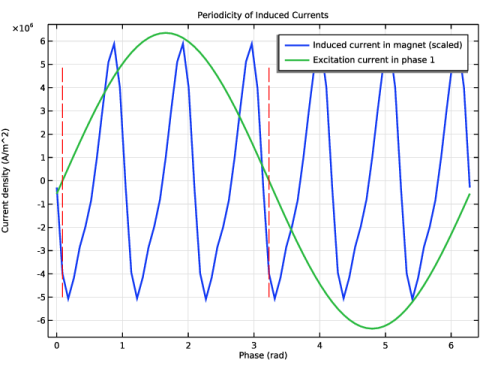
To verify assumptions on the temporal periodicity of induced currents the plot in Figure 8 can be examined. Here the induced current density evaluated at a point in the magnet is scaled up and plotted together with the excitation current density of phase 1. The two vertical lines indicate half an electrical period, which corresponds with the spatial periodicity.
Figure 8: Induced current at a point in magnet and current excitation in phase 1.
By inspection it is seen that the induced currents are periodic with half the electrical period and completes six cycles in the span of the full period.
The overall results — such as shaft power, average torque, total losses, and electromagnetic efficiency — are calculated and tabulated in an Evaluation Group at the end of the Modeling Instructions. They can also be inspected by opening the model from the Application Library and selecting the General Results node under the Results branch in the Model Builder.
Application Library path: ACDC_Module/Devices,_Motors_and_Generators/pmm_steady_state
Modeling Instructions
From the File menu, choose New.
New
In the New window, click  Model Wizard.
Model Wizard
1
In the Model Wizard window, click  2D.
2
In the Select Physics tree, select AC/DC > Electromagnetics and Mechanics > Magnetic Machinery, Rotating, Time Periodic (mmtp).
3
Click Add.
4
Geometry 1
Insert the geometry sequence from the pmm_steady_state_geom_sequence.mph file.
1
In the Geometry toolbar, click Insert Sequence and choose Insert Sequence.
2
3
In the Geometry toolbar, click  Build All.
Global Definitions
Parameters 1 - Main
Move all geometry parameters to a new node to separate them from the main parameters.
1
In the Model Builder window, under Global Definitions click Parameters 1.
2
In the Settings window for Parameters, locate the Parameters section.
3
4
Click Move to New Parameters.
5
In the Model Builder window, click Parameters 1.
6
In the Label text field, type Parameters 1 - Main.
7
Locate the Parameters section. In the table, enter the following settings:
Parameters 2 - Geometry
1
In the Model Builder window, click Parameters 2.
2
In the Settings window for Parameters, type Parameters 2 - Geometry in the Label text field.
Add Material
1
In the Home toolbar, click  Add Material to open the Add Material window.
2
Go to the Add Material window.
Add magnet and electrical steel materials only. The default Free Space node specifies the magnetic properties of air for remaining domains.
3
In the tree, select AC/DC > Hard Magnetic Materials > Sintered NdFeB Grades (Chinese Standard) > N42 (Sintered NdFeB).
4
Click the Add to Component button in the window toolbar.
5
In the tree, select Nonlinear Magnetic > Silicon Steel NGO > Silicon Steel NGO 35PN270.
6
Click the Add to Component button in the window toolbar.
Materials
Silicon Steel NGO 35PN270 (mat2)
1
In the Materials toolbar, click  Add Material to close the Add Material window.
2
In the Settings window for Material, locate the Geometric Entity Selection section.
3
From the Selection list, choose Stator and rotor cores.
N42 (Sintered NdFeB) (mat1)
1
In the Model Builder window, click N42 (Sintered NdFeB) (mat1).
2
In the Settings window for Material, locate the Geometric Entity Selection section.
3
From the Selection list, choose Rotor Magnets (Internal Rotor – V-shaped Embedded Magnets 1).
Magnetic Machinery, Rotating, Time Periodic (mmtp)
In the settings of Magnetic Machinery, Rotating, Time Periodic (mmtp) enter key parameters which defines the temporal periodicity and resolution, and which allows for automatic configuration of the spatial periodicity.
1
In the Model Builder window, under Component 1 (comp1) click Magnetic Machinery, Rotating, Time Periodic (mmtp).
2
In the Settings window for Magnetic Machinery, Rotating, Time Periodic, locate the Thickness section.
3
In the d text field, type L.
4
Locate the Time Periodic Settings section. In the fTP text field, type f_el.
5
In the nTP text field, type Nframes.
6
Locate the Motion Settings section. In the npoles text field, type Np.
7
Click Add Rotational Boundary Features.
Multiphase Winding 1
1
In the Physics toolbar, click  Domains and choose Multiphase Winding.
2
In the Settings window for Multiphase Winding, locate the Domain Selection section.
3
From the Selection list, choose All coils.
4
Locate the Multiphase Winding section. In the Ipk text field, type Ipk.
5
In the αi text field, type init_ang.
6
From the Winding layout configuration list, choose Automatic three phase.
7
In the nslots text field, type Ns.
8
Click Add Phases.
Laminated Core 1
1
In the Physics toolbar, click  Domains and choose Laminated Core.
2
In the Settings window for Laminated Core, locate the Domain Selection section.
3
From the Selection list, choose Stator and rotor cores.
4
Locate the Steinmetz section. In the α text field, type 1.45.
5
In the β text field, type 2.06.
Magnet 1
1
In the Physics toolbar, click  Domains and choose Magnet.
2
In the Settings window for Magnet, locate the Domain Selection section.
3
From the Selection list, choose Rotor Magnets (Internal Rotor – V-shaped Embedded Magnets 1).
For the initial locked rotor simulation disable the magnet electric conductivity in order to evaluate torque accuracy.
4
Locate the Constitutive Relation Jc-E section. From the σ list, choose User defined.
North 1
1
In the Model Builder window, expand the Magnet 1 node, then click North 1.
2
South 1
1
In the Model Builder window, click South 1.
2
Rotating Domain 1
1
In the Physics toolbar, click  Domains and choose Rotating Domain.
2
In the Settings window for Rotating Domain, locate the Domain Selection section.
3
From the Selection list, choose All domains (Internal Rotor – V-shaped Embedded Magnets 1).
4
Locate the Rotating Domain section. From the Time periodic rotation list, choose Nonrotating.
Refine the default mesh in domains with electrical steel and in the airgap region.
Mesh 1
In the Model Builder window, under Component 1 (comp1) right-click Mesh 1 and choose Edit Physics-Induced Sequence.
Size 1
1
In the Mesh toolbar, click  Sizing and choose Size.
2
3
In the Settings window for Size, locate the Geometric Entity Selection section.
4
From the Geometric entity level list, choose Domain.
5
From the Selection list, choose Stator and rotor cores.
6
Locate the Element Size section. Click the Custom button.
7
Locate the Element Size Parameters section.
8
Select the Maximum element size checkbox. In the associated text field, type 3.
Size 2
1
Right-click Size 1 and choose Duplicate.
To achieve reasonable torque accuracy ensure there are at least two elements between the Rotational Magnetic Continuity boundaries and the nearest magnetic material such as the electrical steel or magnet.
2
In the Settings window for Size, locate the Geometric Entity Selection section.
3
Click  Clear Selection.
4
5
Locate the Element Size Parameters section. In the Maximum element size text field, type airgap/3.
6
Click  Build All.
Add Study
1
In the Study toolbar, click  Add Study to open the Add Study window.
2
Go to the Add Study window.
3
Find the Studies subsection. In the Select Study tree, select General Studies > Stationary.
4
Click the Add Study button in the window toolbar.
5
In the Study toolbar, click  Add Study to close the Add Study window.
Study 1
Step 1: Stationary
In the Study toolbar, click  Compute.
Results
Torque
1
In the Results toolbar, click  1D Plot Group.
2
In the Settings window for 1D Plot Group, type Torque in the Label text field.
3
Locate the Legend section. Clear the Show legends checkbox.
Global 1
1
Right-click Torque and choose Global.
2
In the Settings window for Global, click Add Expression in the upper-right corner of the y-Axis Data section. From the menu, choose Component 1 (comp1) > Magnetic Machinery, Rotating, Time Periodic > Mechanical > mmtp.drcon1.Tax_tpph - Axial torque, function of phase - N·m.
3
Locate the x-Axis Data section. From the Parameter list, choose Phase.
4
In the Phase text field, type range(0,1/Nframes,1)*2*pi.
5
Click to expand the Coloring and Style section. From the Width list, choose 2.
6
In the Torque toolbar, click  Plot.
Graph Marker 1
1
Right-click Global 1 and choose Graph Marker.
2
In the Settings window for Graph Marker, locate the Text Format section.
3
Select the Show x-coordinate checkbox.
4
Click to expand the Coloring and Style section. From the Anchor point list, choose Middle left.
5
In the Torque toolbar, click  Plot.
Main Results
1
In the Results toolbar, click  Evaluation Group.
2
In the Settings window for Evaluation Group, type Main Results in the Label text field.
Global Evaluation 1
1
Right-click Results and choose Global Evaluation.
2
In the Settings window for Global Evaluation, click Add Expression in the upper-right corner of the Expressions section. From the menu, choose Component 1 (comp1) > Magnetic Machinery, Rotating, Time Periodic > Mechanical > mmtp.drcon1.Tax_tpavg - Axial torque, time periodic average - N·m.
3
In the Main Results toolbar, click  Evaluate.
Update the init_ang variable and compute results with rotation and full torque.
Global Definitions
Parameters 1 - Main
1
In the Model Builder window, under Global Definitions click Parameters 1 - Main.
2
In the Settings window for Parameters, locate the Parameters section.
3
Magnetic Machinery, Rotating, Time Periodic (mmtp)
Rotating Domain 1
1
In the Model Builder window, under Component 1 (comp1) > Magnetic Machinery, Rotating, Time Periodic (mmtp) click Rotating Domain 1.
2
In the Settings window for Rotating Domain, locate the Rotating Domain section.
3
From the Time periodic rotation list, choose Synchronous (pole pair).
Magnet 1
1
In the Model Builder window, click Magnet 1.
2
In the Settings window for Magnet, locate the Constitutive Relation Jc-E section.
3
From the σ list, choose From material.
4
In the Home toolbar, click  Compute.
Results
Magnetic Flux Density Norm (mmtp)
To plot the magnetic field at a different phase angle, update the dataset settings.
Study 1/Solution 1 (sol1)
1
In the Model Builder window, expand the Results > Datasets node, then click Study 1/Solution 1 (sol1).
2
In the Settings window for Solution, locate the Solution section.
3
In the Solution at angle (phase) text field, type 90.
Magnetic Flux Density Norm (mmtp)
1
In the Model Builder window, under Results click Magnetic Flux Density Norm (mmtp).
2
In the Magnetic Flux Density Norm (mmtp) toolbar, click  Plot.
Voltages
1
In the Results toolbar, click  1D Plot Group.
2
In the Settings window for 1D Plot Group, type Voltages in the Label text field.
Global 1
1
Right-click Voltages and choose Global.
2
In the Settings window for Global, click Add Expression in the upper-right corner of the y-Axis Data section. From the menu, choose Component 1 (comp1) > Magnetic Machinery, Rotating, Time Periodic > Winding > Voltage > mmtp.wnd1.aPh1.V_tpph - Winding phase voltage, function of phase - V.
3
Locate the y-Axis Data section. In the table, enter the following settings:
4
Locate the x-Axis Data section. From the Parameter list, choose Phase.
5
In the Phase text field, type range(0,1/Nframes,1)*2*pi.
6
In the Voltages toolbar, click  Plot.
Electromagnetic Loss
1
In the Results toolbar, click  2D Plot Group.
2
In the Settings window for 2D Plot Group, type Electromagnetic Loss in the Label text field.
Surface 1
1
Right-click Electromagnetic Loss and choose Surface.
2
In the Settings window for Surface, click Replace Expression in the upper-right corner of the Expression section. From the menu, choose Component 1 (comp1) > Magnetic Machinery, Rotating, Time Periodic > Heating and losses > mmtp.Qh - Volumetric loss density, electromagnetic - W/m³.
3
Locate the Coloring and Style section. From the Color table list, choose GrayBody.
Adjust the color table to make loss distribution in rotor more visible.
4
From the Color table transformation list, choose Nonlinear.
5
Set the Color calibration parameter value to -0.8.
6
In the Electromagnetic Loss toolbar, click  Plot.
Magnetic Flux Density Norm (mmtp)
Add more evaluation features to the Main Results node to gather key results from the simulation.
Global Evaluation 2
1
In the Model Builder window, under Results > Main Results right-click Global Evaluation 1 and choose Duplicate.
2
In the Settings window for Global Evaluation, locate the Expressions section.
3
Main Results
In the Model Builder window, click Main Results.
Surface Integration 1
1
In the Main Results toolbar, click  Integration and choose Surface Integration.
2
In the Settings window for Surface Integration, locate the Selection section.
3
From the Selection list, choose All coils.
4
Click Add Expression in the upper-right corner of the Expressions section. From the menu, choose Component 1 (comp1) > Magnetic Machinery, Rotating, Time Periodic > Heating and losses > mmtp.Qh - Volumetric loss density, electromagnetic - W/m³.
Multiply the loss density variable with the number of sectors and axial length of motor to get the total loss.
5
Locate the Expressions section. In the table, enter the following settings:
Surface Integration 2
1
Right-click Surface Integration 1 and choose Duplicate.
2
In the Settings window for Surface Integration, locate the Selection section.
3
From the Selection list, choose Stator core.
4
Locate the Expressions section. In the table, enter the following settings:
Surface Integration 3
1
Right-click Surface Integration 2 and choose Duplicate.
2
In the Settings window for Surface Integration, locate the Selection section.
3
From the Selection list, choose Rotor iron (Internal Rotor – V-shaped Embedded Magnets 1).
4
Locate the Expressions section. In the table, enter the following settings:
Surface Integration 4
1
Right-click Surface Integration 3 and choose Duplicate.
2
In the Settings window for Surface Integration, locate the Selection section.
3
From the Selection list, choose Rotor Magnets (Internal Rotor – V-shaped Embedded Magnets 1).
4
Locate the Expressions section. In the table, enter the following settings:
Main Results
1
In the Model Builder window, click Main Results.
2
In the Settings window for Evaluation Group, locate the Transformation section.
3
Select the Transpose checkbox.
4
From the Transformation type list, choose General.
5
Select the Keep child nodes checkbox.
6
In the Expression text field, type gev2/(gev2+int1+int2+int3+int4)*100.
7
In the Row header text field, type Efficiency (%).
8
In the Main Results toolbar, click  Evaluate.
The remaining steps describe how to reproduce Figure 8.
Periodicity of Induced Currents
1
In the Results toolbar, click  1D Plot Group.
2
In the Settings window for 1D Plot Group, type Periodicity of Induced Currents in the Label text field.
3
Click to expand the Title section. From the Title type list, choose Label.
4
Locate the Plot Settings section.
5
Select the y-axis label checkbox. In the associated text field, type Current density (A/m^2).
Point Graph 1
1
In the Periodicity of Induced Currents toolbar, click  Point Graph.
2
In the Settings window for Point Graph, locate the Selection section.
3
Click  Paste Selection.
4
In the Paste Selection dialog, type 25 in the Selection text field.
5
6
In the Settings window for Point Graph, click Replace Expression in the upper-right corner of the y-Axis Data section. From the menu, choose Component 1 (comp1) > Magnetic Machinery, Rotating, Time Periodic > Currents and charge > mmtp.JZ_tpph - Current density out of plane, function of phase - A/m².
7
Locate the y-Axis Data section. In the Expression text field, type mmtp.JZ_tpph*50.
8
Select the Description checkbox. In the associated text field, type Induced current in magnet (scaled).
9
Locate the x-Axis Data section. From the Parameter list, choose Phase.
10
In the Phase text field, type range(0,1/Nframes,1)*2*pi.
11
Click to expand the Coloring and Style section. From the Width list, choose 2.
12
Click to expand the Legends section. Select the Show legends checkbox.
13
Find the Include subsection. Clear the Point checkbox.
14
Clear the Solution checkbox.
15
Select the Description checkbox.
Point Graph 2
1
Right-click Point Graph 1 and choose Duplicate.
2
In the Settings window for Point Graph, locate the Selection section.
3
Click  Clear Selection.
4
Click  Paste Selection.
5
In the Paste Selection dialog, type 83 in the Selection text field.
6
7
In the Settings window for Point Graph, locate the y-Axis Data section.
8
In the Expression text field, type mmtp.JZ_tpph.
9
In the Description text field, type Excitation current in phase 1.
Periodicity of Induced Currents
In the Periodicity of Induced Currents toolbar, click  Line Segments.
Line Segments 1
Add vertical line segments marking the zero crossing of first half period of the excitation current of phase 1.
1
In the Settings window for Line Segments, locate the x-Coordinates section.
2
3
Locate the y-Coordinates section. In the table, enter the following settings:
4
Click to expand the Coloring and Style section. From the Color list, choose Red.
5
Find the Line style subsection. From the Line list, choose Dashed.
Line Segments 2
1
Right-click Results > Periodicity of Induced Currents > Line Segments 1 and choose Duplicate.
2
In the Settings window for Line Segments, locate the x-Coordinates section.
3
4
In the Periodicity of Induced Currents toolbar, click  Plot.