


PDF

Hysteresis in Ferroelectric Material
Introduction
Ferroelectric materials exhibit nonlinear polarization behavior such as hysteresis and saturation at large applied electric fields. Many piezoelectric materials are ferroelectric. This model analyzes a simple actuator made of a PZT piezoelectric ceramic material, which is subjected to an applied electric field.
Model Definition
In its ferroelectric phase, the material exhibits spontaneous polarization, so that it consists of domains with nonzero polarization even at zero applied field. The application of an electric field can rearrange the domains, resulting in a net polarization in the material. At very large electric fields, the polarization saturates, as all ferroelectric domains in the material are aligned along the direction of the applied field. Domain wall interactions can also lead to significant hysteresis in the polarization.
The Jiles–Atherton hysteresis model for ferroelectric materials is available in COMSOL Multiphysics. It assumes that the total polarization field is represented by a reversible part Pan, and an irreversible part Pirr. The total polarization change is then found via the equation
where the reversibility is characterized by the parameter cr, and the anhysteretic polarization is found from the relation
where Ps is the saturation polarization. The effective electric field is given by
(1)
where α is a material parameter called the inter-domain coupling. The polarization shape is characterized by the Langevin function
where a is a material parameter called the domain wall density.
Finally, the change of the irreversible polarization is computed from the relation
where kp is the pinning loss.
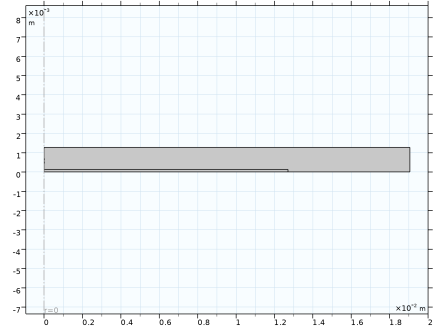
The ferroelectric actuator in this model is a simple disk with the radius of 0.5 in and thickness of 0.01 in, which is composed of PZT-5A piezoelectric ceramic material. The following parameter values have been estimated in Ref. 1 based on experimental data:
Ps
4.4·105 V/m
α
3.6·106 m/F
cr
kp
1.9·106 V/m
The upper surface of the actuator is grounded, while the lower surface is subjected to an electric potential that can cyclically vary in small increments between Vmax and +Vmax. The actuator is surrounded by air. Because of the symmetry, it is sufficient to model only the upper half of the setup.
Figure 1: Model geometry. The smaller domain represents the upper half of the ferroelectric actuator. The larger domain is used for modeling the surrounding air.
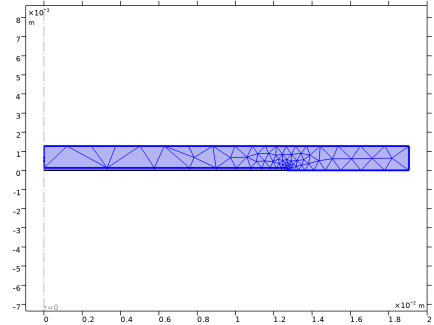
Because of the actuator aspect ratio, a relatively coarse mesh can be used everywhere except in the regions near the disk edge.
Figure 2: Model mesh.
Results and Discussion
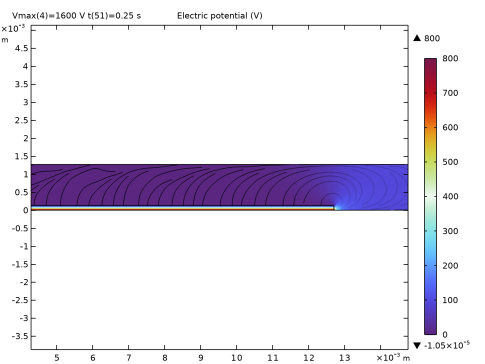
The typical distribution of the electric potential is show in Figure 3.
Figure 3: Electric potential field.
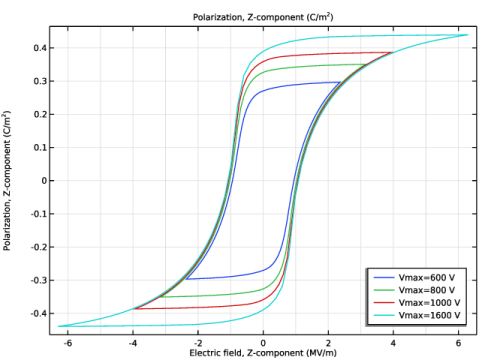
Four full cycles have been computed for each value of Vmax. The polarization variation is studied at the point in the middle of the actuator.
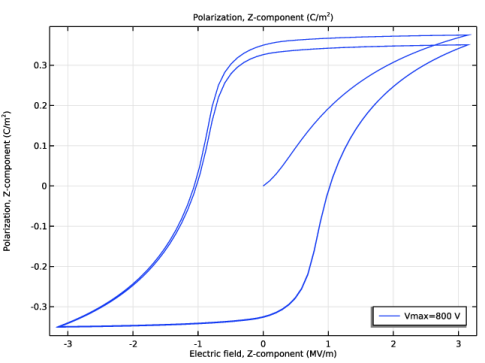
The first cycle includes the initial transient; see Figure 4. The hysteresis loops become fully established after three full cycles; see Figure 5. The results agree well with those presented in Ref. 1.
Figure 4: Hysteresis loop including the initial transient for the maximum applied voltage of 800 V.
Figure 5: Hysteresis loops fully established after three cycles for different values of the maximum applied voltage.
Notes About the COMSOL Implementation
The Ferroelectric dielectric model option becomes available in any Charge Conservation feature under Electrostatics interface as soon as the material type for that feature is set to Solid.
In this example, you study the hysteresis with respect to the incremental variation of the applied electric potential using a stationary parametric study. The same hysteresis model can be also used for time-dependent studies.
Reference
1. R.C. Smith and Z. Ounaies, “A Domain Wall Model for Hysteresis in Piezoelectric Materials,” J. Int. Mat. Sys. Struct., vol. 11, no. 1, pp. 62–79, 2000.
Application Library path: ACDC_Module/Devices,_Capacitive/ferroelectric_hysteresis
Modeling Instructions
From the File menu, choose New.
New
In the New window, click  Model Wizard.
Model Wizard
1
In the Model Wizard window, click  2D Axisymmetric.
2
In the Select Physics tree, select AC/DC > Electric Fields and Currents > Electrostatics (es).
3
Click Add.
4
Click  Study.
5
In the Select Study tree, select General Studies > Stationary.
6
Global Definitions
Parameters 1
Define parameters for the geometry, material properties, and applied voltage.
1
In the Model Builder window, under Global Definitions click Parameters 1.
2
In the Settings window for Parameters, locate the Parameters section.
3
Definitions
Variables 1
1
In the Model Builder window, under Component 1 (comp1) right-click Definitions and choose Variables.
2
In the Settings window for Variables, locate the Variables section.
3
This time variation of the applied voltage will cause the electric field within the material to change at a frequency of 1 Hz.
Geometry 1
Rectangle 1 (r1)
1
In the Geometry toolbar, click  Rectangle.
2
In the Settings window for Rectangle, locate the Size and Shape section.
3
In the Width text field, type R0.
Because of the symmetry, it is sufficient to model only the upper half of the actuator.
4
In the Height text field, type H0/2.
Rectangle 2 (r2)
1
Right-click Rectangle 1 (r1) and choose Duplicate.
2
In the Settings window for Rectangle, locate the Size and Shape section.
3
In the Width text field, type 1.5*R0.
4
In the Height text field, type 5*H0.
5
Click  Build All Objects.
Electrostatics (es)
The default Free Space feature will be used for modeling the air domain. Add a Charge Conservation in Solids feature to model the ferroelectric material.
Charge Conservation: PZT5A
1
In the Physics toolbar, click  Domains and choose Charge Conservation in Solids.
2
In the Settings window for Charge Conservation in Solids, type Charge Conservation: PZT5A in the Label text field.
3
4
Locate the Constitutive Relation D-E section. From the Dielectric model list, choose Ferroelectric.
5
Locate the Ferroelectric Material Properties section. Select the Hysteresis Jiles–Atherton model checkbox.
Ground 1
1
In the Physics toolbar, click  Boundaries and choose Ground.
2
Electric Potential 1
1
In the Physics toolbar, click  Boundaries and choose Electric Potential.
Because of the symmetry, you set the potential at the symmetry boundary to a half of that applied to the whole actuator.
2
3
In the Settings window for Electric Potential, locate the Electric Potential section.
4
In the V0 text field, type V0/2.
Materials
PZT5A
1
In the Model Builder window, under Component 1 (comp1) right-click Materials and choose Blank Material.
2
In the Settings window for Material, type PZT5A in the Label text field.
3
Define the ferroelectric properties for the material using the parameters.
4
Locate the Material Contents section. In the table, enter the following settings:
Mesh 1
Mapped 1
1
In the Mesh toolbar, click  Mapped.
2
In the Settings window for Mapped, locate the Domain Selection section.
3
From the Geometric entity level list, choose Domain.
4
Distribution 1
1
Right-click Mapped 1 and choose Distribution.
2
In the Settings window for Distribution, locate the Distribution section.
3
In the Number of elements text field, type 1.
4
Distribution 2
1
In the Model Builder window, right-click Mapped 1 and choose Distribution.
2
3
In the Settings window for Distribution, locate the Distribution section.
4
From the Distribution type list, choose Predefined.
5
In the Number of elements text field, type 12.
6
In the Element ratio text field, type 24.
7
From the Growth rate list, choose Exponential.
8
Click  Build All.
Free Triangular 1
1
In the Mesh toolbar, click  Free Triangular.
2
In the Settings window for Free Triangular, click  Build All.
Study 1
Step 1: Stationary
1
In the Model Builder window, under Study 1 click Step 1: Stationary.
2
In the Settings window for Stationary, click to expand the Study Extensions section.
3
Select the Auxiliary sweep checkbox.
4
Compute four full cycles for the applied electric potential for each given maximum value.
5
Parametric Sweep
1
In the Study toolbar, click  Parametric Sweep.
2
In the Settings window for Parametric Sweep, locate the Study Settings section.
3
4
5
6
In the Study toolbar, click  Compute.
Results
Electric Potential (es)
1
In the Settings window for 2D Plot Group, locate the Data section.
2
From the Parameter value (t (s)) list, choose 0.25.
3
In the Electric Potential (es) toolbar, click  Plot.
Polarization
1
In the Results toolbar, click  1D Plot Group.
Plot the axial polarization variation with respect to the applied electric field at the center of the actuator.
2
In the Settings window for 1D Plot Group, type Polarization in the Label text field.
3
Locate the Data section. From the Dataset list, choose Study 1/Parametric Solutions 1 (sol2).
4
Locate the Grid section. Select the Manual spacing checkbox.
5
In the y spacing text field, type 0.1.
6
Locate the Legend section. From the Position list, choose Lower right.
Point Graph 1
1
Right-click Polarization and choose Point Graph.
2
3
In the Settings window for Point Graph, locate the y-Axis Data section.
4
In the Expression text field, type es.PZ.
5
Locate the x-Axis Data section. From the Parameter list, choose Expression.
6
In the Expression text field, type es.EZ.
7
From the Unit list, choose MV/m.
8
Click to expand the Legends section. Select the Show legends checkbox.
9
Find the Include subsection. Clear the Point checkbox.
10
In the Polarization toolbar, click  Plot.