PDF

FEM Resistor in Circuit
Introduction
This introductory model illustrates two different ways to couple an electrical circuit model to a finite element simulation. The finite element part represents a cylindrical resistor in the circuit, and will be coupled to the circuit by either using two External I-Terminal features or by using an External I vs. U feature. Differences between the two approaches will then be highlighted.
Model Definition
The electrical circuit is the same in both cases and consists of three resistors (one of them being the FEM model) and a voltage source connected in series. The difference lies in how this circuit is connected to the finite element model. In the first case, two Terminal features are added to the two ends of the cylinder in the Electric Currents physics interface - each of them connected to an External I-Terminal feature in the Electrical Circuit physics interface. An External I-Terminal feature is only applied to a single node in the circuit, which is why two of them are needed.
In the second case, a single External I vs. U feature is used in the Electrical Circuit physics interface. This feature is connected to a Terminal feature in the Electric Currents model. The External I vs. U feature has two nodes, as it represents a differential external voltage measurement. This means that instead of having a terminal at each end of the cylinder, one end needs to be at a local ground. This is done by adding a Ground feature in the Electric Currents interface.
Results and Discussion
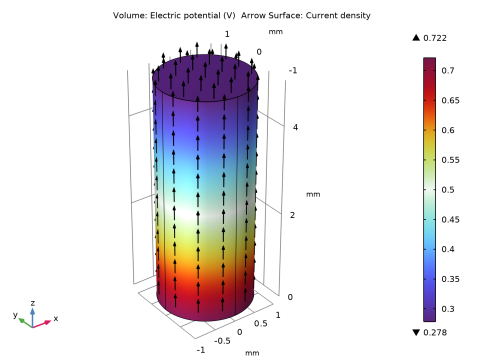
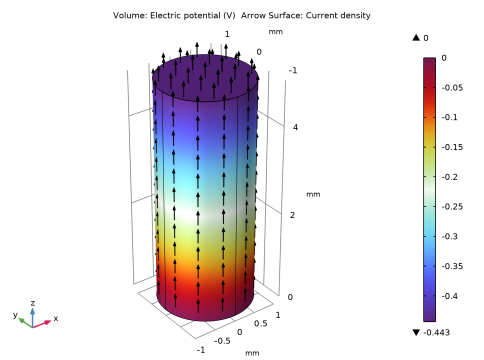
The electric potential in the cylindrical resistor in the first and second cases is shown in Figure 1 and Figure 2, respectively. Note that even though the absolute values of the potential differ between the two cases, the voltage drop over the resistor is still the same. In the case with two terminal features, there is one consistent electric potential definition in the model and just one single ground reference. This means that the values plotted in Figure 1 agree with the node voltages in the circuit. However, when having a local ground in the finite element model, there will be two shifted electric potentials - one in the Electric Currents interface and one in Electrical Circuit interface. As a result, the absolute values plotted in Figure 2 do not agree with the corresponding node voltages in the circuit. As long as this is properly accounted for, it does not make a difference, as voltage drops and currents will be the same in both cases. The node voltages along with the computed resistance of the cylinder are evaluated in the model.
Figure 1: The top and bottom electric potential values in the FEM model are coupled separately to the node voltages in the circuit. No local ground is used or required in the FEM model and the electric potential is consistently defined in both the FEM and the circuit part of the model.
Figure 2: The potential difference between bottom and top in the FEM model is coupled as a difference between two node voltages in the circuit. A local ground is used in the FEM model. The electric potential is not consistently defined in the FEM and circuit parts of the model but potential differences within each part of the model as well as electric field and currents are identical to when using a consistent electric potential definition.
To conclude both presented approaches will, for a single circuit device (resistor etc.) in the FEM model, give correct results when it comes to currents and node voltages in the circuit and current density and electric field in the FEM model. For FEM models representing more than one circuit device in the same geometry, the first modeling method is the preferred choice. This is because any coupling between the devices within the FEM model requires the electric potential definition being consistent throughout the entire coupled model.
Application Library path: ACDC_Module/Electromagnetics_and_Circuits/circuit_fem_resistor
Modeling Instructions
From the File menu, choose New.
New
In the New window, click  Model Wizard.
Model Wizard
1
In the Model Wizard window, click  3D.
2
In the Select Physics tree, select AC/DC > Electric Fields and Currents > Electric Currents (ec).
3
Click Add.
4
In the Select Physics tree, select AC/DC > Electrical Circuit (cir).
5
Click Add.
6
Click  Study.
7
In the Select Study tree, select General Studies > Stationary.
8
First, define some parameters that will be used when building the model.
Global Definitions
Parameters 1
1
In the Model Builder window, under Global Definitions click Parameters 1.
2
In the Settings window for Parameters, locate the Parameters section.
3
1[Ω]
1 Ω
1[Ω]
1 Ω
Geometry 1
Set the length unit of the model to millimeters, and create the cylinder that represents a resistor in the circuit.
1
In the Model Builder window, under Component 1 (comp1) click Geometry 1.
2
In the Settings window for Geometry, locate the Units section.
3
From the Length unit list, choose mm.
Cylinder 1 (cyl1)
1
In the Geometry toolbar, click  Cylinder.
2
In the Settings window for Cylinder, locate the Size and Shape section.
3
In the Radius text field, type r.
4
In the Height text field, type L.
Now, add a material with a conductivity that is representative of a resistor.
Materials
Material 1 (mat1)
1
In the Model Builder window, under Component 1 (comp1) right-click Materials and choose Blank Material.
2
In the Settings window for Material, locate the Material Contents section.
3
Add two Terminal features, one for each end of the resistor. In order to connect these to the Electrical Circuit interface, set the Terminal type in each feature to Circuit.
Electric Currents (ec)
Boundary Terminal 1
1
In the Physics toolbar, click  Boundaries and choose Boundary Terminal.
2
3
In the Settings window for Boundary Terminal, locate the Terminal section.
4
From the Terminal type list, choose Circuit.
Boundary Terminal 2
1
In the Physics toolbar, click  Boundaries and choose Boundary Terminal.
2
3
In the Settings window for Boundary Terminal, locate the Terminal section.
4
From the Terminal type list, choose Circuit.
Mesh 1
1
In the Model Builder window, under Component 1 (comp1) click Mesh 1.
2
In the Settings window for Mesh, locate the Physics-Controlled Mesh section.
3
From the Element size list, choose Coarse.
4
Click  Build All.
Finally, add the remaining components to the circuit in the Electrical Circuit physics interface. Add two resistors, a voltage source, and two External I-Terminal features that connect to the two Terminal features.
Electrical Circuit (cir)
Resistor 1 (R1)
1
In the Electrical Circuit toolbar, click  Resistor.
2
In the Settings window for Resistor, locate the Node Connections section.
3
4
Locate the Device Parameters section. In the R text field, type R1.
External I-Terminal 1 (termI1)
1
In the Electrical Circuit toolbar, click  External I-Terminal.
2
In the Settings window for External I-Terminal, locate the External Terminal section.
3
From the V list, choose Terminal voltage (ec/term1).
4
Locate the Node Connections section. In the Node name text field, type 1.
External I-Terminal 2 (termI2)
1
In the Electrical Circuit toolbar, click  External I-Terminal.
2
In the Settings window for External I-Terminal, locate the External Terminal section.
3
From the V list, choose Terminal voltage (ec/term2).
Resistor 2 (R2)
1
In the Electrical Circuit toolbar, click  Resistor.
2
In the Settings window for Resistor, locate the Node Connections section.
3
4
Locate the Device Parameters section. In the R text field, type R2.
Voltage Source 1 (V1)
1
In the Electrical Circuit toolbar, click  Voltage Source.
2
In the Settings window for Voltage Source, locate the Node Connections section.
3
Add a second 3D component to the model, with the same geometry and materials as the previous component. Also add the same physics interfaces. The only differences will be that one of the Terminal features will be replaced by a Ground feature and that the two External I-Terminal features will be replaced by an External I vs. U feature.
Add Component
Right-click Voltage Source 1 (V1) and choose Add Component > 3D.
Geometry 2
1
In the Settings window for Geometry, locate the Units section.
2
From the Length unit list, choose mm.
Cylinder 1 (cyl1)
1
In the Geometry toolbar, click  Cylinder.
2
In the Settings window for Cylinder, locate the Size and Shape section.
3
In the Radius text field, type r.
4
In the Height text field, type L.
Add Physics
1
In the Home toolbar, click  Add Physics to open the Add Physics window.
2
Go to the Add Physics window.
3
In the tree, select AC/DC > Electric Fields and Currents > Electric Currents (ec).
4
Click the Add to Component 2 button in the window toolbar.
5
In the tree, select AC/DC > Electrical Circuit (cir).
6
Click the Add to Component 2 button in the window toolbar.
7
In the Home toolbar, click  Add Physics to close the Add Physics window.
Materials
Material 2 (mat2)
1
In the Model Builder window, under Component 2 (comp2) right-click Materials and choose Blank Material.
2
In the Settings window for Material, locate the Material Contents section.
3
Electric Currents 2 (ec2)
Boundary Terminal 1
1
In the Physics toolbar, click  Boundaries and choose Boundary Terminal.
2
3
In the Settings window for Boundary Terminal, locate the Terminal section.
4
From the Terminal type list, choose Circuit.
Ground 1
1
In the Physics toolbar, click  Boundaries and choose Ground.
2
Electrical Circuit 2 (cir2)
Resistor 1 (R1)
1
In the Electrical Circuit toolbar, click  Resistor.
2
In the Settings window for Resistor, locate the Node Connections section.
3
4
Locate the Device Parameters section. In the R text field, type R1.
External I vs. U 1 (IvsU1)
1
In the Electrical Circuit toolbar, click  External I vs. U.
2
In the Settings window for External I vs. U, locate the Node Connections section.
3
4
Locate the External Device section. From the V list, choose Terminal voltage (ec2/term1).
Resistor 2 (R2)
1
In the Electrical Circuit toolbar, click  Resistor.
2
In the Settings window for Resistor, locate the Node Connections section.
3
4
Locate the Device Parameters section. In the R text field, type R2.
Voltage Source 1 (V1)
1
In the Electrical Circuit toolbar, click  Voltage Source.
2
In the Settings window for Voltage Source, locate the Node Connections section.
3
Mesh 2
1
In the Model Builder window, under Component 2 (comp2) click Mesh 2.
2
In the Settings window for Mesh, locate the Physics-Controlled Mesh section.
3
From the Element size list, choose Coarse.
4
Click  Build All.
Study 1
In the Study toolbar, click  Compute.
Results
Arrow Surface 1
1
Right-click Electric Potential (ec) and choose Arrow Surface.
2
In the Settings window for Arrow Surface, locate the Coloring and Style section.
3
From the Color list, choose Black.
Electric Potential (ec)
1
In the Model Builder window, click Electric Potential (ec).
2
In the Electric Potential (ec) toolbar, click  Plot.
Arrow Surface 1
1
In the Model Builder window, right-click Electric Potential (ec2) and choose Arrow Surface.
2
In the Settings window for Arrow Surface, locate the Coloring and Style section.
3
From the Color list, choose Black.
Electric Potential (ec2)
1
In the Model Builder window, click Electric Potential (ec2).
2
In the Electric Potential (ec2) toolbar, click  Plot.
Add two Global Evaluation nodes that can be used to check some of the circuit variables. In the first one, compare the voltages at the different nodes for the two components. In the second one, compare the computed resistance of the FEM model with the analytical expression for the resistance of a cylinder.
Global Evaluation 1
1
In the Results toolbar, click  Global Evaluation.
2
In the Settings window for Global Evaluation, locate the Expressions section.
3
4
Click  Evaluate.
Global Evaluation 2
1
In the Results toolbar, click  Global Evaluation.
2
In the Settings window for Global Evaluation, locate the Expressions section.
3
4
Click  Evaluate.