A Thorough Example: On/Off Control of a Thermal Actuator
This tutorial familiarizes you with the workflow to set up a cosimulation between the COMSOL model and a Simulink diagram.
In this section, learn how to:
•
Prepare the COMSOL model for a cosimulation
•
Export the cosimulation file
•
Include a COMSOL Cosimulation block in a Simulink diagram
•
Run the cosimulation
•
Work with the COMSOL model after the simulation
The example is based on a modified version of the Thermal Microactuator Simplified model from the COMSOL Multiphysics application library, which analyzes the electrothermal deformation of a microactuator.
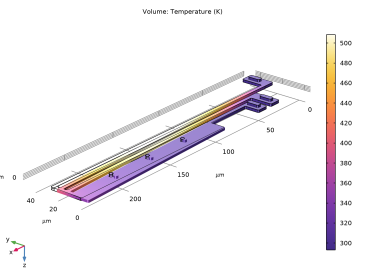
This model consists of a two-hot-arm thermal actuator made of polysilicon. The actuator is activated through thermal expansion. The temperature increase required to deform the two hot arms, and thus displace the actuator, is obtained through Joule heating (resistive heating). The greater expansion of the hot arms, compared to the cold arm, causes a bending of the actuator.
Temperature distribution in a deformed shape of the microactuator.
The original model focuses on obtaining the stationary solution for the actuator deformation due to resistive heating (Joule heating). In this tutorial, we modify the model to include dynamical effects, and control the applied current to maintain the actuator deflection within set limits.
Note:
The step-by-step instructions below are designed to be carried out in sequence. Skipping any of the sections might result in data being unavailable for the following sections. Start with
Setting Up the COMSOL Model for Cosimulation
and work through the sections until reaching the last section,
Working With the Model After the Cosimulation
.