Starting COMSOL Multiphysics® with Simulink®
Starting on Windows
®
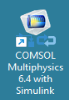
To start COMSOL Multiphysics with Simulink, double-click the COMSOL Multiphysics 6.4 with Simulink icon available on the desktop.
This opens the MATLAB desktop along with the COMSOL Multiphysics Server, which is represented by the command window appearing in the background.