Creating the Computational Domain
Converting to a Single Solid
To be able to use the objects in the defined selections in the model setup, they need to become part of the final geometry. To incorporate all objects into a single solid object use the Convert to Solid geometry operation.
1
From the Geometry toolbar click Conversions
and choose Convert to Solid
.
2
In the Settings window for Convert to Solid, from the Input objects list select Room.
3
From the Repair tolerance list select Relative, and check that the Relative repair tolerance is set to
1E-6
.
4
Click Build All Objects
.
Deleting Entities
Since only the room volume is needed at the end, delete the domains for the walls, roof, and floor.
1
In the Geometry toolbar click Delete
.
2
In the Settings window for Delete Entities, from the Geometric entity level list, select Domain.
3
From the Selection list select Room Bounding Solids.
4
Click Build All Objects
.
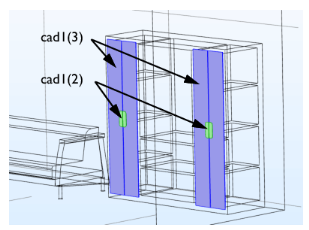
The next step is to delete the solid objects for the handles and the doors for the bookshelf in the room. The small details on these are not needed for the simulation. You will generate a new surface in place of the doors further ahead.
5
In the Geometry toolbar click Delete
.
6
In the Settings window for Delete Entities, from the Geometric entity level list, select Object.
7
In the Graphics window select the two objects highlighted in the figure below.
8
Click Build All Objects
.
Computing the difference of the Room and Furniture
The last step before obtaining the computational volume is to subtract the objects for the furniture from the object for the room.
1
In the Geometry toolbar click Booleans and Partitions
and choose Difference
.
2
In the Settings window for Difference, from the Objects to add list select Room.
3
Click the Activate button under Objects to subtract.
4
From the Objects to subtract list select Furniture.
5
Click Build All Objects
.
The solid for the room volume is now ready. Before meshing however, remove small features that remain in the geometry by using the defeaturing tools.
 and choose Convert to Solid
  .
. .
. .
. .
. .
.
 .
. and choose Difference
  .
. .
.