Modifying the Equations
The equation defining the physics node can be edited with the method featureInfo('info') applied to a feature of the physics node physics(<phystag>).feature(<ftag>), where <phystag> and <ftag> identify the physics interface and the feature, respectively:
info = phystag.feature(<ftag>).featureInfo('info');
Use the method getInfoTable(type) to return the tables available in the Equation View node:
infoTable = info.getInfoTable(type);
where type defines the type of table to return. It can have the value 'Weak' to return the weak form equations, 'Constraint' to return the constraint types table, or 'Expression' to return the variable expressions table.
Example: Access and Modify the Equation Weak Form
This example continues from the Example: Implement and Solve a Heat Transfer Problem and modifies the model equation.
To retrieve information about the physics interface create an info object:
ht = model.component('comp1').physics('ht');
info = ht.feature('solid1').featureInfo('info');
From the info object access the weak form equation by entering:
infoTable = info.getInfoTable('Weak')
This returns a string variable that contains both the name of the weak equation variable and the equation of the physics implemented in the weak form as in below:
infoTable =
[] '(ht.dfluxx*t…' 'root.comp1.ht…' '4' 'Spatial' 'Domain 1' '3'
The output shows that the heat equation is defined at the first row and the weak expression at the second column. Enter:
infoTable(1,2)
to get the weak equation as a string variable. The result of this command is:
ans =
(ht.dfluxx*test(Tx)+ht.dfluxy*test(Ty)+ht.dfluxz*test(Tz))*ht.d
To access the equation in the node root.comp1.ht.solid1.weak$2; for example, to modify the equation and lock the expression, run the commands:
equExpr = '200[W/(m*K)]*(-Tx*test(Tx)-Ty*test(Ty)-Tz*test(Tz))';
info.set(infoTable(1,2), {equExpr});
These commands set the heat conductivity to a constant value directly within the heat balance equation.
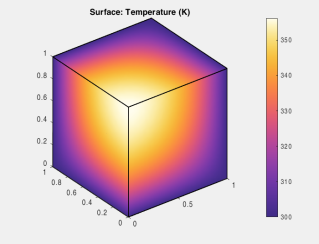
You can now compute the solution and display the results in a figure:
mphrun(model,'study');
mphplot(model,'pg1','rangenum',1);