Importing External Meshes and Mesh Objects
It is possible to import meshes to COMSOL Multiphysics using the following formats:
NASTRAN® files (extension .nas or .bdf).
The command mphwritemesh can be used to write mesh data using the mphtxt, mphbin and stl-formats. This command supports selections and allows the user to select which types of meshes that should be written to file. Types supported are shown in the following table
In order to export the tri and quad elements to an mphtxt-file use this command
mphwritemesh(model, 'mesh1', 'mfile.mphtxt', ...
  'types', {'tri', 'quad'})
Importing Meshes
To import a mesh stored in a supported format use the Import feature. The following commands import and plot a mesh defined in a COMSOL Multiphysics text file:
model = ModelUtil.create('Model');
comp1 = model.component.create('comp1', true);
comp1.geom.create('geom1', 3);
 
mesh1 = comp1.mesh.create('mesh1', 'geom1');
imp1 = mesh1.feature.create('imp1', 'Import');
filenamepath = fullfile(COMSOL, 'applications', ...
'COMSOL_Multiphysics','Meshing_Tutorials');
model.modelPath(filenamepath);
imp1.set('filename','mesh_example_1.mphtxt');
mesh1.feature('imp1').importData;
 
mesh1.run;
mphmesh(model);
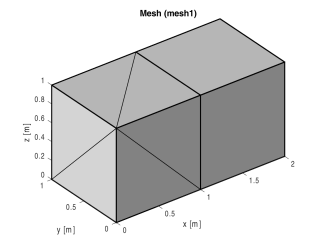
Where COMSOL is the path of root directory where COMSOL Multiphysics is installed. The above command sequence results in Figure 3-16.
Figure 3-16: Imported mesh.
For additional properties supported, see Import in the COMSOL Multiphysics Programming Reference Manual.
For a description of the text file format see the COMSOL Multiphysics Reference Manual.
Code for use with MATLAB®
model = ModelUtil.create('Model');
comp1 = model.component.create('comp1', true);
comp1.geom.create('geom1', 3);
mesh1 = comp1.mesh.create('mesh1');
imp1 = mesh1.feature.create('imp1', 'Import');
filenamepath = fullfile(COMSOL,'applications',...
'COMSOL_Multiphysics','Meshing_Tutorials');
model.modelPath(filenamepath);
imp1.set('filename','mesh_example_1.mphtxt');
mesh1.feature('imp1').importData;
mesh1.run;
mphmesh(model);