Modeling with a Parameterized Geometry
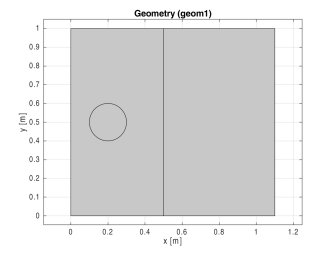
COMSOL Multiphysics has built-in support for parameterized geometries. Parameters can be used in most geometry operations. To exemplify parameterizing a geometry, the following script studies the movement of a circular source through two adjacent rectangular domains:
model = ModelUtil.create('Model');
model.param.set('a',0.2);
comp1 = model.component.create('comp1',true);
geom1 = comp1.geom.create('geom1',2);
r1 = geom1.feature.create('r1','Rectangle');
r1.set('size',[0.5 1]);
r1.set('pos',[0 0]);
r2 = geom1.feature.create('r2','Rectangle');
r2.set('size',[0.6 1]);
r2.set('pos',[0.5 0]);
c1 = geom1.feature.create('c1','Circle');
c1.set('r',0.1);
c1.set('pos',{'a','0.5'});
mphgeom(model);
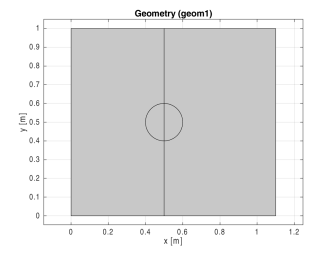
Change the position of the circle by changing the value of parameter
a
:
model.param.set('a',0.5);
mphgeom(model);
Create a loop that changes the position of the circle in increments:
for a=0.2:0.1:0.5
model.param.set('a',a);
geom1.run;
end
Create a mesh:
comp1.mesh.create('mesh1');
Add a Weak Form PDE interface:
w = comp1.physics.create('w', 'WeakFormPDE', 'geom1');
w.feature('wfeq1').set('weak', 1, '-test(ux)*ux-test(uy)*uy');
dir1 = w.feature.create('dir1', 'DirichletBoundary', 1);
dir1.selection.set([1 2 3 6 7]);
src1 = w.feature.create('src1', 'SourceTerm', 2);
src1.set('f', 1, '1');
src1.selection.set([3]);
Then, create a stationary study step:
std1 = model.study.create('std1');
stat1 = std1.feature.create('stat1', 'Stationary');
You can run the parametric sweep using a MATLAB for loop:
for a=0.2:0.1:0.8
model.param.set('a',a);
mphrun(model);
end
After updating a parameter that affects the geometry, COMSOL detects this change and automatically updates the geometry and mesh before starting the solver. The geometry is associative, which means that physics settings are preserved as the geometry changes.
Code for use with MATLAB
®
model = ModelUtil.create('Model');
model.param.set('a',0.2);
comp1 = model.component.create('comp1',true);
geom1 = comp1.geom.create('geom1',2);
r1 = geom1.feature.create('r1','Rectangle');
r1.set('size',[0.5 1]);
r1.set('pos',[0 0]);
r2 = geom1.feature.create('r2','Rectangle');
r2.set('size',[0.6 1]);
r2.set('pos',[0.5 0]);
c1 = geom1.feature.create('c1','Circle');
c1.set('r',0.1);
c1.set('pos',{'a','0.5'});
mphgeom(model);
model.param.set('a',0.5);
mphgeom(model);
for a=0.2:0.1:0.5
model.param.set('a',a);
geom1.run;
end
comp1.mesh.create('mesh1');
w = comp1.physics.create('w', 'WeakFormPDE', 'geom1');
w.feature('wfeq1').set('weak', 1, '-test(ux)*ux-test(uy)*uy');
dir1 = w.feature.create('dir1', 'DirichletBoundary', 1);
dir1.selection.set([1 2 3 6 7]);
src1 = w.feature.create('src1', 'SourceTerm', 2);
src1.set('f', 1, '1');
src1.selection.set([3]);
std1 = model.study.create('std1');
stat1 = std1.feature.create('stat1', 'Stationary');
for a=0.2:0.1:0.8
model.param.set('a',a);
mphrun(model);
end