Model Manager Features
The Model Manager is a set of tools for helping you with version control of models and data files. The Model Manager is available directly from the COMSOL Desktop® and includes comprehensive functionality for saving, searching, organizing, and sharing models and data files stored in a Model Manager database.
Model Manager comes with an extensive API that you can use to automate some tasks involved with load, saving and searching for models. This API is based on the Java programming language and is available when using MATLAB. Some of the functionality is made easily accessible though a few wrapper functions that are described in the following sections.
The functionality of Model Manager is described in the Model Manager Reference Manual and you should be familiar with accessing a database using Model Manager using the user interface. Using the API you are able to access databases that are configured in the user interface.
Loading a Model Saved Using the Model Manager
To open a model from the Model Manager at the command line use mphopen as in the command below:
mphopen '<location>'
where <location> is the location in the database of the model you want to load. The location is a long string that starts with dbmodel:///.
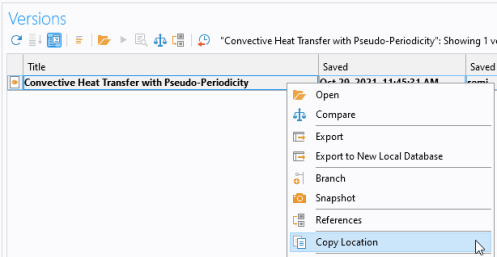
The location of a model can be obtained from the COMSOL Desktop. Follow the step below to proceed:
1
2
3
Now the location is in your clipboard, make sure you paste it in the mphopen command within quotes (single ' or double ") so that the location is interpreted as a string.
Saving a Model in the Model Manager
The function mmsave allows you to save a model to a database using the Model Manager. In case you have open a model from a database as described in the section Loading a Model Saved Using the Model Manager you can directly save the model as a version using the command below:
mmsave(model,'version',<commit message>)
where <commit message> is the text you want to set as commit.
In case you want to save the model as draft enter:
mmsave(model,'draft',<commit message>)
In case the model was not already saved in the database or you would like to save it somewhere else in the database, you can specify the branch where to save the model:
mmsave(model,type,<commit message>,'branch',<branchvar>)
where type can either be version or draft and <branchvar> is the branch variable defining the branch in the database where to save the model.
To get the branch variable in a database, run mmgetbranch as in the command below:
branchvar = mmgetbranch(<brname>,<repname>,<dbname>);
where <brname>, <repname>, and <dbname> are the name of the branch, the repository, and the database of interest.
Searching for models using mmsearch
It is possible to search for model in a branch. Searching can either be full-text searches or searches can be limited to certain parts of the model structure using filters (keywords).
In order to perform a full-text search for the string busbar simply do
branch = mmgetbranch('Main', 'Repository 1', 'MyDatabase')
dat = mmsearch(branch, 'busbar');
The dat variable is a struct array that contains information about the model (or file). In order to open the first returned result (assuming it is a model and not a file) execute this command
mphopen(dat(1).location)
In order to obtain more information about the model, for example the commit message, use the mmmodelinfo command
info = mmmodelinfo(dat(1))
mmmodelinfo can be called with a model variable as argument. In case you have opened a model either from an MPH file or from Model Manager you can use mmmodelinfo to determine where it has been loaded from since info will contain the location either as a filename or as a location string.
loc = mmmodelinfo(model).location
In order to obtain information about a specific commit use mmgetcommit
[cm,msg] = mmgetcommit(branch, dat(1))
cm is a commit object and msg is a struct with information about the commit that includes commit comment, saved date and time information and the name of the user who performed the commit.
In order to perform searches using specific filters (keywords) specify the filters and search terms one after the other. All search terms entered this way will be joined as if an explicit AND has been written between them. In order to search for models that are both having a node type of analytic and are saved as regular models use the following search.
dat = mmsearch(branch,'node','@type:analytic','savetype','regular')
Not all types of searches can be performed using this syntax. In order to specify arbitrary search terms use Model Manager’s own search syntax. E,g, to search for files that match either free or chem anywhere in the filename do the following
dat = mmsearch(branch, '@filename:*free* OR @filename:*chem*')