Loading and Saving a Model
Loading a Model at the MATLAB Prompt
To load an existing model saved as an MPH file use the function mphopen. To load the model with the name <filename> enter
model = mphopen(<filename>)
where <filename> is a string. This creates a model object Model on the COMSOL server that is accessible using the MATLAB variable model.
A shorter form is to simply use
mphopen <filename>
that will load the model with the given filename and use the variable name model for accessing the model later. Any existing variable model will be overwritten without warning.
The function mphload can also be used with the same property. In the following documentation the commands also work with mphload.
mphload does not store the filename in the recent file list as mphopen does by default.
Once the model is loaded, the filename and its associated model object tag are displayed in the COMSOL server window.
If there is already a model object Model in the COMSOL server, mphopen overrides the existing model object unless the model is also open in a COMSOL Multiphysics Client. In the later case, an index number is appended to the new model object name, for instance Model1.
mphopen and mphload do not look for lock file when opening a model in the COMSOL server.
If you want to manually specify the model object in the COMSOL server. use the command
model = mphopen(<filename>, <ModelTag>);
where <ModelTag> is a string defining the tag that defines the loaded model in the COMSOL server.
When using the function mphopen, the model history is automatically disabled to prevent large history information when running a model in a loop. To turn model history on, use the function mphopen:
model = mphopen(<filename>,'-history');
If you do not want to update the recent opened file list with the model you are about to open, use the -nostore flag with the function mphopen as in the command below:
model = mphopen(<filename>, <ModelTag>, '-nostore')
If the model MPH file is protected using a password, use mphload as in the command below:
model = mphopen(<filename>, <ModelTag>, <password>)
where <password> is a string defining the password protecting the file.
If you want to get the full filename of the loaded file, add a second output as in the command below:
[model, filenameloaded]= mphopen(<filename>, ...)
Loading a Model from a List of Existing files
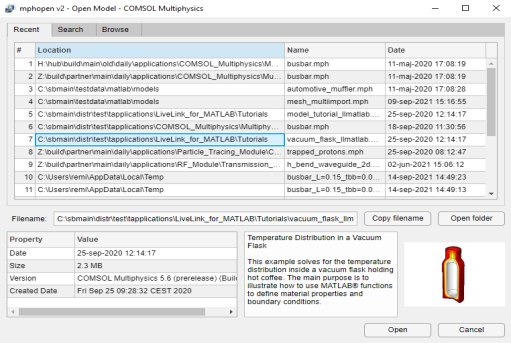
You can use a GUI where to load the model from a list files corresponding to the recent opened file or the files in a specified directory.
At the MATLAB prompt enter the command:
mphopen
This starts a GUI with a list of the recent opened files.
For each selected files, the model information is available in the File Info section.
Click the Recent button to get the list of the recent opened file. Click the Search button to search for a file using file pattern. Click the Browse button to browse the directory where to get filename list.
To clear the recent opened file list enter the command:
mphopen -clear
To open the GUI with the list of files in a specific directory (<dirpath>), enter the command:
mphopen -dir <dirpath>
Loading a Model from Current Folder Window
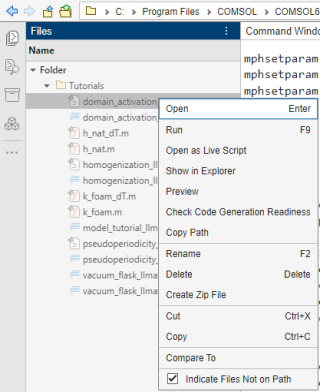
You can load a model directly in the current folder window from the MATLAB desktop. To proceed locate the Current Folder in the MATLAB desktop, right click on the model MPH file to load and select Open.
This load the model in the COMSOL Multiphysics server and create the link model in MATLAB workspace.
If you select Open Outside MATLAB instead this will opens the model in a COMSOL Desktop only.
Saving a Model to a File
Use the function mphsave to save the model object linked to the MATLAB object model:
mphsave(model,<filename>)
where <filename> is a string. If the filename specified <filename> does not provide a path, the file is saved relative to the current MATLAB path. The file extension determines the format to use (*.mph, *.m, *.java, or *.vba).
When saving the model as an M-file mphsave does not automatically use the component syntax to save model using the COMSOL API, to enable this syntax run the command below:
mphsave(model,<filename>,'component','on')
To save the model as a copy set the property copy to on as in the line below:
mphsave(model,<filename>), 'copy', 'on');
After saving a copy, the model does not remember where the copy was saved. Instead it remembers its previous save location.
When saving a COMSOL files (MPH files) you can choose the file to be optimized for speed (using uncompressed files that are faster to save), or to be optimized for file size (using compressed files). To do so set the property optimize to speed, or size, respectively, as in the command below:
mphsave(model,<filename>), 'optimize', 'size');
To save a clean model — that is, one without built, computed, and plotted data — set the property excludedata to on:
mphsave(model,<filename>), 'excludedata', 'on');
If you want to include a title when saving the model, use the property title as in the command below:
mphsave(model,<filename>, 'title', '<modeltitle>');
To use a MATLAB figure as model thumbnail run mphsave including the property thumbnail:
mphsave(model,<filename>, 'thumbnail', fighandle);
where fighandle is the handle of the MATLAB figure to use as thumbnail.
Set a model Thumbnail
Before saving your model, you may want to include a model thumbnail to quickly identify your model in your own Application Library or when using mphopen. To set the model thumbnail enter the command:
mphthumbnail(model,<filename>)
where <filename> is the image filename.
You can also use a MATLAB figure to set the thumbnail. The following command will set the thumbnail to the image of the current figure:
mphthumbnail(model,gcf)
Note that the thumbnail is stored in memory. In order to save the thumbnail in the model file the model must be saved.
You can extract the image and image filename for the thumbnail stored in model, enter the command:
[image, imagefilename] = mphthumbnail(model)
Example
The code below shows how to get the model thumbnail as MATLAB image data, show the image in a MATLAB figure and store the new image as thumbnail in the model.
mphopen model_tutorial_llmatlab
im = mphthumbnail(model);
imshow(im)
mphthumbnail(model, gcf)
mphsave(model, 'newfilename')