Getting Model Information in the Model Manager
For models saved using the Model Manager you can retrieve the information in the database using the function
mmmodelinfo
:
info = mmmodelinfo(model)
where model is link in MATLAB of the model loaded in the COMSOL Multiphysics server from the database.
An alternative is to use the tag in the COMSOL Multiphysics server as in the command below:
info = mmmodelinfo(
<tag>
)
where
<tag>
is the model tag in the COMSOL Multiphysics server.
See
mphtags
to get the list of the model loaded in the COMSOL Multiphysics server.
In case the model is not loaded in the server you can use its location in the database:
info = mmmodelinfo(
<location>
)
The location variable
<location>
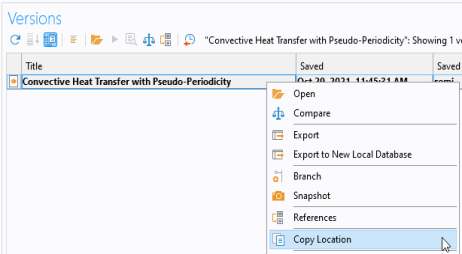
of a model can only be obtained from the COMSOL Desktop. Follow the step below to proceed:
1
In the Model Manager right-click on the model and select Versions.
2
In the Versions section right-click the desired versions and select Copy Location.