Each model object contains predefined expressions that depend on the physics interface used in the model. Use the Model Search window to get the list of all the expressions, constants, solution variables, or parameters available in the model object. To open the Model Search window type at the MATLAB prompt:
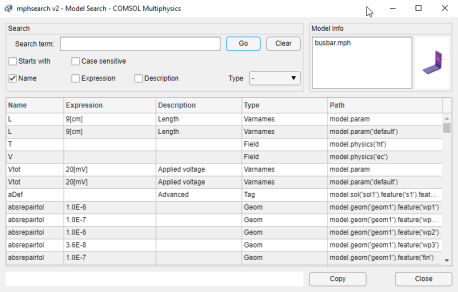
The Model Search window shows all the variables available in the model. These are listed in the table containing the following information: the Name of the expression, the
Expression as it is set in the property value, the
Description (if there is one) set for the expression, the
Type of the expression, and the
Path in the model object.
where <modelname> is the name of the model object variable in MATLAB.
The Search section has a search tool to filter the list. Enter any string in the text field and select where to search the string — in the name, the expression, or the description of the table entry. You can also select the type you want to list. The expression type can be Equation, Field, Function, Geom, Mesh, Tag, VarNames, or Weak. You can select
Starts with to search for any expression that start with the string enter in the text field. Click
Go to display the result of the search. Click
Clear to clear the search settings.

 ) only model object with name model are supported.
 ).
).