Extracting Reduced-Order State-Space Matrices
COMSOL Multiphysics models often have a large number of degrees of freedom. This leads to large state-space models when exported using mphstate. COMSOL Multiphysics provides model reduction functionality, which can reduce the number of states using an eigenvalue (or eigenfrequency) study leading to a low number of states that can be used for simulation and analysis.
The function mphreduction returns state-space matrices or a MATLAB state-space model using the ss function of a given reduced-order model set in the COMSOL model.
See the Modal Reduced-Order Model and The Modal Solver Algorithm in the COMSOL Multiphysics Reference Manual for more information.
Extracting Reduced-Order State-Space Matrices
In this section you will find an example that illustrates how to use the mphreduction function to extract the reduced-order model state-space matrices.
The problem studied here is a heat transfer model set with a heat source. In the expected state-space system, the heat source is set as the input. The temperature at specified location is used as the output. The tutorial shows how to extract the state-space matrices and solve the system using the MATLAB functions.
This is the same problem solved as in Extracting State-Space Matrices, so you can compare the solution and computational performance when solving the problem with full state-space system matrices.
The following example sets up a model using commands from MATLAB. You need the Heat Transfer Module or MEMS Module to run the model because reduced-order modeling requires eigenvalues of the physical problem. If you do not have access to one of these modules, you can find the commands that sets up and solve the same problem using the General Form PDE interface in the section Code for use with MATLAB® - General Form PDE.
First, load the model model_tutorial_llmatlab from the Application Library:
model = mphopen('model_tutorial_llmatlab');
This model is used as the base model for the documentation tutorial. The geometry, mesh, and physics are set, but for this specific problem you need to edit the model to use parameters for the initial and external temperatures as they will be used later in the reduced-order model:
power = 30; Temp = 300; Text = 300; T0 = 293.15;
model.param.set('power', power);
model.param.set('Temp', Temp);
model.param.set('T0', T0);
model.param.set('Text', Text);
comp1 = model.component('comp1');
ht = comp1.physics('ht');
ht.feature('init1').set('Tinit', 'T0');
ht.feature('hf1').set('Text', 'Text');
First switch the temperature constraint boundary condition to a heat flux condition using a stiff spring expression:
ht.feature('temp1').active(false);
hf2 = ht.create('hf2', 'HeatFluxBoundary', 2);
hf2.selection().set(3);
hf2.set('HeatFluxType', 'ConvectiveHeatFlux');
hf2.set('h', '1e6');
hf2.set('Text', 'Temp');
Next, add a time-dependent study:
std1 = model.study.create('std1');
time = std1.feature.create('time','Transient');
time.set('tlist','range(0,1,20)');
Add a domain point probe plot, which will define the output of the reduced-order model:
pdom = comp1.probe.create('pdom', 'DomainPoint');
pdom.model('comp1');
pdom.set('coords3',[1e-2 1e-2 1e-2]);
Run the study and create a plot group to display the probe:
mphrun(model);
pg4 = model.result.create('pg4', 'PlotGroup1D');
glob1 = pg4.create('glob1', 'Global');
glob1.set('expr', 'comp1.ppb1');
A reduced-order model requires eigenvalue solution of the problem. To create an eigenfrequency study and specify the number of eigenvalues to 60 enter:
std2 = model.study().create('std2');
eig = std2.create('eig', 'Eigenvalue');
eig.activate('ht', true);
eig.set('neigsactive', true);
eig.set('neigs', 60);
eig.set('shiftactive', true);
mphrun(model,'std2');
Before adding a reduced-order study to your model, you need to set the input. In this example, add the power variable power, the bottom temperature Temp, and the exterior temperature Text:
grmi1 = model.common.create('grmi1','GlobalReducedModelInputs','');
grmi1.setIndex('name', 'power', 0);
grmi1.setIndex('name', 'Temp', 1);
grmi1.setIndex('name', 'Text', 2);
Now you can add a model-reduction study.
std3 = model.study.create('std3');
mr = std3.create('mr','ModelReduction');
mr.set('trainingStudy','std2');
mr.set('trainingStep','eig');
mr.set('unreducedModelStudy','std1');
mr.set('unreducedModelStep','time');
mr.setIndex('qoiname','Tout',0);
mr.setIndex('qoiexpr','comp1.ppb1',0);
mphrun(model,'std3');
Here the model-reduction study generates a Time Dependent, Modal Reduced-Order Model node that you can identify with the tag rom1. To get the newly generated reduced-order model you can either type the command:
model.reduced;
or inspect the model using the mphnavigator window by typing:
mphnavigator
To visualize the reduced-order node in the mphnavigator window, you need to go the Settings menu and select Advanced.
A call to mphreduction creates the state-space matrices needed to simulate the reduced-order system.
MR = mphreduction(model, 'rom1', ...
'out', {'MA' 'MB' 'C' 'D' 'Mc' 'x0'})
Now the reduced-order system can be simulated using the function ode23s.
input = [power Temp Text];
func = @(t,x) MR.MA*x + MR.MB*input';
opt = odeset('mass',MR.Mc);
[t,x2] = ode23s(func,0:1:20,MR.x0,opt);
y2 = MR.C*x2';
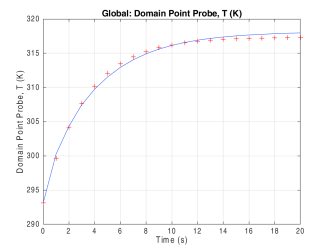
Compare the solution computed with the system and the one computed with COMSOL Multiphysics (see Figure 4-3):
plot(t,y2,'r+');
hold on;
mphplot(model,'pg1');
Figure 4-3: Temperature distribution computed with the reduced-order model state-space system (red marker) and COMSOL Multiphysics (blue line).
Evaluate the steady-state temperature value:
G = -MR.C*(inv(MR.MA))*MR.MB;
y_inf = full(G*input')
As an alternative to using ode23s, you can use functions in the Control System Toolbox, which is an add-on to MATLAB. The matrices stored in MR can be used to manually construct a state-space system using the function ss, or you can call mphreduction using the return option to specify that mphreduction should do the conversion:
sys = mphreduction(model, 'rom1', ...
'out', {'MA' 'MB' 'A' 'B' 'C' 'D' 'Mc' 'x0' 'Y0' 'Kr'}, ...
'return', 'ss')
The system can, for example, be simulated using the lsim function.
t = 0:1:20;
u = repmat(input,length(t),1);
figure(2)
[y,t] = lsim(sys, u,t);
grid on
Code for use with MATLAB®
model = mphopen('model_tutorial_llmatlab');
power = 30; Temp = 300; Text = 300; T0 = 293.15;
model.param.set('power', power);
model.param.set('Temp', Temp);
model.param.set('T0', T0);
model.param.set('Text', Text);
comp1 = model.component('comp1');
ht = comp1.physics('ht');
ht.feature('init1').set('Tinit', 'T0');
ht.feature('hf1').set('Text', 'Text');
ht.feature('temp1').active(false);
hf2 = ht.create('hf2', 'HeatFluxBoundary', 2);
hf2.selection().set(3);
hf2.set('HeatFluxType', 'ConvectiveHeatFlux');
hf2.set('h', '1e6');
hf2.set('Text', 'Temp');
std1 = model.study.create('std1');
time = std1.feature.create('time','Transient');
time.set('tlist','range(0,1,20)');
pdom = comp1.probe.create('pdom', 'DomainPoint');
pdom.model('comp1');
pdom.set('coords3',[1e-2 1e-2 1e-2]);
mphrun(model);
pg4 = model.result.create('pg4', 'PlotGroup1D');
glob1 = pg4.create('glob1', 'Global');
glob1.set('expr', 'comp1.ppb1');
std2 = model.study().create('std2');
eig = std2.create('eig', 'Eigenvalue');
eig.activate('ht', true);
eig.set('neigsactive', true);
eig.set('neigs', 60);
eig.set('shiftactive', true);
mphrun(model,'std2');
grmi1 = model.common.create('grmi1','GlobalReducedModelInputs','');
grmi1.setIndex('name', 'power', 0);
grmi1.setIndex('name', 'Temp', 1);
grmi1.setIndex('name', 'Text', 2);
std3 = model.study.create('std3');
mr = std3.create('mr','ModelReduction');
mr.set('trainingStudy','std2');
mr.set('trainingStep','eig');
mr.set('unreducedModelStudy','std1');
mr.set('unreducedModelStep','time');
mr.setIndex('qoiname','Tout',0);
mr.setIndex('qoiexpr','comp1.ppb1',0);
mphrun(model,'std3');
MR = mphreduction(model, 'rom1', ...
'out', {'MA' 'MB' 'C' 'D' 'Mc' 'x0'})
input = [power Temp Text];
func = @(t,x) MR.MA*x + MR.MB*input';
opt = odeset('mass',MR.Mc);
[t,x2] = ode23s(func,0:1:20,MR.x0,opt);
y2 = MR.C*x2';
plot(t,y2,'r+');
hold on;
mphplot(model,'pg4');
G = -MR.C*(inv(MR.MA))*MR.MB;
y_inf = full(G*input')
Code for use with MATLAB® - General Form PDE
model = mphopen('model_tutorial_llmatlab');
power = 30; Temp = 300; Text = 300; T0 = 293.15;
model.param.set('power', power);
model.param.set('Temp', Temp);
model.param.set('T0', T0);
model.param.set('Text', Text);
comp1 = model.component('comp1');
comp1.physics('ht').active(false);
g = comp1.physics.create('g', 'GeneralFormPDE', {'u'});
g.prop('Units').set('DependentVariableQuantity', 'temperature');
g.prop('Units').setIndex('CustomSourceTermUnit', 'W/m^3', 0, 0);
gfeq1 = g.feature('gfeq1');
gfeq1.setIndex('Ga', {'-material.k11*ux' '-material.k22*uy' '-material.k33*uz'}, 0);
g.feature('init1').set('u', 'T0');
gfeq1.setIndex('f', 0, 0);
gfeq1.setIndex('da', 'material.rho*material.Cp', 0);
src1 = g.create('src1', 'SourceTerm', 3);
src1.selection.set([2]);
src1.setIndex('f', 'power/(1[cm]*1[cm]*1[mm])', 0);
flux1 = g.create('flux1', 'FluxBoundary', 2);
flux1.selection.set([7 8 10 11 12]);
flux1.setIndex('g', '10[W/(m^2*K)]*(Text-u)', 0);
flux2 = g.create('flux2', 'FluxBoundary', 2);
flux2.selection.set([3]);
flux2.setIndex('g', '1e6[W/(m^2*K)]*(Temp-u)', 0);
std1 = model.study.create('std1');
time = std1.feature.create('time','Transient');
time.set('tlist','range(0,1,20)');
pdom = comp1.probe.create('pdom', 'DomainPoint');
pdom.model('comp1');
pdom.set('coords3',[1e-2 1e-2 1e-2]);
mphrun(model);
pg4 = model.result.create('pg4', 'PlotGroup1D');
glob1 = pg4.create('glob1', 'Global');
glob1.set('expr', 'comp1.ppb1');
std2 = model.study().create('std2');
eig = std2.create('eig', 'Eigenfrequency');
eig.activate('ht', true);
eig.set('neigsactive', true);
eig.set('neigs', 60);
eig.set('shiftactive', true);
mphrun(model,'std2');
grmi1 = model.common.create('grmi1','GlobalReducedModelInputs','');
grmi1.setIndex('name', 'power', 0);
grmi1.setIndex('name', 'Temp', 1);
grmi1.setIndex('name', 'Text', 2);
std3 = model.study.create('std3');
mr = std3.create('mr','ModelReduction');
mr.set('trainingStudy','std2');
mr.set('trainingStep','eig');
mr.set('unreducedModelStudy','std1');
mr.set('unreducedModelStep','time');
mr.setIndex('qoiname','Tout',0);
mr.setIndex('qoiexpr','comp1.ppb1',0);
mphrun(model,'std3');
MR = mphreduction(model, 'rom1', ...
'out', {'MA' 'MB' 'A' 'B' 'C' 'D' 'Mc' 'x0'})
input = [power Temp Text];
func = @(t,x) MR.MA*x + MR.MB*input';
opt = odeset('mass',MR.Mc);
[t,x2] = ode23s(func,0:1:20,MR.x0,opt);
y2 = MR.C*x2';
plot(t,y2,'r+');
hold on;
mphplot(model,'pg4');
G = -MR.C*(inv(MR.MA))*MR.MB;
y_inf = full(G*input')