where x is the state variable vector.
If the components of the mass matrix MC are small, it is possible to approximate the dynamic state-space model with a static model, where
 :
:
Let Null be the PDE constraint null-space matrix and
ud a particular solution fulfilling the constraints. The solution vector
U for the PDE problem can then be written
where u0 is the linearization point, which is the solution stored in the sequence once the state-space export feature is run.
The function mphstate requires that the input variables, output variables, and the list of the matrices to extract in the MATLAB workspace are all defined:
where <soltag> is the solver node tag used to assemble the system matrices listed in the cell array
out, and
<input> and
<output> are cell arrays containing the list of the input and output variables, respectively.
The output data str returned by
mphstate is a MATLAB structure and the fields correspond to the assembled system matrices.
mphstate uses linearization points to assemble the state-space matrices. The default linearization point is the current solution provided by the solver node, to which the state-space feature node is associated. If there is no solver associated to the solver configuration, a null solution vector is used as a linearization point unless you manually set the linearization point to an existing solution.
where method corresponds to the type of linearization point — the initial value expression (
'init') or a solution (
'sol').
where <initsoltag> is the solver tag to use for a linearization point. You can also set the
initsol property to
'zero', which corresponds to using a null solution vector as a linearization point. The default is the current solver node where the assemble node is associated.
where <solnum> is an integer value corresponding to the solution number. The default value is the last solution number available with the current solver configuration.
If there is a solver associated to the solver configuration <soltag>, you need to extract the matrices after the
Dependent Variables node in the solver configuration, to proceed use the property
extractafter as in the command below:
State-space models can be defined using the ss and
sparss functions. The
sparss function can be used if the state-space matrices are sparse. The system can be simulated using the
lsim function. In order to create a reduced-order system using MATLAB, you can use the
balred function. This function only accepts the use of full matrices. Hence, the function
ss is used for defining the state-space system in MATLAB. Note that calling the function
ss with argument matrices that are sparse results in a set of warnings. These warnings can be ignored.
where <input> is the input vector of the state space system, and
<tspan> is the time step list.
where <order> is the desired order reduction, and
<tfinal> the simulation end time.
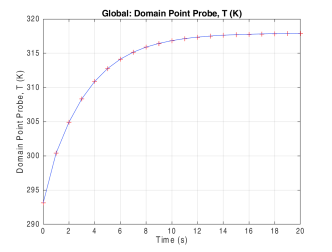
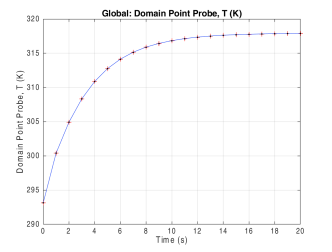
This is the same problem solved as in Extracting Reduced-Order State-Space Matrices, so you can compare the solution and computational performance when solving the problem with reduced-order model state-space system matrices.
First, load the model model_tutorial_llmatlab from the Application Library:
Extract the state-space system matrices Mc,
MA,
MB,
C, and
D of the model, with
power,
Temp, and
Text as inputs and the probe evaluation
comp1.ppb1 as the output:
For some types of control system design, the use of the matrices A,
B,
C, and
D are commonly used. Extract the state-space system matrices
A,
B,
C, and
D of the model with
power,
Temp, and
Text as inputs and the probe evaluation
comp1.ppb1 as the output: