Obtaining Model Information
Modifying an existing model object requires you to know how the model is set up. Some functions help you to access this information so that you can add or remove a model feature, or modify the value of an existing property. The function mphnavigator helps you to retrieve model object information. Calling mphnavigator at the MATLAB prompt displays a summary of the features and their properties for the model object available in the MATLAB workspace.
1
2
mphopen busbar
Alternatively, use this more advanced form of the command if you wish to use another variable name than model:
model = mphopen('busbar');
3
mphnavigator
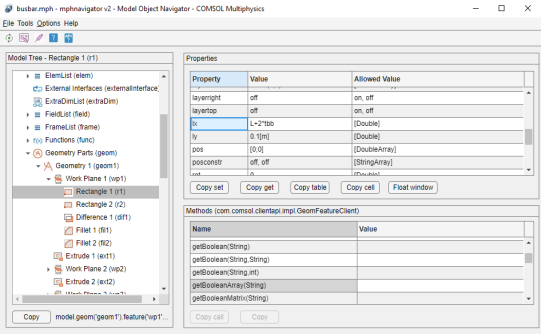
In the mphnavigator graphical user interface, the model nodes are listed under the Model Tree section. The nodes can be expanded to access the subnodes. When a node is selected in the Model Tree, its properties are listed in the Properties section. The Methods section lists the methods available for the selected node. Just above the Methods section, you can see the COMSOL API syntax that lead to the feature. The Copy button copies the API syntax of the command to the system clipboard.
4
5
6
In the Model Object Navigator, Properties section, you can see the that the lx property of the geometry feature r1 is set to L+2*tbb, which represents the length of the rectangle. The width of the rectangle, represented with the property ly, is set to 0.1.
7
8