Evaluating Data at Node Points
Use the mpheval function to evaluate the electric potential, which is one of the dependent variables in the busbar model. mpheval returns the value of the expression evaluated using the nodes of a simplex mesh. By default, the simplex mesh corresponds to the active mesh in the model object.
1
data = mpheval(model,'V')
A MATLAB structure is returned according to:
data =
expr: {'V'}
d1: [1x7334 double]
p: [3x7334 double]
t: [4x30916 int32]
ve: [7334x1 int32]
unit: {'V'}
 
mpheval returns a MATLAB structure defined with the following fields:
-
expr contains the list of the evaluated expression,
-
d1 contains the data of the evaluated expression,
-
p contains the coordinates of the evaluation points,
-
t contains the indices to columns in the p field. Each column in the t field corresponds to an element of the mesh used for the evaluation,
-
ve contains the indices of the mesh elements at each evaluation point,
-
unit contains the unit of the evaluated expression.
2
data2 = mpheval(model,{'T' 'V'})
This command returns this structure:
data2 =
expr: {'T' 'V'}
d1: [1x7334 double]
d2: [1x7334 double]
p: [3x7334 double]
t: [4x30916 int32]
ve: [7334x1 int32]
unit: {'K' 'V'}
The fields data2.d1 and data2.d2 contain the values for the temperature and electric potential, respectively.
3
Now evaluate the temperature T, including at the element midpoints as defined by a quadratic shape function. Use the refine property and set the property value to 2, which corresponds to the discretization order:
data3 = mpheval(model,'T','refine',2)
This command returns this structure:
data3 =
expr: {'T'}
d1: [1x49794 double]
p: [3x49794 double]
t: [4x247328 int32]
ve: [49794x1 int32]
unit: {'K'}
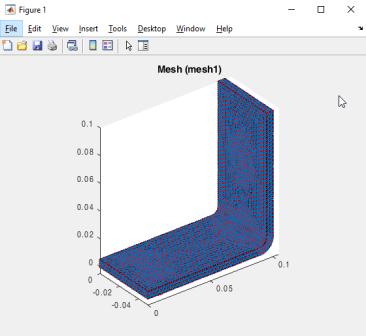
To visualize the evaluation location for both data2 and data3 together with the mesh, enter the commands:
mphmesh(model)
hold on;
plot3(data3.p(1,:),data3.p(2,:),data3.p(3,:),'.');
plot3(data2.p(1,:),data2.p(2,:),data2.p(3,:),'.r');
4
This step demonstrates how to use the edim property in combination with the selection property. edim allows you to determine the space dimension of the evaluation and selection allows you to set the entity number indicating where to evaluate the expression.
To evaluate data on a specific domain, such as the norm of the current density at boundary number 43, enter:
data4 = mpheval(model,'ec.normJ',...
'edim','boundary','selection',43)
This command returns this structure:
data4 =
expr: {'ec.normJ'}
d1: [1x65 double]
p: [3x65 double]
t: [3x10⁸ int32]
ve: [65x1 int32]
unit: {'A/m^2'}