A Thorough Example: The Busbar
This tutorial familiarizes you with the COMSOL model object and the COMSOL API syntax. In this section, learn how to:
•
Create a geometry
•
Set up a mesh and apply physics properties
•
Solve the problem
•
Generate results for analysis
•
Exchange the model between the scripting interface of MATLAB
®
and the COMSOL Desktop.
The model you are building at the MATLAB command line is the same model described in the
Introduction to COMSOL Multiphysics
. The difference is that, in this guide, you will use a COMSOL model object instead of the COMSOL Desktop.
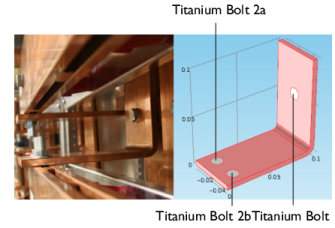
This multiphysics example describes electrical heating in a busbar. The busbar is used to conduct direct current from a transformer to an electrical device and is made of copper with titanium bolts, as shown in the figure below.
Note:
The step-by-step instructions below are designed to be carried out in a sequence. Skipping any of the sections might result in data being unavailable for the following sections. Start with
About The Model Object
and work through the sections until reaching the last section,
Saving the Model
.