Saving the Model File for VBA
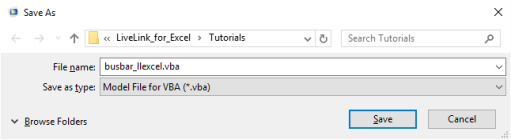
You can save the COMSOL model as a file for VBA ready to use in an Excel
®
macro. In the COMSOL Desktop go to
File
menu, choose
Save As
, and, in the
Save As
window, from the
Save as type
list select
Model File for VBA (*.vba)
.
The commands for each operation on the model are listed in the file in the order that they were performed, this way it is easy to get the corresponding command for a specific operation as it is the last one in the file.
If you do not want to save the entire model history and save only the commands that correspond to the current model status, in the File menu click
Compact History
prior to saving the model.