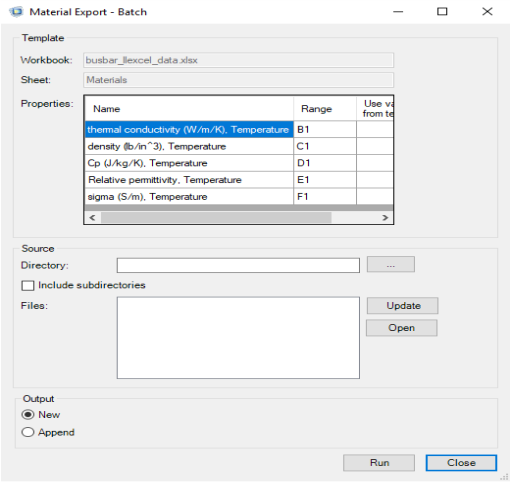
In the Template section you find the settings defined for the material export. The
Properties table lists the material, the property name, and the cell range to export. Select
Use value from template if the property is only defined in the template worksheet but should be included in all material during the batch export.
In the Source section define the worksheet to use during the export. First, in the
Directory text field enter the path of the directory that contains the source Excel files. Select
Include subdirectories to include workbooks stored under the main directory. Click
Update to list the files to be used during the batch export. If you need to open one of the listed files, select the file in the list and click
Open.
In the Output section you define where to export the material data. Select
New to export the material data in a new material library. Select
Append to export the material data to an existing material library.
 ) to open the Material Export - Batch.