|
3
|
|
2
|
|
3
|
|
4
|
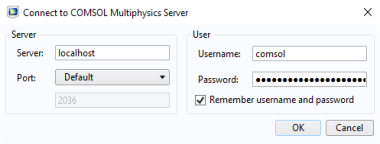
In the Server text field enter the COMSOL server name (or server IP address). Enter localhost if the COMSOL server and Excel are running on the same machine.
|
|
5
|
In the Port menu list select manual if the COMSOL server is not listening to the default port number (2036). The port number is the one displayed in the COMSOL server window.
|
|
6
|
|
7
|
Click OK.
|
 |
 ).The Connect to Server window appears.