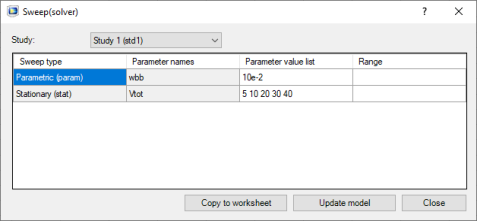
In the Study list you can select the study where to define the parameter sweep value.
The Parameter names column lists the model parameters defined to run in sweep. The
Parameter value list column contains the associated value. The
Range column lists the cell range in the worksheet linked to the model parameters. You can directly edit the
Parameter value list column. Click
Update Model to update the model with the edited values.
In the Sweep window, click Copy to Worksheet to insert the parameter sweep value list into the current worksheet. A link, represented by a cell comment, is created between the worksheet and the model. In the worksheet, the parameter sweeps are stored in line from the cell containing the comment, the first column including the parameter names.
After the data has been inserted into the worksheet, the Range column is updated with the cell range defining the sweep parameter values. Note that a cell comment is also created for each parameter name allowing specific update of a selected parameter if necessary.
You can now edit the parameter value linked with the selected cell comment in the worksheet. Then close the Sweep window. The parameter value has to be defined in the cells beside the one containing the parameter name.
If the worksheet contains a link between a range and a parameter sweep list, select the cell with the comment and select Sweep (

). The
Parameter value list and the
Range columns are automatically updated with the value from the worksheet. Click
Update Model to update the model with the value defined in the worksheet.
To update the model with the modified parameter value list, you need to select the cell with the comment and select Sweep (

). The parameter value list now contains the value from the worksheet. Click
Update Model to update the model with the value defined in the worksheet.
 ) to open the Sweep window.