|
•
|
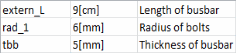
Parameters: the first column in the cell range defines the parameter name, the second its expression, and the third optional column the parameter description.
 |
|
•
|
Parameters: the first column in the cell range defines the parameter name, the second its expression, and the third optional column the parameter description.
|



|
•
|
Variables: the first column in the cell range defines the parameter name, the second its expression, and the third optional column the parameter description.
 |
|
•
|
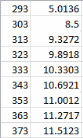
Interpolation functions: the first cell column in the cell range defines the value of the input argument parameter t, and the second column defines the value of the function f(t).
 |
|
•
|
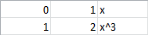
Piecewise functions: the first column in the cell range defines the start of the interval, the second column defines the end of the interval, and the third column defines the expression for the function.
 |
|
•
|
Parametric Sweep and Auxiliary Sweep: the first column in the cell range defines the parameter name, and the second column contains the list of the parameters separated by space.
 |