Importing a Sweep List
With the use of an auxiliary sweep, you can solve the model for a range of parameter values, which enables you to vary, for example, a boundary condition. Here, solve the model for different values of the applied voltage Vtot, imported from the same Excel file used previously.
1
2
3
4
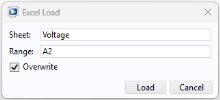
The continuation parameter list can be found in the worksheet, Voltage, in the file.
5
In the Excel Load dialog, enter Voltage and A2, in the Sheet and Range text fields, respectively.
6
The study is now set up to compute the solution for each of the specified voltage values: 5 mV, 10 mV, 20 mV, 30 mV, and 40 mV.