|
1
|
|
4
|
In the Load from File dialog, select the Microsoft Excel Workbook (*.xlsx) file type, and navigate to the COMSOL installation directory. In the folder applications/LiveLink_for_Excel/Tutorials, select the file busbar_llexcel_data.xlsx, then click Open.
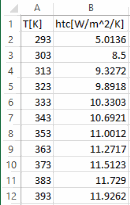 |
|
5
|
In the Settings window for Interpolation enter htc(T) in the Sheet text field.
|
|
6
|
|
9
|
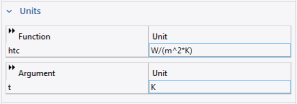 Locate the section, Units. In the Function text field enter W/(m^2*K). In the Arguments text field enter K. Locate the section, Units. In the Function text field enter W/(m^2*K). In the Arguments text field enter K. |
 in the Definitions group. Under the Local section, select Interpolation
  . On Linux and Mac, the Home toolbar refers to the specific set of controls near the top of the Desktop.
 .
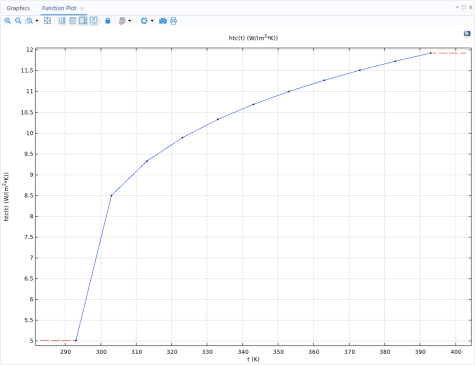
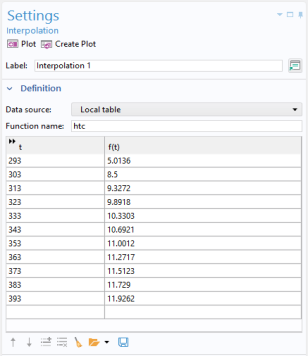
.
 .
.