Defining Material Export Settings from Field Data
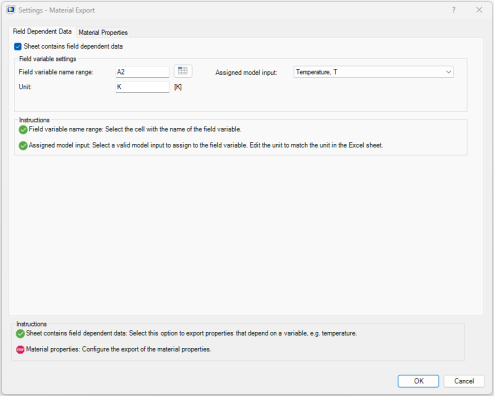
In this section you will continue to define the material export settings, but this time using data defined as fields that depend on a variable. A valid field variable corresponds to model inputs in the COMSOL model. Typical examples include physical quantities such as temperature, concentration, and frequency. See About Model Inputs in the COMSOL Multiphysics Reference Manual to get a complete list of valid model inputs.
You can choose to export the material properties as tabulated data or constant values.
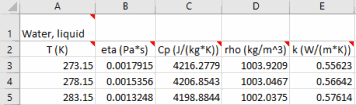
Note: The export procedure described in this chapter assumes that data is stored in the spreadsheet with the field variable data in a single column and the material property names in a single row. The data are placed at the intersection cells of the field data and the property name. It also assumes one material per sheet.
1
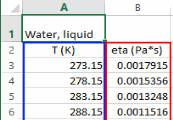
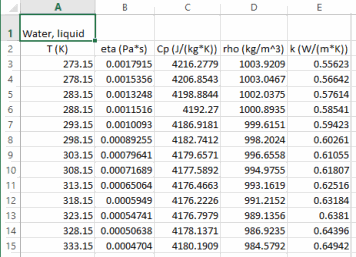
In the workbook busbar_llexcel_data.xlsx, go to the worksheet Water, liquid that contains the definitions for the dynamic viscosity, heat capacity at constant pressure, density, and thermal conductivity of liquid water. The spreadsheet includes property data in the temperature range 273.15 K to 518.15 K.
2
3
4
5
Note: If the data stored in the worksheet are not defined in SI units, you need to update the Unit text field.
You can verify that all requirements in the field dependent page are set when the instructions list only contains green check marks ().
6
7
8
9
10
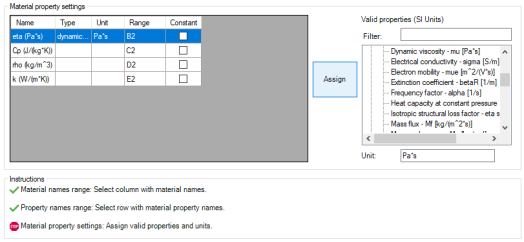
The properties are now listed in the table in the Material property settings section. You now need to assign valid COMSOL properties to the material properties in the spreadsheet.
11
12
Note that the number of properties remaining to be assigned is displayed in the Instructions section.
13
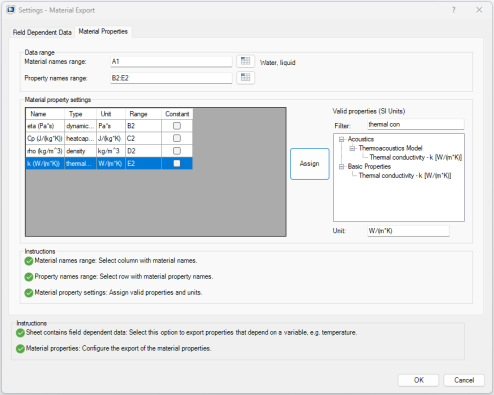
Repeat steps 11 and 12 for the remaining material properties. Select valid properties according to the table below:
Once there are no unassigned properties remaining, a check mark appears next to the last step in the Instructions section.
Note: Select Constant dialog to export a specific property as constant. For constant export, select the cell range of the property values in the Property name range.
14
15