Running Model in Sweep
This model of the busbar contains a Parametric Sweep node and a Stationary node including an Auxiliary sweep. You can insert the sweep settings into a worksheet to control the parameter values for the sweep from there.
1
Select cell A8 in Sheet 1 and from the Study group on the ribbon tab select Compute > Sweep
to open the Sweep dialog. In the Sweep dialog, you can see that the current sweep node is defined with the busbar width parameter (wbb) set to the value 10e-2.
2
Click Copy to Worksheet to insert the sweep parameter data starting at cell A8 and create a link between the cell range and the model.
3
To be able to edit the worksheet, first click Close to close the Sweep dialog.
4
Add additional parameter values to the parametric sweep, in cell B9 enter
0.05
, in C9 enter
0.1
and in D9 enter
0.15
.
5
You will now update the model with the additional parameter values, select A8 and click Compute > Sweep
.
6
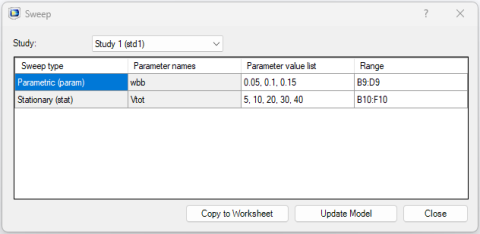
You may notice that the parameter value list and the range columns are updated with the new values. Click Update Model to send these parameter values to the model.
 to open the Sweep dialog. In the Sweep dialog, you can see that the current sweep node is defined with the busbar width parameter (wbb) set to the value 10e-2.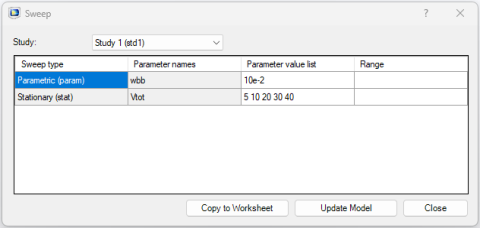
 .
.