Linking Parameters to COMSOL
By following the steps below you can select parameters from the AutoCAD file to be linked to the COMSOL model.
1
Switch to AutoCAD.
2
Click the Parameter Selection
button, which is found on the COMSOL Multiphysics tab.
3
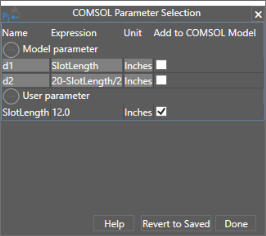
The COMSOL Parameter Selection window lists the available parameters in the file.
4
To link the user parameter
SlotLength
to COMSOL select the corresponding checkbox in the Add to COMSOL Model column.
Note that the two model parameters, d1 and d2 are defined by the user parameter SlotLength, and therefore they can only be transferred to the COMSOL model as read-only parameters, that is, they cannot be controlled.
5
To confirm click the Done button.
 button, which is found on the COMSOL Multiphysics tab.