Study 1
1
In the Model Builder window, click Study 1.
2
In the Settings window for Study, type
Study 1 - Dry Wick
in the Label text field.
Material Sweep
In order to select the state of our material switch “Fluid in Wick” to correspond to the dry case, a material sweep is added to the study, but is only given a single case, the index (1) of our first material in the switch, “Gas: water 1”.
1
In the Study toolbar, click
Material Sweep.
2
In the Settings window for Material Sweep, locate the Study Settings section.
3
Click
Add.
4
In the table, enter the following settings:
Switch
Cases
Case numbers
Fluid in wick (sw1)
User defined
1
Step 1: Stationary
1
In the Model Builder window, under Study 1 click Step 1: Stationary.
2
In the Settings window for Stationary, locate the Physics and Variables Selection section.
3
In the table, clear the Solve for checkboxes for Laminar Flow (spf) and Brinkman Equations (br).
4
In the Study toolbar, click
Compute.
Once the solver is done, look at the temperature profile along the heat pipe for this “dry” case.
 Material Sweep.
 Add.
Add.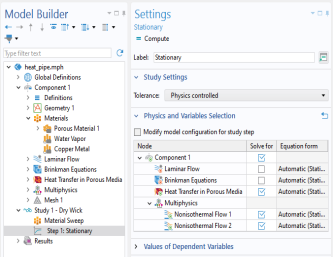
 Compute.